Uwe Smidt
Forum Replies Created
-

Thank you, Andreas!
I’ll give it a try!
-
Hi Andreas,
I was thinking of your proposed method as a workaround if I was not able to raise an event by code.
But you are right, it is not the workaround, but the proper way of doing it!
But asking for a (lazy) friend 😉 : even if was NOT clean coding style, is the a way to raise an event by code?
Best regards
Uwe
-
Sorry,
It DOES do the job:
Do [AnyCommandThatMakesSenseANDIsCorrectlySpelled]
works perfect!!!!! I had ‘Do…’ at the beginning of my string, and Omnis correctly refuses to cooperate with someone saying
Do Do my command.
So yes, problem solved, learned 2 important lessons – thank you!
-
This reply was modified 8 months, 2 weeks ago by Uwe Smidt. Reason: spelling
-
This reply was modified 8 months, 2 weeks ago by
-
Hi Andreas,
I love the creative use of the $sendall-method – I recently tried something similar but did not get it to work. So this one I’ll put in a golden frame!
Here, $sendall does not do what is needed for me, because it would sort in the order that the columns are in the list (C1, C2, …,Cn), as opposed to an arbitrary runtime order (eg as specified by user: C7, C3,C9).
But the
Do [AnyKindOfString]
WOULD do the job – if only it did. I rebuild the string, said Do [lString] – which left Omnis Studio (11.0) and my Datalist completely unimpressed.
Unfortunately, I can’t open your sample lib – I’m on 11.0 (Pro) and 11.1 (CE) 😳
I will try and get an update on my CE to open it.Thank you very much for your help!
Best regards
Uwe
-
[], eval() and evalf() did not work 😳, but my unelegant spaghetti code did work.
I would still favour a more elegant solution than switch casing, because this dynamic problem not only applies to $sort, but everywhere where $ref is use in the parameter of a method, eg $search() etc
-
Hi Andreas,
Thanks for your prompt response.
I will try the [] and eval – approach, but your second answer does allow for the dynamic aspect of my intended method: I do not know how many sort column there will be, so a static approach will not work.
Right now, I am trying to work around the problem (very unelegantly) with:
Switch prSortByFields.$colcount ## depending on no of sort cols..
Case 1
Do llList.$sort($ref.[prSortByFields.1],kFalse) ## ...set up the $sort - params
Case 2
Do llList.$sort($ref.[prSortByFields.1],kFalse,$ref.[prSortByFields.2],kFalse)
Case 3
Do llList.$sort($ref.[prSortByFields.1],kFalse,$ref.[prSortByFields.2],kFalse,$ref.[prSortByFields.3],kFalse)
Case 4
Do llList.$sort($ref.[prSortByFields.1],kFalse,$ref.[prSortByFields.2],kFalse,$ref.[prSortByFields.3],kFalse,$ref.[prSortByFields.4],kFalse)
Case 5
Do llList.$sort($ref.[prSortByFields.1],kFalse,$ref.[prSortByFields.2],kFalse,$ref.[prSortByFields.3],kFalse,$ref.[prSortByFields.4],kFalse,$ref.[prSortByFields.5],kFalse)
Default
#0 or more than 5 sort coloumns: do nothing, as yet
End Switch
But I’ll try with [] and eval()!
Best regards
Uwe -
A display order is a display order is a display order…
…no matter if changed or not!
Hi Andreas, problem solved! Thank you for pointing me in the right direction!
But I do think that the implementation of $displayOrder in Omnis is half-hearted: it should not matter if the order has been changed by the user or not – even the initial displayorder – which will always be ‘1,2,3,…,n’, is a displayorder and should be given by grid.$displayorder().
In my app, I want to rearrange a 30 column grid by code (not user intervention)- so in order to do this, I first have to generate a string like ‘1,2,3,…,30’ to transform it to something like ‘1,17,6,3,…,30’. No big deal to generate this initial string of ‘1,2,3,…,30’, but I’d expect Omnis to always consider a DisplayOrder a DisplayOrder – not only after changing it.
Best regards
Uwe
-
Uwe Smidt
MemberJanuary 28, 2026 at 12:45 pm in reply to: datagrid filters have no effect on grid’s datalistHi Götz,
Thank you for going the long way with JavaScript – I’ll try to integrate it into my code!
And I hope for the enhancement request to be implemented soon- because the grid’s filter function is only half as useful – or rather unfinished, if it does not sync with the datalist attached to it.
I really like the grid’s filter function, but as long as it doen’t sync it may be better to code your own filter functionality, so what you see (grid) is what you get (datalist). So I’ll look into filtering the datalist itself with $filter() and the like…
Best regards
Uwe -
Ok, so here we go:
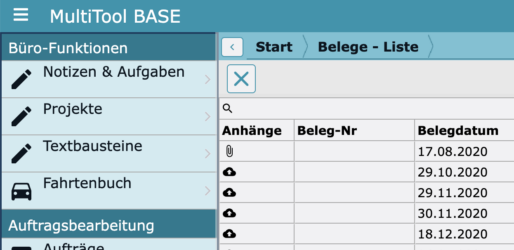
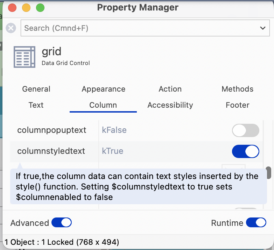
1) the datagrid column that is to contain an icon needs to have the property $columnstyledtext=ktrue
2) the $columndatacol needs to be styled text. In my app, I do it this way, depending on if there is an attachment (‘Anhaenge’):
Do ilDataList.$sendall($ref.Anhaenge.$assign(style(kEscBmp,’attach_file+16×16′)),$ref.tB_Set_FS>0)
Do ilDataList.$sendall($ref.Anhaenge.$assign(style(kEscBmp,’cloud_upload+16×16′)),isclear($ref.tB_Set_FS))
Find more info on the function style() in the docs:
https://www.omnis.net/developers/resources/onlinedocs/FunctionRef/Functions_A-Z/style.html#styleHope this helped!
Btw: I would never have figured this out myself – Andreas helped me a lot then (and now)…
-
Hi Blake,
Short answer: yes, definitely! Via styled text/html.
Long answer: pending, need to look in my code, asap
-
Hi Diego,
Thank you for your ideas.
I’m afraid I could not really put the puzzle pieces together for me 😳.
Best regards
Uwe
-
Hi Andreas,
Yeah, this really sounds complicated! I’ll recommend my ‘friend’ to go the way you previously described!
As for the ODC, I’d love to attend and see all of you again, but I’m afraid I’ll have to ride a motorbike from Lima to Cartagena😪…
But maybe we’ll meet again at the next EurOmnis!
Best regards
Uwe
-
Hi Andreas,
Yeah, works great, thank you!
When doing this, I noticed maybe 100 edit fields ‘0’ in the field list that I did not create myself. I suppose they were created by system crashes or so? Since there is no ‘delete’ command in the context menu, I removed them with the ‘cut’ command in the edit menu.
Is there a more elegant/efficient way to remove this kind of ‘garbage’?
Best regards
Uwe
-
Uwe Smidt
MemberJanuary 31, 2026 at 11:35 am in reply to: Create Omnis Documentation as PDF files to be used in tools such as PDF PalsHi Sten-Erik,
I was thinking that it would be a great idea to put all specific Omnis Knowledge (Documentation, Forum, Omnis List, own coding, etc) into one model, but as I am not very much into creating my own AI, I have not followed up this idea.
Now I accidentally found your comment on this 😃! What is your state of affairs in this matter?
Best regards
Uwe
-
Dear $all,
Thank you for your replies!The Apple Script I posted before does a fairly good job in keeping my IDE organized, and maybe with Matthew’s hint to sys(194), the script could be optimized further…