Forums

Find answers, ask questions, and connect with our
community all around the world.

Home Forum Omnis General Forum Re-ordering elements in the code editor

  • Re-ordering elements in the code editor

    Posted by Uwe Smidt on April 23, 2026 at 1:13 pm

    Hi $All,

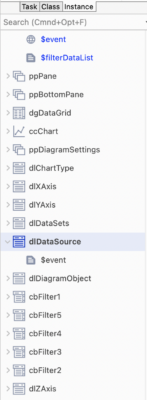
    is there a way to reorder the elements in the code editor? While it is no problem for the class methods, I can’t find a way to rearrange the event methods for form controls. They seem to appear in order of creation – which is not always the most logical order. Like here, I would put the Z Axis control method right after the Y axis.

    Maybe you know a trick?

    Andreas Pfeiffer replied 10 hours, 26 minutes ago 2 Members · 3 Replies
  • 3 Replies
  • Andreas Pfeiffer

    Administrator
    April 23, 2026 at 1:23 pm

    Hi Uwe,

    You can re-arrange the methods using drag&drop.

    However I think you are talking about the fields listed in the method editor. They order is given by the $order property of the fields which also controls the tab order.

    I hope this helps.

    Best,

    Andreas

    • Uwe Smidt

      Member
      April 24, 2026 at 12:23 pm

      Hi Andreas,

      Yeah, works great, thank you!

      When doing this, I noticed maybe 100 edit fields ‘0’ in the field list that I did not create myself. I suppose they were created by system crashes or so? Since there is no ‘delete’ command in the context menu, I removed them with the ‘cut’ command in the edit menu.

      Is there a more elegant/efficient way to remove this kind of ‘garbage’?

      Best regards

      Uwe

      • Andreas Pfeiffer

        Administrator
        April 24, 2026 at 12:39 pm

        Hi Uwe,

        This is a know bug in an older Omnis version.

        You can use a little code to get rid of any component that has no id. Something like this should work:

        Set reference lObjRef to pClassRef.$objs.$first()

        While lObjRef

        If lObjRef.$ident=0

        Do pClassRef.$objs.$remove(lObjRef)

        Set reference lObjRef to pClassRef.$objs.$first()

        Else

        Set reference lObjRef to pClassRef.$objs.$next(lObjRef)

        End If

        End While

        Save class [pClassRef.$lib().$name].[pClassRef.$name]

        “pClassRef” is an item reference to the class in question (not the instance). “lObjRef” is a local item reference variable.

        The code loops through any field and if $ident is zero it will delete this field. Probably you would need to also implement a recursive call as it can happen that fields are inside containers. Let me know if you need this too.

        I hope this helps.

        Best,

        Andreas

Log in to reply.