
Feed › Forum › Omnis General Forum › Images/Icons within JS Data Grid
-
Images/Icons within JS Data Grid
Posted by blake on January 28, 2026 at 8:41 amIs there a way to display images or icons in JS Data Grids? I know it’s possible to make it happen on complex grid, but I wanted to know if it’s possible for that to happen on data grids as well.
I am using Omnis 10.2
Any help is appreciated
blake replied 3 months, 3 weeks ago 3 Members · 6 Replies -
6 Replies
-

Hi Blake,
Short answer: yes, definitely! Via styled text/html.
Long answer: pending, need to look in my code, asap
-
Ok, so here we go:
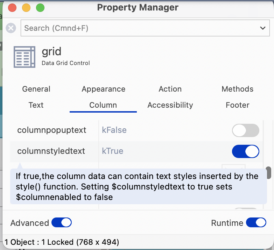
1) the datagrid column that is to contain an icon needs to have the property $columnstyledtext=ktrue
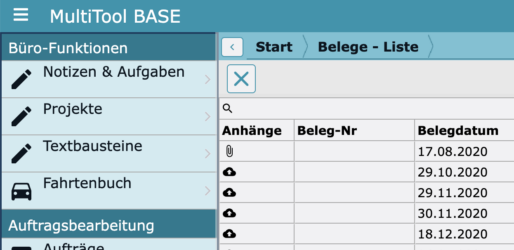
2) the $columndatacol needs to be styled text. In my app, I do it this way, depending on if there is an attachment (‘Anhaenge’):
Do ilDataList.$sendall($ref.Anhaenge.$assign(style(kEscBmp,’attach_file+16×16′)),$ref.tB_Set_FS>0)
Do ilDataList.$sendall($ref.Anhaenge.$assign(style(kEscBmp,’cloud_upload+16×16′)),isclear($ref.tB_Set_FS))
Find more info on the function style() in the docs:
https://www.omnis.net/developers/resources/onlinedocs/FunctionRef/Functions_A-Z/style.html#styleHope this helped!
Btw: I would never have figured this out myself – Andreas helped me a lot then (and now)…
-

Thank you sincerely for your help, Uwe. I will try this out tomorrow and let you know how it goes 👍
-
Hi Uwe,
I tried your code and it is working! Thank you for your help.
-
Thanks a lot for the detailed explanation, that’s really helpful.
I read https://www.omnis.net/developers/resources/onlinedocs/FunctionRef/Functions_A-Z/style.html#stylewheelie life. So, I have a question: when you use <code data-start=”120″ data-end=”157″>style(kEscBmp, ‘attach_file+16×16’)Are those icons coming from a built-in Omnis set, or did you have to import/register them somewhere first?
Also, have you noticed any performance impact when using styled text with icons in larger data grids (like a few hundred rows)?
-
This reply was modified 4 months ago by Brian Allen.
-
Hi Brian,
The inbuilt icons are in Omnis’s html/icons/material folder. You can place your icons in said folder and they will instantly appear on the icon selection window. Simply apply the name of the svg file on your code and it will show up. Hope that helps.
As for the second question, I cannot answer that accurately but I personally didn’t experience any lag.
-
This reply was modified 4 months ago by
-
Log in to reply.