Uwe Smidt
Forum Replies Created
-

It seems like Omnis considers llAggregierteZaehlerstaende not to be ‘worth’ considering the $dowork-method, like it is not $smartlist, or not even defined from an SQL class.
Is the a way the check the ‘status’ of a list, i.e. is it a SQL class-based list?
-
Thanks for the hint:
Calculate liStatus as llAggregierteZaehlerstaende.$history.1.$status ## Status is 8: kRowInserted
So the first line has Status kRowInserted, andDo llAggregierteZaehlerstaende.$includelines(kRowInserted) ## are there lines to be inserted? YES, all 747 lines
says that there are 747 lines to be inserted!
-
So the main instance is $dowork’able, but the correctly created ‘sub’ instance llAggregierteZaehlerstaende is not.
Is there an explanation for this behaviour?
-
Hi Andreas,
Happy New Year to you, too!
My $doinsert is overridden in taSuper, but
Do llAggregierteZaehlerstaende.$dowork()
(or $doinserts) does not care to fire – it does not ‘catch’. When I step in, it just steps over.
However, I’ve added some lines, merging llAggregierteZaehlerstaende into llZaehlerstaende, and now it works on ‘Do llZaehlerstaende.$dowork()’:Do llZaehlerstaende.$smartlist.$assign(kTrue)
Do llZaehlerstaende.$merge(llAggregierteZaehlerstaende)
Calculate lbSmart as llZaehlerstaende.$smartlist ## is it still smart(enough)? YES
Do llZaehlerstaende.$includelines(kRowInserted) ## are there lines to be inserted? YES, all 747 lines
Do llZaehlerstaende.$dowork() -
Dear $Forum,
Yes, it’s a pain! While I’m trying to have a quiet sunday nap, my phone keeps on pinging for some spammer the Forum software/ admin does not care to prevent from spamming. Causing the admin the work of removing this trash & the spammer from the forum, and causing all forum users who cared to subscribe to new entries to clear their mailboxes, too.
I had a look at the members section: from April 2025 until now, there have only been 4 new ‘real’ members, and only one made a posting.
Wouldn’t it have been more efficient – and less frustrating for the other subscribed users – if an admin had checked the first posting of a new user and set this user on ‘pass – can write postings’ as opposed to ‘pass any spam’ and remove it later?
Of course, we can go back to the email list server and communicate hidden from the public like freemasons, but I had understood that Omnis would like to attract new developers – and this is unlikely to happen if the greatest part of the community operates under cover…
But if Omnis does not succeed in making this Forum a bit more up-to-date and functional, the list users will have absolutely no reason to post their absolutely valuable content here.
Have a nice sunday!
Regards
Uwe
-
<div>Hi Matthew,</div>
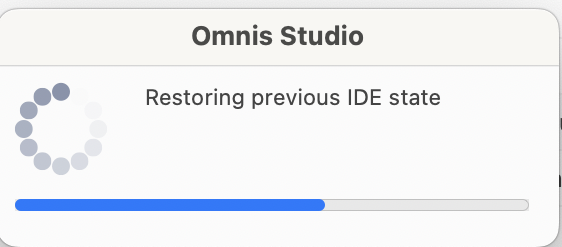
I suppose Omnis is working on it, but maybe not with the highest of priorities, When I open Omnis 11, I get a short & small dialog saying ‘restoring IDE’
And with Shift F3 you can store individual window settings – so it’s all there, just needs to be assembled to one ‘save workspace’ command. So vote my idea
https://www.omnis.net/community/forums/forum/discussion/saving-named-workspaces/up by one, then we may see it a bit earlier… 😉
Regards
Uwe
PS: I had this topic earlier with Omnis support, but then the only advice was to have 2 separate installations …
https://www.omnis.net/community/forums/forum/discussion/positioning-studio-ide-windows-by-code/


omnis.net
Saving named Workspaces - Omnis Forum
I am using my notebook both stand-alone and in multi-monitor-mode. It would be great to be able save named workspaces, like 'on the road',…
-
Hi Matthew,
I work with different environments, so saving named workspaces is on my wish list (https://www.omnis.net/community/forums/forum/discussion/saving-named-workspaces/)
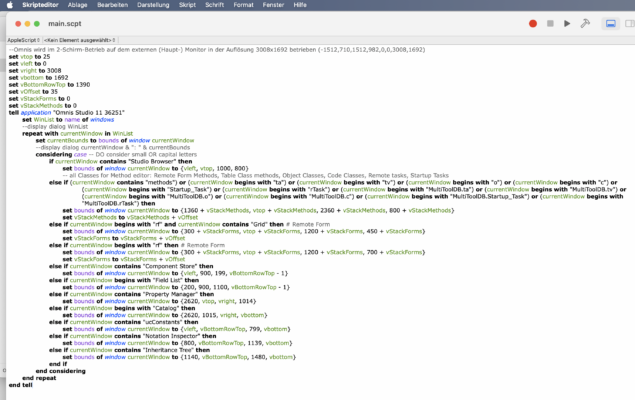
In the meantime, I helped myself with an AppleScript that helps me to arrange windows for different settings like ‘mobile’ or ‘mobile + external screen’.
As you are on MS Windows, maybe there is an equivalent automation shell?
Regards
Uwe
omnis.net
Saving named Workspaces - Omnis Forum
I am using my notebook both stand-alone and in multi-monitor-mode. It would be great to be able save named workspaces, like 'on the road',…
-
Hi Birgit,
Thank you for your clear commitment to the future of the free version of the Community Edition.
It is important to me & my potential customers, as a means to start ands generate business on a smaller scale.
Not everyone has the skill and the ambition to make it big…
Best regards
Uwe
-
Hi Mats,
I would agree that ‘Community Pro’ is a of an awkward and misleading way of naming a product – and it could have been taken as clue as to where Omnis is going take the Community edition: to a subscription paid version.So I am glad that Birgit clarified Omnis’ commitment to the free edition.
Best regards
Uwe
-
Hi Andreas,
Sorry for the late response 😳!
Yes, the shop gives a good comparison of all three versions of Omnis Studio.
But only as per now – tomorrow, one or two items might just be ‘missing’, so I was hoping for a more general statement from Omnis, which Birgit finally gave.Best regards
Uwe -
Hi Mats,
Yes, your are right, the Omnis site in general does mark the forefront of modern web technology and design, but I think most of the time, it does its job quite ok. It is mainly the Forum that is giving me pain!
And I would not really consider using Omnis to build a web SITE – there are better tools for that, and Omnis is better in other aspects of creating web apps.
-
Uwe Smidt
MemberMay 4, 2025 at 12:19 pm in reply to: Tree List Control – NOT enterable: bug or feature?Hi Götz,
Thank you for your prompt response and reaction!
Which brings me to my next question:
I am currently using the Omnis Studio Community Edition 11.1 37266. How is the update process and cycle for the Community Edition? I have not found a CE tree in the Omnis File Archive (https://www.omnis.net/developers/resources/download/archive.jsp), nor any other way to find and download updates on my CE Version.
Best regards
Uwe
-
Hi Andreas,
Thank you for guiding me in the right direction.Changing the Prefs (in the Omnis Class Browser) to language= German did the job!
-
Dear $all,
I am just using Andreas wonderful Export to File function, just to find out that my issue c) (please see above) is still unresolved:
The list comes out as csv with American formats: Decimal separator is . (dot) and not , (comma), and dates are exported with American names (October instead of Oktober). When I import this into Excel, it is all scrambled…How do I instruct Omnis to use local (German) number and date settings, as in the system preferences?
Thank you in advance!
Regards
Uwe -
Hi Götz,
Thank you for taking the time to check!
As I am no longer on paid maintenance scheme, will there be a free bug fix release, or will I have to live with this bug?
Best regards
Uwe