
Home › Forum › Omnis General Forum › Images/Icons within JS Data Grid
-
Images/Icons within JS Data Grid
Posted by blake on January 28, 2026 at 8:41 amIs there a way to display images or icons in JS Data Grids? I know it’s possible to make it happen on complex grid, but I wanted to know if it’s possible for that to happen on data grids as well.
I am using Omnis 10.2
Any help is appreciated
blake replied 1 month, 1 week ago 2 Members · 4 Replies -
4 Replies
-

Hi Blake,
Short answer: yes, definitely! Via styled text/html.
Long answer: pending, need to look in my code, asap
-
Ok, so here we go:
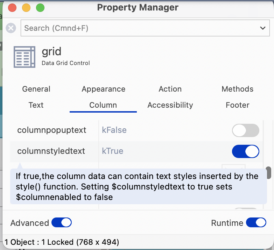
1) the datagrid column that is to contain an icon needs to have the property $columnstyledtext=ktrue
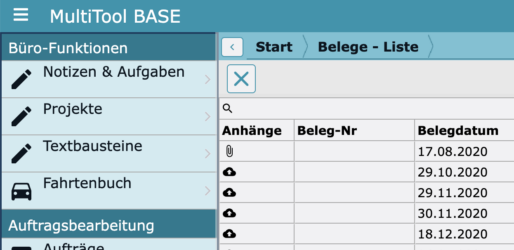
2) the $columndatacol needs to be styled text. In my app, I do it this way, depending on if there is an attachment (‘Anhaenge’):
Do ilDataList.$sendall($ref.Anhaenge.$assign(style(kEscBmp,’attach_file+16×16′)),$ref.tB_Set_FS>0)
Do ilDataList.$sendall($ref.Anhaenge.$assign(style(kEscBmp,’cloud_upload+16×16′)),isclear($ref.tB_Set_FS))
Find more info on the function style() in the docs:
https://www.omnis.net/developers/resources/onlinedocs/FunctionRef/Functions_A-Z/style.html#styleHope this helped!
Btw: I would never have figured this out myself – Andreas helped me a lot then (and now)…
-

Thank you sincerely for your help, Uwe. I will try this out tomorrow and let you know how it goes 👍
-
Hi Uwe,
I tried your code and it is working! Thank you for your help.
-
Log in to reply.