
Home › Forum › Omnis General Forum › Dynamic sorting of lists
-
Dynamic sorting of lists
Posted by Uwe Smidt on January 31, 2026 at 9:47 amDear $all,
I am writing a method to sort lists, where I pass the the fields to be sorted as row(‘fieldname1′,’fieldname2′,…,’fieldnameN’). How do I build the $sort parameters in order to make it work? This, and MANY other attempts did not work (however, it does some sorting, but I have not understanding the logic of it…):
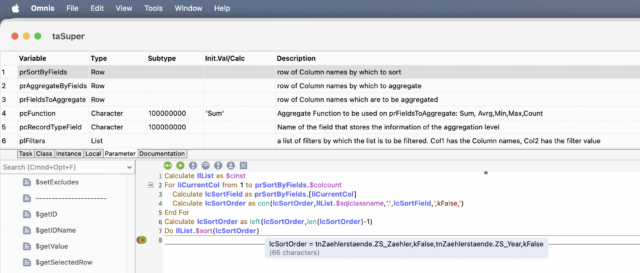
Calculate llList as $cinst
For liCurrentCol from 1 to prSortByFields.$colcount
Calculate lcSortField as prSortByFields.[liCurrentCol]
Calculate lcSortOrder as con(lcSortOrder,llList.$sqlclassname,'.',lcSortField,',kFalse,')
End For
Calculate lcSortOrder as left(lcSortOrder,len(lcSortOrder)-1)
Do llList.$sort(lcSortOrder)
Thanks in advance
Uwe
 Andreas Pfeiffer replied 1 month, 4 weeks ago 2 Members · 8 Replies
 -
8 Replies
-

Hi Uwe,
The $sort requires a reference to the list column, not just the name of the list column. Only if using a list that is defined from other variables it might work like this.
Do the normal syntax would be something like this:
Do myList.$sort($ref.myColumn,kFalse,$ref.anotherColumn,kFalse)
or
Do myList.$sort(myList.myColumn,kFalse,myList.anotherColumn,kFalse)
I personally prefer $ref.
This said you would be able to create your string including the “$ref.” part. But when executing you would need to make sure that the string is executed.
Not tested though but I guess something of this might work:
Do myList.$search([mySearchArgument])
or maybe
Do myList.$search(eval(mySearchArgument))
Hope this helps.
Best,
Andreas
-
Uwe,
On the other hand instead of using the real column names you could also do something like this. So if you know the list has two columns you could do this:
Do myList.$search($ref.c1,kFalse,$ref.c2,kFalse)
Best,
Andreas
-

Hi Andreas,
Thanks for your prompt response.
I will try the [] and eval – approach, but your second answer does allow for the dynamic aspect of my intended method: I do not know how many sort column there will be, so a static approach will not work.
Right now, I am trying to work around the problem (very unelegantly) with:
Switch prSortByFields.$colcount ## depending on no of sort cols..
Case 1
Do llList.$sort($ref.[prSortByFields.1],kFalse) ## ...set up the $sort - params
Case 2
Do llList.$sort($ref.[prSortByFields.1],kFalse,$ref.[prSortByFields.2],kFalse)
Case 3
Do llList.$sort($ref.[prSortByFields.1],kFalse,$ref.[prSortByFields.2],kFalse,$ref.[prSortByFields.3],kFalse)
Case 4
Do llList.$sort($ref.[prSortByFields.1],kFalse,$ref.[prSortByFields.2],kFalse,$ref.[prSortByFields.3],kFalse,$ref.[prSortByFields.4],kFalse)
Case 5
Do llList.$sort($ref.[prSortByFields.1],kFalse,$ref.[prSortByFields.2],kFalse,$ref.[prSortByFields.3],kFalse,$ref.[prSortByFields.4],kFalse,$ref.[prSortByFields.5],kFalse)
Default
#0 or more than 5 sort coloumns: do nothing, as yet
End Switch
But I’ll try with [] and eval()!
Best regards
Uwe -
[], eval() and evalf() did not work 😳, but my unelegant spaghetti code did work.
I would still favour a more elegant solution than switch casing, because this dynamic problem not only applies to $sort, but everywhere where $ref is use in the parameter of a method, eg $search() etc
-
Hi Uwe,
The simplest way is just to assume that you have a certain amount of columns max. Even if you have more it is likely not necessary to include the very last columns. But even if you add unnecessary columns to your sort command it would not hurt. For example:
Do iDataList.$sort($ref.c1,kFalse,$ref.c2,kFalse,$ref.c3,kFalse,$ref.c4,kFalse,$ref.c5)
will work – even if your list has only two columns.
However, if you want to have it precise, you can always create a string that can then be performed in square brackets. For example:
#get a string suitable for the $sort function
Do iDataList.$cols.$sendall(lString.$assign(con(lString,'$ref.',$sendallref.$name,',kFalse,')))
#get rid of the last comma
Calculate lString as trim(lString,kFalse,kTrue,',')
#now create the entire command
Calculate lString as con(iDataList.$name,'.$sort(',lString,')')
#finally perform it
Do [lString]
I will attach the Omnis Studio 11.2 test library.
Hope this helps.
Best, Andreas
-
This reply was modified 2 months ago by Andreas Pfeiffer.
-
This reply was modified 2 months ago by Andreas Pfeiffer.
-
This reply was modified 2 months ago by
-
Hi Andreas,
I love the creative use of the $sendall-method – I recently tried something similar but did not get it to work. So this one I’ll put in a golden frame!
Here, $sendall does not do what is needed for me, because it would sort in the order that the columns are in the list (C1, C2, …,Cn), as opposed to an arbitrary runtime order (eg as specified by user: C7, C3,C9).
But the
Do [AnyKindOfString]
WOULD do the job – if only it did. I rebuild the string, said Do [lString] – which left Omnis Studio (11.0) and my Datalist completely unimpressed.
Unfortunately, I can’t open your sample lib – I’m on 11.0 (Pro) and 11.1 (CE) 😳
I will try and get an update on my CE to open it.Thank you very much for your help!
Best regards
Uwe
-
Sorry,
It DOES do the job:
Do [AnyCommandThatMakesSenseANDIsCorrectlySpelled]
works perfect!!!!! I had ‘Do…’ at the beginning of my string, and Omnis correctly refuses to cooperate with someone saying
Do Do my command.
So yes, problem solved, learned 2 important lessons – thank you!
-
This reply was modified 1 month, 4 weeks ago by Uwe Smidt. Reason: spelling
-
Hi Uwe,
I am glad that it works for you!
Thanks for the feedback.
Best,
Andreas
-
This reply was modified 1 month, 4 weeks ago by
Log in to reply.