
Home › Forum › Omnis General Forum › Data Grid Filters
-
Data Grid Filters
Posted by Sam Kashlan on November 25, 2025 at 10:23 amI need help in printing the filtered data grid. Please help.
Andreas Pfeiffer replied 4 months ago 2 Members · 5 Replies -
5 Replies
-

Hi Sam,
You would need to create a report class that defines what is going to be printed. I recommend using an instance variable of type list inside the report. Assign this list as a $listname for the report. Then declare a parameter of type list in the $construct method of the report class and copy the data from the parameter to the instance variable.
Finally in your remote form you can use the command “print report” with an argument of the list that you have in your remote form. This content will then be transferred into the parameter of the report class.
I hope this helps.
Best,
Andreas
-

Hi Andreas;
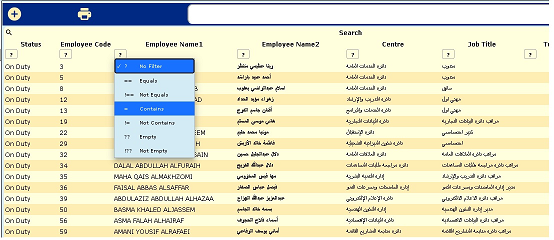
Thank you for your quick response. However, I do not think I explained the issue properly. We are using the filter available the JS remote form the list object itself. Sorry I was not able to upload the picture on the Omnis website, it kept giving an error.
-
Hi Sam,
So you do not want to print it then?
Or am I missing something here?
Best,
Andreas
-
I do want to print the filtered list. The user want to print on different filters available part of the SJ object.

-
Sam,
I think you would need to filter the list on the server before you can print it in a report.
All the component does is to filter it on the client I assume.
What exactly do you mean when you say “print”? Just display or create a PDF report? In the latter case it would need to be filtered on the server. You can do this by making the list become a smart list, set $smartlist of the list to kTrue. Then you can filter the list using the $filter method of the list. Finally you can pass this list to the report class to create a PDF report out of it.
I hope this helps.
Best,
Andreas
Log in to reply.