maxperique
Forum Replies Created
-

In case anyone needs it, I found out how to do it
Calculate locStdDev as stddevc(ivList;eval(con(‘”‘;locColName;'”‘)))
using eval() function to evaluate the locColName variable between quotes (or double quotes).
-
maxperique
MemberSeptember 26, 2025 at 11:44 am in reply to: Format y axis tick labels in graph2 kG2xyScatterHi Götz.
Perfect thank you!!!
-
maxperique
MemberMarch 1, 2025 at 10:36 am in reply to: Browser or Proxy error when trying Python WorkerUPDATE: solved!
For anyone facing the same issue, the problem was that I was not passing any vListOrRow to $callmethod.
Passing an empty Row defined as
Do locRow.$define('')and calling the module as
Do ivPythonWorker.$callmethod("omnis_test","test",locRow,,locErrorText) Returns #Fsolved the issue, where ivPythonWorker is an object reference of subtype objPythonWorker defined as
Calculate ivPythonWorker as $objects.objPythonWorker.$newref()
and objPythonWorker is an object with OW3 PYTHONWorker superclass and overridden methods to send the response back to the calling item (a remote form, in my case).
-
This reply was modified 1 year, 1 month ago by maxperique. Reason: wrong formatting
-
This reply was modified 1 year, 1 month ago by
-
maxperique
MemberFebruary 28, 2025 at 10:30 pm in reply to: Browser or Proxy error when trying Python WorkerHi.
I’ve got the same error 10811.
I’m on macOS 15.3.1, Apple M1, and I’m using Omnis Studio Community Edition version 11.1
There is no Python sample under Hub in the Community Edition, so I can’t compare my code with a working example.
I created an object with the OW3 Python Worker superclass, overriding $methodreturn and $methoderror methods to send the response row back to the calling instance, a remote form, where an object reference to the objPythonWorker has been set.
Python 3.11 is correctly installed in a conda environment, and all the required packages are installed, too.
I tried to call the basic omnis_test module and I can see the __pycache__ inside pyworker folder (so, at least something is actually working).
Is it an issue/limitation of the Community Edition?
Thank you.
-
maxperique
MemberMarch 11, 2026 at 9:23 am in reply to: Sort all lists based on a column of one listHi Andreas.
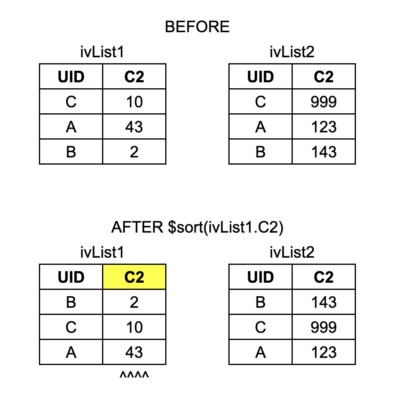
This command will sort all lists based on the 2nd column of each list. So the 2nd list in the example would be A,B,C instead of B,C,A
I’d need instead something like this
Do $cinst.$ivars.$sendall($ref.$sort(ivList1.C2),$ref.$type=kList)
The fastest way to do it, that I found so far, is to add ivList1.COL1 to ivList2 (with another column name, e.g. TEMP), do ivList2.$sort($ref.TEMP) and finally remove it ivList2.$cols.$remove(ivList2.$colcount)
-
This reply was modified 3 weeks, 2 days ago by maxperique.
-
This reply was modified 3 weeks, 2 days ago by
-
maxperique
MemberMarch 10, 2026 at 6:57 pm in reply to: Sort all lists based on a column of one listHi Andreas.
Something like the attached example.
ivList1 is sorted based on $ref.C2 and so does ivList2: it is sorted based on ivList1.C2, as if they were a single list…

-
maxperique
MemberOctober 3, 2025 at 11:48 am in reply to: evGraphClick parameters in Omnis Studio 8.1Hi Götz. I got it.
My iGraphList is defined with columns X and Y that are Number, Floating dp. In this case, pSetname is NULL, it is returned only when X is Integer and is the value on the x-axis.
In case of multiple data, for example
Do iGraphList.$define(lName, X1, Y1, X2, Y2, X3, Y3)
only pSet is returned (in case all columns are Number, Floating dp) which is the $line of iGraphList. The parameter pItem is always equal to 1 and the others all NULL. So I don’t know how to identify the data series. i.e. did I click on (X1, Y1), (X2, Y2) or (X3, Y3)?
-
maxperique
MemberOctober 3, 2025 at 8:35 am in reply to: evGraphClick parameters in Omnis Studio 8.1Hi Götz.
Thank you. I guess it’s happening because my iGraphList is not well-formed. I’ll check more in detail.