Andreas Pfeiffer
Forum Replies Created
-

Micha,
Again this is hard to say without having the library. Would you mind sending me a small sample library that demonstrates the problem?
Thanks and best regards,
Andreas
-
Hi Mischa,
I am not sure what you are trying to achieve using the $prepare of a row variable when using a schema.
Actually my recommendation always using a table class rather a schema class directly. If doing so there are two ways to use a table class:
- The table class has an attached schema class in its $sqlclassname property. If so that table class is best use for a row variable where you would typically use its $select, $fetch, $update, $insert etc. methods to manipulate one specific record.
- The table class has no schema class involved. In this case you would typically have a statement block and then using $cinst.$statementobject().$prepare() to execute the statement block. The result set then determines the columns of the current instance which would be typically a list variable to represent a number of records.
I hope this helps.
Best,
Andreas
-
Andreas Pfeiffer
AdministratorJanuary 15, 2024 at 8:20 am in reply to: 'Millio/en'nium PANE^ BackgroundHallo Herr Köhler,
Entschuldigung der Post ist leider nicht zu lesen. Bitte posten Sie erneut – wenn es geht ohne die HTML Tags.
Vielen Dank.
Mit freundlichen Grüßen
Andreas H. Pfeiffer
-
Andreas Pfeiffer
AdministratorJanuary 15, 2024 at 8:18 am in reply to: ‘Millio/en’nium PANE^ HintergrundHallo Herr Köhler,
der Text Block scheint schon das richtige Instrument zu sein. Der Statementblock ist gedacht für SQL Statements.
Probieren Sie zunächst ob der HTML Text dem Sie der HTML Komponente zuweisen wollen so mit der Komponente funktioniert indem Sie das HTML mit Copy&Paste in die $html Eigenschaft des Controls hinein kopieren. Beachten Sie, dass das HTML entweder in einem Frame oder in einem DIV sein muss damit dies in der Komponente funktioniert.
Wenn das klappt, dann prüfen Sie den Code, den Sie für die Zuweisung verwenden. Haben Sie die richtige Referenz zur Komponente? Steht der HTML Code korrekt in der Variablen die Sie für den Text Block verwenden?
Mit freundlichen Grüßen
Andreas H. Pfeiffer
-
Hi Mischa,
I am still not sure what you are trying to achieve here. Would you mind sending a test case to the Omnis support so it can be investigated and if there is a fault they will raise it to Engineers.
Best,
Andreas
-
Hi Mischa,
This is hard to say without having an idea what your code looks like.
I can only guess that there might be some characters where Omnis is having trouble with?
Best,
Andreas
-
This reply was modified 2 years, 2 months ago by Andreas Pfeiffer.
-
This reply was modified 2 years, 2 months ago by
-
Hi Kevin,
you may be interested in the following technical note: https://www.omnis.net/developers/resources/technotes/tngi0001.jsp
Depending on what you are trying to achieve it might be probably better to put the responsibility on how the menu is going to act right into the menu itself rather trying to control it from the outside. Please see the following technical note that describes this: https://www.omnis.net/developers/resources/technotes/tngi0022.jsp
Hope this helps.
Best,
Andreas
-
Andreas Pfeiffer
AdministratorJanuary 2, 2024 at 11:06 am in reply to: Positioning Studio/IDE windows by codeUwe,
For the Omnis Studio IDE Browser I found a solution that you might want to use:
Create an instance variable i.e. “iBrowserRef” in the Startup_Task of your library. Then make a method that allows to set the $top, $left, $width and $height property. If you make it a public method you could reach this method from anywhere else in the task context. For example you could create a window class that allows to call this method, i.e. Do $ctask.$setBrowserProps(10,10,600,400)
Now in the first line of the $construct of your remote task type the following to set the reference:
Set reference iBrowserRef to $topwind
The reference should now hold the reference to the browser. However there are a few caveats. If you close and re-open the browser, the reference will be invalid. If you open multiple instances of your browser the reference will only go to the one browser instance that was open, when the library has been opened.
Also this is not a solution for the Property Manager, as this one is a C++ window and not an Omnis window.
Best,
Andreas
-
This reply was modified 2 years, 2 months ago by Andreas Pfeiffer.
-
This reply was modified 2 years, 2 months ago by
-
Andreas Pfeiffer
AdministratorJanuary 2, 2024 at 8:09 am in reply to: Positioning Studio/IDE windows by codeHi Uwe,
How about making a copy of your Omnis installation? You could then simply have one version with and another without the external monitor.
Best,
Andreas
-
This reply was modified 2 years, 2 months ago by Andreas Pfeiffer.
-
This reply was modified 2 years, 2 months ago by
-
Andreas Pfeiffer
AdministratorDecember 21, 2023 at 2:07 pm in reply to: $makelist WITH column names / maxc() WITHOUT column namesI see.
$maximum is a property of a list column. So you could try something like this:
listVar.$cols.myCol.$maximum()
-
This reply was modified 2 years, 3 months ago by Andreas Pfeiffer.
-
This reply was modified 2 years, 3 months ago by Andreas Pfeiffer.
-
This reply was modified 2 years, 3 months ago by
-
Andreas Pfeiffer
AdministratorDecember 21, 2023 at 10:09 am in reply to: $makelist WITH column names / maxc() WITHOUT column names.. alternatively you could use $redefine() to redefine the list. However personally I prefer $cols.$add because this does not require any additional variables for the definition.
-
Andreas Pfeiffer
AdministratorJanuary 8, 2024 at 8:10 am in reply to: Positioning Studio/IDE windows by codeUwe,
Nice one!
Best,
Andreas
-
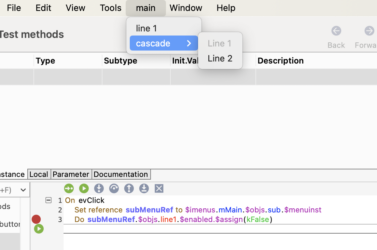
Hi Kevin,
I just did a little try and was able to change a property ($enabled) of the submenu instances first line. Please see attached screenshot.
I hope this helps.
Best,
Andreas
-
Andreas Pfeiffer
AdministratorJanuary 2, 2024 at 2:36 pm in reply to: Positioning Studio/IDE windows by codeHi Uwe,
Happy New Year to you as well!
Yes – you can just hold a copy of the omnis.cfg file that contains the positioning of the IDE windows as well as the serialisation.
If you create an update.sh file you could have some code that copies the required file when Omnis launches. See also: https://www.omnis.net/developers/resources/onlinedocs/Programming/01omnistools.html#auto-updates
Best,
Andreas
-
Andreas Pfeiffer
AdministratorDecember 21, 2023 at 1:11 pm in reply to: $makelist WITH column names / maxc() WITHOUT column namesWhat are you trying to achieve?