Forums

Find answers, ask questions, and connect with our
community all around the world.

Home Forum Omnis General Forum Omnis Studio IDE Programming

  • Omnis Studio IDE Programming

    Posted by matthew on February 21, 2025 at 5:22 am

    Does anyone here have any experience with programmatically controlling the Omnis Studio IDE? I’m thinking things like

    – Determine what Method Editors are open (including which library, class and method they are editing)

    – Move and resize Method Editor, Studio Browser and design windows

    – Read and modify other window state, like being in the foreground, etc.

    I’ve discovered the Classes command group, which include ‘Modify Methods’ and ‘Close Design’ which are part the way there and are able to control IDE windows. Im also aware that through notation all of this can be accomplished for windows that you have created as part of your app, but I have been unable to find an equivalent for IDE windows. It’s very possible it all exists and I’ve just missed it.

    Im currently working with Omnis Studio CE 11.1 on Windows 11, but I have access to the Omnis Professional trial if need be.

    Thanks, from Matthew

    Uwe Smidt replied 1 week, 1 day ago 4 Members · 9 Replies
  • 9 Replies
  • Michael Monschau Monschau

    Member
    February 21, 2025 at 9:58 am

    There is a bunch of class notation that can help with this to some extend, i.e. to modify a method you can $classes.myclass.$methods.//$method_name//.$modify(2) which wold open the method editor at line 2 of that method. Any notation that begins with $classes or $libs.mylib.$classes will access class notation and $modify() is a method of the actual class or method within a class. Hope this helps

    Regards,

    MIchael

    • Michael Monschau Monschau

      Member
      February 21, 2025 at 10:04 am

      Sorry, did not read thoroughly. Don’t know much about controlling IDE windows except that preferences for these are stored in the configuration file. There are various sections to do with the IDE and method editor. May be worthwhile playing with those.

      • matthew

        Member
        February 22, 2025 at 2:03 am

        Hi Michael, thanks for the response.

        I took a look through the IDE config files but nothing there is really offering the options Im looking for. Thanks for bringing up the ‘$modify()’ method too, it’s a more precise way of opening a method for editing.

        Regards, Matthew

  • Uwe Smidt

    Member
    February 23, 2025 at 6:29 pm

    Hi Matthew,

    I work with different environments, so saving named workspaces is on my wish list (https://www.omnis.net/community/forums/forum/discussion/saving-named-workspaces/)

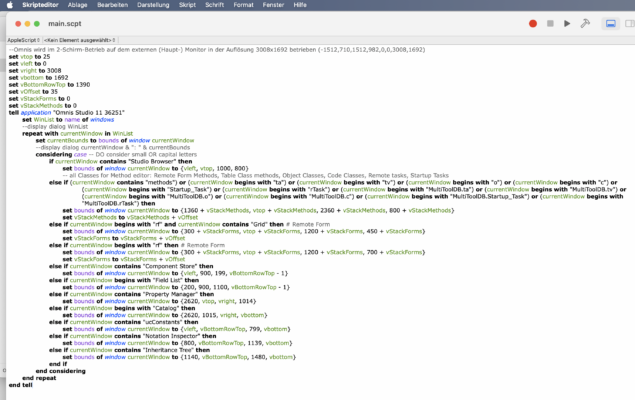
    In the meantime, I helped myself with an AppleScript that helps me to arrange windows for different settings like ‘mobile’ or ‘mobile + external screen’.

    As you are on MS Windows, maybe there is an equivalent automation shell?

    Regards

    Uwe

    • matthew

      Member
      February 24, 2025 at 10:21 pm

      Hi Uwe, thanks for replying.

      Your solution is almost exactly what I was looking for, but it won’t work on Windows. The Omnis program on Windows opens as a single document application, with all the Browser, Method Editor and other windows opening as windows inside that application. I don’t believe I can control those windows with external scripting tools.

      Regards, Matthew

    • Uwe Smidt

      Member
      January 24, 2026 at 8:10 am

      Dear $all,
      Thank you for your replies!

      The Apple Script I posted before does a fairly good job in keeping my IDE organized, and maybe with Matthew’s hint to sys(194), the script could be optimized further…

  • Uwe Smidt

    Member
    February 24, 2025 at 10:42 pm

    <div>Hi Matthew,</div>

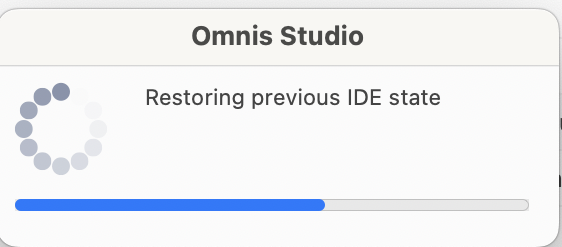
    I suppose Omnis is working on it, but maybe not with the highest of priorities, When I open Omnis 11, I get a short & small dialog saying ‘restoring IDE’

    And with Shift F3 you can store individual window settings – so it’s all there, just needs to be assembled to one ‘save workspace’ command. So vote my idea
    https://www.omnis.net/community/forums/forum/discussion/saving-named-workspaces/

    up by one, then we may see it a bit earlier… 😉

    Regards

    Uwe

    PS: I had this topic earlier with Omnis support, but then the only advice was to have 2 separate installations …

    https://www.omnis.net/community/forums/forum/discussion/positioning-studio-ide-windows-by-code/

  • Debra Woods

    Member
    January 22, 2026 at 7:54 am

    From what I know, Omnis doesn’t really expose full programmatic control over IDE windows (Method Editor, Studio Browser, etc.) the same way it does for app windows. The notation and window commands are mostly limited to runtime/UI objects you create yourself.

    The Classes command group is about as far as Omnis officially goes for IDE automation. Things like detecting which Method Editors are open, moving/resizing IDE panes, or changing focus aren’t supported via notation or commands, at least not in CE or Pro.

    Hope that helps a bit.

    • matthew

      Member
      January 22, 2026 at 9:08 am

      Like you said, on the whole there isn’t much control that the programmer has over the IDE. However, since I made this post I learnt about sys(194) which lists all the open windows, including design/method editor windows. It includes references to the class being edited as well.

Log in to reply.