Omnis Technical Note TNGI0032Oct 2023
Enhancing your Tool Tips
for Omnis Studio 10.2 or above
Thanks to Christian Müller for providing this tech note
There is a great feature in Omnis Studio that allows you to popup a tooltip that shows some information when the user hovers their mouse over an item, for example, hovering over the cells in a Complex grid.
With the following technique, you can automatically call a function that receives a reference to the row of the data list, and in addition you can use the style() function to give your tooltip a better appearance.
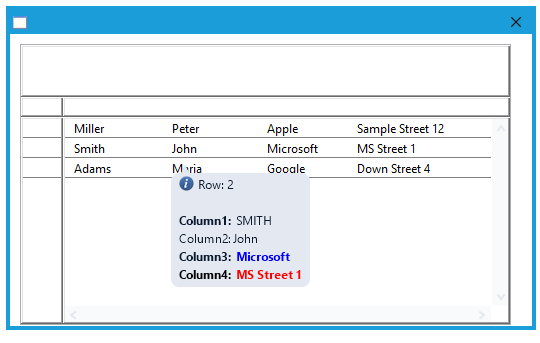
Formatted tool tips
To show how you can create formatted tooltips, I have created a window with a Complex grid. Each field in the grid has the following argument within its $tooltip property using square brackets:
[$cinst.$getTooltip(ivDataList.[mouseover(kMLine)].$ref())]
The $getTooltip method receives a reference to the row under the mouse and contains the following code to format the tooltip:
Begin text block (Carriage return)
Line:[style(kEscBmp,1694)] Row: [pRow.$ident]
Line:
Line:[style(kEscStyle,kBold)]Column1:[style(kEscStyle,kPlain)] [con(upp(pRow.C1))]
Line:Column2: [pRow.C2]
Line:[style(kEscStyle,kBold)]Column3: [style(kEscColor,kBlue)] [pRow.C3] [style(kEscColor,kBlack] [style(kEscStyle,kPlain)])]
Line:Column4: [style(kEscColor,kRed)] [pRow.C4] [style(kEscColor,kBlack)]
End text block
Get text block lvToolTip
Quit method lvToolTip
The method uses the style() function to implement certain formatting properties such as adding an icon, and changing the font style and colors of the text.
There is a sample library which demonstrates this technique (compatible with Omnis Studio 11 revision 35659 or above).



 Please logon or create a free account to download this file.
