Andreas Pfeiffer
Forum Replies Created
-

Andreas Pfeiffer
AdministratorAugust 23, 2023 at 8:48 am in reply to: How do I hilite a selected line in a complex grid control?Hi Mischa,
I would recommend using a data grid instead. This one has $multipleselect and if switched on you can select multiple list lines.
The complex grid is designed for always being enterable, hence not really useful for making a user selection.
What you probably could do is adding a control that shows the status of a line. For example you could use a checkbox or an icon to show if a row has been selected. You could also change the text color of certain objects (see here: https://www.omnis.net/developers/resources/onlinedocs/WebDev/03jscomps.html#exceptions) or use a page pane that shows different pages by setting the paged panes $dataname to a column of the list. https://www.omnis.net/developers/resources/onlinedocs/WebDev/03jscomps.html#using-dataname
Best,
Andreas
-
Andreas Pfeiffer
AdministratorAugust 18, 2023 at 12:14 pm in reply to: Python Worker : sendError() callsHi Nathanaël,
I would think this is due to asynchronous execution. Omnis starts the worker and continues to execute that method. Therefore you need to have a callback that can be used to get the result from Python.
Best,
Andreas
-
This reply was modified 2 years, 7 months ago by Andreas Pfeiffer.
-
This reply was modified 2 years, 7 months ago by
-
Hi Martin,
This is because the string table is assigned in the $stringtable property of the remote task that is being used.
Note when using Omnis Studio 11 you could also use the $label property of the entry field using this “$st.” notation. Here is the documentation about using string tables in remote forms: https://www.omnis.net/developers/resources/onlinedocs/WebDev/06localization.html#localizing-remote-forms
Normally the browsers language locale is used. However if the user wants he can change the language using the language menu in the logon remote form. It contains some code to change the language. It is a client executed method that reloads the browser with a different language.
Hope this helps.
Best,
Andreas
-
This reply was modified 2 years, 7 months ago by Andreas Pfeiffer.
-
This reply was modified 2 years, 7 months ago by Andreas Pfeiffer.
-
This reply was modified 2 years, 7 months ago by
-
Hi Martin,
There is a $iconsets property of your library. This is also documented here: https://www.omnis.net/developers/resources/onlinedocs/WebDev/03jscomps.html#icon-sets
Best,
Andreas
-
Hi Martin,
I am not sure if I understand you well.
Do you mean where to copy the icon folder? It is described in the readme.txt file.
Does that help?
Best,
Andreas
-
Andreas Pfeiffer
AdministratorAugust 18, 2023 at 2:37 pm in reply to: Python Worker : sendError() callsHi Nathanaël,
I think Götz already covered this.
Best,
Andreas
-
Hi Martin,
What chapter in the training manual do you refer?
BTW. Do you mind not mixing the threads?
Thanks and best regards,
Andreas
-
No worries. Have a great day!
Best,
Andreas
-
Hi Martin,
I suppose no data are in the complex grid. Hence the buttons will not show up.
If you want to present data you can do the following:
Add a folder in the Omnis App Support inside the /omnispdf folder and call it “Madagascar”. Then place PDF files there. Those are the one that will be displayed for every of the contacts. Possibly you would need to load the data differently because it would not make sense to present the same files for all contacts.
To change this: go to the $load method of taFileList. This table class is used in that specific subclass. Then you could probably add some SQL that loads the file list and the pathnames from SQL if you have the information there. But note that only the /omnispdf folder is allowed for downloading. If you need a different folder then you would need to give permission via getpdfFolders in the server section of the config.json file.
Best,
Andreas
-
Please see attached picture
-
The application support is not in the Program Files folder.
On Windows go to: c:\user\yourUserName\AppData\Local\Omnis Software\OS 11 35439 x64\studio
-
Hi Martin,
Sorry, I have overseen your question regarding config.json and servermgmt.lbs.
In Omnis Studio 11 you will find the library in the Omnis package (on macOS) /Applications/Omnis\ Studio\ 11\ 35439.app/Contents/MacOS/webserver/servermgmt.lbs
On Windows it is here: C:\Program Files\Omnis Software\OS 11 35439 x64\webserver
I will add a documentation fault as it was different in Omnis Studio 10.22
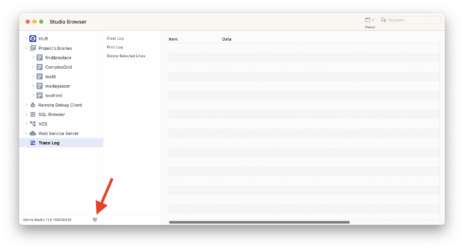
The config.json file is located in the /studio folder within your app support. Alternatively you can use the little button on the left bottom in your Omnis Studio Browser and pick “edit configuration”. That will allow you to change the content of your config.json file from within Omnis. Here is the reference: https://www.omnis.net/developers/resources/onlinedocs/WebDev/07Deployment.html#server-configuration
I hope this helps.
Best,
Andreas
-
You are welcome.
Best,
Andreas
-
Hi Martin,
Actually there is no tooltip.
You might refer to the error handler though? When you press the “save” button it will call the $save method of the table class. The $save method of the table class then calls the $check method of that instance. In that case the $check method of the taPersons is overridden and therefore it checks which fields are mandatory. It also saves the error text and the field name that caused the error. Back in the form if the $save fails it will then load the error text and the field name and show the error directly on that field. So this follows the OO rules and puts the business rules ($check) into the table class instance. See also this tech note I wrote a while ago: https://www.omnis.net/developers/resources/technotes/tnjs0008.jsp
Is this what you are asking for?
Best,
Andreas
-
Hello Martin,
There is a property $inputtype which needs to be set to kJSInputtypeDate. Also there are $datepickermode, $datepickeroptions and $datepickerpopupstyle where you can control how this is going to look.
I hope this helps.
Best,
Andreas