To debug, the DAM needs to be built into the Omnis.app/Contents/MacOS/xcomp folder.
Creating your own non-visual DAMs
This document details the APIs used to write non-visual DAM components and it assumes familiarity with the earlier sections of this manual. For general documentation on the use of Omnis Studio Object DAMs, please refer to the Omnis Programming Manual.
Omnis Studio DAMs (Data Access Modules) are specialised, non-visual external components that allow the Omnis Studio development tool to access data sources through a consistent programming interface. The non-visual DAMs replace the old DAM external libraries. This was required primarily to allow an object-oriented approach to the DAM interface to be adopted and secondly to allow database access in a multi-threaded environment as part of the Omnis Web Server.
The objects provided by a DAM represent the session, statement and worker objects. These objects provide properties and methods to the application to allow it to manage communication with the external database server. Using the non-visual approach, an application creates object variables of a particular DAM class that are instantiated when the object is created by the component. There are a group of common operations that apply to all DAM objects (those provide by the “base class”) and a set of DAM specific operations based on the type of object (those provided by the “implementation” or “derived object”).
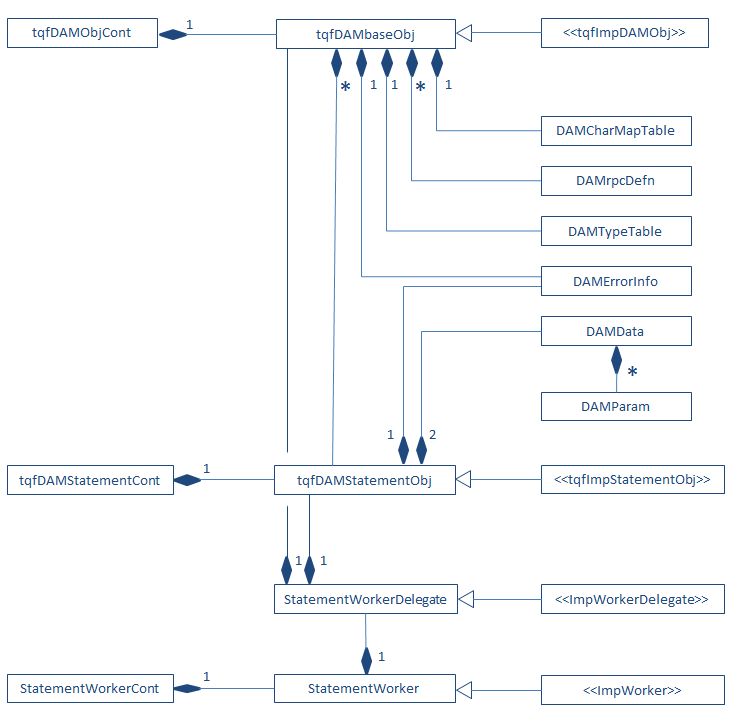
The primary object is the session object, internally known as tqfDAMbaseObj, which manages the connection for a particular DAM type and is used to pass commands to the database server. Every DAM has a unique DAM type associated with it. For example if an application requires a Sybase session then it will use a SybaseDAM object. The tqfDAMbaseObj object is wrapped within a container object called tqfDAMObjCont so that it is recognised by the component library.
The application uses the session object to create a statement object, internally known as tqfDAMStatementObj in order to issue SQL statements. A statement object can be used for all types of statements, e.g. SQL, PL/SQL cursors and remote procedures. There can be multiple statement objects which share a common context provided by a single session object. The tqfDAMStatementObj object is wrapped within a container object called tqfDAMStatementCont.
For use with the multi-threaded Omnis Web Server, we created the concept of a session pool; a pre-defined array of session objects sharing the same DAM type. An application can request session objects from this pool. Each object in the pool is connected with the same attributes when the pool is created. This has an advantage in performance since the connection is immediately available when a client requests an object.
The multi-threaded nature of session objects, session pools and statement objects are part of the underlying implementation and DAM developers do not need to implement any specific functionality, although they should be aware of the need to write thread safe code.
Additionally, there are 7 main support classes designed to encapsulate specific tasks relating to data manipulation:
| DAMrpcDefn | DAMrpcDefn is the Remote Procedure Call definition class. This class encapsulates the data for the database server procedures and their parameters. This is used by the derived session object. |
| DAMErrorInfo | DAMErrorInfo is the error handling class. This stores and reports any errors whether internally or remotely and is used by both the derived session and statement objects. |
| DAMCharMapTable | DAMCharMapTable is the character mapping class that is used to manipulate 8-bit characters moved between the application and the database. Its creation is based on a character map file and is used by the derived session object. |
| DAMTypeTable | DAMTypeTable contains the internal mapping between Omnis data types and SQL C types. This object is created during the construction of the derived session object and is generally standard among databases. |
| DAMData | DAMData encapsulates the DAMParam objects relating to a single SQL statement. This performs functions that relate to all of the parameters. It is used by the derived session object. |
| DAMParam | DAMParam encapsulates the data and information for a single Omnis bind variable. This includes both in and out parameters or a return value from a procedure. These parameters are contained within a DAMData object. |
| DAMunicodeText | DAMunicodeText is a utility class encapsulating several Unicode conversion functions provided by the component library. It can be used to create and concatenate text in various Unicode encodings. |
There are also two additional classes designed to support asynchronous worker objects:
| StatementWorker | An interface object that can be used to $init() and $start() worker background tasks. These callback into the Omnis core on completion. |
| StatementWorkerDelegate | Subordinate to StatementWorker, this class performs the actual work of the worker object and can be spawned (and detached) multiple times. StatementWorker can only interface with one StatementWorkerDelegate at a time. |
Asynchronous worker objects may be considered an extension to the basic DAM functionality and are discussed later.
The main base objects, tqfDAMbaseObj and tqfDAMStatementObj, need to be sub classed by your implementation and any pure virtual functions defined by the base class must be implemented.
The remainder of this document introduces you to a generic DAM object which you can use as the starting point for your own implementation. The developer guide addresses the techniques involved in developing and testing your DAM and describes the sequencing of the various processes involved and how they relate to your derived objects.
The reference section describes the API’s for the classes shown above and gives examples on how to write the pure virtual functions in your tqfDAMbaseObj and tqfDAMStatementObj implementations.
Figure 1. UML class diagram showing relationship between DAM object classes.
This section discusses in greater detail the processes involved in developing a custom DAM.
Key concepts to be aware of whilst developing your DAM are:
Cross platform development
Working with the Omnis component library and DAM library, it is possible to write cross-platform code easily provided that your database server provides the appropriate clientware for each platform. In essence, you maintain one source file (and associated header file) for your session object, one source file (and associated header file) for your statement object and a file containing resource strings used by your implementation. The same files are used on each platform you will be developing for.
The Omnis component library is designed with cross platform development in mind. By using the component library and not relying on platform-specific SDKs, you insure your code against issues such as missing API calls, different function arguments and behavior.
Unicode
If you are writing a DAM for use with Studio 5 or later, your component must support Unicode, although the base class supports both Unicode and non-Unicode targets, for use with Studio 4.3 and earlier for example.
Even if your clientware does not support Unicode, there are several Unicode conversion functions and classes built into the component and DAM libraries which readily convert between Omnis’ UTF-32 character set and non-Unicode, UTF-8 or UTF-16. The DAMunicodeText class can also be overridden allowing you to provide additional functionality if required.
Debugging and Maintainability
To simplify the process of writing a new component and to avoid having to start from scratch, a template DAM is provided, available for download from the Omnis website. The template DAM is supplied with project files for all supported platforms:
Windows: Microsoft Visual C++ 2008 & 2013 projects
Macintosh: XCode 8.1 project plus support files
Linux: gcc 4.2 compatible makefile (should also work with other versions)
This generic DAM is the recommended starting point for any new development. It requires no clientware and contains stubs for all of the derived virtual methods. Debug messages built into most of the derived methods should assist with debugging as you develop your DAM.
Once you have established a build environment for your DAM, you should compile it and test it using Omnis Studio. (Ensure that you build a Debug target in order to do this!)
Make sure the component loads, that you can see it in the Interface Manager, that any constants have been registered (F9), that derived test methods and properties are visible within the session and statement objects. You should also be able to hit breakpoints set inside your derived C++ methods.
Moving forward, you should adhere to good programming practice by keeping your methods as compact as possible (breaking complex processes down if necessary). Use naming and formatting conventions to make your code easily readable and understandable (by other people). Also, try to minimize the time that your code is in a non-compiling state. Keeping your code in a usable state makes it easy to test changes to your DAM and the effect they might have on existing behaviour.
As a first step, you may first wish to rename your source files, target name, classes, structures, and constants to better suit your target database. Hint: you can change the DAM name that appears in Omnis by editing resource string 1000.
Study the DAM API carefully to ensure that you do not duplicate processes which the API already provides or does for you implicitly. The component and DAM libraries provide several classes for handling strings and converting data, some of which are alluded to in the generic code.
As with other types of external component, DAMs need to be linked with the Omnis component library (COMPLIB). In addition to the component library, DAMs must also be linked with the DAM base library (DAMLIB) which contains additional header files your implementation will need to refer to. Any client API libraries specific to the target database will also need to be linked to the project.
The COMPLIB and DAMLIB SDKs can be downloaded from the Omnis website. For further information on building an external component please review the Omnis External Components Tutorial.
The recommended folder structure used when developing your DAM is shown below.
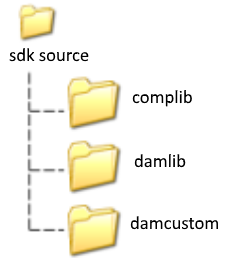
complib contains the static component library and associated header files. damlib contains the static DAM library and associated header files. The Unicode component library will be named similar to omnisu.lib (or omnisu64.lib). Likewise, the Unicode DAM library will be named damobju.lib (or damobju64.lib)
The template project looks for header files and libraries in ..\complib and ..\damlib as well as in the current folder by default.
Your custom session and statement source files are placed in the custom DAM folder (renamed as appropriate). You may also wish to place your client-specific header files and static libraries inside this folder.
Mac OSX
For Mac OSX, the XCode project uses a folder structure as shown.
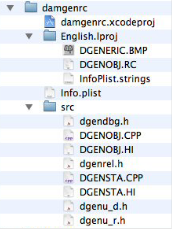
Note that resource & localisation files are stored in the English.lproj sub-folder. Source files, including prefix header files (one for each build target) are stored in the src sub-folder.
The info.plist file contains bundle resource information.
The InfoPlist.strings file is a simple XML file which contains the bundle name (DAM name). These two files will need to be modified later. See the Renaming Files section for details.
When the folder structure has been setup and the component & DAM base libraries have been built, you should be able to navigate to the custom DAM folder and build the template/generic DAM.
Once built and ready for testing, the DAM should be placed in the xcomp folder of the Omnis Studio development tree. When Omnis starts the DAM will be loaded along with all the other external components. If it loads successfully it will appear in the $root.$extobjects group in the Notation Inspector. If your DAM object does not appear in this group then an error message will appear in the Omnis trace log. Initially, this may be because the new component may have initialisation problems or may not be recognised as a viable Omnis component.
Later on, when you add external client libraries it is possible that one or more dynamic dependencies could not be resolved on the client machine; i.e. a client library could not be located.
Please note that Unicode components require the Unicode version of Omnis Studio and vice-versa.
For Windows platforms, this involves opening the .vcproj file (VC++ 2008) or .vcxproj file (VC++2013), selecting the required build configuration and selecting Build. If you want to debug the component, you will need to edit the project settings, change the build location to the Omnis\xcomp folder and add the omnis.exe as the debug executable. You can then start Omnis (F5) and verify that the custom DAM loads, e.g. by inspecting the $root.$components node and/or the Omnis trace log.
Note that as with other platforms, you can also set a breakpoint inside the GenericObjProc to trap the ECM_CONNECT message; If your component is viable, the Omnis will attempt to load it on startup.
For Mac OS X, a separate Omnis resource compiler is required. This should also be downloaded from the Omnis website and installed into the /Developer/Tools folder before you attempt to build the DAM. See the Omnis Resource Compiler section for more details.
Next, copy the DGENOBJ.RC and DGENERIC.BMP files into the English.lproj folder (XCode looks for resource files at this location).
Double-click the xcodeproj file to start XCode, select the required target and configuration, then press Build. As above, you will need to change the build location for the Unicode Debug target if you want to debug the component.
To debug, the DAM needs to be built into the Omnis.app/Contents/MacOS/xcomp folder.
To debug, the DAM needs to be built into the Omnis.app/Contents/MacOS/PlugIns folder.
You will also need to add the Omnis.app as a New Custom Executable. Following this, you can use the Build and Go feature to start debugging.
If the component fails to load on starting Omnis, you can verify the integrity of the component by navigating to Omnis.app/Contents/MacOS/xcomp, right-clicking on the component and selecting Show Package Contents. The Contents folder should be as shown.
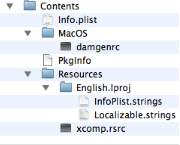
Note the resource files which should be copied into the component package during the build process. Localizable.strings and xcomp.rsrc are generated by the Omnis resource compiler from the .RC files. xcomp.rsrc in particular must be present in order for Omnis to recognise the package as an Omnis external component. Clean the project, verify that the Omnis resource compiler is working and check your build phases if this file is missing.
If the component fails to load on starting Omnis, you can verify the integrity of the component by navigating to Omnis.app/Contents/MacOS/PlugIns, right-clicking on the component and selecting Show Package Contents. The Contents folder should be as shown.
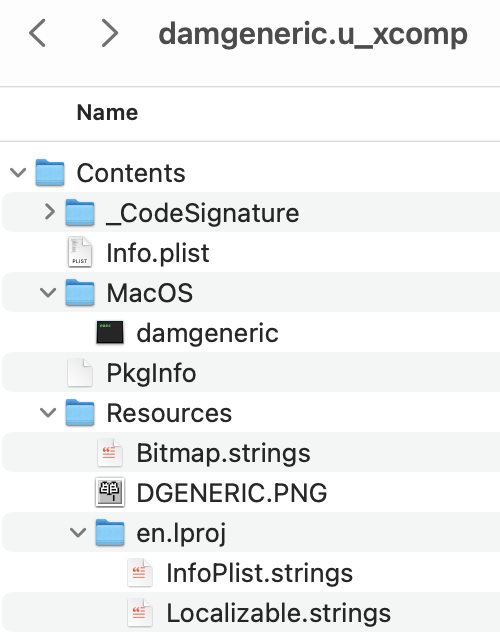
Note the resource files which should be copied into the component package during the build process. Localizable.strings is generated by the Omnis resource compiler from the .RC files. This file must be present for Omnis to recognise the package as an Omnis external component. Clean the project, verify that the Omnis resource compiler is working and check your build phases if this file is missing.
For Linux, the gcc command line compiler is used to build the DAM. You will also need to download the Omnis resource compiler and install this for example into ~/omnisrcdir. See the Omnis Resource Compiler section for more details.
The Linux build requires certain environment variables to be setup before building can take place:
V4DIR - This variable points to the location of certain additional Omnis core header files required to build components.
PATH - This variable should be appended with the path to the Omnis resource compiler.
OMNISRC - This variable should also be set to the folder containing the resource compiler.
LD_LIBRARY_PATH - This variable should be set to the location of the omnisxi.so file.
omunicode - This variable should be set to 1 to build the Unicode targets, 0 to build non-Unicode targets. Note: this is lower-case.
A setenv script is provided to simply this process, although it will require editing initially to set the values of the environment variables. It can subsequently be run to setup the build environment:
. ~/setenv (note the use of dot-space-tilde)
Whilst your source files are shared across Windows, Mac and Linux there is an important point to note regarding the Linux file format. Specifically, Linux requires simple linefeed characters at the end of each line of text whereas Windows and Macintish use linefeed and carriage return characters.
For this reason, a DOS2UNIX utility is provided for use on Windows. DOS2UNIX provides simple one-way conversion of text files, stripping out carriage return characters (as well as unsupported #pragmas in the source code). You should therefore take a copy of your source files before processing them using DOS2UNIX and retain your original files for making any code changes.
Failure to process line endings in your .cpp, .he and .rc files may cause the resulting binary file to be non-viable and/or resource strings may fail to load.
To install DOS2UNIX, place the executable file in the Windows\System32 folder.
Before building the DAM, the damobj.rc file must be manually copied into the project folder:
cp ../damlib/damobj.rc .
Additionally, omnisxi.so (X-Windows Interface library) should be copied from the Studio folder:
cp $V4DIR/omnisxi.so .
Failure to observe these steps will result in build errors.
The supplied makefiles require lower case filenames. Use the lc utility provided to lower-case your source file names before proceeding:
lc –f
The lc utility should be placed in /usr/bin or /usr/local/bin
Once the environment has been setup and your files are in place, you can build the Release target by entering:
rm –rf releaseuni (or rm -rf release, depending on the value of omunicode) make Release
or the Debug target by entering:
rm -rf debuguni (or rm –rf debug) make Debug
To test the DAM, you should copy the built product into the Omnis/xcomp folder:
cp debuguni/damgenrc.so /usr/local/Omnis Software/studio100/xcomp
You can then startup Omnis using the gdb debugger (if installed) by entering:
cd /usr/local/Omnis Software/studio100
gdb omnis
Alternatively, you can use your debugger of choice (e.g. Totalview), use the DAM interface’s debugging mechanism or seed your code with fprintf() statements to assist with debugging.
This section applies to Mac OSX and Linux platforms only which require a separate build utility in order to compile Omnis resource strings. Omnis resource compilers for Mac OSX and Linux are provided as part of the Component SDK. Microsoft Visual Studio, does not require a separate resource compiler.
If you have already followed the “Getting Started with Generic” section in the External Components tutorial, it is likely that your resource compiler is already setup, in which case this section may be ignored.
Mac OSX
Once downloaded, the Mac resource compiler should be placed in to the /Developer/Tools folder before starting Xcode. When building the component, omnisrc and the name of your .RC file should appear in the detailed build results. As a sanity check, output similar to the following should be displayed inside the Report Navigator → Build (All Messages):
gXcomp: 1
COCOA VERSION 1.0CountResources(‘OCTY’) = 64
gXcomp: 1
COCOA VERSION 2.0Linux
For Linux, the resource compiler should be placed in a folder to which you have execute privileges, for example: /usr/local/omnisrc or ~/omnisrc. Two environment variables are also required:
OMNISRC – used internally by the resource compiler
PATH – used by the system to locate the resource compiler
You can test availability of the resource compiler before building your component using the following terminal commands:
. ~/setenv (note the use of dot-space-tilde)
omnisrc
The Linux omnisrc.ini file requires modification before it can be used by the compiler. Specifically, the Setup→Template attribute should contain the path to the omnisrc.tpl file.
Setup→IncludeDirs should be set to the folder containing Studio core header files. E.g.
[Setup]
Template=/home/user/omnisrcdir/omnisrc.tpl
IncludeDirs=/home/user/corefiles
If the resource compiler is correctly configured, output similar to the following should be generated when you build the component:
Compiling dgenobj.rc
dgenobj.rc successfully compiled.
String objects : 190
Bitmap objects : 1
Cursor objects : 0
Dialog objects : 0
User-Defined data objects : 0
RCDATA objects : 0
gcc –g –fPIC –I/home/user/corefiles –I../damlib –c omnisrc.c –o debuguni/omnisrc.o
If the resource compiler fails during a build, there is possibly a problem with one or more missing environment variables, the omnisrc.ini or omnisrc.tpl files are incorrect, the format of one of the .RC files (unexpected carriage returns or missing quotation marks). Ensure also, that damobj.rc can be located. Recall that for Linux, this file needs to be copied into the project folder.
When you are ready to expand on the generic code you should rename the project makefile, source files, target names and auxiliary files appropriate to your intended application.
Historically, Omnis DAMs use an 8.3 filename convention, e.g. DAMORA8, DAMSYBSE & DAMGENRC. Adherence to this convention is nolonger a requirement of modern compilers although you should avoid spaces in filenames.
The C++ sources, header files, resource file and bitmap file should be renamed first. You then need to make any corrections to your project/makefile in order to recognise the renamed files.
Edit your resource file and change the name of the component (1000), the exported session name (2000) and the name of the DAM's entry point (31000). The bitmap filename must match the value of resource string 1. In the source file for the session object, rename the entry point function/message handler from GenericObjProc to reflect the name of your DAM, retaining the ObjProc suffix. This name must match resource string 31000.
Windows
Rename the DGENERIC.DEF file, then edit this file and change the exported entry point name to match the name of your message handler/ObjProc. You will need to edit the Linker→Input→Module Definition File with the new file name
Mac OSX
For all build targets, rename the Packaging→Product Name project setting, retaining the dam… prefix. Rename the four prefix header files, then for each target, edit the Language→Prefix Header project setting with the new filename.
Edit the Info.plist file and change the value of CFBundleExecutable to match the product name.
Edit the Infoplist.strings file using TextEdit and edit the CFBundleName key value with the new DAM name. Perform a Build→Clean All before attempting to build your select target.
Linux
Edit the makefile and change the PROJ_NAME, objects, DEPENDENCIES and RCFILE to correspond with your renamed files, (retaining the .o, .he and .rc filename extensions).
Remove any intermediate files before attempting to build (e.g. rm -rf debuguni).
Once you have carried-out any renaming and house-keeping on the generic DAM and you have a working component, you are ready to start expanding the various stub functions to provide the functionality you want.
At this point you may wish to link in any external client libraries your implementation will require, even if you are not calling any of their functions for the time being. This verifies that the libraries are compatible with the compiler and hopefully avoids any nasty surprises later on.
Try to pigeon-hole any API calls provided by the external API into the various functional areas provided by the DAM interface, perhaps allocating them to their appropriate derived methods. Certain API calls will lend themselves sensibly to the DAM’s session object; others will be more applicable to the statement object. You should also note any custom properties and/or methods you may need to add to the session or statement objects for functionality not provided by the DAM API. This includes properties which provide additional parameters for pre-defined base class methods, for example; to the $logon() method.
Avoid the temptation to write in API calls and custom properties immediately as this will undoubtedly break the code. Instead, add them as stubs or comments or add them as you come to develop each section of code. Analysing the functions provided by the client API allows you to anticipate any shortcomings in either the DAM library or the client interface which your code will need to overcome. You may also be able to identify API calls which your DAM will not need.
Other points to bear in mind before commencing include:
Is your database server ‘relational’ (i.e. rows & columns) in nature? The DAM API is designed with relational database management systems (RDMS) in mind. Use with non-relational database systems may require careful examination of the requirements of the database versus those of the DAM API.
Does your database support direct execution of SQL statements? (dAllowsDirectExec())
Does your database/clientware support multiple transactions (multiple statement objects)?
Does your clientware support place markers in place of bind variables?
Will your database require support for/conversion of specialised data types?
Does your database support remote procedures/function calls?
Is information about tables/columns/indexes/primary keys readily available for use by the meta-data calls? What (if any) extra information will your meta-data methods need to return via their DamInfoRow columns?
Does your database/clientware support chunking of result data? (dGetNextChunk())
Does your database support deferring of input parameter data? (dSendParameter())
When you start to implement the code for your DAM, you should first concentrate on initializing the session object (the session object constructor). The next step is to open a connection to the database by implementing the dLogon() method.
Once you have a working connection (and at all stages of development), check in Omnis that the session properties are correct and that your DAM is working as expected. You may wish to refer back to the Omnis Programming Manual periodically to ensure that your DAM conforms to the documentation. If you are maintaining both Unicode and non-Unicode targets, you should also check that the $logon() method succeeds using both DAMs (in both versions of Omnis Studio).
From here, you may wish to implement dLogOff() and add one or more session properties which return additional information about the connection. Useful next steps might be to implement error reporting in the session object, which you can test by entering erroneous logon credentials for example. You can also implement dColText() in the session object, which will allow you to test $createnames() and $coltext() in Omnis.
The next major step in development is to implement the statement object; concentrating first on the statement object constructor and dClearStatement(). Give consideration at this point to transaction support; if and how your DAM will manage multiple statement objects and how transactions on each will be isolated. You may wish to go back to the session object and implement dBegin(), dCommit() and dRollback() for manual transaction mode before proceeding further.
In the statement object, you can now implement dPrepare(), dExecute() and dExecDirect() and related methods to issue simple SQL statements to the database. The statement object has its own error handler, so you may wish to implement this next.
Once simple queries are working, you might concentrate on the fetching mechanism; describing and returning result sets to Omnis; i.e. dSetResults(), dDescribeParam(), dFetch() and dConvertParam().
Next, implement the meta-data methods; dTables(), dColumns() and dIndexes() plus their associated fetch methods dTablesGet…(), dColumnsGet…(), dIndexesGet…().
Next, implement input binding and/or inlining of parameters into your SQL text; dBindParameter(), dSetInputBufferValue(), dProcessExecuteParams() and dSendParameter(). Ensure that your bind marker gets substituted for the Omnis bind variables and that dBindParameter() is called either at prepare or execute time as appropriate.
Once the main derived virtual functions have been implemented, you can add additional functionality, such as support for RPC calls ($rpc()) plus any custom functionality noted earlier from the client API.
Naming Conventions Used
The DAM SDK, like the component SDK adheres to certain naming conventions and styles laid down by Omnis programmers. Additionally, this document uses conventions to differentiate between code written in Omnis (Omnis code) and code written in C++:
tqfDAMObject tqf is prepended to base class session and statement objects as well as their container objecrs. The historical significance of the letters tqf is unknown.
DAMObject DAM is prepended to other object classes provided by the DAM SDK and also to callbacks provided by the Omnis core executable.
cConstant c is used to denote enumerations or hard-coded constants. Such constants are used to identify resource strings, property and method IDs as well as implementation-specific constants.
pValue p denotes a method parameter, either a static value, a pointer or a value passed by reference.
mAttribute m denotes a private, protected or public member of an object class. You will not have direct access to private members of base class objects. Only the derived sub-class will have access to protected base class members.
kConstant k denotes either an Omnis constant value as seen via the Omnis catalog (F9) or a constant defined in the component or DAM SDK, usually defined using the #define directive. k Constants usually have corresponding values/meanings in Omnis.
dMethodName() d denotes a derived pure or non-pure virtual object method. Pure virtual methods defined by the base class must be implemented by your DAM. Implementation of non-pure virtual methods is optional. Note also the use of parentheses which are used to differentiate method names from properties.
$attribute $ denotes an Omnis object property, visible when your DAM is running inside Omnis Studio.
$method() Denotes an Omnis object method, visible when your DAM is running inside Omnis Studio.
Resources
Omnis DAMs use bespoke resource strings with resource numbers ranging from 1000 to 32000. The DAM API reserves certain resources and ranges of resource IDs for specific uses as described below.
| 1 | Bitmap Resource file name. This is 16x16 pixel (icon sized) image that will be associated with the DAM component. Not strictly relevant for non-visual components. A generic bitmap is supplied. |
| 1000 | Component Name (RES_LIB_NAME) The DAM's message handler returns this string when sent the ECM_GETCOMPLIBINFO message. The name typically conforms to "CUSTOMDAM" |
| 2000 to 200x | Advertised Object Names The component library requests the names of any objects provided by the component via the ECM_GETOBJECT message sent to the message handler. 2000 contains the name that will represent the session object provided by your DAM and typically conforms to: "CUSTOMSESS:Custom Session". Since statement objects may not be instantiated directly, resource 2001 is empty by default. This prevents Omnis developers from creating object variables of subtype statement object. |
| 2100 to 5999 | Available for use by the implementation (with the exception of 4000-4002) It is advisable to subdivide this range to allow for the following categories: - General strings required by the implementation, e.g. version, timezone, datetime format, server data types & misc. error messages - Columns names assigned to lists, e.g. when returning DamInfo via $tables() & $columns() - DAM-specific constants that you wish to register with the Omnis core - Custom session object methods - Custom session object properties - Custom session object method parameters - Custom statement object methods - Custom statement object properties - Custom statement object method parameters See the template resource file for a suggested implementation. |
| 4000 | This must be set to the SQL text required in order to create a database column which accepts null values. If the database creates nullable columns by default, the string can be empty. Example: “NULL” |
| 4001 | This must be set to the SQL text required in order to create a database column which does not accept null values. Example: “NOT NULL” |
| 4002 | This must be set to the SQL text required in order to specify that a database column is a primary key. If the database does not support primary key columns, the string can be empty. Example: "PRIMARY KEY" |
| 6000 to 6099 | Reserved for use by base class session instance methods. |
| 7000 to 7099 | Reserved for use by base class session object properties. |
| 8000 to 8099 | Reserved for use by base class session method parameters. |
| 9000 to 9199 | Reserved for use by base class statement instance methods. |
| 10000 to 10099 | Reserved for use by base class statement object properties. |
| 11000 to 11099 | Reserved for use by base class statement method parameters. |
| 12000 to 12999 | Reserved for use by the base class. |
| 13000 to 30999 | Not currently used. |
| 31000 | DAM Entry Point (EXTFUNCPROCRCID) The DAM component exports a single entry point (procedure) with a name similar to customDAMObjProc. The name of the entry point (aka Function Proc, aka Message Handler) must be assigned to Resource String 31000 inside your .RC file. The component library uses this string to register the entry point for your component. Windows developers will also note that there is a .DEF file which additionally exports this procedure name |
| 31020 | ORFC Version (ORFC_VER_RESID) Required for WebClient components, resource number 31020 is reserved for the ORFC version string, used by the Omnis webserver when dynamically updating components. This takes the form "VER M m %%ORFC_VER%%" where M represents the component’s major version number and m represents the product's minor version number. %%ORFC_VER%% is a place marker for use on Linux platforms. Used by ECOreturnVersion(). |
| 32000 | Thread Safe Resources (UTSR) Components must assign resource number 32000 to the string "UTSR" in order to use thread-safe resources. |
By inspecting the resource file supplied with the base class (DAMOBJ.RC), you may also make use of other gaps in resource ranges. This should be carried out judiciously however as future releases of the base class may result in base class resources conflicting with your own.
Adding constants for use with your DAM involves:
Adding resource strings containing descriptions of the new constants
Handling the ECM_GETCONSTNAME message to register the constants
Resource strings for constants should be in the following format:
(See External Component documentation on ECM_GETCONSTNAME for more details)
“[group~]name:num:charvalue:desc” For example:
2354 "Transaction Status~kPgSqlTranIdle:0:kPgSqlTranIdle:Transaction status idle"
2355 "kPgSqlTranActive:1:kPgSqlTranActive:Command in progress"
2356 "kPgSqlTranInTran:2:kPgSqlTranInTran:Idle, within a transaction block"
2357 "kPgSqlTranInError:3:kPgSqlTranInError:Idle, within a failed transaction"
2358 "kPgSqlTranUnknown:4:kPgSqlTranUnknown:Transaction status not known"
2359 "Connection Status~kPgSqlConnectionOK:0:kPgSqlConnectionOK:Successful connection"
2360 "kPgSqlConnectionBad:1:kPgSqlConnectionBad:The connection failed"
2361 "kPgSqlConnectionStarted:2:kPgSqlConnectionStarted:Waiting for connection to be made"
The resource numbers for the first and last constants to be defined are returned using the ECOreturnConstants() method. Thus, you need to amend the relevant constants each time a constant is added. When the component has loaded, constants returned via the ECM_GETCONSTNAME message can be viewed in the Omnis Catalog (F9).
Adding a custom property to the session or statement object involves the following:
Add a resource string describing the new property
Add a constant to the relevant header file, identifying the resource number
Amend the ECOproperty structure of and session/statement object to include a description of the new property
Add support for the property to the dPropertyCanAssign(), dSetProperty() and dGetProperty() derived methods
Property resource strings should be in the following format:
(See External Component documentation on ECM_GETPROPNAME for more details)
“propName:Description” For example:
2505 "$datesecdp:The number of decimal places used for SQL Server date columns"Note that all property names start with a dollar character. The description field appears in the Interface Manager and as a tooltip in the Property Inspector. Note also that the resource file groups session properties and statement properties separately.
Your session/statement header file should include a constant for any custom properties. The constant added for each property should be defined with the property’s resource number, for example:
const cSessionDateSecDp = 2505;The ECOproperty structure is used by the ECM_GETPROPNAME message in the DAM’s message handler to register any custom properties defined by the session & statement objects. Each entry in the structure identifies the property’s resource number, its data type and other flags including whether it is read-only.
When attempting to assign a value to a property from Omnis, the base class’ propertySupport() method is called. This in turn calls the derived dPropertyCanAssign() method with the property’s resource number. dPropertyCanAssign() must return qtrue in order to permit assignment, even if the ECOproperty structure did not use EXTD_FLAG_EDITRONLY in its declaration.
Pending the result of dPropertyCanAssign(), dSetProperty() is called, which sets an internal property (usually a private member of the object). dSetProperty() does not need to be implemented for read-only properties.
When Omnis interrogates the value of a property, the base class calls dGetProperty() which uses the supplied resource number to identify the property and returns the value of the appropriate private member.
Implementation Note
It is important to bear in mind that object properties may be interrogated frequently and repeatedly, for instance in situations where the Property Inspector, SQL Browser or Interface Manager are being used. For performance reasons, it is advisable to avoid making client calls to the database or other time-consuming operations when retrieving property values. If necessary, such operations should be performed elsewhere and the results cached via private class members.
Adding a custom method to the derived session/statement object involves the following:
Add a resource string with a description of the new method
Add further resource strings for each method parameter
Add constants to the relevant header file, identifying the resource numbers
Amend the ECOmethodEvent structure of the object to include a description of the new method and its parameters
Append dMethodCall() with the implementation for the custom method
Method resource strings should be in the format required by the ECM_GETMETHODNAME message:
“methodName:Description” For example:
omnis 2705 "$serverstatus:Returns information about the database server's current status"1
Parameters are normally grouped separately in the resource file, for example:
5000 "Parameter:The server parameter to be queried" //$parameterstatus
5001 "Fieldlength:The field length to which this mapping applies" //$addenumtype
Note that method names also start with a dollar character. The description field appears in the Interface Manager and as a tooltip in the Property Inspector.
Your session/statement header file should include a constant group for any custom methods. The constant added for each method should be defined with the method’s resource number, for example:
const cSessionServerStatus = 2705;

const cSessionParamParam = 5000,
      cSessionParamFieldLen = 5001;
When the DAM’s message handler receives an ECM_GETMETHODNAME message, it returns the relevant ECOMethodEvent structures for the specified object.
Each ECOMethodEvent structure defines one method’s resource number, return type, number of parameters plus any extended flags. If the method requires parameters, these are also returned via a pointer to an ECOparam struct. As with ECOproperty structures, ECOMethodEvent and ECOparam structures are normally located near the top of the relevant source file, after the #include section.
When the DAM’s message handler receives an ECM_METHODCALL message, it calls the base class’ methodCall() method, which in turn calls the derived dMethodCall() handler.
Except where the derived methods have a trivial implementation, it is normally better practice to implement each custom method as a separate C++ function and call in to these. This keeps your dMethodCall() handler compact and easier to maintain.
Return Values
Please note that the return value of the dMethodCall() handler does not constitute the return value of the custom method; it indicates whether or not the implementation successfully handled the requested method.
To return a value from a custom method, the dMethodCall() rtnVal and hasRtnVal parameters are used. It is recommended to adopt a consistent approach towards custom method return values; i.e. by using a Boolean value to indicate the success or failure of any given method, your method handler might look similar to this:
qbool tqfODBCDAMObj::dMethodCall(EXTCompInfo* pEci, EXTfldval &rtnVal, qbool &hasRtnVal)
{
  qlong funcId = ECOgetId(pEci);
  qbool status = qfalse, rtnStatus = qtrue;
  switch (funcId)
  {
    //…
    case cODBCSessionSetConfigOption:
    {
      status = setConfigOption( pEci );
      break;
    }
    default:
    {
      rtnStatus = qfalse;
      break;
    }
  }
  hasRtnVal = qtrue;
  rtnVal.setBool(status? preBoolTrue : preBoolFalse); //indicates whether (funcId) succeeded
  return rtnStatus; //indicates whether dmethodCall() succeeded
}
Adding Method Parameters
Resource strings for method parameters are also returned via the ECM_GETMETHODNAME message (as part of the ECOMethodEvent structure) and take the form: “paramName:Description”
For example:
8107 "Option:Constant specifying the required attribute"
8108 "Attribute:Character value containing attribute"
The derived object should define an ECOparam structure for each method where one or more parameters are required, for example:
ECOparam ODBCObjParamSetOption[] =
{
  8107, fftConstant, 0, 0, //attrib type
  8108, fftCharacter, EXTD_FLAG_PARAMOPT, 0 //attrib value
};
Each entry in the structure defines a parameter’s resource number, its datatype and other flags, for example whether the method needs to write back to the parameter. ECOparam is discussed in greater detail in the External Component documentation.
ECOmethodEvent ODBCObjFuncs[] =
{
  DAM_OBJ_FUNCS,
  cODBCSessionSetConfigOption,cODBCSessionSetConfigOption, fftBoolean, 2, ODBCObjParamSetOption, 0, 0
};
The above example registers a custom method containing 2 parameters and with a return type of Boolean.
The base class DAMTypeTable object is used to store information relating to each Omnis data type. The type table contains one entry for each eTypeEntry enum: kTypeCharacter, kTypeBoolean, kTypeDateTime, kTypeDate, kTypeTime, kTypeSequence, kTypeNumber, kTypeShortNumber, kTypeFloat, kTypeInteger, kTypeShortInteger, kTypePicture, kTypeBinary, kTypeList, kTypeRow, kTypeObject, kTypeItemRef and kTypeUnknown.
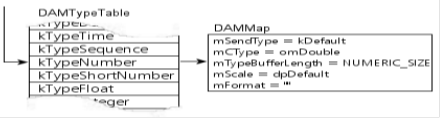
The DAMTypeTable class provides conversion between Omnis data types and C-Types, which are database-independent data types. It uses a private map2TypeTable() method to derive the type table index from any given Omnis data type and sub-type.
Each table entry contains a DAMMap structure which describes:
sendType – how variables of this type should be sent to the database. One of kDefault, kInline, kConvert or kDeferInline.
cType – the implementation-independent datatype.
bufferLength – the default buffer length that parameters of this type will require.
scale – the default numeric scale (decimal places) used for this type.
format – the date/time format string to be used when formatting datetime values.
The base class provides default values for the C-Type, length, scale, sendType and format attributes of each entry. The DAMTypeTable is designed to be overridden by the implementation, which is then free to make any modifications to this table, for example during construction of the derived type table object, or inside the derived session object’s construct method or at any point up until the connection has been established (dLogon()). The contents of this table then usually remain constant for the life of the session.
The DAM type table is used by the base statement object’s setupInputVars() method to establish the default C-Type, scale, sendType and buffer lengths for each input bind parameter (mInputParams).
The DAM type table is also used by DAMParam::setBufferValue() when assigning datetime values, it uses the type entry’s format attribute to format date and time values correctly.
enum eTypeEntry is described further in the Constants and Enumerations section.
The DAMTypeTable class public methods are described in the Support Classes section.
This section summarises the main methods provided by the DAM interface and shows you the protected virtual functions in the context of the Omnis methods which call them. The order in which various sub-methods are called is also shown. Calls to derived methods are shown in bold and there are brief explanatory notes where applicable. For a fuller description of the base class methods used, please refer to the Private Methods section for the relevant object.
For descriptions explaining the implementation requirements for each of the derived methods, please refer to the Protected Virtual Methods section for the object.
| Key: | |
|---|---|
| ↻method() | Where ↻ appears before a method name, this indicates that the method is called inside a loop, multiple times |
| method()↻ | Where ↻ appears after the method name, this indicates that the method contains a loop |
| ←DAMcallback() | Indicates a callback to the Omnis Studio core executable |
| dMethod() | Indicates a derived virtual method; a call to your DAM implementation |
tqfDAMbaseObj::callLogon()
    logon()
        logoff()
    ←DAMregisterSession()
    dLogon()
    dSetBindMarker()
    ←DAMunregisterSession()
logoff() is only called if the session is currently logged on (mState=kSessionLoggedOn)
DAMunregisterSession() is called if dLogon() or dSetBindMarker() fails.
tqfDAMbaseObj::logoff()
    dropStatements()
        mStatements→↻drop()→dDropStatement()
    dLogoff()
    ←DAMunregisterSession()
drop() causes dDropStatement() to be called for each derived statement object
Clears a session object.
tqfDAMbaseObj::clear()
    getOmnisSeparators()
    clearStatements()
        mStatements→↻clearAll()
getOmnisSeparators() evaluates $root.$prefs.$separators() each time a session object is cleared in case Omnis decimal and thousand separators have changed in the interim.
Makes a schema class.
objectinst::makeSchema()
    newStatement()
    statementobj→doSQL(kSOBJcolumns)
        dColumns()
    statementobj→doSQL(kSOBJfetch)
        dFetch()
        dColumnsGet…()
makeSchema() is implemented by the Omnis Studio core. It invokes a $columns() call on an internal statement object and also fetches the complete result set.
Creates a statement object.
tqfDAMbaseObj::newStatement()
    dGetStatementId()
    dNewStatement()
If dNewStatement() is successful, newStatement() assigns a statement name to the newly created object, assigns the object’s session pointer and copies the session object’s mStripSpaces property into the statement object.
If the user calls $newstatement(), newStatement() returns the object instance. If the user calls $newstatementref(), newStatement() returns a pointer to the newly created statement object.
Begin a transaction.
tqfDAMbaseObj::begin()
    dUsesAutoBegin()
    dBegin()
The session must be logged on and the transaction mode must be set to kTranManual in order for begin() to succeed. mAllowsTransactions must be qtrue and dUsesAutoBegin() must return qfalse in order for dBegin() to be called.
Commit a transaction.
tqfDAMbaseObj::commit()
    dCommit()
The session must be logged on and the transaction mode must be set to kTranManual in order for commit() to succeed. mAllowsTransactions must be qtrue in order for dCommit() to be called.
Rollback a transaction.
tqfDAMbaseObj::rollback()
    dRollback()
The session must be logged on and the transaction mode must be set to kTranManual in order for rollback() to succeed. mAllowsTransactions must be qtrue in order for dRollback() to be called.
Get the next native error.
tqfDAMbaseObj::setNativeError()
  dGetNativeError()
This call fails if the session object’s mErrorInfo.getNativeErrorPending() returns qfalse.
If dGetNativeError() succeeds, the mErrorInfo native error code and native error text attributes are set from the returned values. mErrorPending on the error object is also set to qtrue. Native errors are those generated by your database API.
Define parameters for remote procedure call.
tqfDAMbaseObj::rpcDefine()
    findRpc()
    DAMrpcDefn::DAMrpcDefn()
This call fails if parameters 1 or 2 are missing or if parameter 2 is not a list variable.
If a case-sensitive search on the RPC name succeeds, the existing definition is modified. Otherwise, a new DAMrpcDefn object is created. rpcDefine() then builds a list of parameters as supplied
Get SQL text for a table column.
tqfDAMbaseObj::coltext()
    dColText()
If coltext() is called with a predefined EXTparamTypeInfo structure, this is passed to dColText().
Otherwise the ffttype of the parameter is determined from the EXTparamInfo. If the parameter has a binary type (includes lists, item refs, pictures and objects), the length supplied to dColtext() is set to mBlobSize
Get createnames clause for a CREATE TABLE statement.
tqfDAMbaseObj::createnames()
    dColText()
$createnames() calls dColText() for each column in the supplied list. For binary columns, the length supplied to dColText() is set to mBlobsize.
Get insertnames clause for an INSERT statement.
tqfDAMbaseObj::insertnames()
    selectnames()
insertnames() calls selectnames() to get a list of column names. The VALUES clause is generated based on the column names of the supplied list/row variable and column names. No call to the derived session object is required.
Get selectnames clause for a SELECT statement.
tqfDAMbaseObj::selectnames()selectnames() generates a comma-separated list based on the column names of the supplied list/row. No call to the derived session object is required.
Get updatenames clause for an UPDATE statement.
tqfDAMbaseObj::updatenames()updatenames() generates the SET clause for an UPDATE statement based on the column definitions of the supplied list/row. No call to the derived session object is required.
Get wherenames clause for a SQL statement.
tqfDAMbaseObj::wherenames()wherenames() generates the WHERE clause for a SQL statement based on the supplied parameters. No call to the derived session object is required.
Clearing a statement object.
tqfDAMStatementObj::clearAll()
    dClearStatement()
    dClearParams(mInputParams)
    dClearParams(mOutputParams)
    clear()
      clearResults()
      mInputParams.dropParams()
      mOutputParams.dropParams()
clearResults() causes mRowsFetched , mBatchRow, mRowsAffected , mColumnCount , mRowCount, mNoRows and mResultsPending to be reset to default values. clear() also drops input and output parameters, resets mRpcReturnValue, sets mState to kStateClear and frees mTableRef if it is owned by the object.
Drop a statement object.
tqfDAMStatementObj::drop()
    clearAll()
        dDropStatement()
Dropping a statement object is carried out implicitly by the base class. There is no Omnis method to invoke this directly. drop() is called for each statement object when a session object is about to be destructed.
Describing table columns.
tqfDAMStatementObj::columns()
    prepareForMetaDataMethod()
        clearAll()
    dColumns()
    readyForFetch()
        dSetResults()
    describe()
        ↻dDescribeParam()
        dProcessOutputColumns()
prepareForMetaDataMethod() ensures that the statement is in a suitable state to execute a new SQL statement. This involves checking for errors and clearing the statement. dColumns() is responsible for executing the SQL statement required to describe the table. readyForFetch() calls dSetResults() and commits the transaction (in kTranAutomatic only) on success. describe() calls dDescribeParam() for each column of the pending result set. dProcessOutputColumns() allows the derived statement object to make any additional adjustments, e.g. to mOutputParams. columns() stops executing and returns qfalse if any of these methods fail.
Direct execution of a SQL statement.
tqfDAMStatementObj::execdirect()
    mSession→allowsDirectExec()
        dAllowsDirectExec()
    execdirect()    or prepareExec()
    describe()
If dAllowsDirectExec() returns qtrue, execdirect() is called. Otherwise prepareExec() is called.
tqfDAMStatementObj::execdirect()
    clearAll()
        dClearStatement()
        dClearParams(mInputParams)
        dClearParams(mOutputParams)
    setStatementText()
        ←DAMPrepareBindVariables()
        mSession→charMapOut()
            dAllowsCharConversion(kCharMapOut)
    setupInputVars(kBindExecute)
    mSession→getTypeTable()
    DAMParam::setBuffers(1)
    dProcessPrepareParams(mInputParams)
    ←DAMgetBindVariableValues()
    setBufferValues()
        ┌→DAMParam::setBuffervalue()
        │    charMapOut()
        │    dAllowsCharConversion(kCharMapOut)
        └─dSetInputBufferValue()   (only if sendType=kConvert)
        dProcessExecuteParams(mInputParams)
    dProcessInlines(mInputParams)
    bindInputBuffers(kBindExecute)
        ↻dBindParameter()
    dExecDirect()
    sendInputValues()
        ↻dSendParameter()
    readyForFetch()
        dSetResults()
getTypeTable() invokes the derived session object’s dGetTypeTable() method.
tqfDAMStatementObj::prepareExec()
    prepare()    ( see $prepare() )
    execute()    ( see $execute() )
tqfDAMStatementObj::describe()
↻dDescribeParam()
dProcessOutputColumns()Output character mapping of the SQL statement is only performed if $unicode is kFalse.
setupInputVars() initialises the buffer type, subtype, C-type, scale, sendType, offset, bindType, parameterType and field length for each input paramter. setBuffers() allocates the data buffer and data length buffer for each parameter. The interface does not support array binding of input variables. Hence setBuffers() is passed 1 for the batch size parameter.
After calling execdirect() or prepareExec(); describe() is called. This popluates mOutputParams with descriptions of the result set columns. dSetResults() must set mColumnCount to the number of columns in the result set.
Prepare a SQL Statement.
tqfDAMStatementObj::prepare()  (Prepare SQL statement)
    clearAll()
        dClearStatement()
        dClearParams(mInputParams)
        dClearParams(mOutputParams)
    setStatementText()
        ←DAMPrepareBindVariables()
        mSession→charMapOut()
            dAllowsCharConversion(kCharMapOut)
    setupInputVars(kBindPrepare) ↻
        mSession→getTypeTable()
        DAMParam::setBuffers(1)
    dProcessPrepareParams(mInputParams)
    dPrepare()
    bindInputBuffers(kBindPrepare)
        ↻dBindParameter()
getTypeTable() invokes the derived session object’s dGetTypeTable() method.
Execute a SQL statement.
tqfDAMStatementObj::execute()
    ←DAMgetBindVariableValues()
    setBufferValues()↻
        ┌→DAMParam::setBuffervalue()
        │    charMapOut()
        │    dAllowsCharConversion(kCharMapOut)
        └─dSetInputBufferValue() (only if sendType=kConvert)
        dProcessExecuteParams(mInputParams)
    dProcessInlines()
    bindInputBuffers(kBindExecute)
        ↻dBindParameter()
    dExecute()
    sendInputValues()
        ↻dSendParameter()
    readyForFetch()
dSetResults()Fetching results.
tqfDAMStatementObj::fetch()
    dPreFetch()
    defineList()
    bindOutputBuffers()
        mOutputParms.setBuffers()
        ↻dBindColulmn()
    fetchRows()
        ┌→dFetch()
        │    dCanAddRow()
        └─addRow()
             mTableRef→insertRow()
             setOmnisColumnData()*
    dPostFetch()
    dMoreResults()        ┐
    dSetResults()         ├ (only called if fetchStatus returns kFetchFinished)
    describe()            ┘
*Called only if mAddRowMode is eDAMaddRowNormal. For other modes (metadata), addTableRow(), addColumnRow(), addIndexRow(), addRpcProcedureRow() or addRpcParameterRow() is called instead.
fetch() attempts to describe another result set when fetchRows() returns kFetchFinished (or when dPostFetch() augments fetchStatus).
tqfDAMStatementObj::setOmnisColumnData()     (Set the contents of an Omnis field value)

        ┌→dGetNextChunk()
        └─DAMParam::writeNextChunk() (until chunkState=kChunkFinished)
        mSession→convertCharacterDataFromEncoding() (character data only)
        mSession→charMapIn() (non-Unicode character data only)
            dAllowsCharConversion(kCharMapIn)

OR

        dConvertParam()
        mSession→charMapIn() (non-Unicode character data only)
            dAllowsCharConversion(kCharMapIn)
        DAMParam::setOmnisVal()
        setFldVal() OR convFldVal() (only called if paramLen != DAM_PARAM_IS_NULL)
            mSession→convertCharacterDataFromEncoding()*
If pParam→getChunk() is qtrue, setOmnisColumnData() fetches all data chunks and writes them to the parameter’s chunk handle. It then (conditionally) converts and maps character data.
For non-chunked data, dConvertParam() is called, followed by setOmnisVal(), which either sets an Omnis field value from the contents of the parameter buffer or converts the data where the data type of the parameter does not match the data type of the field value. If the parameter value is NULL, setOmnisVal() sets the field value to NULL implicitly.
*setFldVal() calls convertCharacterDataFromEncoding() when the parameter’s C-Type=omChar.
tqfDAMStatementObj::addTableRow()  (Extract one row of a $tables() result set)
    dTablesGetOwner()
    dTablesGetTableName()
    dTablesGetTableType()
    dTablesGetDesription()
    dTablesGetDamInfo()
tqfDAMStatementObj::addColumnRow() (Extract one row of a $columns() result set)
dColumnsGetDatabaseOrCatalog()
dColumnsGetOwner()
dColumnsGetColumnName()
dColumnsGetOmnisDataTypeText()
addOmnisTypeAndSubType()
dColumnsGetOmnisDataType()
dColumnsGetOmnisDataSubType()
dColumnsGetSqlDataType()
dColumnsGetLength()
dColumnsGetScale()
dColumnsGetNull()
dColumnsGetIndex()
dColumnsGetPrimaryKey()
dColumnsGetDescription()
dColumnsGetDamInfo()tqfDAMStatementObj::addIndexRow() (Extract one row of a $indexes() result set)
dIndexesGetDatabaseOrCatalog()
dIndexesGetOwner()
dIndexesGetColumnName()
dIndexesGetIndexName()
dIndexesGetUnique()
dIndexesGetColumnPosition()
dIndexesGetDamInfo()tqfDAMStatementObj::addRpcProcedureRow() (Extract one row of a $rpcprocedures() result set)
dRpcProceduresGetDatabaseOrCatalog()
dRpcProceduresGetOwner()
dRpcProceduresGetProcedureName()
dRpcProceduresGetDamInfo()tqfDAMStatementObj::addRpcParameterRow() (Extract one row of a $rpcparameters() result set)
dRpcParametersGetOmnisDataTypeText()
dRpcParametersGetDatabaseOrCatalog()
dRpcParametersGetParameterName()
dRpcParametersGetSqlDataType()
dRpcParametersGetScale()
dRpcParametersGetLength()
dRpcParametersGetPassType()
addOmnisTypeAndSubType()
dRpcParametersGetOmnisDataType()
dRpcParametersGetOmnisDataSubType()
dRpcParametersGetDamInfo()Fetching directly into Omnis variables.
tqfDAMStatementObj::callFetchInto()
    clear_mTableRef()
    ↻mTableRef→addCol()
    fetch()
    clear_mTableRef()
callFetchInto() calls fetch() with rowCount=1. Data is then copied from the mTableRef columns into the supplied Omnis fields. mTableRef is subsequently released.
Fetching data into a file.
tqfDAMStatementObj::callFetchToFile()
    clear_mTableRef()
    fetch()↻
    writeListToFile()↻
    clear_mTableRef()
callFetchToFile() calls fetch() as per a normal fetch. The contents of mTableRef are then written to an external file. mTableRef is subsequently released.
Describe table Indexes.
tqfDAMStatementObj::indexes()
    prepareForMetaDataMethod()
        clearAll()
    dIndexes()
    readyForFetch(eDAMaddRowIndexes)
describe()Get next native error.
nextnativeerror()
    mErrorInfo.getNativeErrorPending()
    setNativeError()
        dGetNativeError()
$nextnativeerror() invokes setNativeError() if an error is pending on mErrorInfo. Otherwise setError(kDAMNoPendingError) is called.
Describe columns of a result set.
tqfDAMStatementObj::results()
defineMetaDataList()
    ┌→dResults()
    │     ←DAMgetDataTypeText()
    │     dGetColumnInfoForResults()
    └─addResultsRow()
dResults() and dGetColumnInfoForResults() are called once for each column in the pending result set.
Call a remote procedure.
tqfDAMStatementObj::rpc()
    clearAll()
    dRpc()
    readyForFetch()
describe()Describe procedure parameters.
tqfDAMStatementObj::rpcParameters()
    prepareForMetaDataMethod()
        clearAll()
    dRpcParameters()
    readyForFetch()
describe()List remote procedures.
tqfDAMStatementObj::rpcProcedures()
    prepareForMetaDataMethod()
        clearAll()
    dRpcProcedures()
    readyForFetch()
describe()List server tables/views.
tqfDAMStatementObj::tables()
    prepareForMetaDataMethod()
        clearAll()
    dTables()
    readyForFetch()
describe()Initialise statement worker object.
StatementWorker::methodInit()
    mDelegate→init()
        clearParams()
        clearResultRow()
        mErrorInfo.clearError()
dInit()Run statement worker on main thread.
StatementWorker::methodRun()
    mDelegate→run()
        clearResultRow()
        dRun()
mDelegate→pushWorkerCallbackFromRunMethod()Run statement worker on background thread.
StatementWorker::methodStart()
    mDelegate->start()
        clearResultRow()
        ECOcreateThread()→

→mDelegate→run()
        clearResultRow()
        dRun()
mDelegate→pushWorkerCallbackFromRunMethod()Cancel statement on background thread.
StatementWorker::methodCancel()
    mDelegate->cancel()
dCancel()StatementWorker::methodSessionRef() Return an object reference to the internal session object
mDelegate->getSessionObj() (session)
mDelegate->damGetSessionObjId()
session->addRef()methodSessionRef() makes no call to the derived worker object.
The DAM base object controls the session environment from which statement objects are created. It contains attributes and methods which are common to a given connection. This includes the logon parameters, the transaction mode and any default statement properties such as the size of large object data chunks. From Omnis, an instance of a new object is created either explicitly via the $new() method or wherever an object variable of subtype MyDAMObj it is first used. This causes the object to initialise (construct) with default property values. When the object goes out of scope or is closed explicitly then depending on the session state any statements are closed and the connection is logged off. Internally, tqfDAMbaseObj encapsulates a database session or connection handle. Its purpose is to be sub-classed for use by the DAM implementation.
| Type | Name | Description |
| DAMErrorInfo | mErrorInfo | Stores error information for the session object |
| eTranMode | mTransactionMode | The transaction mode associated with the session. It can be one of kTranAutomatic, kTranManual or kTranServer. See Constants for further information. |
| qlong | mAllowsTransactions | Should be set to true if the database supports manual transactions. |
| str80 | mStatementBindMarker | The symbol expected by the database in place of bind variables, e.g. “?” |
| str255 | mSessionName | The name of the session object used by the application. See $logon() |
| qlong | mDebugLevel | The level of internal debugging information that should be generated. See $debuglevel |
| qbool | mIsUnicode | qtrue if the DAM is operating in Unicode mode. See $unicode |
| preconst | mCodePage | The ANSI codepage used to interpret non-Unicode character data. See $codepage |
| qbool | mFetch64BitInts | Enables/disables fetching of 64-bit integer values as numbers |
| qlong64 | mBytesReceived | The number of bytes received through session object since logon |
| qlong64 | mBytesSent | The number of bytes sent through session object since logon |
| qlong | mDebugSize | The maximum size of debug file before truncation occurs |
Although you may not call private methods directly, these are referred to in the Omnis Methods section and in the damobj.he header file so are described here in overview.
| tqfDAMbaseObj::callLogon() |
|---|
| qbool tqfDAMbaseObj::callLogon(EXTCompInfo* pEci) |
callLogon() is invoked by calling $logon() from Omnis. It validates the supplied parameters then calls the logon() public method, returning qtrue if the logon succeeds.
| tqfDAMbaseObj::addBindVariable() |
|---|
| qbool tqfDAMbaseObj::addBindVariable(str255 &pRowName,str255 &pColName, EXTfldval &pRtnBindText) |
addBindVariable() is called from the insertnames(), updatenames(), wherenames() public methods. Its function is to create a string in the following format: @[pRowName.pColName] which is written into pRtnBindText.
| tqfDAMbaseObj::dropStatements() |
|---|
| void tqfDAMbaseObj::dropStatements() |
dropStatements() calls drop() on each object in the session object’s linked-list of statement objects. It is used by the logoff() public method.
| tqfDAMbaseObj::commitClearStatements() |
|---|
| void tqfDAMbaseObj::commitClearStatements() |
commitClearStatements() is by during commit() ($commit()). If dGetCommitMode() returns kCommitDelete; tranClearStatements() is called. If the commit mode is kCommitClose- tranCloseStatements() is called. For kCommitPreserve, no action is performed.
| tqfDAMbaseObj::rollbackClearStatements() |
|---|
| void tqfDAMbaseObj::rollbackClearStatements() |
rollbackClearStatements() is called by rollback() ($rollback()). If dGetRollbackMode() returns kRollbackDelete- tranClearStatements() is called. If the commit mode is kRollbackClose- tranCloseStatements() is called. For kRollbackPreserve, no action is performed.
| tqfDAMbaseObj::tranCloseStatements() |
|---|
| void tqfDAMbaseObj::tranCloseStatements() |
tranCloseStatements() calls close() on each object in the session object’s linked-list of statements (mStatements). Invoked indirectly via $commit() and $rollback() in Omnis.
| tqfDAMbaseObj::tranClearStatements() |
|---|
| void tqfDAMbaseObj::tranClearStatements() |
tranClearStatements() calls clearTran() on each object in the session object’s linked-list of statements (mStatements). Invoked indirectly via $commit() and $rollback() in Omnis.
| tqfDAMbaseObj::clearError() |
|---|
| void tqfDAMbaseObj::clearError() |
clearError() calls mErrorInfo.clearError() followed by dClearNativeError(). It is invoked by methodCall() and propertySupport() (ECM_SETPROPERTY).
| tqfDAMbaseObj::setMapTable() |
|---|
| qbool tqfDAMbaseObj::setMapTable(EXTfldval &pFldVal) |
setMapTable() is invoked by calling $maptable() from Omnis. setMapTable() terminates if mUnicode=qtrue. Otherwise, two new DAMCharMapTable objects are allocated and the supplied filename (plus either a .IN or .OUT suffix) is assigned to each object. If there are no errors, mMapIn and mMapOut are freed (if they are already allocated) then assigned to the newly created objects.
| tqfDAMbaseObj::setCharMap() |
|---|
| qbool tqfDAMbaseObj::setCharMap(qlong pCharMap) |
setCharMap() is invoked by assigning a value to the $charmap property in Omnis and sets mCharMap based on pCharMap. setCharMap() fails if mIsUnicode=qtrue.
| tqfDAMbaseObj::rpcDefine() |
|---|
| qbool tqfDAMbaseObj::rpcDefine(EXTCompInfo *pEci) |
rpcDefine() is invoked by calling $rpcdefine() from Omnis. This method receives two parameters. The first is the name of the RPC to define, and the second is the list defining its parameters. This list requires at least 4 columns, and these 4 columns must contain information such as that returned as the result set of $rpcparameters(). rpcDefine() terminates if either of these parameters cannot be validated. Otherwise, findRpc() is called to determine whether a definition for the RPC already exists, in which case it is replaced. If the RPC is not found, a new DAMrpcDefn is created and assigned to the linked list if RPC definitions (mRpcs). Next, for each parameter mapOmCons2fftType() is called and the results stored in the RPC definition’s parameter array.
| tqfDAMbaseObj::needsBlobLength() |
|---|
| qbool tqfDAMbaseObj::needsBlobLength(ffttype pOmnisType) |
needsblobLength() is called by coltext() and createnames() to determine whether mBlobsize should be substituted for the column length. It returns qtrue if the supplied ffttype is fftBinary, fftList, fftRow, fftObject, fftPicture or fftItemref, qfalse otherwise.
| tqfDAMbaseObj::getLibStripSpaces() |
|---|
| qbool tqfDAMbaseObj::getLibStripSpaces(locptype *pLocp) |
getLibStripSpaces() is called from the session object constructor. It evaluates the notation string “$clib.$prefs.$sqlstripspaces” (read from DAMOBJ.RC) and is used to set mStripSpaces, from which all spawned statement objects take their default values. qfalse is returned if the notation cannot be evaluated.
| tqfDAMbaseObj::mapOmCons2fftType() |
|---|
| void tqfDAMbaseObj::mapOmCons2fftType(qlong pConsType, qlong pConsSubType, ffttype &pParmType, qshort &pSubType) |
mapOmCons2fftType() is called by rpcDefine() and is used to convert the data type and sub-type constants found in the parameter list into ffttypes and sub-types. Affects lists, rows and datetime types.
| tqfDAMbaseObj::getErrorText() |
|---|
| qbool tqfDAMbaseObj::getErrorText(str255 &pErrorText) |
getErrorText() is invoked when the object’s $errortext property is inspected. It reads an internal error message from the Omnis core resources. The RESgetOmnisDAT() callback is used to obtain a handle on the core’s resource strings. The statement object’s mErrorInfo→getErrorCode() is used to derive the resource number for the error text.
| tqfDAMbaseObj::endDebug() |
|---|
| qbool tqfDAMbaseObj::endDebug() |
endDebug() is invoked from Omnis by assigning $debugfile to an empty string. Otherwise, endDebug() is called when the session object is destructed. endDebug() closes the debug file (mDebugFilePtr) if open and frees the debug text buffer (mDebugBuffer)
| tqfDAMbaseObj::startDebug() |
|---|
| qbool tqfDAMbaseObj::startDebug(str255 &pFileName) |
startDebug() is invoked from Omnis when a non-empty string is assigned to $debugfile. It first calls endDebug() to close any existing debug file before attempting to open the specified filename, or the standard error device (stderr). mDebugBuffer is then allocated, into which debug messages will be cached before being written to mDebugFilePtr. See debugMsg()
| tqfDAMbaseObj::convertToCharacterSet() |
|---|
| qbool tqfDAMbaseObj::convertToCharacterSet(csettype pCharSet, qbyte *pData, qlong pDataLen, eCharMapMode pDir) |
convertToCharacterSet() is called from charMapOut() and charMapIn() when mCharMap=kSessionCharMapTable or kSessionCharMapOmnis and only when dAllowsConversion(pDir) permits character set conversion.
convertToCharacterSet() uses one of two static mapping tables; one which maps MacRoman extended characters to ISO8859/Latin1 characters (mactowin), and another which maps Latin1 extended characters to Mac Roman characters (wintomac). When output character mapping, convertToCharacterSet() is called before any custom character mapping. When input character mapping, this is called after any custom character mapping. For Macintosh targets, when pCharSet is csetOdata, no conversion is performed.
8-bit character mapping (and hence this function) is not called if mUnicode=qtrue.
| tqfDAMbaseObj::insertQuotes() |
|---|
| void tqfDAMbaseObj::insertQuotes(str255 &pString) |
insertQuotes() is intended to be supplied with a string conforming to database.owner.colname and converts this into “database”.”owner”.”colname” i.e. it inserts quotes around dot-delimited identifiers. It is called from selectnames() and wherenames() and only when mQuotedIdentifier ($quotedidentifier) is qtrue (kTrue).
| tqfDAMbaseObj::tqfDAMbaseObj() |
|---|
| tqfDAMbaseObj::tqfDAMbaseObj(EXTCompInfo *pEci) |
The DAM base class constructor initialises the members of the base class.
| tqfDAMbaseObj::~tqfDAMbaseObj() |
|---|
| tqfDAMbaseObj::~tqfDAMbaseObj() |
The base class destructor logs off from any session and removes(unlinks) any associated statement objects. This does NOT destroy any statement objects.
| tqfDAMbaseObj::addRef() |
|---|
| void tqfDAMbaseObj::addRef() |
This method increments the number of references to this object instance.
| tqfDAMbaseObj::releaseRef() |
|---|
| void tqfDAMbaseObj::releaseRef() |
This decrements the reference count of this object instance. If the reference count reaches zero then the base class is destroyed.
| tqfDAMbaseObj:: getOmnisSerialNumber() |
|---|
| qbool getOmnisSerialNumber(str80 &pSerialNumber) |
Provides implementation with access to the Omnis serial number. Returns qtrue on success.
| tqfDAMbaseObj:: methodCall() |
|---|
| qbool tqfDAMbaseObj::methodCall(EXTCompInfo* pEci) |
The external component library calls methodCall() every time a session object function is invoked within Omnis Studio. The pEci parameter will contain the information about the invoked DAM function and the base class will call the appropriate method based on this information. Returns qtrue on success.
| tqfDAMbaseObj:: propertySupport() |
|---|
| qlong tqfDAMbaseObj::propertySupport( LPARAM pMessage, WPARAM wParam, LPARAM lParam, EXTCompInfo* eci ) |
This method supports the session object properties. It will determine whether a property is read only as well as read and write the value of the property if permitted. Returns qtrue on success.
pMessage - The type of property request. This can be ECM_PROPERTYCANASSIGN, ECM_SETPROPERTY or ECM_GETPROPERTY
wParam - This is set to ECM_WPARAM_PROPBUTTON when pMessage is ECM_SETPROPERTY and if the Property Manager popup button was pressed to set the property. For example, a file name property may wish to use a file open dialog if the popup button was pressed. Otherwise it is not used.
lParam - Not used.
eci - The external component information class that contains information regarding the property to be processed.
| tqfDAMbaseObj:: logon() |
|---|
| qbool tqfDAMbaseObj::logon(EXTCompInfo *pEci, str255& pHostName, str255& pUserName, str255& pPassWord, str255 &pSessionName) |
This method registers the session with the $sessions group if necessary and then calls the database specific logon implementation. If this is successful then the connection properties are updated in the session object. Returns qtrue on success.
pEci - The external component information class that contains information regarding logon method.
pHostName – The hostname required to connect to the database.
pUserName – The username for the database connection
pPassWord – The password for the database connection.
pSessionName – An optional parameter that if used will register the session as pSessionName in the $sessions group.
| tqfDAMbaseObj::logoff() |
|---|
| qbool tqfDAMbaseObj::logoff() |
This method drops any statements associated with the session before unregistering with $sessions and finally dropping the database connection.
| tqfDAMbaseObj::coltext() |
|---|
| qbool tqfDAMbaseObj::coltext(EXTParamInfo *pParam, str255 &pRtnString, EXTparamTypeInfo *pInfo) |
This method returns a text string that contains the equivalent SQL Data type text for an Omnis variable or column of a list. Returns qtrue on success.
pParam – Contains information about the Omnis variable passed as a parameter to $coltext()
pRtnString – An out parameter that will contain the SQL datatype text for the Omnis variable.
pInfo – A structure that contains information regarding the column of a list. Used by the core during list.$createnames() methods.
| tqfDAMbaseObj::selectnames() |
|---|
| qbool tqfDAMbaseObj::selectnames(EXTParamInfo* pTableDefParam,EXTParamInfo* pTableNameParam,EXTfldval &pRtnString) |
This method returns a text string defining the columns to be used in a SQL SELECT statement.
pTableDefParam- A parameter info structure containing a list or row variable containing the row definition.
pTableNameParam – A parameter info structure containing the name of the table.
pRtnString - An out parameter that will contain a text string defining the columns to be used in a SQL SELECT statement.
| tqfDAMbaseObj::insertnames() |
|---|
| qbool tqfDAMbaseObj::insertnames(EXTParamInfo* pRowDefParam,EXTfldval &pRtnString) |
This method returns a text string containing a comma delimited list specifying the columns to be used in SQL INSERT statement.
pRowDefParam – A list or row variable containing the row definition.
pRtnString - An out parameter that will contain a text string defining the columns to be used in a SQL INSERT statement.
| tqfDAMbaseObj::updatenames() |
|---|
| qbool tqfDAMbaseObj::updatenames(EXTParamInfo* pRowDefParam,EXTfldval &pRtnString) |
This method returns a text string which is a comma delimited list specifying the columns to be used in SQL UPDATE statement.
pRowDefParam – A list or row variable containing the row definition.
pRtnString - An out parameter that will contain a text string defining the columns to be used in a SQL UPDATE statement.
| tqfDAMbaseObj::wherenames() |
|---|
| qbool tqfDAMbaseObj::wherenames(EXTParamInfo* pRowDefParam,EXTParamInfo* pTableNameParam, EXTParamInfo* pComparisonParam, EXTParamInfo* pOperatorParam,EXTfldval &pRtnString) |
This method returns a text string that is to be used in SQL WHERE clause.
pRowDefParam – A list or row variable containing the row definition.
pTableNameParam – The name of the table.
pComparisonParam – The comparison predicate to be used e.g. ‘=’
pOperatorParam – The operator to be used between columns e.g. ‘AND’
pRtnString - An out parameter that will contain a text string defining the columns to be used in a SQL WHERE clause.
| tqfDAMbaseObj::createnames() |
|---|
| qbool tqfDAMbaseObj::createnames(EXTParamInfo* pTableDefParam,EXTfldval &pRtnString, EXTParamInfo* pNullInfo, EXTParamInfo* pPrimKeys) |
This method returns a text string defining the columns and types to be used in a SQL CREATE TABLE statement.
pTableDefParam – A list or row variable containing the row definition.
pRtnString - An out parameter that will contain a text string defining the columns and types to be used in a SQL CREATE TABLE statement.
pNullInfo – An optional boolean parameter which is used to append NULL/NOT NULL information to each datatype.
pPrimKeys – An optional Boolean parameter which is used to append PRIMARY KEY information to the required datatype.
| tqfDAMbaseObj::newStatement() |
|---|
| qobjinst tqfDAMbaseObj::newStatement(str255& pStatementName, EXTCompInfo* pEci) |
This method dynamically generates a new statement object instance.
pStatementName – The name for the new statement object.
pEci – Information about the statement object to be created.
| tqfDAMbaseObj::removeStatements() |
|---|
| void tqfDAMbaseObj::removeStatements() |
This method removes the session reference from the session's statements and removes statements from session’s list of statements. Called internally during destruction of the session object.
| tqfDAMbaseObj::setStatements() |
|---|
| void tqfDAMbaseObj::setStatements(tqfDAMStatementObjPtr pStatementList) |
This sets a list of Statement objects in the Session object. Called internally during destruction of the session object.
| tqfDAMbaseObj::getStatements() |
|---|
| tqfDAMStatementObjPtr tqfDAMbaseObj::getStatements() |
This returns a list of statement objects belonging to the session object.
Example:
tqfMyStatementObjPtr currStatement = (tqfMyStatementObjPtr)mSession->getStatements()
while(currStatement != NULL)
{
  // do something
  currStatement = (tqfMyStatementObjPtr)(currStatement->getNext());
}| tqfDAMbaseObj::setState() |
|---|
| void tqfDAMbaseObj::setState(eSessionState pState) |
This method sets the state of the session. See Session State Constants. The base class handles the session state by default but this method allows the implementation to override for instance if a connection break has been detected.
| tqfDAMbaseObj::getState() |
|---|
| eSessionState tqfDAMbaseObj::getState() |
This method returns the current state of the session. See Session State Constants. Normally used to check whether the session is logged on before performing a session or statement operation.
| tqfDAMbaseObj::getTypeTable() |
|---|
| DAMTypeTablePtr tqfDAMbaseObj::getTypeTable() |
This returns the database specific type conversion table for the session. Not normally needed by the implementation as the DAMTypeTable is handled by the base class.
| tqfDAMbaseObj::setTranMode() |
|---|
| qbool tqfDAMbaseObj::setTranMode(qlong pTranMode) |
This method sets the transaction mode for the session.
| tqfDAMbaseObj::getTranMode() |
|---|
| eTranMode tqfDAMbaseObj::getTranMode() |
This method returns the transaction mode for the current session. See Transaction Mode Constants.
| tqfDAMbaseObj::commit() |
|---|
| qbool tqfDAMbaseObj::commit() |
This commits all transactions associated with the session.
| tqfDAMbaseObj::rollback() |
|---|
| qbool tqfDAMbaseObj::rollback() |
This rolls back all transactions associated with the session.
| tqfDAMbaseObj::begin() |
|---|
| qbool tqfDAMbaseObj::begin() |
This begins a new transaction. Only supported manual transaction mode, and if transactions are supported, and $autobegin is kFalse.
| tqfDAMbaseObj::needsChunk() |
|---|
| qbool tqfDAMbaseObj::needsChunk(qlong pDataLength) |
This method determines whether chunking is required based on the data length parameter. If the data length is greater than the lob threshold then chunking is required.
| tqfDAMbaseObj::setLobThreshold() |
|---|
| qbool tqfDAMbaseObj::setLobThreshold(qlong pLobThreshold) |
This method sets the data length threshold at which chunking should occur.
| tqfDAMbaseObj::getLobThreshold() |
|---|
| qlong tqfDAMbaseObj::getLobThreshold() |
This method returns the current Large OBject threshold set in the session.
| tqfDAMbaseObj::setLobChunkSize() |
|---|
| qbool tqfDAMbaseObj::setLobChunkSize(qlong pChunkSize) |
This method sets the Large OBject chunk size in the session.
| tqfDAMbaseObj::getLobChunkSize() |
|---|
| qlong tqfDAMbaseObj::getLobChunkSize() |
This method returns the current Large OBject chunk size set in the session.
| tqfDAMbaseObj::getStatementBindMarker() |
|---|
| void tqfDAMbaseObj::getStatementBindMarker(str80 &pBindMarker) |
This method returns the bind marker used as a placeholder when preparing statements with bound variables.
| tqfDAMbaseObj::allowsDirectExec() |
|---|
| qbool tqfDAMbaseObj::allowsDirectExec() |
This method returns qtrue if the database allows direct execution of a SQL Statement. Called by the base class to determine whether the implementation supports direct execution. See dAllowsDirectExec()
| tqfDAMbaseObj::charMapOut() |
|---|
| qbool charMapOut(qbyte *pData, qlong pDataLen, eSessionEncoding pEncoding) |
This method converts the character string in the buffer ready to be sent to the server.
8-bit character mapping is only applied to non-Unicode data, i.e. it is not applied if the DAM is operating in Unicode Mode. If pEncoding is not kSessionEncodingAnsi, the data is converted to 8-bit data, character-mapped, then converted back to pEncoding; i.e. the data is assumed to contain 8-bit data encoded as Unicode.
pData – The buffer containing the string to be converted.
pDataLen – The length of the data in the buffer.
pEncoding – The Unicode encoding of the data
| tqfDAMbaseObj::charMapIn() |
|---|
| qbool charMapIn(qbyte *pData, qlong pDataLen, eSessionEncoding pEncoding) |
This method converts the character string in the buffer ready to be transferred to Omnis.
8-bit character mapping is only applied to non-Unicode data, i.e. it is not applied if the DAM is operating in Unicode Mode. If pEncoding is not kSessionEncodingAnsi, the data is converted to 8-bit data, character-mapped, then converted back to pEncoding; i.e. the data is assumed to contain 8-bit data encoded as Unicode.
pData – The buffer containing the string to be converted.
pDataLen – The length of the data in the buffer.
pEncoding – The Unicode encoding of the data
| tqfDAMbaseObj::getCharMap() |
|---|
| eSessionCharMap tqfDAMbaseObj::getCharMap() |
This method returns the character map (type) for the session. See Session Character Map Constants.
| tqfDAMbaseObj::setBlobSize() |
|---|
| qbool tqfDAMbaseObj::setBlobSize(qlong pBlobSize) |
This method sets the maximum length of binary data for insertion into database columns.
pBlobSize must be greater than zero and less than MAX_BINARY_LEN
| tqfDAMbaseObj::getBlobSize() |
|---|
| qlong tqfDAMbaseObj::getBlobSize() |
This method returns the current session BLOB size.
| tqfDAMbaseObj::setDefaultDate() |
|---|
| qbool tqfDAMbaseObj::setDefaultDate(datestamptype pDefDate) |
This method sets the default date property in the Session.
| tqfDAMbaseObj::getDefaultDate() |
|---|
| datestamptype tqfDAMbaseObj::getDefaultDate() |
This method returns the session’s default date property.
| tqfDAMbaseObj::makeValidDate() |
|---|
| void tqfDAMbaseObj::makeValidDate(datestamptype &pDate) |
This method checks the supplied date and substitutes any missing date components from the session’s default date property (mDefaultDate) so that the resulting date is suitable for insertion into the database.
| tqfDAMbaseObj::findRpc() |
|---|
| DAMrpcDefn *tqfDAMbaseObj::findRpc(strxxx &pRpcName) |
This method locates a Remote Procedure Call by name, returning its definition structure. The RPC must already be registered with the session object using the $rpcdefine() method from Omnis.
| tqfDAMbaseObj::getStripSpaces() |
|---|
| qbool tqfDAMbaseObj::getStripSpaces() |
This returns the setting for the session strip-spaces property (mStripSpaces). qtrue indicates that spaces will be stripped from strings being returned to Omnis. This affects the default value assigned to new statements spawned from the session object. Implementation statement objects should therefore not use this property directly. Instead use tqfDAMStatementObj::getStripSpaces().
| tqfDAMbaseObj::setStripSpaces() |
|---|
| void tqfDAMbaseObj::setStripSpaces(qbool pDoStrip) |
This method sets the session strip-spaces property to the flag specified. qtrue indicates that spaces will be stripped from strings being returned to Omnis. Affects only the default value assigned to new statements. Implementation statement objects should normally use tqfDAMStatementObj::setStripSpaces() instead.
| tqfDAMbaseObj::setCompInfo() |
|---|
| void tqfDAMbaseObj::setCompInfo(EXTCompInfo *pCompInfo) |
This method stores the current external component information pointer in the session. Not normally useful to/needed by the implementation.
| tqfDAMbaseObj::getCompInfo() |
|---|
| EXTCompInfo *tqfDAMbaseObj::getCompInfo() |
This method returns the current external component information object.
| tqfDAMbaseObj::setDecSeparator() |
|---|
| qbool tqfDAMbaseObj::setDecSeparator(str15 &pDecSep) |
This sets the session object’s decimal separator property. Accepts a single character.
| tqfDAMbaseObj::getDecSeparator() |
|---|
| void tqfDAMbaseObj::getDecSeparator(str15 &pDecSep) |
This returns the session object’s decimal separator property.
| tqfDAMbaseObj::setThouSeparator() |
|---|
| qbool tqfDAMbaseObj::setThouSeparator(str15 &pThouSep) |
This sets the session object’s thousand separator property. Accepts a single character.
| tqfDAMbaseObj::getThouSeparator() |
|---|
| void tqfDAMbaseObj::getThouSeparator(str15 &pThouSep) |
This returns the session object’s thousand separator property.
| tqfDAMbaseObj::convertDecimalSep() |
|---|
| qbool tqfDAMbaseObj::convertDecimalSep(str255 &pDecimalString) |
This method converts the thousand and decimal separators in the decimal string from Omnis separators ($root.$prefs.$separators) to the session object’s decimal and thousand separators.
| tqfDAMbaseObj::allowsTransactions() |
|---|
| qlong tqfDAMbaseObj::allowsTransactions() |
This method returns the session object’s mAllowsTransactions property. May be cBoolUnknown, qfalse or qtrue.
| tqfDAMbaseObj::getProcessFolder() Mac OSX only |
|---|
| static qbool tqfDAMbaseObj::getProcessFolder(str255 &pProcessFolder, qbool pMainFolderOnly = qfalse) |
Returns the HFS (colon delimited) path to the folder containing the Omnis executable.
If pFolderNameOnly is selected, the path is stripped to the folder containing the Omnis tree.
pProcessFolder - (output) The path to the Omnis process folder.
pMainFolderOnly - If qtrue, the folder containing Omnis.app is returned. Otherwise the folder containing the executable is returned (usually the MacOS folder).
| tqfDAMbaseObj::setEnvFile() Mac OSX only |
|---|
| void tqfDAMbaseObj::setEnvFile() |
Initialises an internal path to the DAM-specific ‘.ini’ file used to set additional environment variables on OSX. This file resides in the Omnis.app:contents:Macos:xcomp:ini folder and the file name must conform to “damname.ini” where damname is the string assigned to resource number 1000 (cRESDamName). The implementation does not normally need to call this method.
| tqfDAMbaseObj::getEnvFile() Mac OSX only |
|---|
| void tqfDAMbaseObj::getEnvFile(str255 &pEnvFile) |
This method returns the path to the ‘.ini’ file used to set additional environment variables on OSX.
| tqfDAMbaseObj::setEnvVars() Mac OSX only |
|---|
| qbool tqfDAMbaseObj::setEnvVars() |
This method reads the environment variables from the DAM’s environment file and sets them according to the database implementation. Environment variables set in this way exist in the context of the Omnis process only.
| tqfDAMbaseObj::getHostName() |
|---|
| void tqfDAMbaseObj::getHostName(str255 &pHostName) |
This method returns the hostname that was previously passed to the $logon() method, or empty if the logon failed.
| tqfDAMbaseObj::getUserName() |
|---|
| void tqfDAMbaseObj::getUserName(str255 &pUserName) |
This method returns the username that was previously passed to the $logon() method, or empty if the logon failed.
| tqfDAMbaseObj:: getPassword() |
|---|
| void tqfDAMbaseObj::getPassword(str255 &pPassword) |
This method returns the password that was previously passed to the $logon() method, or empty if the logon failed.
| tqfDAMbaseObj::emptyDateIsNull() |
|---|
| qbool tqfDAMbaseObj::emptyDateIsNull() |
This returns the value of the session object’s $emptydateisnull property. This is set to qtrue to allow empty dates to be inserted as Null values.
| qreal tqfDAMbaseObj::stringToReal() |
|---|
| qreal tqfDAMbaseObj::stringToReal(strxxx &pString) |
This method extracts a real value from the supplied string, converting from server decimal and thousand separators ($sqldecimalseparator & $sqlthousandseparator) to Omnis separators.
| tqfDAMbaseObj::realToString() |
|---|
| void tqfDAMbaseObj::realToString(qreal pRealVal, qshort numDp, strxxx &pString) |
This method converts a real number to the server string representation, converting from Omnis decimal and thousand separators to server separators.
pRealVal – The decimal value to be converted
numDp – The number of decimal places required in the output
pString – The output string
| tqfDAMbaseObj::getApiEncoding() |
|---|
| eSessionEncoding tqfDAMbaseObj::getApiEncoding() |
Returns the value of mApiEncoding, previously set using setApiEncoding(), or its default value; kSessionEncodingUtf8.
mApiEncoding refers to the encoding required for SQL text and other literal arguments being passed to the client API.
| tqfDAMbaseObj::setApiEncoding() |
|---|
| qbool tqfDAMbaseObj::setApiEncoding(qlong pEncoding) |
This method sets the Unicode encoding required by the database client API. This refers to the encoding required for SQL text and other literal arguments being passed to the client API.
| tqfDAMbaseObj::getDbEncoding() |
|---|
| eSessionEncoding tqfDAMbaseObj::getDbEncoding() |
Returns the value of mDbEncoding, set previously using setDbEncoding(), or its default value; kSessionEncodingUtf8.
mDbEncoding is used to convert character bind variables to/from the encoding expected by the server database
| tqfDAMbaseObj::setDbEncoding() |
|---|
| qbool tqfDAMbaseObj::setDbEncoding(qlong pEncoding) |
This method sets the Unicode encoding expected by the database server.
Affects conversion of bound character data being sent to and received from the server.
| tqfDAMbaseObj::getCodePage() |
|---|
| preconst tqfDAMbaseObj::getCodePage() |
This method returns the session object’s $codepage property. See mCodePage.
| tqfDAMbaseObj::convertCharacterDataToEncoding() |
|---|
| qHandle tqfDAMbaseObj::convertCharacterDataToEncoding(EXTfldval &pData, eSessionEncoding pEncoding) |
This method extracts a character string from pData and converts it to the specified Unicode encoding. If pEncoding is kSessionEncodingAnsi, then mCodePage is used to determine the character mapping into the 8-bit character set.
pData - Omnis field value containing the character data
pEncoding- One of the eSessionEncoding constants specifying the target encoding
Example:
qHandle hSQLText = mMySession->convertCharacterDataToEncoding(sqlTextFldVal, kSessionEncodingUtf16);
UChar *mySQLText = hSQLText->mData;| tqfDAMbaseObj::convertCharacterDataToEncoding() |
|---|
| qlong tqfDAMbaseObj::convertCharacterDataToEncoding(str255 &pString, qbyte *pEncodedString, eSessionEncoding pEncoding) |
This method converts the supplied string to the specified Unicode encoding, writing the output to pEncodedString. The user is responsible for ensuring the destination buffer is large enough to accommodate the output.
pString - The source character data.
pEncodedString - The output buffer for the conversion.
pEncoding - One of the eSessionEncoding constants specifying the target encoding
| tqfDAMbaseObj::convertCharacterDataToEncoding() |
|---|
| qlong tqfDAMbaseObj::convertCharacterDataToEncoding(qchar *pData, qbyte *pEncodedString, eSessionEncoding pEncoding) |
This method converts the supplied string to the specified Unicode encoding, writing the output to pEncodedString. The user is responsible for ensuring the destination buffer is large enough to accommodate the output. The source data must be null-terminated.
pData - The null-terminated source character data.
pEncodedString - The output buffer for the conversion.
pEncoding- One of the eSessionEncoding constants specifying the target encoding
| tqfDAMbaseObj::convertCharacterDataFromEncoding() |
|---|
| void tqfDAMbaseObj::convertCharacterDataFromEncoding(qbyte *pParamData, qlong pParamLen, EXTfldval &pOutputData, eSessionEncoding pEncoding) |
This method converts character data from the specified Unicode encoding to the Omnis character set, i.e. to UTF-32 for Unicode DAMs
pParamData - The source character data (cast as qbyte *)
pParamLen - The length of the source data in bytes.
pOutputData - An Omnis field value which receives the converted data.
pEncoding - One of the eSessionEncoding constants specifying the source encoding
| tqfDAMbaseObj::apiByteLen() |
|---|
| qlong tqfDAMbaseObj::apiByteLen(qlong pLen, eSessionEncoding pEncoding) |
This utility method derives the maximum storage size of a character string from the supplied character length. The value of pEncoding is used to determine the size based on the storage requirements for the encoding, e.g. Utf8 has a potential storage requirement of 4 bytes per character. apiByteLen() is not a pure virtual, meaning that the implementation can override this method if required. Otherwise the default implementation should be sufficient.
pLen – The length in characters of a string
pEncoding – The encoding used by the string
Example:
fieldLength = mMySession->apiByteLen(fieldLength);| tqfDAMbaseObj::apiCharLen() |
|---|
| qlong tqfDAMbaseObj::apiCharLen(qlong pLen) |
This utility method derives the equivalent client API character length from the supplied byte length. The value of mApiEncoding is used to determine the divisor used.
dApiCharLen() is not a pure virtual, meaning that the implementation can override this method if required. Otherwise the default implementation should be sufficient.
| tqfDAMbaseObj::debugMsg() |
|---|
| void tqfDAMbaseObj::debugMsg(char pLevel, char *pMsg, ...) |
This method submits a debug message to the debug file. The message is only written if mDebugLevel >= pLevel and only if a debug file has been previously specified via $debugfile.
pLevel specifies the detail level of the message to allow the user to filter out low level diagnostic messages if necessary. Detail level should conform to the following convention:
High level debugging. Used by the base class.
More detailed base class debugging.
Basic implementation messages, e.g. at the top of implementation methods.
Detailed implementation messages, e.g. verbose messages & variable values
The message may contain one or more format markers to be substituted with variable values which are supplied via additional parameters. The following format markers are accepted:
%i or %d – a decimal integer value
%x – a hexadecimal integer value
%f – a floating point decimal value
%b – a non-Unicode string argument (first 80 characters will be written)
%u – a UTF-16 encoded string (first 80 characters will be written, converted to 8-bit)
%s (or any other marker) – UTF-32 encoded string (first 80 characters, converted to 8-bit)
String arguments should be null terminated. The message should also contain a newline escape character (‘\n’) to format the output correctly. Messages with detail level 3 or higher will be indented when written to the debug file.
pLevel – The session debug level at which the message should appear.
pMsg – The formatted debug message.
… - Zero or more additional parameters corresponding to any variables to be displayed.
Example:
mMySession->debugMsg(3,"dConvertParam called, response type=%d, mColumnNum=%d\n", mResponse->type, mColumnNum);| tqfDAMbaseObj::getValidateUtf8() |
|---|
| qbool tqfDAMbaseObj::getValidateUtf8() |
This method returns the value previously assigned to the $validateutf8 session property.
| tqfDAMbaseObj::setValidateUtf8() |
|---|
| void tqfDAMbaseObj::setValidateUtf8(qbool pVal) |
This method assigns a new value to the session object’s $validateutf8 property; mValidateUtf8.
The statement base class uses this property to determine whether character data should be converted from an ANSI codepage (mCodePage) or treated as UTF-8.
| tqfDAMbaseObj::isUnicode() Studio 5+ only |
|---|
| qbool tqfDAMbaseObj::isUnicode() |
This method returns the value of the session $unicode property, indicating whether the DAM is operating in Unicode mode (default) or in non-Unicode mode. In non-Unicode mode the DAM should attempt to read/write non-Unicode data, generate and map to non-unicode server data types only.
| tqfDAMbaseObj::getDebugFile() |
|---|
| FILE *tqfDAMbaseObj::getDebugFile() |
This method returns the file pointer used for writing debug information, allowing custom output to the debug file via fprintf() (stdio.h). Implementation normally calls debugMsg() instead.
| tqfDAMbaseObj::getQuotedIdentifier() |
|---|
| qbool tqfDAMbaseObj::getQuotedidentifier() |
Returns the value of mQuotedIdentifier. When qtrue, the base class methods; selectnames(), updatenames(), wherenames() and createnames() place quotes around column names. Exposed via $quotedidentifier.
| tqfDAMbaseObj::fetch64BitInts() |
|---|
| qbool tqfDAMbaseObj::fetch64BitInts() |
Returns the value of mFetch64BitInts. When qtrue, fetched 64-bit integers are returned to Omnis as 64-bit integers. When qfalse, they are converted to character data. Exposed via $fetch64bitints
| tqfDAMbaseObj::addbytesReceived() |
|---|
| void tqfDAMbaseObj::addBytesReceived(qlongarch pBytes) |
Adds pBytes to mBytesReceived. Used to count the total amount of data received by the session object and its statement objects since logon. Exposed via $bytesreceived.
| tqfDAMbaseObj::addbytesSent() |
|---|
| void tqfDAMbaseObj::addBytesSent(qlongarch pBytes) |
Adds pBytes to mBytesSent. Used to count the total amount of data sent by the session object and its statement objects since logon. Exposed via $bytessent.
| tqfDAMbaseObj::getNativeErrorCode() |
|---|
| qlong tqfDAMbaseObj::getNativeErrorCode() |
Returns the value of mErrorInfo.mNativeErrorCode. (Added for use by worker delegate class)
| tqfDAMbaseObj::getLocalTimezoneOffset() |
|---|
| int tqfDAMbaseObj::getLocalTimezoneOffset(str80 &pTzOffset, qbool &pIsDst) |
Obtains the client machine’s local timezone offset as +/-HH:MM and returns the local timezone offset calculated in minutes.
pTzOffset – Returns the client machine’s local timezone offset relative to GMT.
pIsDst – pIsDst is set to qtrue if daylight saving time is in effect, qfalse otherwise.
| tqfDAMbaseObj::clearStatements() |
|---|
| qbool tqfDAMbaseObj::clearStatements() |
clearStatements() is invoked by calling $clear() from Omnis. clearAll() is called for each object in the session object’s linked-list of statement objects (mStatements). clearStatements() fails if any of the clearAll() calls returns qfalse.
| tqfImpDAMObj::setSerialised() Deprecated |
|---|
| void tqfImpDAMObj::setSerialised(qbool pSerialised) |
Historically used in conjunction with an ECOisSerialised() call which compares the supplied product code against the Omnis serial number to determine whether the serial number supports this component. setSerialised() assigns a value to mIsSerialised which the implementation can access via the isSerialised method().
Example:
static qchar sD3OM[5] = {'D','3','O','M',0};   //This product code is for the ODBC DAM
setSerialised(ECOisSerialised(sD3OM));| tqfImpDAMObj::isSerialised() Deprecated |
|---|
| void tqfImpDAMObj::isSerialised() |
Returns the value of mIsSerialised. mIsSerialised defaults the qfalse when the object is constructed.
Example:
if(isSerialised() == qtrue)
  status = sqlAllocHandle(SQL_HANDLE_DBC, mEnvironHandle, &mConnectionHandle);
else
setError(kDAMNotSerialised);| tqfImpDAMObj::setQuotedIdentifier() |
|---|
| void tqfImpDAMObj::setQuotedIdentifier(qbool pQuotedIdentifier) |
Assigns mQuotedIdentifier to the value of pQuotedIdentifier. mQuotedIdentifier is used to place quotes around column names generated by the metadata functions; selectnames(), updatenames(), wherenames() and createnames().
| tqfImpDAMObj::setError() |
|---|
| void tqfImpDAMObj::setError(qlong pErrorCode) |
This sets the session error and retrieves a native session error if it exists. dGetNativeError() is called to obtain the native error code and error text.
Example:
setError(kDAMParameterNumError);| tqfImpDAMObj::setNativeError() |
|---|
| qbool tqfDAMbaseObj::setNativeError() |
setNativeError() is invoked by calling $nextnativeerror() from Omnis as well as from the setError() protected method. It calls dGetNativeError() and sets the mErrorInfo error text & error code with the results. If dGetNativeError() returns kErrorPending, the error pending flag of mErrorInfo is set to qtrue.
Unless otherwise stated, these are all pure-virtual functions meaning that they must be implemented by the subclass. Non-pure virtual functions have a default implementation, so overriding them is optional.
| tqfImpDAMObj::dGetStatementId() |
|---|
| qlong tqfImpDAMObj::dGetStatementId() |
This method is used by the base class to retrieve the implementation's statement object id. The statement object id is a value that is required by the component library and should be specified by the developer in their implementations header file. For example the id for the ODBC DAM is
const cObject_ODBCObj = 15,
      cObject_ODBCStat = 16;
Example:
qlong tqfODBCDAMObj::dGetStatementId()
{
  return cObject_ODBCStat;
}| tqfImpDAMObj::dSetBindMarker() |
|---|
| qbool tqfImpDAMObj::dSetBindMarker() |
This method is used by the base class to obtain the implementation’s bind marker.
The bind marker is the symbol required by the client to act as an indicator for a bind variable. For ODBC the bind marker is a ‘?’. The implementation normally loads the bind marker from the resource file.
Example:
qbool tqfODBCDAMObj::dSetBindMarker()
{
  RESloadString(gInstLib, cResBindMarker, mStatementBindMarker);
  return qtrue;
}| tqfImpDAMObj::dLogon() |
|---|
| qbool tqfImpDAMObj::dLogon(str255& pHostname, str255& pUsername, str255& pPassword) |
This method implements the session object’s logon code. It should log on to the host server using the supplied username and password and establish a connection that this session can use to send commands to the server. Once a connection is created the kState property is set to kSessionLoggedOn. If the parameters are left empty then depending on the DAM object type the user should, (where possible,) be prompted by the database client to provide a value. Some servers will implicitly begin a transaction. Where this is not the case then in kTranAutomatic transaction mode a transaction should be started. The $hostname, $username and $password properties are set to those values passed to this call.
pHostname - The host name required to connect to the database.
pUsername – The user name required to connect to the database.
pPassword – The password required to connect to the database.
Example:
qbool tqfODBCDAMObj::dLogon(str255& pHostname, str255& pUsername, str255& pPassword)
{
  qbool rtnStatus = qfalse;
  status = SQLAllocConnect(mEnvironHandle, &mConnectionHandle);
  if(status == SQL_SUCCESS)
  {
    status = SQLConnect(mConnectionHandle, pHostname.cString(), SQL_NTS, pUsername.cString(), SQL_NTS, pPassword.cString(), SQL_NTS);
  }
  if(status == SQL_SUCCESS)
  {
    // Do post logon processing
    rtnStatus = qtrue;
  }
  return rtnStatus;
}| tqfImpDAMObj::dLogoff() |
|---|
| qbool tqfImpDAMObj::dLogoff() |
This method disconnects from the database and frees any connection resources. The connection is dropped and the session state is set to kSessionLoggedOff. Depending on the session state, statements are cleared, cursors used by statements are closed and pending results are cleared. This call should fail if the session is not currently logged on. If it fails for any other reason then the connection may be in an undefined state and the current object should be destroyed. This will not destroy any statement objects used by this session. If there was an active transaction on this session then the behaviour of the DBMS should determine if that transaction is committed or rolled back. The $hostname, $username and $password properties are cleared.
Example:
qbool tqfODBCDAMObj::dLogoff()
{
  RETCODE status = SQL_ERROR;
  qbool rtnStatus = qtrue;
  if(mConnectionHandle != NULL)
  {
    if(mTransactionMode != kTranServer)
      rtnStatus = dCommit();
    if(rtnStatus == qtrue)
      status = SQLDisconnect(mConnectionHandle);
    if(status == SQL_SUCCESS)
      status = SQLFreeConnect(mConnectionHandle);
    else
      rtnStatus = qfalse;
  }
  // Perform log off processing here
  return rtnStatus;
}| tqfImpDAMObj::dNewStatement() |
|---|
| tqfDAMStatementObjPtr tqfImpDAMObj::dNewStatement() |
This method is called by the base class newStatement() method when creating a new database specific statement object. The resulting statement object can be used to send commands and process results. If successful a statement object is returned otherwise this call has no effect possibly due to insufficient resources. The new object should assign defaults to all its custom properties.
Example:
tqfDAMStatementObjPtr tqfODBCDAMObj::dNewStatement()
{
  tqfDAMStatementObjPtr newObject = NULL;
  newObject = new tqfODBCStatementObj();
  return newObject;
}| tqfImpDAMObj::dColtext() |
|---|
| qbool tqfImpDAMObj::dColtext(ffttype pfftType, qshort pSubType, qlong pLength, str255 &pRtnString) |
This method is called by the base class and requires that the implementation return the server-specific SQL text description of supplied Omnis variable.
pfftType – The ffttype of the Omnis variable.
pSubType – The subtype of the Omnis variable.
pLength – The length of the Omnis variable.
pRtnString – The String to return the output into.
Example:
qbool tqfODBCDAMObj::dColtext(ffttype pfftType, qshort pSubType, qlong pLength, str255 &pRtnString)
{
  qlong precision = 0;
  qshort scale = 0;
  str15 precText,scaleText;
  eODBCDecisionType odbcType = getIdealType(pfftType,pSubType,pLength, precision,scale);
  ODBCTypeInfoPtr typePtr = matchODBCType(odbcType,precision,scale);
  if(typePtr != NULL)
  {
    str255 tempString;
    typePtr->getName(tempString);
    pRtnString.concat(tempString);
    if(typePtr->getCreateParams())
    {
      pRtnString.concat('(');//Open Bracket
      qlongToString(precision,precText);
      pRtnString.concat(precText);
      if(scale != -1)
      {
        qlongToString((qlong)scale,scaleText);
        pRtnString.concat(',');
        pRtnString.concat(scaleText);
      }
      pRtnString.concat(')');//Close Bracket
    }
    return qtrue;
  }
  return qfalse;
}| tqfImpDAMObj::dGetTypeTable() |
|---|
| DAMTypeTablePtr tqfImpDAMObj::dGetTypeTable() |
This function returns the DAM specific type table which maps Omnis types to database types. The DAMTypeTable class contains the mapping between Omnis data types and C Types used for transferring data. The Type table is created during construction of the class.
Example:
DAMTypeTablePtr tqfODBCDAMObj::dGetTypeTable()
{
  return (DAMTypeTablePtr)&mDAMTypeTable;
}| tqfImpDAMObj::dSetTranMode() |
|---|
| qbool tqfImpDAMObj::dSetTranMode(eTranMode pTranMode) |
This method is called by the base class and requires that the implementation sets the transaction mode for the session.
Example:
qbool tqfODBCDAMObj::dSetTranMode(eTranMode pTranMode)
{
  RETCODE status = SQL_SUCCESS;
  qbool rtnStatus = qtrue;
  if(mTransactionMode != pTranMode)
  {
    if(mTransactionMode == kTranServer)
    // turn off driver auto commit
    {
      status = SQLSetConnectOption(mConnectionHandle, SQL_AUTOCOMMIT, qfalse);
    }
    if(status == SQL_SUCCESS)
    {
      switch(pTranMode)
      {
        case kTranAutomatic:  // do a commit
        {
          rtnStatus = commit();
          if(rtnStatus == qfalse)
          {
            rollback();
       }
       break;
        }
        case kTranServer:  // turn on driver auto commit
        {
          status = SQLSetConnectOption(mConnectionHandle, SQL_AUTOCOMMIT, qtrue);
          if(status != SQL_SUCCESS)
          {
            rtnStatus = qfalse;
          }
          break;
        }
        default:
       {
          // do nothing
        }
      }
    }
    else
    {
      rtnStatus = qfalse;
    }
  }
  return rtnStatus;
}| tqfImpDAMObj::dGetCommitMode() |
|---|
| eCommitMode tqfImpDAMObj::dGetCommitMode() |
This method returns the implementation’s cursor commit behaviour- one of the eCommitMode constants.
Example:
eCommitMode tqfODBCDAMObj::dGetCommitMode()
{
  RETCODE status;
  SWORD length;
  SWORD transBehaviour;
  eCommitMode commitMode = kCommitPreserve;
  status = SQLGetInfo(mConnectionHandle, SQL_CURSOR_COMMIT_BEHAVIOR, &transBehaviour, sizeof(SWORD), (SWORD FAR *)&length);
  if(status == SQL_SUCCESS)
  {
    if(transBehaviour == SQL_CB_DELETE)
    {
      commitMode = kCommitDelete;
    }
    else if(transBehaviour == SQL_CB_CLOSE)
    {
      commitMode = kCommitClose;
    }
  }
  return commitMode;
}| tqfImpDAMObj::dGetRollbackMode() |
|---|
| eRollbackMode tqfImpDAMObj::dGetRollbackMode() |
This method returns the implementation’s cursor rollback behaviour. This can be kRollbackDelete, kRollbackClose or kRollbackPreserve.
Example:
eRollbackMode tqfODBCDAMObj::dGetRollbackMode()
{
  RETCODE status;
  SWORD length;
  SWORD transBehaviour;
  eRollbackMode rollbackMode = kRollbackPreserve;
  status = SQLGetInfo(mConnectionHandle, SQL_CURSOR_ROLLBACK_BEHAVIOR, &transBehaviour, sizeof(SWORD), (SWORD FAR *)&length);
  if(status == SQL_SUCCESS || status == SQL_SUCCESS_WITH_INFO)
  {
    if(transBehaviour == SQL_CB_DELETE)
      rollbackMode = kRollbackDelete;
    else if(transBehaviour == SQL_CB_CLOSE)
      rollbackMode = kRollbackClose;
  }
  return rollbackMode;
}| tqfImpDAMObj::dUsesAutoBegin() |
|---|
| qbool tqfImpDAMObj::dUsesAutoBegin() |
This method is called by the base class begin() method to determine whether the implementation automatically starts a new transaction whenever a $commit() is executed. If qfalse is returned, this prompts dBegin() to be called.
Example:
qbool tqfODBCDAMObj::dUsesAutoBegin()
{
  return qtrue;
}| tqfImpDAMObj::dCommit() |
|---|
| qbool tqfImpDAMObj::dCommit() |
This method is called by the base class when in manual transaction mode and requires that the implementation issues a commit. This should fail if the $state property is kSessionLoggedOff, the transaction mode is not kTranManual or there is no current transaction. With certain types of databases this will commit and clear all statements, close any cursors used by a statement and clear pending results. This will not destroy the statement objects used by a DAM object. The server may start a new transaction in response to the commit.
Example:
qbool tqfODBCDAMObj::dCommit()
{
  qbool rtnStatus = qfalse;
  RETCODE status;
  status = SQLTransact(mEnvironHandle, mConnectionHandle, SQL_COMMIT);
  if(status == SQL_SUCCESS || status == SQL_SUCCESS_WITH_INFO)
    rtnStatus = qtrue;
  return rtnStatus;
}| tqfImpDAMObj:: dRollback() |
|---|
| qbool tqfImpDAMObj:: dRollback() |
This method is called by the base class when in manual transaction mode and requires that the implementation issues a rollback. This should fail if the $state property is kSessionLoggedOff, the transaction mode is not kTranManual or there is no current transaction. This call cancels the current transaction. With certain types of database this will rollback and clear all statements, close any cursors used by a statement and clear pending results. This will not destroy the statement objects used by a DAM object. The server may start a new transaction in response to the rollback.
Example:
qbool tqfODBCDAMObj::dRollback()
{
  qbool rtnStatus = qfalse;
  RETCODE status;
  status = SQLTransact(mEnvironHandle, mConnectionHandle, SQL_ROLLBACK);
  if(status == SQL_SUCCESS || status == SQL_SUCCESS_WITH_INFO)
    rtnStatus = qtrue;
  return rtnStatus;
}| tqfImpDAMObj::dBegin() |
|---|
| qbool tqfImpDAMObj::dBegin() |
This method is only applicable to certain types of database where the $autobegintran property is kFalse. This call is used to start a transaction when in kTranManual mode and is necessary where the database does not implicitly start a transaction when a connection is established or the current transaction is committed or rolled back. This call should fail if there is a current transaction or the server does not support nested transactions.
Example:
qbool tqfODBCDAMObj::dBegin()
{
  qbool rtnStatus = qfalse;
  RETCODE status;
  status = SQLTransact(mEnvironHandle, mConnectionHandle, SQL_BEGIN);
  if(status == SQL_SUCCESS || status == SQL_SUCCESS_WITH_INFO)
    rtnStatus = qtrue;
  return rtnStatus;
}| tqfImpDAMObj::dClearNativeError() |
|---|
| void tqfImpDAMObj::dClearNativeError() |
This method should clear any currently cached native error.
Example:
void tqfODBCDAMObj::dClearNativeError()
{
  mErrorInfo.clearError();
}| tqfImpDAMObj::dGetNativeError() |
|---|
| eErrorState tqfImpDAMObj::dGetNativeError(qlong &errorCode, EXTfldval &pErrorText) |
This method should return the currently cached error code and message.
errorCode – The native error code to be returned.
pErrorText – The native error message to be returned.
Example:
eErrorState tqfODBCDAMObj::dGetNativeError(qlong &errorCode, EXTfldval &pErrorText)
{
  eErrorState errorState = kErrorOk;
  if(mErrorInfo.getErrorPending() == qtrue) // get cached error
  {
    errorCode = mErrorInfo.getErrorCode();
    mErrorInfo.getErrorText(pErrorText);
    errorState = mErrorInfo.setError(); // next error ?
  }
  else // set up error
  {
    errorState = mErrorInfo.setError();
    errorCode = mErrorInfo.getErrorCode();
    mErrorInfo.getErrorText(pErrorText);
    if(errorState == kErrorPending)
      errorState = mErrorInfo.setError(); // set up next error
  }
  return errorState;
}| tqfImpDAMObj::dAllowsDirectExec() |
|---|
| qbool tqfImpDAMObj::dAllowsDirectExec() |
This method is called by the base class to determine whether the implementation supports direct statement execution. If qtrue is returned, the base class calls StatObj::dExecDirect() in respect of $execdirect() calls. Otherwise StatObj::dPrepare() and StatObj::dExecute() are called.
Example:
qbool tqfODBCDAMObj::dAllowsDirectExec()
{
  return qtrue;
}| tqfImpDAMObj::dMethodCall() |
|---|
| qbool tqfImpDAMObj::dMethodCall(EXTCompInfo* pEci, EXTfldval &rtnVal, qbool &hasRtnVal) |
This method is called by the base class for any function calls defined by the implementation. These methods are the DAM specific methods that will appear in the Session object in addition to the generic methods. For further information about adding methods to you DAM object please review the Omnis External Components Tutorial.
pEci – The external component information object
rtnVal – The value returned by the dam specific method
hasRtnVal – Set if rtnVal contains a value.
Example:
qbool tqfODBCDAMObj::dMethodCall(EXTCompInfo* pEci, EXTfldval &rtnVal, qbool &hasRtnVal)
{
  qbool rtnStatus = qfalse;
  switch(ECOgetId(pEci))
  {
    case cODBCMethodId_DefaultDate:
    {
      hasRtnVal = qtrue;
      rtnStatus = setDefaultDate(pEci);
      rtnVal.setLong(rtnStatus);
      break;
    }
    default:
    {
    }
  }
  return rtnStatus;
}| tqfImpDAMObj::dPropertyCanAssign() |
|---|
| qbool tqfImpDAMObj::dPropertyCanAssign(WPARAM wParam, LPARAM lParam, EXTCompInfo* pEci) |
This method determines whether a property is read only. The properties included in this function are those that are specific to the DAM implementation. If the end user can modify a property then qtrue should be returned , if it is read only then qfalse should be returned. For further information about adding properties to your DAM object please review the Omnis External Components Tutorial.
wParam – Not Used
lParam – Not Used
pEci – The external component information object
Example:
qbool tqfODBCDAMObj::dPropertyCanAssign(WPARAM wParam, LPARAM lParam, EXTCompInfo* pEci)
{
  qbool rtnStatus = qfalse;
  switch(ECOgetId(pEci))
  {
    case cODBCSessionLoginTimeOut:
    {
      rtnStatus = qtrue;
      break;
    }
    default:
    {
      break;
    }
  }
  return rtnStatus;
}| tqfImpDAMObj::dSetProperty() |
|---|
| qbool tqfImpDAMObj::dSetProperty(WPARAM wParam, LPARAM lParam, EXTCompInfo* pEci) |
This method is called by the base class to set the value of a custom property. The properties included in this function are those that are specific to the DAM implementation. For further information about adding properties to your DAM object please review the Omnis External Components Tutorial.
wParam - wParam is set to ECM_WPARAM_PROPBUTTON if the Property Manager popup button was pressed to set the property. For example, a file name property may wish to use a file open dialog if the popup button was pressed.
lParam – Not Used
pEci – The external component information object
Example:
qbool tqfODBCDAMObj::dSetProperty(WPARAM wParam, LPARAM lParam, EXTCompInfo* pEci)
{
  qbool rtnStatus = qfalse;
  mErrorInfo.clearError();
  // get the externals parameter
  EXTParamInfo* param = ECOfindParamNum( pEci, 1 );
  if ( param )
  {
    // get the fldval from the parameter.
    EXTfldval fval( (qfldval)param->mData );
    switch(ECOgetId(pEci))
    {
      case cODBCSessionLoginTimeOut:
      {
        rtnStatus = setLoginTimeOut(fval.getLong());
        break;
      }
 //...
    }
  }
  return rtnStatus;
}| tqfImpDAMObj::dGetProperty() |
|---|
| qbool tqfImpDAMObj::dGetProperty(WPARAM wParam, LPARAM lParam, EXTCompInfo* pEci, EXTfldval &pPropVal) |
This method is called by the base class to retrieve the value of a custom property. The properties included in this function are those that are specific to the DAM implementation. For further information about adding properties to your DAM object please review the Omnis External Components Tutorial and earlier sections of this manual.
wParam – Not used
lParam – Not used
pEci – The external component information object
pPropVal – The value of the property
Example:
qbool tqfODBCDAMObj::dGetProperty(WPARAM wParam, LPARAM lParam, EXTCompInfo* pEci, EXTfldval &pPropVal)
{
  qbool rtnStatus = qtrue;
  switch(ECOgetId(pEci))
  {
    case cODBCSessionDBMSName:
    {
      pPropVal = mDBMSName;
      break;
    }
    case cODBCSessionLoginTimeOut:
    {
      pPropVal.setLong(mLoginTimeOut);
      break;
    }
    default:
    {
      rtnStatus = qfalse;
    }
  }
  return rtnStatus;
}| tqfImpDAMObj::dGetVersion() |
|---|
| qbool tqfImpDAMObj::dGetVersion(str255 &pVersion) |
This method is called by the base class to obtain the database version of the session connection.
Example:
qbool tqfODBCDAMObj::dGetVersion(str255 &pVersion)
{
  str255 nameStr;
  str255 versionStr;
  mDBMSName.getChar(nameStr);
  mDBMSVersion.getChar(versionStr);
  nameStr.concat(' ');
  pVersion.concat(nameStr, versionStr);
  return qtrue;
}| tqfImpDAMObj::dGetApiVersion() |
|---|
| qbool tqfImpDAMObj::dGetApiVersion(str255 &pApiVersion) |
This method is called by the base class to obtain the API version of the client library that the DAM was built against. If this cannot be determined dynamically, it should be stored as a resource and loaded when requested.
Example:
qbool tqfODBCDAMObj::dGetApiVersion(str255 &pApiVersion)
{
  RESloadString(gInstLib, cResApiVersion, pApiVersion);
  return qtrue;
}| tqfImpDAMObj::dAllowsCharConversion() |
|---|
| qbool tqfImpDAMObj::dAllowsCharConversion(eCharMapMode pMode) |
Relevant to DAMs operating in non-Unicode mode only, this function allows the implementation to refuse internal character conversion between Windows and MacRoman character sets. Internal character set conversion is selectively performed before custom output character mapping and after custom input character mapping to ensure that custom character maps always operate using the Omnis/MacRoman character set irrespective of the client platform.
This is not a pure virtual function and so it only needs to be overridden in the DAM if desired. The default implementation returns qtrue.
Example:
qbool tqfDAMbaseObj::dAllowsCharConversion(eCharMapMode pMode)
{
  if (pMode == kCharMapIn)
    return qtrue;
  else
    return qfalse;
}| tqfImpDAMObj::dUnicodeCanAssign() |
|---|
| qbool tqfImpDAMObj::dUnicodeCanAssign() |
This method allows the implementation to prevent changes to the session $unicode property. This may be useful if the implementation only supports Unicode or visa-versa.
This is not a pure virtual function and so it only needs to be overridden in the DAM if desired. The default implementation returns qtrue, implying that the implementation can switch modes. See mIsUnicode.
Example:
qbool tqfDAMbaseObj::dUnicodeCanAssign()
{
  return qtrue;
}| tqfImpDAMObj::dUnicodeChanged() |
|---|
| void tqfImpDAMObj::dUnicodeChanged() |
This method is called by the base class following a change to the session $unicode property. Not called if dUnicodeCanAssign() returns qfalse.
This is not a pure virtual function and so it only needs to be overridden in the DAM if desired. The default implementation does nothing.
Example:
void tqfODBCDAMObj::dUnicodeChanged()
{
  eSessionEncoding encoding = (mIsUnicode==qtrue)? kSessionEncodingUtf16 : kSessionEncodingAnsi;
  setDbEncoding(encoding);
}| tqfImpDAMObj::dSeparatorsChanged() Deprecated |
|---|
| void tqfImpDAMObj::dSeparatorsChanged() |
Called by the base class whenever an assignment is made to the $sqldecimalseparator property.
The mDecimalSep private member is used internally when converting from the server decimal separator to the Omnis decimal separator and the server decimal separator is invariably set to the SQL standard ‘.’ Character (except in the case of the OmnisSQL DAM).
This is a generic object that encapsulates a database cursor or statement handle. Its purpose is to be sub-classed into a more specific database implementation. It contains all attributes and operations relevant to a statement or cursor.
| Type | Name | Description |
|---|---|---|
| DAMErrorInfo | mErrorInfo | An object containing the statement object’s error information. |
| tqfDAMbaseObj | *mSession | The session object that created this statement. |
| qlong | mRowsAffected | The number of rows affected by the last SQL statement. |
| qshort | mColumnCount | The number of columns in the current result set. |
| qlong | mRowCount | The number of rows in the current result set. |
| qlong | mNoRows | The number of rows in current fetch batch. |
| qlong | mBatchRow | The row number of the next batch row to be processed. |
| EXTfldval | mRpcReturnValue | The value returned by the last RPC called. |
| DAMData | mInputParams | An object containing information about all the input variables or columns. |
| DAMData | mOutputParams | An object containing information about all the output variables or columns. |
| DAMstaAddRowMode | mAddRowMode | The mode in which add row is to execute after a fetch. See Constants |
| DAMbindVariables | mBindVars | The object containing information about all the Omnis bound variables. |
| qbool | mUseCursor | When qtrue, a database cursor should be used where possible. Can be scrollable or updateable depending on implementation. |
| EXTfldval | mSQLText | The current SQL statement. |
| qbool | mResultsPending | qtrue when a result set is pending, waiting to be fetched. |
| qlong | mBatchSize | The maximum number of concurrent rows to fetch in a single network transaction. Read only if not implemented. See mCanChangeBatchSize |
| qlong | mMaxBufferSize | The maximum buffer size used to store an array of fetched column data. Used when batch fetching. |
| qbool | mCanChangeBatchSize | Default value qfalse. Implementation must set to qtrue to allow batchsize to be changed. |
| qbool | mCancelled | Set to qtrue when cancel() is called in order to cancel processing of a result set. Added for use by the worker delegate class. |
| qlong | mColumnsFlags | Stores the value of parameter 2 supplied to the $columns() method. Flag constants are contained in the Catalog under ‘Statement Flags’ and are currently used by the MySQL DAM to return datetime, numeric and integer precisions via the Length column. |
Although you may not call private methods directly, these are referred to in the Omnis Methods section and in the damstat.he header file so are described here in overview.
| tqfDAMStatementObj::defineList() |
|---|
| void tqfDAMStatementObj::defineList() |
defineList() uses the value of mAddRowMode to define the statement object’s internal fetch list; mTableRef.
If mAddRowRow = eDAMaddRowNormal, the list is defined from the buffer types, subtypes and field lengths contained in mOutputParams. Otherwise, defineMetaDataList() is called with the appropriate pre-defined column structure.
| tqfDAMStatementObj::defineMetaDataList() |
|---|
| void tqfDAMStatementObj::defineMetaDataList(EXTqlist *pList, DAMlistDefn *pListDefn, qshort pColCount) |
defineMetaDataList() defines the supplied list (mTableRef) according to the specified definition structure, reading column headings from resource strings as needed. The resulting list definition will be suitable for returning a meta-data result set, e.g. $columns(), $indexes(), $rpcparameters().
| tqfDAMStatementObj::fetchRows() |
|---|
| eFetchStatus tqfDAMStatementObj::fetchRows(qlong pRowCount) |
fetchRows() fetches a batch of rows from the pending result set and adds them to the internal fetch list. It calls dFetch() to populate the output parameter buffers, then calls addRow() for each row in the batch (i.e. once when mBatchSize = 1).
fetchRows() continues until the fetch status becomes kFetchFinished or kFetchError, or until the requisite number of rows have been fetched. mRowsFetched is set to indicate the number of rows added to mTableRef.
| tqfDAMStatementObj::rowsAvailable() |
|---|
| qlong tqfDAMStatementObj::rowsAvailable() |
rowsAvailable() subtracts the maximum number of rows for an Omnis list variable from the number of rows in the internal fetch list (mTableRef) to derive the maximum number of rows that can safely be inserted into mTableRef.
| tqfDAMStatementObj::addRow() |
|---|
| qlong tqfDAMStatementObj::addRow() |
addRow() adds one row to the fetch list. If mAddRowMode = eDAMaddRowNormal, it then uses mColumnCount to loop through each output parameter, calling setOmnisColumnData() to set each column value. If mAddRowMode indicates a meta-data result set, addTableRow(), addColumnRow(), addIndexRow(), addRpcProcedureRow() or addRpcParameterRow() is called to populate the column values instead.
| tqfDAMStatementObj::callFetch() |
|---|
| eFetchStatus tqfDAMStatementObj::callFetch(EXTCompInfo* pEci) |
callFetch() verifies that a result set is pending (mResultsPending). It then validates the parameters that were supplied to the $fetch() method, determines ownership of the fetch list and whether it is a list or a row before calling the fetch() public method.
| tqfDAMStatementObj::callFetchInto() |
|---|
| eFetchStatus tqfDAMStatementObj::callFetchInto(EXTCompInfo* pEci) |
callFetchInto() verifies that a result set is pending (mResultsPending). It then sets mBatchSize to 1. mTableRef is cleared and redefined according to the Omnis variables that were passed to the $fetchinto() method. One row is then added to mTableRef before calling fetch().
callFetchInto() then loops through the output columns, writing the values back to the supplied Omnis variables.
| tqfDAMStatementObj::callFetchToFile() |
|---|
| eFetchStatus tqfDAMStatementObj::callFetchToFile (EXTCompInfo* pEci) |
callFetchToFile() verifies that a result set is pending. It then validates the parameters that were supplied to the $fetchtofile() method and clears mTableRef. It then calls fetch() followed by writeListToFile(); passing it the specified filename, rowCount, append, columnNames and encoding parameters.
| tqfDAMStatementObj::writeListToFile() |
|---|
| qbool tqfDAMStatementObj::writeListToFile(str255 &pFilename, qlong pRowCount, qbool pAppend, qbool pColumnNames, preconst pEncoding) |
writeListToFile() writes the contents of mTableRef to the specified external file. All data is converted to character data and to the specified Unicode encoding. The file is closed when the last row has been written.
| tqfDAMStatementObj::clear() |
|---|
| qbool tqfDAMStatementObj::clear() |
clear() calls clearResults() and resets the statement object’s private attributes back to their default states. mInputParams and mOutputParms are dropped and clear_mTableRef() is called.
See also: clearAll()
| tqfDAMStatementObj::clearResults() |
|---|
| qbool tqfDAMStatementObj::clearResults() |
clearResults() sets mRowsFetched = 0, mBatchRow = 1, mRowsAffected = 0, mColumnCount = 0, mRowCount = 0, mNoRows = 0 and mResultsPending = qfalse.
| tqfDAMStatementObj::tables() |
|---|
| qbool tqfDAMStatementObj::tables(EXTCompInfo* pEci) |
tables() first validates the parameters that were supplied to the $tables() method. It then calls prepareForMetaDataMethod() and dTables(), which implements the SQL to generate the result set. readyForFetch(eDAMaddRowTables) and describe() are then called to process the pending result set.
| tqfDAMStatementObj::columns() |
|---|
| qbool tqfDAMStatementObj::columns(EXTCompInfo* pEci) |
columns() first validates the parameters that were supplied to the $columns() method. It then calls prepareForMetaDataMethod() and dColumns(), which implements the SQL to generate the result set. readyForFetch(eDAMaddRowColumns) and describe() are then called to process the pending result set.
| tqfDAMStatementObj::indexes() |
|---|
| qbool tqfDAMStatementObj::indexes(EXTCompInfo* pEci) |
indexes() first validates the parameters that were supplied to the $indexes() method. It then calls prepareForMetaDataMethod() and dIndexes(), which implements the SQL to generate the result set. readyForFetch(eDAMaddRowIndexes) and describe() are then called to process the pending result set.
| tqfDAMStatementObj::results() |
|---|
| qbool tqfDAMStatementObj::results(EXTCompInfo* pEci) |
results() first validates the parameters that were supplied to the $results() method. It then clears and defines the supplied list by calling defineMetaDataList() passing it a predefined column structure.
If mAddRowMode is eDAMaddRowNormal, results() processes mOutputParams, extracting the column name, ffttype, subtype and field length of each column before calling dResults(), which allows the implementation to modify these values if required. The DAMgetDataTypeText() callback is then used to obtain the Omnis data type text for each column. dGetColumnInfoForResults() is then called, allowing the implementation to further process each output parameter and/or the SQL data type text and column length if required. addResultsRow() is then called which adds a row containing the information about each result set column.
If $results() was called following a meta data query, results() calls metaDataResults() passing in the appropriate predefined column structure depending on the value of mAddRowMode. This defines and populates the output results list with static values.
| tqfDAMStatementObj::addTableRow() |
|---|
| void tqfDAMStatementObj::addTableRow(qlong pRowNumber) |
When mAddRowMode is eDAMaddRowTables, addTableRow() is called during addRow() at fetch time. This obtains data required for specific columns of the result set returned by $tables(). The following derived methods are called to achieve this: dTablesGetOwner(), dTablesGetTableName(), dTablesGetTableType(), dTablesGetDescription() and dTablesGetDamInfo().
Each method is passed a reference to the relevant column of mTableRef at the specified row number (pRowNumber), allowing the implementation to set the column values directly.
| tqfDAMStatementObj::addColumnRow() |
|---|
| void tqfDAMStatementObj::addColumnRow(qlong pRowNumber) |
When mAddRowMode is eDAMaddRowColumns, addColumnRow() is called during addRow() at fetch time. This obtains data required for specific columns of the result set returned by $columns(). The following derived methods are called to achieve this: dColumnsGetDatabaseOrCatalog(), dColumnsGetOwner(), dColumnsGetColumnName(), dColumnsGetOmnisDataTypeText(), dColumnsGetOmnisDataType()*, dColumnsGetOmnisDataSubType()*, dColumnsGetSqlDataType(), dColumnsGetLength(), dColumnsGetScale(), dColumnsGetNull(), dColumnsGetIndex(), dColumnsGetPrimaryKey(), dColumnsGetDescription() & dColumnsGetDamInfo().
Each method is passed a reference to the relevant column of mTableRef at the specified row number (pRowNumber), allowing the implementation to set the column values directly.
* dColumnsGetOmnisDataType() & dColumnsGetOmnisDataSubType() are called by addOmnisTypeAndSubType() which attempts to derive Omnis constants to represent the data type and subtype.
| tqfDAMStatementObj::addIndexRow() |
|---|
| void tqfDAMStatementObj::addIndexRow(qlong pRowNumber) |
When mAddRowMode is eDAMaddRowIndexes, addIndexRow() is called during addRow() at fetch time. This obtains data required for specific columns of the result set returned by $indexes(). The following derived methods are called to achieve this: dIndexesGetDatabaseOrCatalog(), dIndexesGetOwner(), dIndexesGetColumnName(), dIndexesGetIndexName(), dIndexesGetUnique(), dIndexesGetColumnPosition() & dIndexesGetDamInfo().
Each method is passed a reference to the relevant column of mTableRef at the specified row number (pRowNumber), allowing the implementation to set the column values directly.
| tqfDAMStatementObj::addRpcProcedureRow() |
|---|
| void tqfDAMStatementObj::addRpcProcedureRow(qlong pRowNumber) |
When mAddRowMode is eDAMaddRowRpcProcedures, addRpcProcedureRow() is called during addRow() at fetch time. This obtains data required for specific columns of the result set returned by $rpcprocedures(). The following derived methods are called to achieve this: dRpcProceduresGetDatabaseOrCatalog(), dRpcProceduresGetOwner(), dRpcProceduresGetProcedureName() & dRpcProceduresGetDamInfo().
Each method is passed a reference to the relevant column of mTableRef at the specified row number (pRowNumber), allowing the implementation to set the column values directly.
| tqfDAMStatementObj::addRpcParameterRow() |
|---|
| void tqfDAMStatementObj:: addRpcParameterRow (qlong pRowNumber) |
When mAddRowMode is eDAMaddRowRpcParameters, addRpcParameterRow () is called during addRow() at fetch time. This obtains data required for specific columns of the result set returned by $rpcparameters(). The following derived methods are called to achieve this: dRpcParametersGetOmnisDataTypeText(), dRpcParametersGetDatabaseOrCatalog(), dRpcParametersGetOwner(), dRpcParametersGetParameterName(), dRpcParametersGetSqlDataType(), dRpcParametersGetScale(), dRpcParametersGetLength(), dRpcParametersGetPassType() & dRpcParametersGetDamInfo(). addOmnisTypeAndSubType() is also called to derive constant values for the equivalent Omnis data type and subtype.
Each method is passed a reference to the relevant column of mTableRef at the specified row number (pRowNumber), allowing the implementation to set the column values directly.
| tqfDAMStatementObj::prepareForMetaDataMethod() |
|---|
| qbool tqfDAMStatementObj::prepareForMetaDataMethod() |
This method checks that the session and statement objects are in a valid state for a meta data call ($columns(), etc). If successful, clearAll() is called to clear the statement.
| tqfDAMStatementObj::metaDataResults() |
|---|
| qbool tqfDAMStatementObj::metaDataResults(EXTqlist *pResultsList, DAMlistDefn *pListDefn, qshort pColCount) |
metaDataResults() uses the supplied list column structure and column count to populate pResultsList. It reads result column names from resource strings and calls the DAMgetDataTypeText() callback to obtain the Omnis data type text corresponding to each column. It then calls dMetaDataGetSqlDataTypeText() in order to obtain the implementation’s SQL data type corresponding to the column’s fftttype. addResultsRow() is then called to add a description of each column of the meta data results.
| tqfDAMStatementObj::addResultsRow() |
|---|
| qbool tqfDAMStatementObj::addResultsRow(EXTqlist *pResultsList, str255 &pColumnName, str255 &pOmnisDataTypeText, str255 &pSqlDataTypeText, qlong pColumnLength, qlong pScale, qbool pCanBeNull) |
addResultsRow() adds a row to the result set generated by a $results() call. A row is inserted into pResultsList. The row is then populated using the supplied parameter values.
| tqfDAMStatementObj::columnCount() |
|---|
| qshort tqfDAMStatementObj::columnCount() |
If mAddRowMode is eDAMaddRowNormal, columnCount() simply returns mColumnCount.
For eDAMaddRowTables, eDAMaddRowColumns, eDAMaddRowIndexes, eDAMaddRowRpcProcedures and eDAMaddRowRpcParameters it returns the number of columns contained in the relevant static list definition, i.e. 5 for $tables(), 14 for $columns(), etc.
| tqfDAMStatementObj::bindOutputBuffers() |
|---|
| qbool tqfDAMStatementObj::bindOutputBuffers() |
bindOutputBuffers() allocates data and length buffers for mOutputParams. If mBatchSize is > , the buffers are multiplied in size accordingly. For each output parameter with a bindType of kBindFetch; dBindColumn() is called so that the implementation can present the fetch buffers to the database clientware.
| tqfDAMStatementObj::setOmnisColumnData() |
|---|
| qbool tqfDAMStatementObj::setOmnisColumnData(DAMParamPtr pParam, EXTfldval &pOmnisColumn, qshort pParmNumber) |
setOmnisColumnData() is called by addRow() at fetch time when mAddRowMode = eDAMaddRowNormal. It handles chunking of result columns as well as data type conversion and character mapping of received data.
If the parameter’s chunking flag is set, this method fetches chunks, writes them to the parameter’s chunk handle until all chunks have been fetched. Unicode conversion and optionally; character mapping and stripping of spaces is then performed on character data. Character data is converted from the parameter’s encoding to the Omnis UTF-32 encoding. Spaces are stripped only if mStripSpaces is qtrue ($sqlstripspaces). Character mapping is performed only if the parameter encoding is kSessionEncodingAnsi or if mSession→isUnicode()=qfalse ($unicode).
If the parameter’s chunking attribute is not set, the data in the parameter buffer is optionally converted by the implementation by calling dConvertParam(), non-Unicode character data is character-mapped by calling session→charMapIn(). DAMParam→setOmnisVal() is then called to copy (or convert) the data into pOmnisColumn. dConvertParam() is only called if the parameter’s sendType=kConvert.
| tqfDAMStatementObj::clearError() |
|---|
| void tqfDAMStatementObj::clearError() |
clearError() clears the statement object’s mErrorInfo object and also calls dClearNativeError() to allow the implementation to clear any additional error information.
| tqfDAMStatementObj::setStatementText() |
|---|
| qbool tqfDAMStatementObj::setStatementText(EXTCompInfo *pEci, EXTfldval& pSQLText, EXTfldval &outStatement, qlong &textLen) |
If pSQLText contains bind variable markers, the DAMprepareBindVariables() callback is called, substituting bind marker placeholders for the bind variables. Otherwise any existing bind variables are cleared (DAMfreeBindVariables()). Output character mapping is also performed on the resulting SQL text, which is returned via outStatement. session.mStatementBindMarker is used for the bind marker substitution.
| tqfDAMStatementObj::rpcProcedures() |
|---|
| qbool tqfDAMStatementObj::rpcProcedures(EXTCompInfo *pEci) |
rpcProcedures() calls prepareForMetaDataMethod(), followed by dRpcProcedures(), readyForFetch(eDAMaddRowRpcProcedures) and describe(). This methods is invoked by calling $rpcprocedures() in Omnis. . Execution stops and an error is returned if any of the primary methods fail.
| tqfDAMStatementObj::rpcParameters() |
|---|
| qbool tqfDAMStatementObj::rpcParameters(EXTCompInfo *pEci) |
rpcParameters() calls prepareForMetaDataMethod(), followed by dRpcParameters(), readyForFetch(eDAMaddRowRpcParameters) and describe(). This methods is invoked by calling $rpcparameters() in Omnis. Execution stops and an error is returned if any of the primary methods fail.
| tqfDAMStatementObj::rpc() |
|---|
| qbool tqfDAMStatementObj::rpc (EXTCompInfo *pEci) |
rpc() is invoked by calling $rpc() in Omnis. It fails if the remote procedure was not previously defined ($rpcdefine()) or if mSession→findRpc() cannot match the RPC name.
rpc() calls clearAll() followed by dRpc() which implements the SQL statement, readyForFetch() and describe(), in case the RPC generates a result set.
| tqfDAMStatementObj::addOmnisTypeAndSubType() |
|---|
| void tqfDAMStatementObj::addOmnisTypeAndSubType(qlong pRowNumber, qshort pDataTypeCol, qshort pSubTypeCol) |
Adds the data type and sub-type from the current row in the result set to the result set
of a $columns() or $rpcparameters() meta-data method. This method attempts to derive Omnis constant values representing the Omnis ffttype and subtype contained in the pDataTypeCol and pSubTypeCol columns of thespecified row of the result set. The constant values are written back to these columns if successful.
| tqfDAMStatementObj::setState() |
|---|
| void tqfDAMStatementObj::setState(eStatementState pState) |
setState() assigns the statement’s internal mState attribute to the supplied value. mDoExecDirect is set to indicate whether the last statement was executed directly (kStateExecDirect).
| tqfDAMStatementObj::clear_mTableRef() |
|---|
| qbool tqfDAMStatementObj::clear_mTableRef() |
If the statement object owns the list contents (i.e. if mTableRefDisposable=qtrue), the contents of mTableRef are cleared (assigned qnil). mTableRef is then deleted and assigned to NULL.
| tqfDAMStatementObj::tqfDAMStatementObj() |
|---|
| tqfDAMStatementObj::tqfDAMStatementObj() |
The statement base class constructor.
| tqfDAMStatementObj::~tqfDAMStatementObj() |
|---|
| tqfDAMStatementObj::~tqfDAMStatementObj() |
This is the statement base class destructor.
| tqfDAMStatementObj::addRef() |
|---|
| void tqfDAMStatementObj::addRef() |
This method increments the number of references to this object instance.
| tqfDAMStatementObj::releaseRef() |
|---|
| void tqfDAMStatementObj::releaseRef() |
This decrements the reference count of this object instance. If the reference count reaches zero then the base class is destroyed.
| tqfDAMStatementObj::methodCall() |
|---|
| qbool tqfDAMStatementObj::methodCall(EXTCompInfo* pEci) |
The external component library calls this method every time a DAM function is invoked within Omnis Studio. The pEci parameter will contain the information about the invoked function and the base class will call the appropriate method based on this information.
| tqfDAMStatementObj::propertySupport() |
|---|
| qlong tqfDAMStatementObj::propertySupport( LPARAM pMessage, WPARAM wParam, LPARAM lParam, EXTCompInfo* eci ) |
This is used to support the DAM statement properties. This will determine whether a property is read only as well as read and write the value of the property if permitted.
pMessage – The type of property request. This can be ECM_PROPERTYCANASSIGN, ECM_SETPROPERTY or ECM_GETPROPERTY
wParam - This is set to ECM_WPARAM_PROPBUTTON when pMessage is ECM_SETPROPERTY and if the Property Manager popup button was pressed to set the property. For example, a file name property may wish to use a file open dialog if the popup button was pressed. Otherwise it is not used.
lParam - Not used
eci - The external component information class that contains information regarding the property to be processed.
| tqfDAMStatementObj::prepare() |
|---|
| qbool tqfDAMStatementObj::prepare(EXTfldval& pSQLText, EXTCompInfo *pEci) |
This method prepares a SQL Statement. If the pSQLText parameter is empty then the statement in the SQL Buffer is processed.
pSQLText – The SQL statement to be prepared.
pEci - The external component information class that contains information regarding the property to be processed.
| tqfDAMStatementObj::workerPrepare() |
|---|
| qbool tqfDAMStatementObj::workerPrepare(EXTfldval& pSQLText, EXTqlist *pParams, qshort *pBindIndexes) |
Prepares a SQL Statement for use with a worker delegate object. workerPrepare() is called from StatementWorkerDelegate::dRun() and is re-entrant to allow for multiple statement execution. workerPrepare() parses pSQLText for bind variable markers. Each marker position is used to access the pBindIndexes array. In turn, pBindIndexes contains column numbers used to access pParams; thus pSQLText can refer to pParams column names in a partial or non-linear order.
workerPrepare() then character maps the SQL text, calls dProcessPrepareParams() followed by dPrepare() and bindInputBuffers(), returning qtrue only if these succeed.
pSQLText – A SQL statement to be executed one or more times (dependant on the number of rows in pParams)
pParams – a list or row variable that was supplied during $init(), containing the bind variables for this SQL statement
pBindIndexes - The Worker base class normally creates the pBindIndexes array during $init() by matching bind variable names in the SQL text against column names in the supplied list or row variable. This is stored (in mBindIndexes) and used here
| tqfDAMStatementObj::execute() |
|---|
| qbool tqfDAMStatementObj::execute(EXTCompInfo *pEci) |
This method executes the previously prepared statement.
| tqfDAMStatementObj::execdirect() |
|---|
| qbool tqfDAMStatementObj::execdirect(EXTfldval& pSQLText, EXTCompInfo *pEci) |
This method directly executes a SQL Statement. If the pSQLText parameter is empty then the statement in the SQL Buffer is processed.
pSQLText – The SQL statement to be prepared.
pEci - The external component information class that contains information regarding the property to be processed.
| tqfDAMStatementObj::prepareExec() |
|---|
| qbool tqfDAMStatementObj::prepareExec(EXTfldval& pSQLText, EXTCompInfo *pEci) |
If the DAM elects not to implement direct execution then this simulates an execdirect. This method prepares a SQL Statement. If the pSQLText parameter is empty then the statement in the SQL Buffer is processed. This is then immediately followed by the execution of the statement.
pSQLText – The SQL statement to be prepared.
pEci - The external component information class that contains information regarding the property to be processed.
| tqfDAMStatementObj::describe() |
|---|
| qbool tqfDAMStatementObj::describe() |
Called after a result set is produced from a statement execution, this method queries the datatypes and specifications of the columns in the result sets.
mColumnCount governs the number of result set columns and dDescribeParam() is responsible for obtaining a description of each result set column.
Output parameters are handled in one of three ways:
If the bind type of an output parameter is set to kBindOmnis, describe() assigns a buffer size of zero implying that the implementation will be writing directly into Omnis field values (EXTfldvals).
If the parameter’s field length is greater than the session object’s $lobthreshold, chunking of the parameter is enabled and the data will be retrieved using the chunking mechanism. $lobchunksize will be used for the parameter’s data buffer.
Otherwise the field length (assigned in dSetResults()) is used to set the parameter’s buffer length and the data will be retrieved during dFetch().
When describe() has finished, it calls the implementation’s dProcessOutputColumns() which allows the implementation to inspect and modify any output parameter descriptions.
| tqfDAMStatementObj::fetch() |
|---|
| eFetchStatus tqfDAMStatementObj::fetch(qlong pRowCount, qshort pAppend) |
This method fetches a set of result rows into current list/row.
pRowCount – The number of rows to be fetched
pAppend – qtrue if results are to be appended to current list
| tqfDAMStatementObj::clearAll() |
|---|
| qbool tqfDAMStatementObj::clearAll() |
This method clears the statement base class and derived members.
| tqfDAMStatementObj::clearTran() |
|---|
| qbool tqfDAMStatementObj::clearTran() |
This method clears the statement base members after a transaction.
| tqfDAMStatementObj::drop() |
|---|
| qbool tqfDAMStatementObj::drop() |
This method clears and drops any implementation specific statement and cursor constructs.
| tqfDAMStatementObj::close() |
|---|
| qbool tqfDAMStatementObj::close() |
This method closes the statement or cursor and resets statement state to kStatePrepared.
| tqfDAMStatementObj::setName() |
|---|
| void tqfDAMStatementObj::setName(str255& pStatementName) |
This sets the name of statement object.
| tqfDAMStatementObj::getName() |
|---|
| void tqfDAMStatementObj::getName(str255& pStatementName) |
This returns the name of the statement object.
| tqfDAMStatementObj::setSession() |
|---|
| void tqfDAMStatementObj::setSession(tqfDAMbaseObj *pSession) |
This function associates the statement object with the specified session object.
| tqfDAMStatementObj::getSession() |
|---|
| tqfDAMbaseObj *tqfDAMStatementObj::getSession() |
This function returns the session object associated with the statement object.
| tqfDAMStatementObj::removeSession() |
|---|
| void tqfDAMStatementObj::removeSession() |
This method removes the statement from the session’s statement list and associates the statement with a null session. This is only used when destroying the statement object.
| tqfDAMStatementObj::splitTableName() |
|---|
| void tqfDAMStatementObj::splitTableName(str255 &pDatabaseStr, str255 &pOwnerStr, str255 &pTableName) |
This method takes the value in pTableName and if necessary splits the string in the form table, or owner.table or database.owner.table, into the three constituent strings returning any part that is absent as an empty string.
pDatabaseStr – The String to return the database part of the table name.
pOwnerStr – The string to return the owner part of the table name.
pTableName – The string that initially contains the full table name in the form table, or owner.table or database.owner.table and returns just the table name.
| tqfDAMStatementObj::clearParams() |
|---|
| void tqfDAMStatementObj::clearParams(DAMDataPtr pDAMData) |
This function allows the subclass to make any dam specific clean up operations on the parameter objects.
| tqfDAMStatementObj::rpcDefnToBindVars() |
|---|
| void tqfDAMStatementObj::rpcDefnToBindVars(DAMrpcDefn *pRpcDefn, EXTCompInfo *pEci) |
This function creates a bind variables array from the RPC definition.
pRpcDefn – The DAMrpcDefn object that contains the RPC definition.
pEci - The external component information class that contains information regarding the allocation of bind variables.
| tqfDAMStatementObj::storeRpcOutputParameters() |
|---|
| qbool tqfDAMStatementObj::storeRpcOutputParameters(DAMrpcDefn *pRpcDefn, EXTCompInfo *pEci) |
This function returns the RPC return value and any output parameters to the Omnis application.
pRpcDefn - The DAMrpcDefn object that contains the RPC definition.
pEci - The external component information class that contains information used for returning output parameters to Omnis.
| tqfDAMStatementObj::getState() |
|---|
| eStatementState tqfDAMStatementObj::getState() |
This function returns the current state of the statement object. Result can be kStateClear, kStatePrepared, kStateExecuted, kStateFetching or kStateExecDirect.
| tqfDAMStatementObj::getStripSpaces() |
|---|
| qbool tqfDAMStatementObj::getStripSpaces() |
This method returns the value of the statement object’s $stripspaces property, i.e. whether or not spaces will be stripped from character data being returned to Omnis.
| tqfDAMStatementObj::setStripSpaces() |
|---|
| void tqfDAMStatementObj::setStripSpaces(qbool pDoStrip) |
This function sets the statement object’s $sqlstripspaces property to pDoStrip. If set to qtrue spaces will be stripped from character values being returned to Omnis. If set to qfalse no stripping will take place.
| tqfDAMStatementObj::setFetchList() |
|---|
| void tqfDAMStatementObj::setFetchList(EXTqlist *pList, qbool isRow, qbool clear) |
This function sets the list in which SQL result sets are to be returned.
pList – The list in which results are to returned
isRow – qtrue if list is a row variable
clear – qtrue if the current list contents are to be deleted
| tqfDAMStatementObj::getFetchList() |
|---|
| EXTqlist *tqfDAMStatementObj::getFetchList() |
This method returns the current fetch list.
| tqfDAMStatementObj::getFetchList() |
|---|
| qbool tqfDAMStatementObj::getFetchList(EXTqlist *pList) |
This function returns the current fetch list as a parameter and returns qtrue if the list is a row.
| tqfDAMStatementObj::isFetchListARow() |
|---|
| qbool tqfDAMStatementObj::isFetchListARow() |
This function returns qtrue if the current fetch list is a row.
| tqfDAMStatementObj::setCompInfo() |
|---|
| void tqfDAMStatementObj::setCompInfo(EXTCompInfo *pCompInfo) |
This function associates the supplied external component information object with the statement object.
| tqfDAMStatementObj::getCompInfo() |
|---|
| EXTCompInfo *tqfDAMStatementObj::getCompInfo() |
This function returns the current external component information object.
| tqfDAMStatementObj::cancel() |
|---|
| void tqfDAMStatementObj::cancel() |
For use by worker delegate objects. Sets the mCancelled protected member to qtrue, indicating that the delegate worker object should abort when it next tests this attribute.
| tqfDAMStatementObj::setError() |
|---|
| void tqfDAMStatementObj::setError(qlong pErrorCode) |
This function sets the error code in the statement object. See DAM Error Constants
| tqfDAMStatementObj::setupInputVars() |
|---|
| qbool tqfDAMStatementObj::setupInputVars(eBindType pBindType) |
This function creates a new set of DAMParam objects based on the bind variables for a SQL statement. It calls mSession→getTypeTable() to obtain the implementation’s data type table.
setupInputVars() uses the type table to obtain, the C-type, scale, sendType and bufferLength based on each bind variable’s type and subtype.
| tqfDAMStatementObj::setBufferValues() |
|---|
| qbool tqfDAMStatementObj::setBufferValues(qbool pRpc) |
This function copies the values from the Omnis fldvals into the DAMParam object buffers.
| tqfDAMStatementObj::bindInputBuffers() |
|---|
| qbool tqfDAMStatementObj::bindInputBuffers(eBindType pBindType) |
This method binds each input buffer to its database bind marker. See dBindParameter() for implementation-specific notes.
| tqfDAMStatementObj::sendInputValues() |
|---|
| qbool tqfDAMStatementObj::sendInputValues() |
This function sends data to the database in chunks if chunking is required.
| tqfDAMStatementObj::setOmnisColumnData() |
|---|
| qbool tqfDAMStatementObj::setOmnisColumnData(DAMParamPtr pParam, EXTfldval &pOmnisColumn, qshort pParmNumber) |
This function moves data from the bound output buffers into the Fetch list after a fetch.
pParam – The current parameter containing SQL data
pOmnisColumn – A EXTfldval object for the column in the list
pParmNumber – The parameter number. 1 refers to the first parameter.
| tqfDAMStatementObj::setNativeError() |
|---|
| qbool tqfDAMStatementObj::setNativeError() |
Calls dGetNativeError() and assigns the resulting error code and error text to mErrorInfo.
If dGetNativeError() returns kErrorPending, the mErrorInfo.mNativeErrorPending is set to expect another error.
setNativeError() returns qfalse if dGetNativeError() returns kErrorFailed.
| tqfDAMStatementObj::readyForFetch() |
|---|
| qbool tqfDAMStatementObj::readyForFetch(DAMstaAddRowMode pAddRowMode= eDAMaddRowNormal) |
readyForFetch() is called after a SQL statement has been executed and any chunked input values have been processed. It calls to the implementation’s dSetResults() method which is responsible for establishing whether a result set was generated by the SQL statement.
If dSetResults() sets mColumnCount > 0, mResultsPending is set to qtrue.
mAddRowMode is also set to the value of pAddRowMode. This governs how the base class will process each row in the result set.
In automatic transaction mode, the session is also committed at this point.
| tqfDAMStatementObj::getErrorText() |
|---|
| qbool tqfDAMStatementObj::getErrorText(str255 &pErrorText) |
getErrorText() reads an internal error message from the Omnis core resources. The RESgetOmnisDAT() callback is used to obtain a handle on the core’s resource strings.
The statement object’s mErrorInfo→getErrorCode() is used to derive the resource number for the error text.
Unless otherwise stated, these are all pure-virtual functions meaning that they must be implemented by the subclass. Non-pure virtual functions have a default implementation, so overriding them is optional.
| tqfImpStatementObj::dPrepare() |
|---|
| qbool tqfImpStatementObj::dPrepare(qchar *pSQLText, qlong pSQLTextLen) |
This function prepares the SQL statement as required by the database specific client. Depending on the database the SQL statement is checked for syntax errors and any character substitution is performed. If the $usecursors property is kTrue and the database client does not automatically support server based cursors then the SQL statement should be a SQL SELECT statement. This method will generate a SQL DECLARE statement with the text provided if server based cursors are not implemented by the database client. The cursor name for the SQL DECLARE will be the name of the statement object. A successful call will result in the statements state being set to kStatePrepared. This call will fail if the DAM objects state is $loggedoff. This call will implicitly issue a $clear() call if the $state property is not kStateClear. Therefore, any active statement, cursor or result set defined on this object is cleared.
pSQLText – Buffer containing the SQL statement to be prepared.
pSQLTextLen – The length of the SQL statement
Example:
qbool tqfODBCStatementObj::dPrepare(qchar *pSQLText, qlong pSQLTextLen)
{
  qbool rtnStatus = qfalse;
  RETCODE status;
  status = SQLPrepare(mStatementHandle, pSQLText, pSQLTextLen);
  if(status == SQL_SUCCESS)
    rtnStatus = qtrue;
  return rtnStatus;
}| tqfImpStatementObj::dExecute() |
|---|
| qbool tqfImpStatementObj::dExecute() |
This function executes or re-executes the statement command previously prepared. If the statement $status property is kStateClear then this call should fail. Re-executing with $resultsPending set to kTrue should clear the current result set and close any open cursor.
It should be possible to re-execute remote procedures with this call.
Example:
qbool tqfODBCStatementObj::dExecute()
{
  RETCODE status = SQL_ERROR;
  qbool rtnStatus = qtrue;
  if(mStatementHandle != NULL)
  {
    tqfODBCDAMObjPtr session = (tqfODBCDAMObjPtr)getSession();
    SQLSetStmtOption(mStatementHandle, SQL_QUERY_TIMEOUT, session->getQueryTimeOut());
    status = SQLExecute(mStatementHandle);
  }
  if(status == SQL_SUCCESS)
  {
    // Do any post execute processing
  }
  return rtnStatus;
}| tqfImpStatementObj::dExecDirect() |
|---|
| qbool tqfImpStatementObj::dExecDirect(qchar *pSQLText, qlong pSQLTextLen) |
This function will directly execute a SQL statement if allowed by the client. If direct execution is supported without a separate prepare stage then the SQL statement is executed immediately, otherwise this invokes a separate $prepare and $execute. Note that if direct execution is supported certain operations may fail and re-execution may not be available. If the statement $state property is kStatePrepared then the previously prepared statement should be cleared.
pSQLText – Buffer containing the SQL statement to be prepared.
pSQLTextLen – The length of the SQL statement
Example:
qbool tqfODBCStatementObj::dExecDirect(qchar *pSQLText, qlong pSQLTextLen)
{
  RETCODE status = SQL_ERROR;
  qbool rtnStatus = qtrue;
  if(mStatementHandle != NULL)
  {
    tqfODBCDAMObjPtr session = (tqfODBCDAMObjPtr)getSession();
    SQLSetStmtOption(mStatementHandle, SQL_QUERY_TIMEOUT, session->getQueryTimeOut());
    status = SQLExecDirect(mStatementHandle, pSQLText, pSQLTextLen);
  }
  if(status == SQL_SUCCESS)
  {
    // Do any post execute processing
  }
  return rtnStatus;
}| tqfImpStatementObj::dDescribeParam() |
|---|
| qbool tqfImpStatementObj::dDescribeParam(qshort pParamNumber, DAMParamPtr pParam) |
This function should populate the DAMParam with database specific information about a column in a result set such as SQL Type and length.
pParamNumber – The parameter number
pParam – The structure containing all the DAMParam objects.
Example:
qbool tqfODBCStatementObj::dDescribeParam(qshort pParamNumber, DAMParamPtr pParam)
{
  qbool rtnStatus = qfalse;
  RETCODE status;
  qchar columnName[MAX_COLUMN_NAME_LEN];
  qshort nameLength, dataType, decimalDigits, nullable;
  qlong columnSize;
  status = SQLDescribeCol(mStatementHandle, pParamNumber, columnName, MAX_COLUMN_NAME_LEN, &nameLength, &dataType, &columnSize, &decimalDigits, &nullable);
  if((status == SQL_SUCCESS) || (status == SQL_SUCCESS_WITH_INFO))
  {
    if(nameLength < MAX_COLUMN_NAME_LEN)
    {
      columnName[nameLength] = '\0';
    }
    str255 name(columnName);
    pParam->setName(name);
    if(nullable != SQL_NO_NULLS)
      pParam->setNullable(qtrue);
    // Convert and transfer data to pParam here.
    rtnStatus = qtrue;
  }
  return rtnStatus;
}| tqfImpStatementObj::dSetResults() |
|---|
| qbool tqfImpStatementObj::dSetResults() |
This function is called by the base class to get meta data information regarding the results set. This information includes column count, row count and rows affected.
Example:
qbool tqfODBCStatementObj::dSetResults()
{
  RETCODE status;
  qbool rtnStatus = qfalse;
  status = SQLNumResultCols(mStatementHandle, &mColumnCount);
  if((status == SQL_SUCCESS) || (status == SQL_SUCCESS_WITH_INFO))
  {
    status = SQLRowCount(mStatementHandle, &mRowsAffected);
    if(mColumnCount != 0)
      mRowCount = mRowsAffected;
  }
  if((status == SQL_SUCCESS) || (status == SQL_SUCCESS_WITH_INFO))
  {
    rtnStatus = qtrue;
  }
  return rtnStatus;
}| tqfImpStatementObj::dBindColumn() |
|---|
| qbool tqfImpStatementObj::dBindColumn(qshort pParamNum, DAMParamPtr pParam) |
This function binds a result set column by sending various attributes(pointers) from the DAMParam object to the database server.
This typically includes the buffer address for the data and for the resulting data length as well as the server data type (for conversion purposes).
The database server populates these during a subsequent dFetch(). pParamNum is the 1-based column number of the pending result set.
Example:
qbool tqfODBCStatementObj::dBindColumn(qshort pParamNum, DAMParamPtr pParam)
{
  qbool rtnStatus = qfalse;
  RETCODE status;
  status = mODBCSession->sqlBindCol(mStatementHandle, pParamNum, (SSHORT)pParam->getServerType(), (PTR)pParam->getParamBuffer(), pParam->getBufferLen(), (SQLLEN*)pParam->getParamLenBuffer());
  if(status == SQL_SUCCESS || status == SQL_SUCCESS_WITH_INFO)
    rtnStatus = qtrue;
  return rtnStatus;
}| tqfImpStatementObj::dFetch() |
|---|
| eFetchStatus tqfImpStatementObj::dFetch() |
This function is called by the base class to fetch a batch of rows from a database results set and returns the fetch status. If there are no more rows left in the current set then kFetchFinished is returned otherwise kFetchOk is returned. If there are no more result sets pending this statements $resultsPending flag is set to kFalse. An attempt to fetch when $resultsPending is kFalse should result in a return status of kFetchError.
The fetch status can be kFetchOk, kFetchFinished, kFetchError or kFetchRowAdded. See fetch constants for more details.
Example:
eFetchStatus tqfODBCStatementObj::dFetch()
{
  eFetchStatus rtnStatus = kFetchError;
  RETCODE status;
  mNoRows = 0;
  status = SQLFetch(mStatementHandle);
  if(status == SQL_SUCCESS || status == SQL_SUCCESS_WITH_INFO)
  {
    rtnStatus = kFetchOk;
    mNoRows = 1;
  }
  else if(status == SQL_NO_DATA_FOUND)  // end of result set
    rtnStatus = kFetchFinished;
  return rtnStatus;
}| tqfImpStatementObj::dPreFetch() |
|---|
| qbool tqfImpStatementObj::dPreFetch(qlong &pRowCount, qshort &pAppend) |
dPreFetch() allows the implementation to intercede at the start of the fetch, changing the pRowCount and pAppend parameters as well as any other accessible attributes if necessary.
dPreFetch() is not a pure virtual function, so implementation in the derived statement object is optional. The default implementation simply returns qtrue.
Example:
qbool tqfAmazonStatementObj::dPreFetch(qlong &pRowCount, qshort &pAppend)
{
  do {
    EXTqlist *fetchList= getFetchList();
    if (mResponse == NULL) break;
    if ((fetchList) && (mResponse->type != SDB_R_DOMAIN_LIST))
      fetchList->clear(listVlen); //clear list contents and definition (forces a redefine)
    if (mResponse->type == SDB_R_DOMAIN_LIST)
      mAddRowMode = eDAMaddRowTables;
    else if (mResponse->type == SDB_R_DOMAIN_METADATA)
      mAddRowMode = eDAMaddRowColumns;
    else
    { //items and attributes
      pRowCount = 2; //ensures that dFetch gets called twice
    }
    mNoRows = 1; //tell base class how many rows to fetch
  } while (0);
  return qtrue;
}| tqfImpStatementObj::dPostFetch() |
|---|
| qbool tqfDAMStatementObj::dPostFetch(qbool pIsRow, eFetchStatus &pFetchStatus) |
dPostFetch() allows the implementation to intercede at the end of the fetch, changing the fetch status and modifying output parameter buffers if necessary. dPostFetch() is not a pure virtual function, so implementation in the derived statement object is optional. The default implementation simply returns qtrue.
Example:
bool tqfAmazonStatementObj::dPostFetch(qbool pIsRow, eFetchStatus &pFetchStatus)
{
  if (pIsRow == qtrue)
    pFetchStatus = kFetchFinished;
  return qtrue;
}| tqfImpStatementObj::dMoreResults() |
|---|
| qbool tqfImpStatementObj::dMoreResults() |
This call should return qtrue if there are further result sets to be processed.
Example:
qbool tqfODBCStatementObj::dMoreResults()
{
  qbool rtnStatus = qfalse;
  RETCODE status;
  status = SQLMoreResults(mStatementHandle);
  if(status == SQL_SUCCESS || status == SQL_SUCCESS_WITH_INFO)
    rtnStatus = qtrue;
  return rtnStatus;
}| tqfImpStatementObj::dCanAddRow() |
|---|
| qbool tqfImpStatementObj::dCanAddRow() |
Called by the base class to determine whether the last fetched row can be added to the fetch list. If qfalse is returned the base class discards the row and proceeds to fetch the next row.
Example:
qbool tqfODBCStatementObj::dCanAddRow()
{
  if (mAddRowMode != eDAMaddRowIndexes && mAddRowMode != eDAMaddRowRpcParameters) return qtrue; // rmm3693
  // Doing $indexes or $rpcparameters
  if (eDAMaddRowRpcParameters == mAddRowMode)
  {
    DAMParamPtr param = mOutputParams.getParam(DODBC_PARAMETERS_COLUMN_PASS_TYPE);
    EXTfldval fval;
    param->setFldVal(fval, mBatchRow);
    qlong passType = fval.getLong();
    return SQL_PARAM_INPUT == passType || SQL_PARAM_OUTPUT == passType || SQL_PARAM_INPUT_OUTPUT == passType || SQL_RETURN_VALUE == passType;
  }
  return qtrue;
}| tqfImpStatementObj::dConvertParam() |
|---|
| qbool tqfImpStatementObj::dConvertParam(DAMParamPtr pParam, qlong pBatchRow) |
This function is called by the base class and should convert database specific types to Omnis equivalent C types. This occurs when returning data from a database server that requires a modification before being returned to Omnis.
pParam – The DAMParam object containing parameter information.
pBatchRow – The row number to be converted.
Example:
qbool tqfODBCStatementObj::dConvertParam(DAMParamPtr pParam, qlong pBatchRow)
{
  eCType cType = pParam->getCType();
  qbyte *buffer = pParam->getParamBuffer();
  qlong *ParamLen = pParam->getParamLenBuffer();
  buffer = &(buffer[(pBatchRow-1)*bufferLen]);
  ParamLen = &(ParamLen[pBatchRow-1]);
  qbool rtnStatus = qtrue;
  switch(cType)
  {
    case omDate:
    {
      datestamptype omnisDS;
      DATE_STRUCT tempDate;
      MEMmovel(buffer, &tempDate, sizeof(DATE_STRUCT));
      omnisDS.mYear = (qshort)tempDate.year;
      omnisDS.mMonth = (qbyte)tempDate.month;
      omnisDS.mDay = (qbyte)tempDate.day;
      omnisDS.mDateOk = (qbool)qtrue;
      omnisDS.mTimeOk = (qbool)qfalse;
      omnisDS.mSecOk = (qbool)qfalse;
      omnisDS.mHunOk = (qbool)qfalse;
      MEMmovel(&omnisDS, buffer, sizeof(datestamptype));
      *ParamLen = sizeof(datestamptype);
      break;
    }
    case omTime:
    {
      //Perform Omnis Time conversion here
    }
    //Perform other type conversions here
    default:
    {
      rtnStatus = qfalse;
    }
  }
  return rtnStatus;
}| tqfImpStatementObj::dClearStatement() |
|---|
| qbool tqfImpStatementObj::dClearStatement() |
This function is called by the base class to clear all SQL activity from the statement . This method should not drop the statement.
Example:
qbool tqfODBCStatementObj::dClearStatement()
{
  qbool rtnStatus = qtrue;
  RETCODE status;
  tqfODBCDAMObjPtr session = (tqfODBCDAMObjPtr)mSession;
  if( (session == NULL) || (session->getConnection() == SQL_NULL_HDBC) )
    mStatementHandle = SQL_NULL_HSTMT;
  if(mStatementHandle != SQL_NULL_HSTMT)
  {
    status = SQLFreeStmt(mStatementHandle, SQL_CLOSE);
    if(status != SQL_SUCCESS && status != SQL_SUCCESS_WITH_INFO)
      rtnStatus = qfalse;
    status = SQLFreeStmt(mStatementHandle, SQL_UNBIND);
    if(status != SQL_SUCCESS && status != SQL_SUCCESS_WITH_INFO)
      rtnStatus = qfalse;
    status = SQLFreeStmt(mStatementHandle, SQL_RESET_PARAMS);
    if(status != SQL_SUCCESS && status != SQL_SUCCESS_WITH_INFO)
      rtnStatus = qfalse;
  }
  // Clear any other statement members here.
 return rtnStatus;
}| tqfImpStatementObj::dDropStatement() |
|---|
| qbool tqfImpStatementObj::dDropStatement() |
This function should drop the statement and free any resources associated with it.
Example:
qbool tqfODBCStatementObj::dDropStatement()
{
  qbool rtnStatus = qtrue;
  RETCODE status = SQL_ERROR;
  tqfODBCDAMObjPtr session = (tqfODBCDAMObjPtr)mSession;
  if((session != NULL) && (session->getConnection() != SQL_NULL_HDBC) && (mStatementHandle != SQL_NULL_HSTMT))
  {
    status = SQLFreeStmt(mStatementHandle, SQL_DROP);
    if(status != SQL_SUCCESS && status != SQL_SUCCESS_WITH_INFO)
    {
      mErrorInfo.setError();
      rtnStatus = qfalse;
    }
  }
  mStatementHandle = SQL_NULL_HSTMT;
  mErrorInfo.setStatementHandle(SQL_NULL_HSTMT);
  return rtnStatus;
}| tqfImpStatementObj::dCloseStatement() |
|---|
| qbool tqfImpStatementObj::dCloseStatement() |
Thus function closes the database cursor associated with statement (if one was defined) and discard all pending results. The application can reopen this cursor later by re-executing the SQL statement again with the same or different parameter values.
Example:
qbool tqfODBCStatementObj::dCloseStatement()
{
  qbool rtnStatus = qtrue;
  RETCODE status;
  tqfODBCDAMObjPtr session = (tqfODBCDAMObjPtr)mSession;
  if( (session != NULL) && (session->getConnection() == SQL_NULL_HDBC) )
    mStatementHandle = SQL_NULL_HSTMT;
  if(mStatementHandle != SQL_NULL_HSTMT)
  {
    status = SQLFreeStmt(mStatementHandle, SQL_CLOSE);
    if(status == SQL_SUCCESS || status == SQL_SUCCESS_WITH_INFO)
      status = SQLFreeStmt(mStatementHandle, SQL_UNBIND);
    if(status != SQL_SUCCESS && status != SQL_SUCCESS_WITH_INFO)
      rtnStatus = qfalse;
  }
  return rtnStatus;
}| tqfImpStatementObj::dClearParams() |
|---|
| void tqfImpStatementObj::dClearParams(DAMDataPtr pDAMData) |
This function allows the DAM implementation to clear any parameter memory it previously allocated.
Example:
void tqfODBCStatementObj::dClearParams(DAMDataPtr pDAMData)
{
  DAMParamPtr param;
  qshort colNum = 1,maxCol;
  param = pDAMData->getParam(colNum);
  maxCol = pDAMData->numParams();
  while((param)&&(colNum <= maxCol))
  {
    qlong *addr = (qlong *) param ->getDamStorage();
    if(*addr != NULL)
    {
      MEMfree((qbyte *)*addr);
      *addr = NULL;
      addr++;
    }
    colNum++;
    param = pDAMData->getParam(colNum);
  }
}| tqfImpStatementObj::dTables() |
|---|
| qbool tqfImpStatementObj::dTables(qlong pTableType, str255 &pOwner) |
This function executes database specific code to build a result set containing information about the tables and views on the database server. Depending on the DAM object there may be additional types of table that can be specified, e.g. system tables. The $fetch() call is used to return the result set rows. This call will clear any previous pending results or statements.
pTableType – The type of tables to be included in the results. This can be kStatementServerAll, kStatementServerTable or kStatementServerView. See Table type constants for further details.
pOwner – The owner of the table. Leave blank to request all tables
Example:
qbool tqfODBCStatementObj::dTables(qlong pTableType, str255 &pOwner)
{
  if (!allocStatement()) return qfalse;
  qchar *owner = (pOwner.length() ? pOwner.cString() : 0);
  qshort ownerLen = pOwner.length() ? SQL_NTS : 0;
  qchar *tableType;
  qshort tableTypeLen = SQL_NTS;
  if (pTableType == kStatementServerView)
    tableType = "'VIEW'";
  else if (pTableType == kStatementServerTable)
    tableType = "'TABLE'";
  else
    tableType = "'TABLE','VIEW'";
  RETCODE status = SQLTables(mStatementHandle, 0, 0, owner, ownerLen, 0, 0, tableType, tableTypeLen);
  if (status != SQL_SUCCESS && status != SQL_SUCCESS_WITH_INFO)
    return qfalse;
  return qtrue;
}| tqfImpStatementObj::dColumns() |
|---|
| qbool tqfImpStatementObj::dColumns(str255 &pTableName) |
This function executes database specific code to build a result set containing information about the columns in a table.
Example:
qbool tqfODBCStatementObj::dColumns(str255 &pTableName)
{
  tqfODBCDAMObjPtr currSession = (tqfODBCDAMObjPtr)getSession();
  // pTableName can be in the form tableName, owner.TableName, or database.owner.TableName
  str255 ownerStr, databaseStr;
  splitTableName(databaseStr, ownerStr, pTableName);
  qchar *database = databaseStr.length() ? databaseStr.cString() : 0);
  qshort databaseLen = databaseStr.length() ? SQL_NTS : 0;
  qchar *owner = ownerStr.length() ? ownerStr.dataPtr() : 0);
  qshort ownerLen = ownerStr.length() ? SQL_NTS : 0;
  qchar *tableName = (pTableName.length() ? pTableName.dataPtr() : 0);
  qshort tableNameLen = pTableName.length() ? SQL_NTS : 0;
  RETCODE status = SQLColumns(mStatementHandle, database, databaseLen, owner, ownerLen, tableName, tableNameLen, 0, 0);
  if (status != SQL_SUCCESS && status != SQL_SUCCESS_WITH_INFO)
    return qfalse;
  return qtrue;
}| tqfImpStatementObj::dIndexes() |
|---|
| qbool tqfImpStatementObj::dIndexes(str255 &pTableName, qlong pIndexType) |
This function executes database specific code to build a result set containing information about the unique and non-unique indexes in a table.
pTableName – The table name
pIndexType – The index type. This can be kStatementIndexUnique, kStatementIndexNonUnique and kStatementIndexAll. See Index type constants for further information.
Example:
qbool tqfODBCStatementObj::dIndexes(str255 &pTableName, qlong pIndexType)
{
  tqfODBCDAMObjPtr currSession = (tqfODBCDAMObjPtr)getSession();
  // pTableName can be in the form tableName, owner.TableName, or database.owner.TableName
  str255 ownerStr, databaseStr;
  splitTableName(databaseStr, ownerStr, pTableName);
  qchar *database = databaseStr.length() ? databaseStr.cString() : 0);
  qshort databaseLen = databaseStr.length() ? SQL_NTS : 0;
  qchar *owner = ownerStr.length() ? ownerStr.dataPtr() : 0);
  qshort ownerLen = ownerStr.length() ? SQL_NTS : 0;
  qchar *tableName = (pTableName.length() ? pTableName.dataPtr() : 0);
  qshort tableNameLen = pTableName.length() ? SQL_NTS : 0;
  if (pIndexType == kStatementIndexUnique)
    unique = SQL_INDEX_UNIQUE;
  else if (pIndexType == kStatementIndexNonUnique)
    unique = SQL_INDEX_ALL;
  RETCODE status = SQLStatistics(mStatementHandle, database, databaseLen, owner, ownerLen, tableName, tableNameLen, unique,(UWORD) SQL_QUICK);
  if (status != SQL_SUCCESS && status != SQL_SUCCESS_WITH_INFO)
    return qfalse;
  return qtrue;
}| tqfImpStatementObj::dTablesGetOwner() |
|---|
| void tqfImpStatementObj::dTablesGetOwner(EXTfldval &pColVal) |
This function should extract the table owner from the results set after a $tables() call.
Example:
void tqfODBCStatementObj::dTablesGetOwner(EXTfldval &pColVal)
{
  //DODBC_TABLES_TABLE_SCHEM defines the result set column number that contains the schema name
  DAMParamPtr param = mOutputParams.getParam(DODBC_TABLES_TABLE_SCHEM);
  param->setFldVal(pColVal, mBatchRow);
}| tqfImpStatementObj::dTablesGetTableName() |
|---|
| void tqfImpStatementObj::dTablesGetTableName(EXTfldval &pColVal) |
This function should extract the table name from the results set after a $tables() call.
Example:
void tqfODBCStatementObj::dTablesGetTableName(EXTfldval &pColVal)
{
  // DODBC_TABLES_TABLE_NAME defines the result set column number that contains the table name
  DAMParamPtr param = mOutputParams.getParam(DODBC_TABLES_TABLE_NAME);
  param->setFldVal(pColVal, mBatchRow);
}| tqfImpStatementObj::dTablesGetTableType() |
|---|
| void tqfImpStatementObj::dTablesGetTableType(EXTfldval &pColVal) |
This function extracts the table type from the results set after a $tables() call.
Example:
void tqfODBCStatementObj::dTablesGetTableType(EXTfldval &pColVal)
{
  // DODBC_TABLES_TABLE_TYPE defines the result set column number that contains the table type information
  DAMParamPtr param = mOutputParams.getParam(DODBC_TABLES_TABLE_TYPE);
  param->setFldVal(pColVal, mBatchRow);
  // Convert text returned for table type to an integer constant value
  str255 typeString;
  pColVal.getChar(typeString);
  qchar *tableType = typeString.cString();
  preconst tableTypeVal;
  if (!strcmp(tableType, "TABLE"))
    tableTypeVal = preStatementServerTable;
  else if (!strcmp(tableType, "VIEW"))
    tableTypeVal = preStatementServerView;
  else
    tableTypeVal = preBoolUnknown; // Should never occur
  pColVal.setConstant(tableTypeVal);
}| tqfImpStatementObj::dTablesGetDescription() |
|---|
| void tqfImpStatementObj::dTablesGetDescription(EXTfldval &pColVal) |
This function extracts the table description from the results set after a $tables() call.
Example:
void tqfODBCStatementObj::dTablesGetDescription(EXTfldval &pColVal)
{
  // DODBC_TABLES_REMARKS defines the result set column number that contains the description information
  DAMParamPtr param = mOutputParams.getParam(DODBC_TABLES_REMARKS);
  param->setFldVal(pColVal, mBatchRow);
}| tqfImpStatementObj::dTablesGetDamInfo() |
|---|
| void tqfImpStatementObj::dTablesGetDamInfo(EXTfldval &pColVal) |
This function extracts any DAM specific information about the table from the results set after a $tables() call. This is a non-pure virtual function, meaning that it only needs to be overridden if desired. The default implementation returns an empty row.
Example:
void tqfODBCStatementObj::dTablesGetDamInfo(EXTfldval &pColVal)
{
  // Add a row containing a single character column
  EXTqlist *infoRow = new EXTqlist(listVlen); //pColVal will deallocate this
  infoRow->clear(listVlen);
  str15 colSqlText;
  RESloadString(gInstLib, 2135, colSqlText); //e.g. hasindexes
  infoRow->addCol(1,fftCharacter, dpFcharacter, 16, NULL, &colSqlText);
  infoRow->insertRow();
  EXTfldval columnData; //set column data
  DAMParamPtr param = mOutputParams.getParam(DB_TABLES_HAS_INDEXES);
  char *buffer = (char *)param->getParamBuffer();
  if (buffer[0] == 1)
    columnData.setBool(preBoolTrue);
  else
    columnData.setBool(preBoolFalse);
  infoRow->putColVal(1,1,columnData);
  pColVal.setList(infoRow, qtrue); //transfer ownership to pColVal
  delete infoRow; //delete local copy
}| tqfImpStatementObj::dColumnsGetDatabaseOrCatalog() |
|---|
| void tqfImpStatementObj::dColumnsGetDatabaseOrCatalog(EXTfldval &pColVal) |
This function should extract the database, schema or catalog from the results set after a $columns() call.
Example:
void tqfODBCStatementObj::dColumnsGetDatabaseOrCatalog(EXTfldval &pColVal)
{
  // DODBC_COLUMNS_TABLE_CAT defines the result set column number that contains the catalog information
  DAMParamPtr param = mOutputParams.getParam(DODBC_COLUMNS_TABLE_CAT);
  param->setFldVal(pColVal, mBatchRow);
}| tqfImpStatementObj::dColumnsGetOwner() |
|---|
| void tqfImpStatementObj::dColumnsGetOwner(EXTfldval &pColVal) |
This function extracts the owner of the table from the results set after a $columns() call.
Example:
void tqfODBCStatementObj::dColumnsGetOwner(EXTfldval &pColVal)
{
  // DODBC_COLUMNS_TABLE_SCHEM defines the result set column number that contains the owner information
  DAMParamPtr param = mOutputParams.getParam(DODBC_COLUMNS_TABLE_SCHEM);
  param->setFldVal(pColVal, mBatchRow);
}| tqfImpStatementObj::dColumnsGetColumnName() |
|---|
| void tqfImpStatementObj::dColumnsGetColumnName(EXTfldval &pColVal) |
This function should extract the column name from the results set after a $columns() call.
Example:
void tqfODBCStatementObj::dColumnsGetColumnName(EXTfldval &pColVal)
{
  // DODBC_COLUMNS_COLUMN_NAME defines the result set column number that contains the column name information
  DAMParamPtr param = mOutputParams.getParam(DODBC_COLUMNS_COLUMN_NAME);
  param->setFldVal(pColVal, mBatchRow);
}| tqfImpStatementObj::dColumnsGetOmnisDataTypeText() |
|---|
| void tqfImpStatementObj::dColumnsGetOmnisDataTypeText(EXTfldval &pColVal) |
This function should extract the Omnis data type text from the results set after a $columns() call.
Example:
void tqfODBCStatementObj::dColumnsGetOmnisDataTypeText(EXTfldval &pColVal)
{
  // DODBC_COLUMNS_DATA_TYPE defines the result set column number that contains the column data type information
  DAMParamPtr param = mOutputParams.getParam(DODBC_COLUMNS_DATA_TYPE);
  param->setFldVal(pColVal, mBatchRow);
  mCurColOdbcDataType = (qshort) pColVal.getLong();
  // DODBC_COLUMNS_COLUMN_SIZE defines the result set column number that contains the column size information
  param = mOutputParams.getParam(DODBC_COLUMNS_COLUMN_SIZE);
  param->setFldVal(pColVal, mBatchRow);
  qlong columnSize = pColVal.getLong();
  // DODBC_COLUMNS_DECIMAL_DIGITS defines the result set column number that contains the decimal digits information
  param = mOutputParams.getParam(DODBC_COLUMNS_DECIMAL_DIGITS);
  param->setFldVal(pColVal, mBatchRow);
  qshort decimalDigits = (qshort) pColVal.getLong();
  // Use a temporary parameter, to allow us to map from the above information to the OMNIS data type
  DAMParam tempParam;
  odbc2Param(&tempParam, mCurColOdbcDataType, columnSize, decimalDigits);
  mCurColType = tempParam.getBufferType();
  mCurColSubType = tempParam.getBufferSubType();
  // Get the OMNIS data type string
  str255 typeText;
  DAMgetDataTypeText(mCurColType, mCurColSubType, tempParam.getFieldLen(), &typeText);
  pColVal.setChar(typeText);
}| tqfImpStatementObj::dColumnsGetOmnisDataType() |
|---|
| void tqfImpStatementObj::dColumnsGetOmnisDataType(EXTfldval &pColVal) |
This function should extract the Omnis data type from the results set after a $columns() call.
Example:
void tqfODBCStatementObj::dColumnsGetOmnisDataType(EXTfldval &pColVal)
{
  pColVal.setLong(mCurColType); // mCurColType set in dColumnsGetOmnisDataTypeText()
}| tqfImpStatementObj::dColumnsGetOmnisDataSubType() |
|---|
| void tqfImpStatementObj::dColumnsGetOmnisDataSubType(EXTfldval &pColVal) |
This function should extract the Omnis data sub type from the results set after a $columns() call.
Example:
void tqfODBCStatementObj::dColumnsGetOmnisDataSubType(EXTfldval &pColVal)
{
  pColVal.setLong(mCurColSubType); // mCurColSubType set in dColumnsGetOmnisDataTypeText()
}| tqfImpStatementObj::dColumnsGetSqlDataType() |
|---|
| void tqfImpStatementObj::dColumnsGetSqlDataType(EXTfldval &pColVal) |
This function should extract the SQL data type from the results set after a $columns() call.
Example:
void tqfODBCStatementObj::dColumnsGetSqlDataType(EXTfldval &pColVal)
{
  // DODBC_COLUMNS_TYPE_NAME defines the result set column number that contains the sql type name information
  DAMParamPtr param = mOutputParams.getParam(DODBC_COLUMNS_TYPE_NAME);
  param->setFldVal(pColVal, mBatchRow);
}| tqfImpStatementObj::dColumnsGetLength() |
|---|
| void tqfImpStatementObj::dColumnsGetLength(EXTfldval &pColVal) |
This function should extract the column length from the results set after a $columns() call.
Example:
void tqfODBCStatementObj::dColumnsGetLength(EXTfldval &pColVal)
{
  // DODBC_COLUMNS_COLUMN_SIZE defines the result set column number that contains the column size information
  qbool retVal;
  switch (mCurColOdbcDataType)
  {
    case SQL_CHAR: case SQL_VARCHAR: case SQL_LONGVARCHAR:
    case SQL_WCHAR: case SQL_WVARCHAR: case SQL_WLONGVARCHAR:
    case SQL_BINARY:case SQL_VARBINARY: case SQL_LONGVARBINARY:
      DAMParamPtr param = mOutputParams.getParam(DODBC_COLUMNS_COLUMN_SIZE);
      param->setFldVal(pColVal, mBatchRow);
      break;
    default:
      pColVal.setLong(0);
  }
  return retVal;
}| tqfImpStatementObj::dColumnsGetScale() |
|---|
| void tqfImpStatementObj::dColumnsGetScale(EXTfldval &pColVal) |
This function extracts the column scale from the results set after a $columns() call.
Example:
void tqfODBCStatementObj::dColumnsGetScale(EXTfldval &pColVal)
{
  // DODBC_COLUMNS_DECIMAL_DIGITS defines the result set column number that contains the scale information
  if (SQL_NUMERIC == mCurColOdbcDataType || SQL_DECIMAL == mCurColOdbcDataType)
  {
    DAMParamPtr param = mOutputParams.getParam(pScaleCol);
    param->setFldVal(pColVal, mBatchRow);
  }
  else pColVal.setLong(0);
}| tqfImpStatementObj::dColumnsGetNull() |
|---|
| void tqfImpStatementObj::dColumnsGetNull(EXTfldval &pColVal) |
This function should extract the column’s null value from the results set after a $columns() call.
Example:
void tqfODBCStatementObj::dColumnsGetNull(EXTfldval &pColVal)
{
  // DODBC_COLUMNS_NULLABLE defines the result set column number that contains the null information
  DAMParamPtr param = mOutputParams.getParam(DODBC_COLUMNS_NULLABLE);
  param->setFldVal(pColVal, mBatchRow);
  qlong nullable = pColVal.getLong();
  preconst nullableConst;
  switch (nullable)
  {
    case SQL_NO_NULLS: nullableConst = preBoolFalse; break;
    case SQL_NULLABLE: nullableConst = preBoolTrue; break;
    default: nullableConst = preBoolUnknown;
  }
  pColVal.setConstant(nullableConst);
}| tqfImpStatementObj::dColumnsGetIndex() |
|---|
| void tqfImpStatementObj::dColumnsGetIndex(EXTfldval &pColVal) |
This function should extract the column’s index state from the results set after a $columns() call.
Example:
void tqfODBCStatementObj::dColumnsGetIndex(EXTfldval &pColVal)
{
  // DODBC_COLUMNS_INDEX_KEY defines the result set column number that contains the index information
  DAMParamPtr param = mOutputParams.getParam(DODBC_COLUMNS_INDEX_KEY);
  param->setFldVal(pColVal, mBatchRow);
  str255 index = pColVal.getChar();
  preconst indexConst;
  if(index.length())
    indexConst = preBoolTrue;
  else
    indexConst = preBoolFalse;
  pColVal.setConstant(indexConst);
}| tqfImpStatementObj::dColumnsGetPrimaryKey() |
|---|
| void tqfImpStatementObj::dColumnsGetPrimaryKey(EXTfldval &pColVal) |
This function should extract the column’s primary key state from the results set after a $columns() call.
Example:
void tqfODBCStatementObj::dColumnsGetPrimaryKey(EXTfldval &pColVal)
{
  // DODBC_COLUMNS_PRIMARY_KEY defines the result set column number that contains the primary key information
  DAMParamPtr param = mOutputParams.getParam(DODBC_COLUMNS_PRIMARY_KEY);
  param->setFldVal(pColVal, mBatchRow);
  str255 pk = pColVal.getChar();
  preconst pkConst;
  if(pk.length())
    pkConst = preBoolTrue;
  else
    pkConst = preBoolFalse;
  pColVal.setConstant(pkConst);
}| tqfImpStatementObj::dColumnsGetDescription() |
|---|
| void tqfImpStatementObj::dColumnsGetDescription(EXTfldval &pColVal) |
This function should extract the column description from the results set after a $columns() call.
Example:
void tqfODBCStatementObj::dColumnsGetDescription(EXTfldval &pColVal)
{
  // DODBC_COLUMNS_REMARKS defines the result set column number that contains the primary key information
  DAMParamPtr param = mOutputParams.getParam(DODBC_COLUMNS_REMARKS);
  param->setFldVal(pColVal, mBatchRow);
}| tqfImpStatementObj::dColumnsGetDamInfo() |
|---|
| void tqfImpStatementObj::dColumnsGetDamInfo(EXTfldval &pColVal) |
This function should extract any DAM specific information about the column from the results set after a $columns() call. This is a non-pure virtual function, meaning that it only needs to be overridden if desired. The default implementation returns an empty row.
Example:
void tqfODBCStatementObj::dColumnsGetDamInfo(EXTfldval &pColVal)
{
  // DODBC_COLUMNS_OTHER defines the result set column number that contains the other relevant information
  DAMParamPtr param = mOutputParams.getParam(DODBC_COLUMNS_OTHER);
  param->setFldVal(pColVal, mBatchRow);
}| tqfImpStatementObj::dIndexesGetDatabaseOrCatalog() |
|---|
| void tqfImpStatementObj::dIndexesGetDatabaseOrCatalog(EXTfldval &pColVal) |
This function should extract the database, schema or catalog from the results set after a $indexes() call.
Example:
void tqfODBCStatementObj::dIndexesGetDatabaseOrCatalog(EXTfldval &pColVal)
{
  // DODBC_STATISTICS_TABLE_CAT defines the result set column number that contains the catalog information
  DAMParamPtr param = mOutputParams.getParam(DODBC_STATISTICS_TABLE_CAT);
  param->setFldVal(pColVal, mBatchRow);
}| tqfImpStatementObj::dIndexesGetOwner() |
|---|
| void tqfImpStatementObj::dIndexesGetOwner(EXTfldval &pColVal) |
This function extracts the owner of the table from the results set after a $indexes call.
Example:
void tqfODBCStatementObj::dIndexesGetOwner(EXTfldval &pColVal)
{
  // DODBC_STATISTICS_TABLE_SCHEM defines the result set column number that contains the schema information
  DAMParamPtr param = mOutputParams.getParam(DODBC_STATISTICS_TABLE_SCHEM);
  param->setFldVal(pColVal, mBatchRow);
}| tqfImpStatementObj::dIndexesGetColumnName() |
|---|
| void tqfImpStatementObj::dIndexesGetColumnName(EXTfldval &pColVal) |
This function should extract the column name from the results set after a $indexes() call.
Example:
void tqfODBCStatementObj::dIndexesGetColumnName(EXTfldval &pColVal)
{
  // DODBC_STATISTICS_COLUMN_NAME defines the result set column number that contains the column name information
  DAMParamPtr param = mOutputParams.getParam(DODBC_STATISTICS_COLUMN_NAME);
  param->setFldVal(pColVal, mBatchRow);
}| tqfImpStatementObj::dIndexesGetIndexName() |
|---|
| void tqfImpStatementObj::dIndexesGetIndexName(EXTfldval &pColVal) |
This function should extract the index name from the results set after a $indexes() call.
Example:
void tqfODBCStatementObj::dIndexesGetIndexName(EXTfldval &pColVal)
{
  // DODBC_STATISTICS_INDEX_NAME defines the result set column number that contains the index name information
  DAMParamPtr param = mOutputParams.getParam(DODBC_STATISTICS_INDEX_NAME);
  param->setFldVal(pColVal, mBatchRow);
}| tqfImpStatementObj::dIndexesGetUnique() |
|---|
| void tqfImpStatementObj::dIndexesGetUnique(EXTfldval &pColVal) |
This function extracts the index’s unique attribute from the results set after a $indexes() call
Example:
void tqfODBCStatementObj::dIndexesGetUnique(EXTfldval &pColVal)
{
  // DODBC_STATISTICS_NON_UNIQUE defines the result set column number that contains the unique status.
  DAMParamPtr param = mOutputParams.getParam(DODBC_STATISTICS_NON_UNIQUE);
  param->setFldVal(pColVal, mBatchRow);
  preconst unique = qbool(pColVal.getLong() == 0) ? preBoolTrue : preBoolFalse;
  pColVal.setConstant(unique);
}| tqfImpStatementObj::dIndexesGetColumnPosition() |
|---|
| void tqfImpStatementObj::dIndexesGetColumnPosition(EXTfldval &pColVal) |
This function should extract the index column position from the results set after a $indexes() call.
Example:
void tqfODBCStatementObj::dIndexesGetColumnPosition(EXTfldval &pColVal)
{
  // DODBC_STATISTICS_ORDINAL_POSITION defines the result set column number that contains the index position.
  DAMParamPtr param = mOutputParams.getParam(DODBC_STATISTICS_ORDINAL_POSITION);
  param->setFldVal(pColVal, mBatchRow);
}| tqfImpStatementObj::dIndexesGetDamInfo() |
|---|
| void tqfImpStatementObj::dIndexesGetDamInfo(EXTfldval &pColVal) |
This function extracts any DAM specific information about the index from the results set after a $indexes() call. This is a non-pure virtual function, meaning that it only needs to be overridden if desired. The default implementation returns an empty row.
Example:
void tqfODBCStatementObj::dIndexesGetDamInfo(EXTfldval &pColVal)
{
  // DODBC_STATISTICS_OTHER defines the result set column number that contains the other relevant information
  DAMParamPtr param = mOutputParams.getParam(DODBC_STATISTICS_OTHER);
  param->setFldVal(pColVal, mBatchRow);
}| tqfImpStatementObj::dMetaDataGetSqlDataTypeText() |
|---|
| void tqfImpStatementObj::dMetaDataGetSqlDataTypeText(ffttype pType, str255 &pSqlDataTypeText) |
This function is called by the base class to obtain the text suitable for describing the SQL type of a result column of a meta-data method, e.g. $columns(). This only needs to support fftCharacter, fftInteger and fftBoolean.
pType – The Internal ffttype of the variable.
pSqlDataTypeText – The SQL data type text.
Example:
void tqfODBCStatementObj::dMetaDataGetSqlDataTypeText(ffttype pType, str255 &pSqlDataTypeText)
{
  qlong resourceNumber = 0;
  switch (pType)
  {
    case fftCharacter: resourceNumber = 2100; break;
    case fftInteger: resourceNumber = 2101; break;
    case fftBoolean: resourceNumber = 2102; break;
  }
  if (!resourceNumber) pSqlDataTypeText[0] = 0;
  else RESloadString(gInstLib, resourceNumber, pSqlDataTypeText);
}| tqfImpStatementObj::dGetColumnInfoForResults() |
|---|
| void tqfImpStatementObj::dGetColumnInfoForResults(DAMParamPtr pParam, str255 &pSqlDataTypeText, qlong &pColumnLength) |
This function is called by the base class to obtain the SQL data type text, column length and scale after a $results call.
pParam – The DAMParam object containing the column data
pSqlDataTypeText – The SQL data type text
pColumnLength – The column length
Example:
void tqfODBCStatementObj::dGetColumnInfoForResults(DAMParamPtr pParam, str255 &pSqlDataTypeText, qlong &pColumnLength)
{
  // The SQL data type is stored in the DAM storage member of the param structure
  SSHORT *storage = (SSHORT *)pParam->getDamStorage();
  qshort index = *storage - SQL_TYPE_MIN;
  ODBCTypeInfoPtr *typeTable = getSessionTypes();
  ODBCTypeInfoPtr typeDesc = typeTable[index];
  if (index < 0 || index >= (SQL_TYPE_MAX - SQL_TYPE_MIN + 1))
  {
    qbool foundMatch = qfalse;
    ODBCTypeInfoPtr unknown = typeTable[SQL_TYPE_NULL-SQL_TYPE_MIN];
    while(unknown != NULL && foundMatch == qfalse)
    {
      if (unknown->getType() == *storage)
      {
        foundMatch = qtrue;
        typeDesc = unknown;
      }
      else
        unknown=(ODBCTypeInfoPtr)unknown->getNext();
    }
    if (foundMatch == qfalse) return;
  }
  if (!typeDesc) return;
  typeDesc->getName(pSqlDataTypeText);
  pColumnLength = needsColumnLength(typeDesc->getType()) ? pParam->getFieldLen() : 0;
}| tqfImpStatementObj::dResults() |
|---|
| qbool tqfImpStatementObj::dResults(str255 *columnName, ffttype *omnisType, qshort *subType, qlong *fieldLen) |
This function allows the DAM implementation to modify the result set returned following a $results() call. This is a non-pure virtual function, meaning that it only needs to be overridden if desired. The default implementation simply returns qtrue.
columnName – The name of the column
omnisType – The fft Type of the column
subtype – The fft sub type of the column
fieldLen - The length of the column
Example:
qbool tqfORAbaseStatementObj::dResults(str255 *columnName, ffttype *omnisType, qshort *subType, qlong *fieldLen)
{
  if (*omnisType == fftCharacter)
  // do some character specific processing here
return qtrue;
}| tqfImpStatementObj::dProcessPrepareParams() |
|---|
| qbool tqfImpStatementObj::dProcessPrepareParams(DAMDataPtr pInputParams) |
This function allows the implementation to provide DAM specific processing to set up input parameters at prepare time such as matching SQL type and whether parameters can be bound.
Example:
qbool tqfODBCStatementObj::dProcessPrepareParams(DAMDataPtr pInputParams)
{
  qbool rtnStatus = qtrue;
  qshort i, noParams = pInputParams->numParams();
  for(i = 1;i <= noParams && rtnStatus == qtrue;i++)
  {
    DAMParamPtr currParam = pInputParams->getParam(i);
    //Perform pre-prepare param specific functionality
    currParam->setBind(kBindExecute);
  }
  return rtnStatus;
}| tqfImpStatementObj::dProcessExecuteParams() |
|---|
| qbool tqfImpStatementObj::dProcessExecuteParams(DAMDataPtr pInputParams) |
This function allows the implementation to provide DAM specific processing to set up input parameters at execute time such as matching SQL type and whether parameters can be bound.
Example:
qbool tqfORAbaseStatementObj::dProcessExecuteParams(DAMDataPtr pInputParams)
{
  qbool rtnStatus = qtrue;
  qshort noParams = pInputParams->numParams();
  tqfORACLEbaseObjPtr session = (tqfORACLEbaseObjPtr)getSession();
  for(qshort i = 1;i<=noParams;i++)
  {
    DAMParamPtr currParam = pInputParams->getParam(i);
    //Perform pre-execute param specific functionality
  }
  return rtnStatus;
}| tqfImpStatementObj::dBindParameter() |
|---|
| qbool tqfImpStatementObj::dBindParameter(DAMParamPtr currParam, qshort parmNumber) |
This function should bind a single input parameter or otherwise prepare the parameter to be sent to the database server.
currParam – The parameter to be bound
parmNumber – The parameter number
Example:
qbool tqfODBCStatementObj::dBindParameter(DAMParamPtr currParam, qshort parmNumber)
{
  qbool rtnStatus = qfalse;
  RETCODE status = SQL_ERROR;
  SSHORT valueType;
  SLONG *strLen = (SLONG *)currParam->getParamLenBuffer();
  SSHORT parameterType = (SSHORT)currParam->getServerType();
  SSHORT decimalDigits = (SSHORT)currParam->getServerScale();
  SLONG bufferLength = (SLONG)currParam->getBufferLen();
  ULONG columnSize = (ULONG)currParam->getServerPrecision();
  PTR parameterValuePtr = (PTR)currParam->getParamBuffer();
  SSHORT paramType = SQL_PARAM_INPUT;
  switch (currParam->getParamType())
  {
    case kParameterOutput: paramType = SQL_PARAM_OUTPUT; break;
    case kParameterInputOutput: paramType = SQL_PARAM_INPUT_OUTPUT; break;
  }
  if (rtnStatus == qtrue && allocStatement() == qtrue)
    status = SQLBindParameter(mStatementHandle, parmNumber, paramType, valueType, parameterType, columnSize, decimalDigits, parameterValuePtr, bufferLength, strLen);
  if(status == SQL_SUCCESS || status == SQL_SUCCESS_WITH_INFO)
    rtnStatus = qtrue;
  else
    rtnStatus = qfalse;
  return rtnStatus;
}| tqfImpStatementObj::dSetInputBufferValue() |
|---|
| qbool tqfImpStatementObj::dSetInputBufferValue(DAMParamPtr pInputParam) |
This function allows the DAM implementation to set up database specific information for each input parameter. It requires the implementation to set or convert the data in the parameter’s data buffer and/or length buffer. The example below uses dSetInputBufferValue() to convert Omnis datetimes into the format required by the ODBC API.
Example:
qbool tqfODBCStatementObj::dSetInputBufferValue(DAMParamPtr pInputParam)
{
  qbool rtnStatus = qtrue;
  eCType cType = pInputParam->getCType();
  EXTfldval *dataVal = pInputParam->getOmnisRef();
  qbyte *paramBuffer = pInputParam->getParamBuffer();
  qlong *paramLenBuffer = pInputParam->getParamLenBuffer();
  switch(cType)
  {
    case omDate:
    {
      DATE_STRUCT destDate;
      om2ODBCDate((datestamptype *)paramBuffer, &destDate, paramLenBuffer);
      MEMmovel((void *)&destDate, (void *)paramBuffer, *paramLenBuffer);
      break;
    }
    case omTime:
    {
      TIME_STRUCT destDate;
      om2ODBCTime((datestamptype *)paramBuffer, &destDate, paramLenBuffer);
      MEMmovel((void *)&destDate, (void *)paramBuffer, *paramLenBuffer);
      break;
    }
    case omTimeStamp:
    {
      TIMESTAMP_STRUCT destDate;
      om2ODBCTimeStamp((datestamptype *)paramBuffer, &destDate, paramLenBuffer);
      MEMmovel((void *)&destDate, (void *)paramBuffer, *paramLenBuffer);
      break;
    }
    default:
    {
      rtnStatus = qfalse;
    }
  }
  return rtnStatus;
}| tqfImpStatementObj::dSendParameter() |
|---|
| qbool tqfImpStatementObj::dSendParameter(DAMParamPtr pParam, qshort pParamNum) |
This function sends a chunk of data to the database server if the data for a column has been chunked.
pParam – The parameter to be bound
pParamNum – The parameter number
Example:
qbool tqfODBCStatementObj::dSendParameter(DAMParamPtr pParam, qshort pParamNum)
{
qbool rtnStatus = qtrue;
eChunkState chunkState = kChunkOk;
RETCODE status;
qlong parameter, chunkLength = pParam->getBufferLen();
qlong *parmPtr = ¶meter;
PTR putData = (PTR)pParam->getParamBuffer();
status = SQLPutData(mStatementHandle, putData, chunkLength);
while( (status == SQL_SUCCESS || status == SQL_SUCCESS_WITH_INFO) && chunkState == kChunkOk)
{
chunkState = pParam->readNextChunk(chunkLength);
if(chunkState != kChunkFailed)
status = SQLPutData(mStatementHandle, (PTR)putData, chunkLength);
}
if(chunkState == kChunkFailed || (status != SQL_SUCCESS && status != SQL_SUCCESS_WITH_INFO))
rtnStatus = qfalse;
// get next data at execution parameter
status = SQLParamData(mStatementHandle, (PTR *)&parmPtr);
if(status == SQL_ERROR)
rtnStatus = qfalse;
return rtnStatus;
}| tqfImpStatementObj::dProcessOutputColumns() |
|---|
| qbool tqfImpStatementObj::dProcessOutputColumns(DAMDataPtr pOutputParams) |
This function allows the implementation to provide DAM specific processing to set up output parameters after a result set has been described.
Example:
qbool tqfODBCStatementObj::dProcessOutputColumns(DAMDataPtr pOutputParams)
{
  qshort i, numParams = pOutputParams->numParams();
  if(pOutputParams->doSend() == qtrue)
  {
    for(i = 1; i <= numParams; i++)
    {
      DAMParamPtr currParam = pOutputParams->getParam(i);
      currParam->setBind(kNoBind);
      currParam->setChunk(qtrue);
    }
  }
  return qtrue;
}| tqfImpStatementObj::dGetNextChunk() |
|---|
| eChunkState tqfImpStatementObj::dGetNextChunk(DAMParamPtr pParam, qshort pParamNum) |
This function should obtain a chunk of data from the database if chunking is required. The return value can be kChunkOk, kChunkFailed or kChunkFinished.
pParam – The current parameter
pParamNum – The parameter number
Example:
eChunkState tqfODBCStatementObj::dGetNextChunk(DAMParamPtr pParam, qshort pParamNum)
{
  eChunkState chunkState = kChunkOk;
  RETCODE status;
  SLONG dataLen = 0;
  qlong *paramLen = pParam->getParamLenBuffer();
  qlong bufferLen = pParam->getBufferLen();
  void *paramBuffer = pParam->getParamBuffer();
  status = SQLGetData(mStatementHandle, pParamNum, pParam->getServerType(), paramBuffer, bufferLen, &dataLen);
  if(status == SQL_SUCCESS || status == SQL_SUCCESS_WITH_INFO)
  {
    if(dataLen >= bufferLen || dataLen == SQL_NO_TOTAL)
    {
      if(pParam->getBufferType() == fftCharacter)
        *paramLen = bufferLen-1; // remove null
      else
        *paramLen = bufferLen;
    }
    else
      *paramLen = dataLen;
  }
  if(status == SQL_SUCCESS)
    chunkState = kChunkFinished;
  else if(status != SQL_SUCCESS_WITH_INFO)
    chunkState = kChunkFailed;
  return chunkState;
}| tqfImpStatementObj::dClearNativeError() |
|---|
| void tqfImpStatementObj::dClearNativeError() |
This function should clear the errors from the statement object.
Example:
void tqfODBCStatementObj::dClearNativeError()
{
  mErrorInfo.clearError();
}| tqfImpStatementObj::dGetNativeError() |
|---|
| eErrorState tqfImpStatementObj::dGetNativeError(qlong &pErrorCode, EXTfldval &pErrorText) |
This function gets the error code and error text from the statement object and returns an error state that can be kErrorFailed, kErrorOk or kErrorPending.
pErrorCode – A long to return the error code into.
pErrorText – A EXTfldval that the error text can be returned into.
Example:
eErrorState tqfODBCStatementObj::dGetNativeError(qlong &errorCode, EXTfldval &pErrorText)
{
  eErrorState errorState = kErrorOk;
  if(mErrorInfo.getErrorPending() == qtrue)
  {
    errorCode = mErrorInfo.getErrorCode();
    mErrorInfo.getErrorText(pErrorText);
    errorState = mErrorInfo.setError();
  }
  else
  {
    errorState = mErrorInfo.setError();
    errorCode = mErrorInfo.getErrorCode();
    mErrorInfo.getErrorText(pErrorText);
    if(errorState == kErrorPending)
      errorState = mErrorInfo.setError();
  }
  return errorState;
}| tqfImpStatementObj::dMethodCall() |
|---|
| qbool tqfImpStatementObj::dMethodCall(EXTCompInfo* pEci, EXTfldval &rtnVal, qbool &hasRtnVal) |
This function is an extension of the methodCall() function in the statement base class and allows the DAM implementation to handle custom methods.
pEci – The External Component Information object containing information about the custom method.
rtnVal – The value returned from the custom method
hasRtnVal – qtrue if the custom method has returned a value.
Example:
qbool tqfODBCStatementObj::dMethodCall(EXTCompInfo* pEci, EXTfldval &rtnVal, qbool &hasRtnVal)
{
  qbool rtnStatus = qfalse;
  switch(ECOgetId(pEci))
  {
    case cODBCMethodId_PrepareForUpdate:
    {
      rtnStatus = prepareForUpdate(pEci);
      rtnVal.setLong(rtnStatus);
      rtnStatus = hasRtnVal = qtrue;
      break;
    }
    default:
    {
    }
  }
  return rtnStatus;
}| tqfImpStatementObj::dPropertyCanAssign() |
|---|
| qbool tqfImpStatementObj::dPropertyCanAssign(WPARAM wParam, LPARAM lParam, EXTCompInfo* eci) |
This function is an extension of the ECM_PROPERTYCANASSIGN message in the statement base class propertySupport function and allows the DAM implementation to handle custom properties. dPropertyCanAssign() should return qtrue if a custom property is assignable, qfalse if the property is read-only.
wParam - Not Used
lParam - Not Used
eci - The External Component Information object containing information about the property.
Example:
qbool tqfODBCStatementObj::dPropertyCanAssign(WPARAM wParam, LPARAM lParam, EXTCompInfo* eci)
{
  qbool rtnStatus = qfalse;
  switch(ECOgetId(eci))
  {
    case cODBCPropertyNativeStaWarnCode:
    {
      rtnStatus = qfalse;
      break;
    }
    case cODBCPropertyNativeStaWarnText:
    {
      rtnStatus = qfalse;
      break;
    }
    case cODBCPropertyArraySize:
    {
      rtnStatus = qtrue;
      break;
    }
    default:
    {
    }
  }
  return rtnStatus;
}| tqfImpStatementObj::dSetProperty() |
|---|
| qbool tqfImpStatementObj::dSetProperty(WPARAM wParam, LPARAM lParam, EXTCompInfo* eci) |
This function is an extension of the ECM_SETPROPERTY message in the statement base class propertySupport function and allows the DAM implementation to handle custom properties. dSetProperty() is responsible for setting internal property values and returns qtrue is the property was successfully handled.
wParam - wParam is set to ECM_WPARAM_PROPBUTTON if the Property Manager popup button was pressed to set the property. For example, a file name property may wish to use a file open dialog if the popup button was pressed.
lParam - Not Used
eci - The External Component Information object containing information about the property.
Example:
qbool tqfODBCStatementObj::dSetProperty(WPARAM wParam, LPARAM lParam, EXTCompInfo* eci)
{
  qbool rtnStatus = qtrue;
  EXTParamInfo* param = ECOfindParamNum( eci, 1 );
  if ( param )
  {
    EXTfldval fval( (qfldval)param->mData );
    switch(ECOgetId(eci))
    {
      case cODBCPropertyArraySize:
      {
        mArraySize = fval.getLong();
        break;
      }
      default:
      {
        rtnStatus = qfalse;
      }
    }
  }
  return rtnStatus;
}| tqfImpStatementObj::dGetProperty() |
|---|
| qbool tqfImpStatementObj::dGetProperty(WPARAM wParam, LPARAM lParam, EXTCompInfo* eci) |
This function is an extension of the ECM_GETPROPERTY message in the statement base class propertySupport function and allows the DAM implementation to handle custom properties. dGetProperty() is responsible for returning custom property values to Omnis and returns qtrue if the requested property id was successfully handled.
wParam - Not Used
lParam - Not Used
eci - The External Component Information object containing information about the property.
Example:
qbool tqfODBCStatementObj::dGetProperty(WPARAM wParam, LPARAM lParam, EXTCompInfo* eci, EXTfldval &pPropVal)
{
  qbool rtnStatus = qtrue;
  switch(ECOgetId(eci))
  {
    case cODBCPropertyArraySize:
    {
      pPropVal.setLong(mArraySize);
      break;
    }
    case cODBCPropertyNativeStaWarnCode:
    {
      pPropVal.setLong(mWarnCode);
      break;
    }
    case cODBCPropertyNativeStaWarnText:
    {
      pPropVal.setChar(mWarnText.getChar());
      break;
    }
    default:
    {
      rtnStatus = qfalse;
    }
  }
  return rtnStatus;
}| tqfImpStatementObj::dProcessInlines() |
|---|
| qbool tqfImpStatementObj::dProcessInlines(DAMDataPtr pDAMData) |
This function allows the DAM implementation to process inline data before the statement is executed.
Example:
qbool tqfODBCStatementObj::dProcessInlines(DAMDataPtr pInputParams)
{
  qbool rtnStatus = qtrue;
  qshort i;
  DAMParamPtr currParam = NULL;
  for(i = 1; i <= pInputParams->numParams() && rtnStatus == qtrue; i++)
  {
    currParam = pInputParams->getParam(i);
    if (currParam->getSendType() == kDeferInline)
    {
      //perform in-line processing for param here.
    }
  }
  return rtnStatus;
}| tqfImpStatementObj::dRpcProcedures() |
|---|
| qbool tqfImpStatementObj::dRpcProcedures(str255 &pOwner) |
This function should issue a call to generate a result set containing a list of remote procedures available in the database, optionally belonging to the specified owner.
Example:
qbool tqfODBCStatementObj::dRpcProcedures(str255 &pOwner)
{
  // Owner is either just the owner (can be empty), or database.owner
  str255 database;
  if (pOwner.length())
  {
    qshort dotPos = pOwner.pos('.');
    if (dotPos)
    {
      database = pOwner;
      database[0] = dotPos - 1;
      pOwner.deleet(1, dotPos);
    }
  }
  qshort ownerLen = pOwner.length() ? SQL_NTS : 0;
  RETCODE status = SQLProcedures(mStatementHandle, database, database.length(), owner, ownerLen, 0, 0);
  if (status != SQL_SUCCESS && status != SQL_SUCCESS_WITH_INFO)
    return qfalse;
  return qtrue;
}| tqfImpStatementObj::dRpcParameters() |
|---|
| qbool tqfImpStatementObj::dRpcParameters(str255 &pProcedureName) |
This function should issue a call to generate a result set containing a list of parameters for the specified remote procedure.
Example:
qbool tqfODBCStatementObj::dRpcParameters(str255 &pProcedureName)
{
  // pProcedureName can be in the form procedureName, owner.ProcedureName, or database.owner.ProcedureName
  str255 ownerStr, databaseStr;
  splitTableName(databaseStr, ownerStr, pProcedureName);
  // Generate the result set
  qshort databaseLen = databaseStr.length() ? SQL_NTS : 0;
  qshort ownerLen = ownerStr.length() ? SQL_NTS : 0;
  qshort procedureNameLen = pProcedureName.length() ? SQL_NTS : 0;
  RETCODE status = SQLProcedureColumns(mStatementHandle, databaseStr, databaseLen, ownerStr, ownerLen, pProcedureName, procedureNameLen, 0, 0);
  if (status != SQL_SUCCESS && status != SQL_SUCCESS_WITH_INFO)
    return qfalse;
  return qtrue;
}| tqfImpStatementObj::dRpcProceduresGetDatabaseOrCatalog() |
|---|
| void tqfImpStatementObj::dRpcProceduresGetDatabaseOrCatalog( EXTfldval &pColVal) |
This function is called by the base class during a fetch of the results set generated by a previous call to $rpcprocedures(). This function should extract the database or catalog of the procedure from the results set.
Example:
void tqfODBCStatementObj::dRpcProceduresGetDatabaseOrCatalog(EXTfldval &pColVal)
{
  // DODBC_PROCEDURES_CAT defines the result set column number that contains the catalog information.
  DAMParamPtr param = mOutputParams.getParam(DODBC_PROCEDURES_CAT);
  param->setFldVal(pColVal, mBatchRow);
}| tqfImpStatementObj::dRpcProceduresGetOwner() |
|---|
| void tqfImpStatementObj::dRpcProceduresGetOwner(EXTfldval &pColVal) |
This function is called by the base class during a fetch of the results set generated by a previous call to $rpcprocedures(). This function should extract the owner of the procedure from the results set.
Example:
void tqfODBCStatementObj::dRpcProceduresGetOwner(EXTfldval &pColVal)
{
  // DODBC_PROCEDURES_SCHEMA defines the result set column number that contains the schema information.
  DAMParamPtr param = mOutputParams.getParam(DODBC_PROCEDURES_SCHEMA);
  param->setFldVal(pColVal, mBatchRow);
}| tqfImpStatementObj::dRpcProceduresGetProcedureName() |
|---|
| void tqfImpStatementObj::dRpcProceduresGetProcedureName(EXTfldval &pColVal) |
This function is called by the base class during a fetch of the results set generated by a previous call to $rpcprocedures(). This function extracts the name of the procedure from the results set.
Example:
void tqfODBCStatementObj::dRpcProceduresGetProcedureName(EXTfldval &pColVal)
{
  // DODBC_PROCEDURES_NAME defines the result set column number that contains the procedure name.
  DAMParamPtr param = mOutputParams.getParam(DODBC_PROCEDURES_NAME);
  param->setFldVal(pColVal, mBatchRow);
}| tqfImpStatementObj::dRpcProceduresGetDamInfo() |
|---|
| void tqfImpStatementObj::dRpcProceduresGetDamInfo(EXTfldval &pColVal) |
This function is called by the base class during a fetch of the results set generated by a previous call to $rpcprocedures(). This function extracts any DAM specific information about the procedure from the results set after a $rpcprocedures call. This is not a pure virtual function and so it only needs to be overridden in the DAM if desired.
Example:
void tqfODBCStatementObj::dRpcProceduresGetDamInfo(EXTfldval &pColVal)
{
  // DODBC_PROCEDURES_OTHER defines the result set column number that contains other information.
  DAMParamPtr param = mOutputParams.getParam(DODBC_PROCEDURES_OTHER);
  param->setFldVal(pColVal, mBatchRow);
}| tqfImpStatementObj::dRpcParametersGetDatabaseOrCatalog() |
|---|
| void tqfImpStatementObj::dRpcParametersGetDatabaseOrCatalog( EXTfldval &pColVal) |
This function is called by the base class during a fetch of the results set generated by a previous call to $rpcparameters(). This function extracts the database or catalog of the RPC parameter from the results set.
Example:
void tqfODBCStatementObj::dRpcParametersGetDatabaseOrCatalog(EXTfldval &pColVal)
{
  // DODBC_PARAMETERS_CAT defines the result set column number that contains the catalog information.
  DAMParamPtr param = mOutputParams.getParam(DODBC_PARAMETERS_CAT);
  param->setFldVal(pColVal, mBatchRow);
}| tqfImpStatementObj::dRpcParametersGetOwner() |
|---|
| void tqfImpStatementObj::dRpcParametersGetOwner(EXTfldval &pColVal) |
This function is called by the base class during a fetch of the results set generated by a previous call to $rpcparameters(). This function extracts the owner of the parameter from the results set.
Example:
void tqfODBCStatementObj::dRpcParametersGetOwner(EXTfldval &pColVal)
{
  // DODBC_PARAMETERS_SCHEMA defines the result set column number that contains the schema information.
  DAMParamPtr param = mOutputParams.getParam(DODBC_PARAMETERS_SCHEMA);
  param->setFldVal(pColVal, mBatchRow);
}| tqfImpStatementObj::dRpcParametersGetParameterName() |
|---|
| void tqfImpStatementObj::dRpcParametersGetParameterName(EXTfldval &pColVal) |
This function is called by the base class during a fetch of the results set generated by a previous call to $rpcparameters(). This function extracts the name of the parameter from the results set.
Example:
void tqfODBCStatementObj::dRpcParametersGetParameterName(EXTfldval &pColVal)
{
  // DODBC_PARAMETERS_PARAM_NAME defines the result set column number that contains the parameter name.
  DAMParamPtr param = mOutputParams.getParam(DODBC_PARAMETERS_PARAM_NAME);
  param->setFldVal(pColVal, mBatchRow);
}| tqfImpStatementObj::dRpcParametersGetOmnisDataTypeText() |
|---|
| void tqfImpStatementObj::dRpcParametersGetOmnisDataTypeText( EXTfldval &pColVal) |
This function is called by the base class during a fetch of the results set generated by a previous call to $rpcparameters(). This function extracts the Omnis data type text of the parameter from the results set.
Example:
void tqfODBCStatementObj::dRpcParametersGetOmnisDataTypeText(EXTfldval &pColVal)
{
  // Get the data type
  // DODBC_PARAMETERS_DATA_TYPE defines the result set column number that contains the parameter data type.
  DAMParamPtr param = mOutputParams.getParam(DODBC_PARAMETERS_DATA_TYPE);
  param->setFldVal(pColVal, mBatchRow);
  mCurColOdbcDataType = pColVal.getLong();
  // Get the column size
  // DODBC_PARAMETERS_COLUMN_SIZE defines the result set column number that contains the parameter column size.
  param = mOutputParams.getParam(DODBC_PARAMETERS_COLUMN_SIZE);
  param->setFldVal(pColVal, mBatchRow);
  qlong columnSize = pColVal.getLong();
  // Get the decimal digits
  // DODBC_PARAMETERS_DECIMAL_DIGITS defines the result set column number that contains the decimal digits.
  param = mOutputParams.getParam(DODBC_PARAMETERS_DECIMAL_DIGITS);
  param->setFldVal(pColVal, mBatchRow);
  qshort decimalDigits = pColVal.getLong();
  // Use a temporary parameter, to allow us to map from the above information to the OMNIS data type
  DAMParam tempParam;
  odbc2Param(&tempParam, mCurColOdbcDataType, columnSize, decimalDigits);
  // Remember these values, for later columns
  mCurColType = tempParam.getBufferType();
  mCurColSubType = tempParam.getBufferSubType();
  // Get the OMNIS data type string
  str255 typeText;
  DAMgetDataTypeText(mCurColType, mCurColSubType, tempParam.getFieldLen(), &typeText);
  pColVal.setChar(typeText);
}| tqfImpStatementObj::dRpcParametersGetSqlDataType() |
|---|
| void tqfImpStatementObj::dRpcParametersGetSqlDataType(EXTfldval &pColVal) |
This function is called by the base class during a fetch of the results set generated by a previous call to $rpcparameters(). This function extracts the SQL data type of the parameter from the results set.
Example:
void tqfODBCStatementObj::dRpcParametersGetSqlDataType(EXTfldval &pColVal)
{
  // DODBC_PARAMETERS_TYPE_NAME defines the result set column number that contains the sql data type name.
  DAMParamPtr param = mOutputParams.getParam(DODBC_PARAMETERS_TYPE_NAME);
  param->setFldVal(pColVal, mBatchRow);
}| tqfImpStatementObj::dRpcParametersGetLength() |
|---|
| void tqfImpStatementObj::dRpcParametersGetLength(EXTfldval &pColVal) |
This function is called by the base class during a fetch of the results set generated by a previous call to $rpcparameters(). This function extracts the length of the parameter from the results set.
Example:
void tqfODBCStatementObj::dRpcParametersGetLength(EXTfldval &pColVal)
{
  // DODBC_PARAMETERS_COLUMN_SIZE defines the result set column number that contains the column size.
  DAMParamPtr param = mOutputParams.getParam(DODBC_PARAMETERS_COLUMN_SIZE);
  param->setFldVal(pColVal, mBatchRow);
}| tqfImpStatementObj::dRpcParametersGetScale() |
|---|
| void tqfImpStatementObj::dRpcParametersGetScale(EXTfldval &pColVal) |
This function is called by the base class during a fetch of the results set generated by a previous call to $rpcparameters(). This function extracts the scale of the parameter from the results set.
Example:
void tqfODBCStatementObj::dRpcParametersGetScale(EXTfldval &pColVal)
{
  // DODBC_PARAMETERS_DECIMAL_DIGITS defines the result set column number that contains the parameters scale.
  DAMParamPtr param = mOutputParams.getParam(DODBC_PARAMETERS_DECIMAL_DIGITS);
  param->setFldVal(pColVal, mBatchRow);
}| tqfImpStatementObj::dRpcParametersGetPassType() |
|---|
| void tqfImpStatementObj::dRpcParametersGetPassType(EXTfldval &pColVal) |
This function is called by the base class during a fetch of the results set generated by a previous call to $rpcparameters(). This function extracts the pass type of the parameter from the results set.
Example:
void tqfODBCStatementObj::dRpcParametersGetPassType(EXTfldval &pColVal)
{
  // DODBC_PARAMETERS_COLUMN_PASS_TYPE defines the result set column number that contains the parameters pass type.
  DAMParamPtr param = mOutputParams.getParam(DODBC_PARAMETERS_COLUMN_PASS_TYPE);
  param->setFldVal(pColVal, mBatchRow);
  qlong passType = pColVal.getLong();
  switch (passType)
  {
  case SQL_PARAM_INPUT:
    pColVal.setConstant(preParameterInput); break;
  case SQL_PARAM_OUTPUT:
    pColVal.setConstant(preParameterOutput); break;
  case SQL_PARAM_INPUT_OUTPUT:
    pColVal.setConstant(preParameterInputOutput); break;
  case SQL_RETURN_VALUE:
    pColVal.setConstant(preParameterReturnValue); break;
  }
}| tqfImpStatementObj::dRpcParametersGetOmnisDataType() |
|---|
| void tqfImpStatementObj::dRpcParametersGetOmnisDataType(EXTfldval &pColVal) |
This function is called by the base class during a fetch of the results set generated by a previous call to $rpcparameters(). This function extracts the Omnis data type of the parameter from the results set.
Example:
void tqfODBCStatementObj::dRpcParametersGetOmnisDataType(EXTfldval &pColVal)
{
  //mCurColType was set in dRpcParametersGetOmnisDataTypeText()
  pColVal.setLong(mCurColType);
}| tqfImpStatementObj::dRpcParametersGetOmnisDataSubType() |
|---|
| void tqfImpStatementObj::dRpcParametersGetOmnisDataSubType( EXTfldval &pColVal) |
This function is called by the base class during a fetch of the results set generated by a previous call to $rpcparameters(). This function extracts the Omnis data sub type of the parameter from the results set.
Example:
void tqfODBCStatementObj::dRpcParametersGetOmnisDataSubType(EXTfldval &pColVal)
{
  // mCurColSubType was set in dRpcParametersGetOmnisDataTypeText()
  pColVal.setLong(mCurColSubType);
}| tqfImpStatementObj::dRpcParametersGetDamInfo() |
|---|
| void tqfImpStatementObj::dRpcParametersGetDamInfo(EXTfldval &pColVal) |
This function is called by the base class during a fetch of the results set generated by a previous call to $rpcparameters(). This function extracts any DAM specific information about the parameter from the results set. This is not a pure virtual function and so it only needs to be overridden in the DAM if desired.
Example:
void tqfODBCStatementObj::dRpcParametersGetDamInfo(EXTfldval &pColVal)
{
  // DODBC_PARAMETERS_OTHER defines the result set column number that contains other information.
  DAMParamPtr param = mOutputParams.getParam(DODBC_PARAMETERS_OTHER);
  param->setFldVal(pColVal, mBatchRow);
}| tqfImpStatementObj::dRpc() |
|---|
| qbool tqfImpStatementObj::dRpc(DAMrpcDefn *pRpcDefn, EXTCompInfo *pEci) |
The function is called to execute the RPC defined in pRpcDefn and stores any output from the procedure.
pRpcDefn – The DAMrpcDefn object containing information about the RPC to be executed
pEci – The EXTCompInfo object contain information for the RPC execution.
Example:
qbool tqfODBCStatementObj::dRpc(DAMrpcDefn *pRpcDefn, EXTCompInfo *pEci)
{
  eDAMError errorCode = kDAMNoError;
  qbool rtnStatus = qfalse;
  do {
    // Build the text for the RPC call. This requires parameter markers for the return value, and the parameters.
    EXTfldval rpcCall;
    buildRpcCall(pRpcDefn, rpcCall);
    // Now, bind the RPC parameters. These are all bound using mInputParams, even the RPC output parameters, since mOutputParams is used for the result set. Convert the RPC definition to a bind variables array structure. The first bind variable definition must be for the return value of the procedure.
    rpcDefnToBindVars(pRpcDefn, pEci);
    // Set up the bind variables
    if (!setupInputVars(kBindExecute)) break;
    if (!dProcessPrepareParams(&mInputParams))
    {
      errorCode = kStatementRpcPrepareParamsError;
      break;
    }
    qret bindStatus = DAMgetBindVariableValues(pEci, mBindVars);
    if (bindStatus != e_ok)
    {
      errorCode = kStatementRpcGetParamValuesError;
      break;
    }
    if (!setBufferValues(qtrue)) break;
    if (!bindInputBuffers(kBindExecute)) break;
    // Now call the procedure and store the output parameters in the caller's parameters
    qHandle textHandle = rpcCall.getHandle(qfalse);
    qHandleTextPtr textHp(textHandle, 0);
    if (!dExecDirect(*textHp, textHp.charLen()) || !sendInputValues() || !storeRpcOutputParameters(pRpcDefn, pEci))
    {
      errorCode = kStatementExecDirectFailed;
      if ((mSession != NULL) && (kTranAutomatic == mSession->getTranMode())) mSession->rollback();
        break;
    }
    mSQLText = rpcCall;
    // Success
    rtnStatus = qtrue;
  } while (0);
  if (!rtnStatus && errorCode != kDAMNoError) setError(errorCode);
    return rtnStatus;
}| tqfImpStatementObj::dRpcBindIndex() |
|---|
| qshort tqfImpStatementObj::dRpcBindIndex(DAMrpcDefn *pRpcDefn, qshort pParamIndex) |
This function is called to map a zero-based index in the parameter definition, to a zero-based index in the bind variables array for the parameters. Allows the implementation to bind variables in a different order to that specified in the RPC definition.
pRpcDefn – The DAMrpcDefn object containing information about the RPC
pParamIndex – The Parameter number
Example:
qshort tqfODBCStatementObj::dRpcBindIndex(DAMrpcDefn *pRpcDefn, qshort pParamIndex)
{
  // Need to make sure the return value binds as the first parameter
  qshort returnValueIndex = pRpcDefn->returnValueIndex();
  if (returnValueIndex < 0) return pParamIndex; // No return value
  else if (pParamIndex == returnValueIndex) return 0;
  else if (pParamIndex < returnValueIndex) return pParamIndex + 1;
  else return pParamIndex;
}The StatementWorker class provides an interface object for the SQL Worker Delegate object and is designed to be further subclasses by the derived statement worker object. Once initialised and started the worker delegate normally executes on a background thread and has access to the custom DAM’s session and statement objects. Please refer to the main product documentation for a high level description of Worker Objects and their use. The generic DAM sample also contains worker object support.
| Type | Name | Description |
|---|---|---|
| StatementWorkerDelegate * | mDelegate | The detachable object that performs the actual work of the worker object |
Although you may not call private methods directly, these are referred to in the Omnis Methods section and in the damworker.he header file so are described here in overview.
| dup() |
|---|
| StatementWorker* StatementWorker::dup(qobjinst objinst, EXTCompInfo* pEci) |
Duplicates a client worker object into a new object. Creates a new StatementWorkerObject, then calls copy(this) to initialize it and returns the new object.
| copy() |
|---|
| void StatementWorker::copy(StatementWorker* pObj) |
Copies pObj objects contents into this objects contents. Specifically, the object’s mObjPtr (qobjinst) is copied, then this object’s copy constructor is called.
| methodInit() |
|---|
| qbool StatementWorker::methodInit(EXTCompInfo *pEci); |
Client worker object initialisation method invoked when $init() is called. Calls mDelegate→init().
If mDelegate is marked to be detached (orphaned) then the delegate is dup()licated at this point and its init() method is called.
Returns qtrue if one (or both) calls to mDelegate→init() succeeds, qfalse otherwise.
| methodRun() |
|---|
| qbool StatementWorker::methodRun(EXTCompInfo *pEci); |
methodRun() is invoked when $run() is called. Calls mDelegate→run() on the main thread followed by mDelegate→pushWorkerCallbackFromRunMethod(). Returns qtrue if run() succeeds, qfalse otherwise.
| methodStart() |
|---|
| qbool StatementWorker::methodStart(EXTCompInfo *pEci); |
methodStart() is invoked when $start() is called. Calls mDelegate→start() and returns qtrue is start() succeeds, qfalse otherwise.
| methodCancel() |
|---|
| qbool StatementWorker::methodCancel(EXTCompInfo *pEci); |
methodCancel() is invoked when $cancel() is called on the interface object. Calls mDelegate→cancel() (which sets the delegate’s mCancelled flag to qtrue). methodCancel() always returns qtrue.
| methodSessionRef() |
|---|
| qbool StatementWorker::methodSessionRef(EXTCompInfo *pEci); |
methodSessionRef() is invoked when $sessionref() is called. methodSessionRef() obtains the session object being used by mDelegate (if one exists) and dervies an object reference to it (increasing its reference count by 1). The object reference is written into the supplied pEci structure for return to Omnis.
| StatementWorker() |
|---|
| StatementWorker::StatementWorker(qobjinst ptr, EXTCompInfo *pEci); |
Constructor. Assigns mEci to pEci, mObjPtr to ptr and sets mRefCount to 0.
| ~StatementWorker() |
|---|
| StatementWorker::~StatementWorker() |
Destructor. If mDelegate is running when the interface object destructs, then its mOrphaned flag is set to qtrue. If mCancelIfRunning it qtrue, then the delegate’s methodCancel() is also called. If not running then mDelegate is deleted.
| addRef() |
|---|
| void StatementWorker::addRef() |
addRef() increments this object’s mRefCount.
| releaseRef() |
|---|
| void StatementWorker::releaseRef() |
releaseRef() decrements this object’s mRefCount. If mRefCount reaches zero then this object is deleted.
| propCount() |
|---|
| static qshort StatementWorker::propCount() |
Returns the number of properties supported by the Statement Worker object. This needs to be implemented in the derived worker object in case additional properties are added.
Example:
//Declare standard properties for a SQL worker object
ECOproperty PgSqlStatementWorkerProps[] =
{
  WORKER_PROPS   //(defined in damworker.he)
};
//..

qshort StatementWorker::propCount()
{
  return sizeof(PgSqlStatementWorkerProps)/sizeof(PgSqlStatementWorkerProps[0]);
}| methodCount() |
|---|
| static qshort StatementWorker::methodCount() |
Returns the number of methods supported by the Statement Worker object. This needs to be implemented in the derived worker object in case additional methods are added.
Example:
//Declare standard methods for a SQL worker object
ECOmethodEvent StmtWorkerFuncs[] =
{
  WORKER_FUNCS   //(defined in damworker.he)
};
//..

qshort StatementWorker::methodCount()
{
  return sizeof(StmtWorkerFuncs)/sizeof(StmtWorkerFuncs[0]);
}| methodCall() |
|---|
| qbool StatementWorker::methodCall(EXTCompInfo* pEci) |
methodCall() handles custom method calls to the StatementWorker object. It calls into one of methodInit(), methodRun(), methodStart(), methodCancel() or methodSessRef(), returning that method’s result code where applicable. . If the derived worker object contains additional methods, you will need to override this method.
| propertySupport() |
|---|
| qlong StatementWorker::propertySupport( LPARAM pMessage, WPARAM wParam, LPARAM lParam, EXTCompInfo* eci ) |
propertySupport() handles the StatementWorker object’s standard properties; $cancelifrunning, $waitforcomplete, $state, $errortext, $errorcode, $nativeerrorcode, $nativeerrortext and $threadcount. If the derived worker object contains additional properties, you will need to override this method.
StatementWorkerDelegate is derived from the component library’s Worker class and is designed to be further subclassed by the derived statement worker delegate object.
| Datatype | Name | Description |
|---|---|---|
| tqfDAMbaseObj * | mSessionObj | The session object that will be used by the worker delegate |
| tqfDAMStatementObj * | mStatementObj | The statement object that will be used by the worker delegate |
| qbool | mSessionObjMine | qtrue if the delegate creates its own session object |
| qobjinst | mPoolRef | Assigned when initialised using a sessionpool |
| qbool | mCancelled | qtrue if the delegate receives a cancel request |
| EXTCompInfo * | mEci | External Component Info structure (assigned during construct) |
| str255 | mHostname | Stores the hostname parameter assigned during $init() |
| str255 | mUsername | Stores the username parameter assign during $init() |
| str255 | mPassword | Stores the password parameter assigned during $init() |
| str255 | mDatabase | Stores the database parameter assigned during $init() |
| StatementWorkerDelegate |
|---|
| StatementWorkerDelegate::StatementWorkerDelegate(qobjinst objptr, EXTCompInfo* pEci) |
Constructor. Initialises all member properties to qfalse/NULL. Assigns mObjPtr to objptr and mEci to pEci.
| ~StatementWorkerDelegate() |
|---|
| StatementWorkerDelegate::~StatementWorkerDelegate() |
Destructor. If using the (deprecated) timer completion model, then this object is unsubscribed from the static timer object.
If mPoolRef was assigned from a sessionpool then this is released (returned to the pool).
| dup() |
|---|
| virtual StatementWorkerDelegate* StatementWorkerDelegate::dup(qobjinst objinst, EXTCompInfo* pEci) = 0 |
dup() is responsible for duplicating an existing statement worker delegate object and must be implemented in the derived object.
The newly duplicated object is returned.
Example:
pgsqlWorkerDelegate* pgsqlWorkerDelegate::dup(qobjinst objinst, EXTCompInfo* pEci)
{
  pgsqlWorkerDelegate* theCopy = new pgsqlWorkerDelegate(objinst, pEci); //create new object
  theCopy->setWaitForComplete(mWaitForComplete);
  theCopy->setCancelIfRunning(mCancelIfRunning);
  return theCopy; //return to caller
}| damGetSessionObjId() |
|---|
| virtual qlong StatementWorkerDelegate::damGetSessionObjId() = 0 |
damGetSessionObjId() should be implemented in the derived statement worker delegate object and should return the custom DAM’s session object ID as returned via the ECM_GETOBJECT message.
Example:
const int cObject_PgSqlObj = 29; // ID of PgSql DAM object
//..

virtual qlong damGetSessionObjId() { return cObject_PgSqlObj; }| dGetNativeError() |
|---|
| void StatementWorkerDelegate::dGetNativeError() |
dGetNativeError() attempts to assign a database error code and error message for return via $nativeerrocode and $nativeerrortext. If this object’s mErrorInfo.getErrorCode() contains kStatementPrepareFailed then mStatementObj->dGetNativeError() is called to obtain the native errorcode and errortext. Otherwise, the base class uses pre-defined error strings read from resources, for example:
mErrorInfo.setErrorCode(kWorkerAlreadyRunning);(Applicable constants can be found in the dmconst.he header file and must exist between preDAMErrorsF and preWorkerErrorsL)
Note that dGetNativeError() is only used for code that executes on the main thread, i.e. during $init(), $run or in $start (before the delegate worker thread starts). Errors generated after the worker delegate thread starts are returned as part of the result row supplied to the worker object’s $completed() method.
| dAbortFetch() |
|---|
| void StatementWorkerDelegate::dAbortFetch() |
This method sets the mCancelled protected member to qtrue. (Override is optional). The base class monitors this flag inside the loop which processes result data and breaks-out accordingly. Note that is $cancelifrunning is set to kTrue, the worker delegate mCancelled flag is automatically set before detaching if from the interface object, i.e. the detached thread will terminate as soon as possible.
| dInit() |
|---|
| eWorkerError StatementWorkerDelegate::dInit(EXTCompInfo* pEci, EXTqlist* pParams) |
dInit() extracts and validates parameters from the supplied Omnis row parameter. If “poolname” is supplied, then dInit() attempts to obtain a session reference from the pool. If “session” is supplied, then dInit() validates and attempts to use the supplied session object or object reference.
dInit() also extracts the “hostname”, “username” and “password” parameters if supplied.
It then calls damWorkerInit() which creates the database-specific session and statement objects.
pEci – External Component Information structure(used to create a session object)
pParams – The row variable used to initiailise the worker object
| dRun() |
|---|
| worker::eWorkerState StatementWorkerDelegate::dRun() |
dRun() executes on a background thread when $start() is called, and on the main thread when $run() is called. It sets up the Results and Errors lists that are supplied when $completed() is called. If not already connected, it then calls damWorkerLogon() instructing the derived worker delegate to connect to the database. Inside the main execution loop, dRun() then extracts the bind variables for each SQL statement, prepares, executes, describes and fetches any result sets, accumulating any error messages along the way. Calls to the derived implementation are summarised as follows:
damWorkerLogon()
┌→mStatementObj→workerPrepare()
│         clearAll()
│              dClearStatement()
│              dClearParams(mInputParams)
│              dClearParams(mOutputParams)
│         mSession→getStatementBindMarker()
│         mSession→charMapOut()
│             dProcessPrepareParams(mInputParams)
│             dPrepare()
│         bindInputBuffers(kBindPrepare)
│             dBindParameter()
│   mStatementObj j→mInputParams.doInline()
│   mStatementOb→dProcessInlines(mInputParams)
│   mStatementObj→bindInputBuffers(kBindExecute)
│        dBindParameter()
│   mStatementObj→dExecute()
│   mStatementObj→readyForFetch()
│        dSetResults()
│   mStatementObj→describe()
│        dDescribeParam()
│     dProcessOutputColumns(mOutputParams)
│   mStatementObj→fetch(kFetchAll)
│        dFetch()
└─mStatementObj→dClearStatement()

mStatementObj→dDropStatement()
←DAMreleasePoolRef()      (if using mPoolRef)
sessionObj->dLogoff()      (if mSessionObjMine)
It should not be necessary to override this method but you should ensure that your custom DAM is able to execute the highlighted derived methods in a thread-safe manner.
| dCancel() |
|---|
| void StatementWorkerDelegate::dCancel() |
dCancel() sets mCancelled to qtrue- see dAbortFetch(). Override of this method is optional.
| addError() |
|---|
| void StatementWorkerDelegate::addError(EXTqlist *pErrList, eWorkerError pErrCode, qlong pQueryNum, qlong pBindRow) |
The derived worker delegate class must implement this method. addError() is called during dRun() whenever an error occurs when extracting expected parameters, logging-on, preparing or executing SQL statements. addError() should get the native error code & native error text from the delegate's statement/session object as appropriate.
pErrList – (output) Error information is added to the supplied pErrList
pErrCode – An error code summarising the error, e.g. kWorkerPrepareFailed
pQueryNum – For multiple queries, the query number that generated the error. 1 otherwise
pBindRow – For queries with multiple rows of bind variables, the row number in the list. 1 otherwise
Example:
void sqliteWorkerDelegate::addError(EXTqlist *pErrList, eWorkerError pErrCode, qlong pQueryNum, qlong pBindRow)
{
  EXTfldval errCode, errText, nativeErrCode, nativeErrText;
  mErrorInfo.setErrorCode(pErrCode); //set errorcode so that errText can be extracted
  mErrorInfo.getErrorText(errText);
  errCode.setConstant(preDAMErrorsF,preWorkerErrorsL,pErrCode);
  tqfSQLiteStatementObj *statement = (tqfSQLiteStatementObj*)mStatementObj;
  tqfSQLiteDAMObj *session = (tqfSQLiteDAMObj*)mSessionObj;
  qlong nec=0;
  if (statement)   //test for a statement-level error
    statement->dGetNativeError(nec, nativeErrText);
  if (nec==0 && session)   //test for a session-level error
    session->dGetNativeError(nec, nativeErrText);
  nativeErrCode.setLong( nec );
  qlong errRow = pErrList->insertRow(); //Add error info row
  pErrList->putColVal(errRow,1,errCode); //generic error code
  pErrList->putColVal(errRow,2,errText); //generic error text
  pErrList->putColVal(errRow,3,nativeErrCode); //native error code
  pErrList->putColVal(errRow,4,nativeErrText); //native error text
  EXTfldval intVal;
  intVal.setLong(pQueryNum); pErrList->putColVal(errRow,5,intVal);
  intVal.setLong(pBindRow); pErrList->putColVal(errRow,6,intVal);
}| damWorkerInit() |
|---|
| void StatementWorkerDelegate::damWorkerInit() |
The derived worker delegate class must implement this method. damWorkerInit() creates the database-specific sesssion & statement objects.
Additional custom paramters can also be extracted if desried using the built-in extractParameter() method, e.g.
EXTfldval fval; str255 colName(QTEXT("my_param");
if (!extractParameter(colName, fval)) break;   //error, parameter not found
str255 myValue = fval.getChar();
This is possible because the worker delegate takes a copy of the initialization parameters during $init().
Example:
void sqliteWorkerDelegate::damWorkerInit()
{
  if (!mSessionObj)  //we need to create a session object if not already supplied
  {
    mSessionObj = (tqfDAMbaseObj*) new tqfSQLiteDAMObj(mEci);
    mSessionObjMine = qtrue;   //worker object will delete mSessionObj
  }
  if (!mStatementObj) mStatementObj = new tqfSQLiteStatementObj();
  ((tqfSQLiteDAMObj*)mSessionObj)->dSetBindMarker();
  ((tqfDAMStatementObj*)mStatementObj)->setSession(mSessionObj);
}| damWorkerLogon() |
|---|
| qbool StatementWorkerDelegate::damWorkerLogon() |
The derived worker delegate class must implement this method. damWorkerLogon() is responsible for performing any additional configuration and logging on to the derived session object. This can usually be achieved by simply calling the derived session object’s dLogon() method.
Example:
qbool sqliteWorkerDelegate::damWorkerLogon()
{
  tqfSQLiteDAMObj *session = (tqfSQLiteDAMObj*)mSessionObj;
  return session->dLogon(mHostname, mUsername, mPassword);
}This is a standard container class used by Omnis external components to encapsulate a non-visual object. tqfDAMObjCont is tailored for a tqfDambaseObj. Container classes are used inside the component’s entry procedure or “ObjProc” when processing the ECM_OBJCONSTRUCT,
ECM_OBJDESTRUCT, ECM_PROPERTYCANASSIGN, ECM_SETPROPERTY, ECM_GETPROPERTY and ECM_METHODCALL messages.
| Type | Name | Description |
| tqfDAMbaseObjPtr | mObject | The DAM base object. |
| qobjinst | mObjPtr | The DAM object instance ptr |
| tqfDAMObjCont::tqfDAMObjCont() |
|---|
| tqfDAMObjCont::tqfDAMObjCont(qobjinst pObjPtr, tqfDAMbaseObjPtr pNewObject) |
This constructor initialises the object with the parameters shown and is normally used in response to the ECM_OBJCONSTRUCT message inside the DAM’s message handler.
pObjPtr – The session object instance pointer
pNewObject – The session object.
Example:
extern "C" qlong OMNISWNDPROC ODBCObjProc(OMNISHWND hwnd, LPARAM Msg,WPARAM wParam,LPARAM lParam,EXTCompInfo* eci)
{
  // Initialize callback tables - THIS MUST BE DONE
  ECOsetupCallbacks(hwnd, eci);
  switch (Msg)
  {
    //…
    case ECM_OBJCONSTRUCT:
    {
      if ( eci->mCompId==cObject_ODBCObj )
      {
        tqfDAMObjCont* object = (tqfDAMObjCont*)ECOfindNVObject( eci->mOmnisInstance, lParam );
        if ( !object )
        {
          tqfODBCDAMObj* damObj = new tqfODBCDAMObj(eci);
          tqfDAMObjCont* obj = new tqfDAMObjCont((qobjinst)lParam, damObj);
          ECOinsertNVObject( eci->mOmnisInstance, lParam, (void*)obj );
          return qtrue;
        }
      }
      else if ( eci->mCompId==cObject_ODBCStat )
      {
        tqfDAMStatementCont* object = (tqfDAMStatementCont*)ECOfindNVObject( eci->mOmnisInstance, lParam );
        if ( !object )
        {
          tqfDAMStatementCont* obj = new tqfDAMStatementCont((qobjinst)lParam);
          ECOinsertNVObject( eci->mOmnisInstance, lParam, (void*)obj );
          return qtrue;
        }
      }
      else return qfalse;
      return qtrue;
    }
    //…
  }
}| tqfDAMObjCont::tqfDAMObjCont() |
|---|
| tqfDAMObjCont::tqfDAMObjCont(qobjinst pObjPtr,tqfDAMObjCont* pObjectContainer) |
This constructor initialises the object from an existing DAM object container.
pObjPtr - The session object instance pointer
pObjectContainer – A tqfDAMObjCont object
| tqfDAMObjCont::~tqfDAMObjCont() |
|---|
| tqfDAMObjCont::~tqfDAMObjCont() |
This destructor decrements the reference count of the DAM object. When the number of containers referencing the DAM object reaches zero, the base class deletes the DAM object.
| tqfDAMObjCont::setObject() |
|---|
| void tqfDAMObjCont::setObject(qobjinst pObjPtr,tqfDAMObjCont* pSource) |
This function removes any previous objects contained within and replaces it with pSource.
pObjPtr – The session object instance pointer
pSource – The session object.
This is a standard container class used by Omnis external components to encapsulate a non-visual object. tqfDAMStatementCont is tailored for a tqfDAMStatementObj.
| Type | Name | Description |
|---|---|---|
| tqfDAMStatementObjPtr | mObject | The DAM statement object. |
| qobjinst | mObjPtr | The DAM statement object instance ptr |
| tqfDAMStatementCont::tqfDAMStatementCont() |
|---|
| tqfDAMStatementCont:: tqfDAMStatementCont(qobjinst pObjPtr, tqfDAMbaseObjPtr pNewObject) |
This constructor initialises the object with the parameters shown and is normally used in response to the ECM_OBJCONSTRUCT message inside the DAM’s message handler.
pObjPtr – The statement object instance pointer
pNewObject – The statement object.
Example: See the tqfDAMObjCont example
| tqfDAMStatementCont::tqfDAMStatementCont() |
|---|
| tqfDAMStatementCont::tqfDAMStatementCont(qobjinst pObjPtr,tqfDAMObjCont* pObjectContainer) |
This constructor initialises the object from an existing statement object container.
pObjPtr - The statement object instance pointer
pObjectContainer - A tqfDAMStatementCont object
| tqfDAMStatementCont::~tqfDAMStatementCont() |
|---|
| tqfDAMStatementCont::~tqfDAMStatementCont() |
This destructor decrements the reference count of the statement object. When the reference count reaches zero the base class deletes the statement object.
| tqfDAMObjCont::setObject() |
|---|
| void tqfDAMObjCont::setObject(qobjinst pObjPtr,tqfDAMObjCont* pSource) |
This function removes any previous objects contained within and replaces it with pSource.
pObjPtr – The statement object instance pointer
pSource – The statement object.
This is a standard container class used by Omnis external components to encapsulate a non-visual object. StatementWorkerCont is tailored for a StatementWorker interface object.
| Type | Name | Description |
|---|---|---|
| StatementWorkerPtr | mObject | The StatementWorker object |
| qobjinst | mObjPtr | The Omnis object instance ptr |
| StatementWorkerCont::StatementWorkerCont() |
|---|
| StatementWorkerCont::StatementWorkerCont(qobjinst pObjPtr, StatementWorkerPtr pNewObject) |
This constructor initialises the object with the parameters shown and is normally used in response to the ECM_OBJCONSTRUCT message inside the DAM’s message handler.
pObjPtr – The statement object instance pointer
pNewObject – The StatementWorker object.
Example: (except from the SQLite DAM’s SQLiteObjProc)
case ECM_OBJCONSTRUCT: //This is a message informing you to create a new object
{
  if ( eci->mCompId==cObject_SQLiteSess )
  {
    tqfDAMObjCont* object = (tqfDAMObjCont*)ECOfindNVObject( eci->mOmnisInstance, lParam );
    if ( !object )
    {
      tqfSQLiteDAMObj* damObj = new tqfSQLiteDAMObj(eci);
      tqfDAMObjCont* obj = new tqfDAMObjCont((qobjinst)lParam, damObj);
      ECOinsertNVObject( eci->mOmnisInstance, lParam, (void*)obj );
      return qtrue;
    }
  }
  else if ( eci->mCompId==cObject_SQLiteStat )
  {
    tqfDAMStatementCont* object = (tqfDAMStatementCont*)ECOfindNVObject( eci->mOmnisInstance, lParam );
    if ( !object )
    {
      tqfDAMStatementCont* obj = new tqfDAMStatementCont((qobjinst)lParam);
      ECOinsertNVObject( eci->mOmnisInstance, lParam, (void*)obj );
      return qtrue;
    }
  }
  else if ( eci->mCompId==cObject_StatementWorker )
  {
    StatementWorkerCont* object = (StatementWorkerCont*)ECOfindNVObject( eci->mOmnisInstance, lParam );
    if ( !object )
    {
      sqliteWorker* worker = new sqliteWorker((qobjinst)lParam, eci);
      StatementWorkerCont* obj = new StatementWorkerCont((qobjinst)lParam, worker);
      ECOinsertNVObject( eci->mOmnisInstance, lParam, (void*)obj );
      return qtrue;
    }
  }
  return qfalse;
}| StatementWorkerCont::StatementWorkerCont() |
|---|
| StatementWorkerCont::StatementWorkerCont(qobjinst pObjPtr, StatementWorkerCont* pObjectContainer) |
This constructor initialises the object from an existing statement object container.
pObjPtr - The statement object instance pointer
pObjectContainer - A tqfDAMStatementCont object
| StatementWorkerCont::~StatementWorkerCont() |
|---|
| StatementWorkerCont::~StatementWorkerCont () |
This destructor decrements the reference count of the statement object. When the reference count reaches zero the base class deletes the statement object.
| StatementWorkerCont::setObject() |
|---|
| void StatementWorkerCont::setObject(qobjinst pObjPtr, StatementWorkerCont * pSource) |
This function removes any previous object contained within and replaces it with pSource.
pObjPtr – The StatementWorker object instance pointer
pSource – The StatementWorker object container.
This class contains the mapping between Omnis data types and C Types used for transferring data. The Type table is created during the construction of the DAMTypeTable class.
Constants and enums referred to in this section are defined as follows:
fft types and subtypes are defined in EXTFVAL.HE.
enum eTypeEntry is defined in DAMOBJ.HE.
enum eSendType is defined in DAMTYPES.HE.
| DAMTypeTable::DAMTypeTable() |
|---|
| DAMTypeTable::DAMTypeTable() |
This constructor initialises the type table independent of the database. An entry exists in the type table for each Omnis type and associates it with a C type. e.g. kTypeCharacter maps to omChar.
| DAMTypeTable::~DAMTypeTable() |
|---|
| DAMTypeTable::~DAMTypeTable() |
Default destructor. Automatically frees the type table resources.
| DAMTypeTable::setCType() |
|---|
| void DAMTypeTable::setCType(ffttype pSourceType, qshort pSourceSubType, eCType pCType, qshort pScale = dpDefault) |
This function locates the entry in the type table specified by pSourceType and pSourceSubtype and updates the entry’s C-type and scale.
pSourceType – The ffttype for the entry to be updated, e.g. fftCharacter
pSourceSubType – The subtype for the entry to be updated, e.g. dpFcharacter
pCType – The new C type.
pScale – The new scale (optional).
Example:
setCType(fftDate, dpFdate1980, omChar);| DAMTypeTable::setCType() |
|---|
| void DAMTypeTable::setCType(eTypeEntry pTypeEntry, eCType pCType, qshort pScale = dpDefault) |
This function updates the Type entry’s C type and scale.
pTypeEntry– The entry to be updated. See Type Entry Constants.
pCType – The new C type.
pScale – The new scale (optional).
Example:
setCType(kTypeDateTime,omChar);
setCType(kTypeShortInteger,omSLong);| DAMTypeTable::setSendType() |
|---|
| void DAMTypeTable::setSendType(ffttype pSourceType, qshort pSourceSubType, eSendType pSendType) |
This function locates the entry in the type table specified by pSourceType and pSourceSubtype and updates the entry’s send type, one of: kConvert, kInline, kDefault or kDeferInline.
pSourceType – The ffttype for the entry to be updated
pSourceSubType – The subtype for the entry to be updated
pSendType – The new send type.
Example:
setSendType(fftInteger, dpFsinteger, kConvert);| DAMTypeTable::setSendType() |
|---|
| void DAMTypeTable::setSendType(eTypeEntry pTypeEntry, eSendType pSendType) |
This function locates the entry in the type table specified by pTypeEntry and updates the entry’s send type, one of: kConvert, kInline, kDefault or kDeferInline.
pTypeEntry - The entry to be updated. See Type Entry Constants.
pSendType - The new send type
Example:
setSendType(kTypeCharacter, kDeferInline);
setSendType(kTypeNumber, kConvert);| DAMTypeTable::getSendType(eTypeEntry) |
|---|
| eSendType DAMTypeTable::getSendType(eTypeEntry pTypeEntry) |
Returns the send type of the specified type entry.
| DAMTypeTable::getSendType() |
|---|
| eSendType DAMTypeTable::getSendType(ffttype pSourceType, qshort pSourceSubType) |
This function locates the entry in the type table based on the pSourceType and pSourceSubtype and returns the entry’s send type.
pSourceType – The ffttype for the entry.
pSourceSubType – The subtype for the entry
| DAMTypeTable::getCType() |
|---|
| eCType DAMTypeTable::getCType(eTypeEntry pTypeEntry) |
Returns the C type of the type entry. enum eCType is defined in DAMTYPES.HE
| DAMTypeTable::getCType() |
|---|
| eCType DAMTypeTable::getCType(ffttype pSourceType, qshort pSourceSubType) |
This function locates the entry in the type table based on the pSourceType and pSourceSubtype and returns the entry’s C type.
pSourceType – The ffttype for the entry.
pSourceSubType – The subtype for the entry
| DAMTypeTable::setTypeBufferLength() |
|---|
| void DAMTypeTable::setTypeBufferLength(ffttype pSourceType, qshort pSourceSubType, qlong pLength) |
This function locates the entry in the type table based on the pSourceType and pSourceSubtype and updates the entry’s buffer length attribute.
pSourceType – The ffttype for the entry to be updated
pSourceSubType – The subtype for the entry to be updated
pLength – The new length.
| DAMTypeTable::setTypeBufferLength() |
|---|
| void DAMTypeTable::setTypeBufferLength(eTypeEntry pTypeEntry, qlong pLength) |
This function updates the type entry’s buffer length attribute.
pTypeEntry - One of the eTypeEntry constants.
pLength - The new length.
| DAMTypeTable::getTypeBufferLength() |
|---|
| qlong DAMTypeTable::getTypeBufferLength(ffttype pSourceType, qshort pSourceSubType) |
This function locates the entry in the type table based on the pSourceType and pSourceSubtype and returns the entry’s buffer length.
pSourceType – The ffttype for the entry
pSourceSubType – The subtype for the entry
| DAMTypeTable::getTypeBufferLength() |
|---|
| qlong DAMTypeTable::getTypeBufferLength(eTypeEntry pTypeEntry) |
Returns the buffer length of the type entry.
| DAMTypeTable::getScale() |
|---|
| qlong DAMTypeTable::getScale(ffttype pSourceType, qshort pSourceSubType) |
This function locates the entry in the type table based on the pSourceType and pSourceSubtype and returns the entry’s scale.
pSourceType – The ffttype for the entry
pSourceSubType – The subtype for the entry
| DAMTypeTable::getScale() |
|---|
| qlong DAMTypeTable::getScale(eTypeEntry pTypeEntry) |
Returns the scale attribute for the specified type entry.
| DAMTypeTable::setFormat() |
|---|
| void DAMTypeTable::setFormat(ffttype pSourceType, qshort pSourceSubType, str255 &pFormat) |
This function locates the entry in the type table based on the pSourceType and pSourceSubtype and updates the entry’s date format string. The format string specifies how a dates and times sent to the database should be formatted. See Omnis Date codes constants for a list of format characters.
pSourceType – The ffttype for the entry to be updated
pSourceSubType – The subtype for the entry to be updated
pFormat – The new format string.
| DAMTypeTable::setFormat() |
|---|
| void DAMTypeTable::setFormat(eTypeEntry pTypeEntry, str255 &pFormat) |
This function updates the Type entry’s date format string.
pTypeEntry - The entry to be updated. One of the eTypeEntry constants.
pFormat - The new format string
Example:
RESloadString(gInstLib, cDefaultDateFormat, formatString); //e.g. “y-M-D H:N:S”
mTypeTable.setFormat(kTypeDateTime, formatString);| DAMTypeTable::getFormat() |
|---|
| void DAMTypeTable::getFormat(ffttype pSourceType, qshort pSourceSubType, str255 &pFormat) |
This function locates the entry in the type table based on the pSourceType and pSourceSubtype and returns the entry’s date format string.
pSourceType – The ffttype for the entry to be retrieved
pSourceSubType – The subtype for the entry to be retrieved
pFormat – The entry’s format string (output).
| DAMTypeTable::getFormat() |
|---|
| void DAMTypeTable::getFormat(eTypeEntry pTypeEntry, str255 &pFormat) |
Returns the date format for the specified type entry.
pTypeEntry - The entry to be retrieved. See Type Entry Constants.
pFormat - The entry’s date format string (output).
Example:
str255 formatString;
mTypeTable.getFormat(kTypeDateTime, formatString);This class maintains the native error code, error message and any pending errors for its parent object. Both the session and statement base classes contain a DAMErrorInfo object (mErrorInfo).
DAMErrorInfo was originally private to both the derived session and statement objects. It was later made a protected member of the statement base class to enable advanced features to be implemented, for example allowing errors to be placed directly into the object without waiting for dGetNativeError() to be called.
Thus, derived objects should not normally require access directly to mErrorInfo. Instead, they use their dGetNativeError() and setError() methods as described below.
| DAMErrorInfo::DAMErrorInfo() |
|---|
| DAMErrorInfo::DAMErrorInfo() |
This constructor initialises object, clearing the private members.
| DAMErrorInfo::~DAMErrorInfo() |
|---|
| DAMErrorInfo::~DAMErrorInfo() |
Default destructor
| DAMErrorInfo::clearError() |
|---|
| void DAMErrorInfo::clearError() |
This function clears any stored errors. (Handled automatically by the base class)
| DAMErrorInfo::setErrorCode() |
|---|
| void DAMErrorInfo::setErrorCode(qlong pError) |
This function sets the internal error code. eDAMError constants are defined in DAMOBJ.HE.
The derived object, should use the setError() method instead.
Example:
setError(kDAMParameterError);| DAMErrorInfo::getErrorCode() |
|---|
| qlong DAMErrorInfo::getErrorCode() |
This function returns the internal error code. Exposed to Omnis via the $errorcode property,
this method is not available to the derived session object.
| DAMErrorInfo::setNativeErrorCode() |
|---|
| void DAMErrorInfo::setNativeErrorCode(qlong pError) |
This function sets the database server error code.
Derived objects should use dGetNativeError() to set the native error code.
| DAMErrorInfo::getNativeErrorCode() |
|---|
| qlong DAMErrorInfo::getNativeErrorCode() |
This function returns the server error code. Exposed to Omnis via the $nativeerrorcode property, this method is not available to the derived session object.
| DAMErrorInfo::setNativeErrorPending() |
|---|
| void DAMErrorInfo::setNativeErrorPending(qbool pErrorPending) |
This function sets the error pending flag. (Handled automatically by the base class)
| DAMErrorInfo::getNativeErrorPending() |
|---|
| qbool DAMErrorInfo::getNativeErrorPending() |
This function returns qtrue if an error is pending. Exposed to Omnis via the $nativeerrorpending property, this method is not available to the derived session object.
| DAMErrorInfo::getNativeErrorText() |
|---|
| void DAMErrorInfo::getNativeErrorText(EXTfldval &pErrorText) |
This function returns the server error text. Exposed to Omnis via the $nativeerrortext property, this method is not available to the derived session object.
| DAMErrorInfo::setNativeErrorText() |
|---|
| void DAMErrorInfo::setNativeErrorText(EXTfldval &pErrorText) |
This function sets the server error text.
Derived objects should use dGetNativeError() to set the native error text.
This class encapsulates information about Omnis bind variables, return values and result set columns.
It stores the name, Omnis and SQL data types, precision & scale, when the parameter should be bound/sent as well as providing a buffer for the actual data and facilitates chunking of binary data. There are also various methods to access and convert the data.
| DAMParam::DAMParam() |
|---|
| DAMParam::DAMParam(tqfDAMStatementObj *pStatement) |
This constructor initialises the parameter structure
| DAMParam::~DAMParam() |
|---|
| DAMParam::~DAMParam() |
This destructor clears all values and frees any resources owned by the parameter.
| DAMParam::reset() |
|---|
| void DAMParam::reset() |
This function resets all the parameter settings and frees resources.
| DAMParam::clearBuffers() |
|---|
| void DAMParam::clearBuffers() |
This function clears and frees the buffers used to contain the parameter data and the data length.
The implementation uses setBuffers() to reallocate these buffers.
| DAMParam::setSendType() |
|---|
| void DAMParam::setSendType(eSendType pSendType) |
The implementation calls this function at describe time or prepare time to set the send type of the parameter. This governs when and how the parameter will be processed.
| DAMParam::getSendType() |
|---|
| eSendType DAMParam::getSendType() |
This function returns the send type previously assigned to the parameter.
| DAMParam::setName() |
|---|
| void DAMParam::setName(str255 pName) |
The implementation calls this function at describe time to set the name of the parameter.
This name will appear in the column heading of the fetch list.
| DAMParam::getName() |
|---|
| str255* DAMParam::getName() |
This function returns (a pointer to) the name previously assigned to the parameter.
The implementation should not free the returned pointer.
| DAMParam::setNullable() |
|---|
| void DAMParam::setNullable(qbool pNullStatus) |
The implementation calls this function (e.g. at describe time) to indicate whether the parameter accepts NULL values.
| DAMParam::getNullable() |
|---|
| qbool DAMParam::getNullable() |
This function returns qtrue if parameter was previously set to allow NULL values.
| DAMParam::setBufferLen() |
|---|
| void DAMParam::setBufferLen(qlong pBufferLen) |
This function sets the size that will be allocated for the parameter’s data buffer.
| DAMParam::getBufferLen() |
|---|
| qlong DAMParam::getBufferLen() |
This function returns the size of the data buffer. Note that the data buffer is not allocated until setBuffers() is called, either by the base class or by the implementation.
| DAMParam::setBufferType() |
|---|
| void DAMParam::setBufferType(ffttype pBufferType) |
The implementation calls this function at describe time to set the fft type of the data in the parameter buffer.
| DAMParam::getBufferType() |
|---|
| ffttype DAMParam::getBufferType() |
This function returns the buffer fft type previously assigned to the parameter.
| DAMParam::setBufferSubType() |
|---|
| void DAMParam::setBufferSubType(qshort pBufferSubType) |
The implementation calls this function at describe time to set the fft sub-type of the data in the parameter buffer.
| DAMParam::getBufferSubType() |
|---|
| qshort DAMParam::getBufferSubType() |
This function returns the buffer sub-type previously assigned to the parameter.
| DAMParam::setCType() |
|---|
| void DAMParam::setCType(eCType pCType) |
The implementation calls this function to set the C type for the parameter.
The C type describes the data independently of the database server type and the fft type & sub-type.
| DAMParam::getCType() |
|---|
| eCType DAMParam::getCType() |
This function returns the C type previously assigned to the parameter.
| DAMParam::setChunk() |
|---|
| void DAMParam::setChunk(qbool pChunk) |
This function is called to indicate whether the data for the parameter is to be fetched in chunks. Chunking of parameter data is disabled by default but may be enabled by the base class if it is determined that the pending data will not fit into the allocated data buffer.
| DAMParam::getChunk() |
|---|
| qbool DAMParam::getChunk() |
This function returns qtrue if chunking has been enabled for the parameter, qfalse otherwise.
| DAMParam::setBind() |
|---|
| void DAMParam::setBind(eBindType pBind) |
The implementation calls this function to set the type of input binding required for the parameter.
This determines when, if at all the parameter will be bound to the server. enum eBindType is defined in DAMSTAT.HE
| DAMParam::getBind() |
|---|
| eBindType DAMParam::getBind() |
This function returns the bind type previously assigned to the parameter.
| DAMParam::setServerType() |
|---|
| void DAMParam::setServerType(qlong pServerType) |
The implementation calls this method to set the server data type to be used to bind the parameter.
Also called at describe time to store the data type and assist with data type conversion later on.
| DAMParam::getServerType() |
|---|
| qlong DAMParam::getServerType() |
This function returns the server data type previously assigned to the parameter.
| DAMParam::setServerPrecision() |
|---|
| void DAMParam::setServerPrecision(qlong pServerPrecision) |
The implementation calls this function to set the precision for the parameter, if required, either at describe time or during input binding. Can be used for numeric or character data.
| DAMParam::getServerPrecision() |
|---|
| qlong DAMParam::getServerPrecision() |
This function returns the database precision previously assigned to the parameter.
| DAMParam::setServerScale() |
|---|
| void DAMParam::setServerScale(qshort pServerScale) |
The implementation calls this function to set the (numeric) scale for the parameter, if required, either at describe time or during input binding.
| DAMParam::getServerScale() |
|---|
| qlong DAMParam::getServerScale() |
This function returns the database data type scale previously assigned to the parameter.
| DAMParam::setBuffers() |
|---|
| qbool DAMParam::setBuffers(qlong pBatchSize) |
This function allocates the parameter data and data length buffers. The implementation uses setBufferLen() to establish the size of the data buffer.
| DAMParam::getParamBuffer() |
|---|
| qbyte* DAMParam::getParamBuffer() |
This function returns a pointer to the parameter’s data buffer. The implementation should not free or resize this buffer. (Use clearBuffers() and setBuffers() if re-sizing is required).
| DAMParam::getParamLenBuffer() |
|---|
| qlong* DAMParam::getParamLenBuffer() |
This function returns a pointer to the parameter’s data-length buffer (a 4-byte buffer) which contains the amount of data written to or placed in the data buffer. The implementation should not free this buffer. Allocation of the parameter data and length buffers is normally handled automatically by the base class.
| DAMParam::setOmnisRef() |
|---|
| void DAMParam::setOmnisRef(EXTfldval &pFldVal) |
This function sets the parameter’s internal field value to a copy of the supplied field value, freeing any previous contents. Resources for the internal field value are handled by the object.
| DAMParam::setOmnisRef() |
|---|
| void DAMParam::setOmnisRef(qfldval pFldVal) |
This function sets the parameter’s internal field value based on the supplied qfldval, freeing any previous contents.
| DAMParam::getOmnisRef() |
|---|
| EXTfldval *DAMParam::getOmnisRef() |
This function returns a pointer to the parameter’s internal Omnis field value.
| DAMParam::clearOmnisRef() |
|---|
| void DAMParam::clearOmnisRef() |
This function explicitly clears and frees the parameter’s internal field value.
| DAMParam::setOmnisVal() |
|---|
| qbool DAMParam::setOmnisVal(qlong pBatchRow, ffttype pOmnisType, qshort pOmnisSubType) |
This function sets the parameter’s internal field value from data in the parameter’s data buffer.
The data will be converted to the specified Omnis type and sub-type if these differ from the internal data type and sub-type. Returns qtrue on success, qfalse otherwise; usually indicating a conversion error.
pBatchRow – When batch fetching, this represents the index of the required row. Pass 1 to access the first (or only) item.
pOmnisType – The Omnis data type required.
pOmnisSubType – The Omnis sub-type required.
| DAMParam::setBufferValue() |
|---|
| qbool DAMParam::setBufferValue(qbool pRpc) |
This function sets the parameter’s data and data length buffers from the value stored in the internal field value. Returns qtrue on success, qfalse otherwise.
| DAMParam::setBufferScale() |
|---|
| void DAMParam::setBufferScale(qshort pScale) |
This function sets the parameter’s scale attribute to the supplied value to reflect the numeric scale of the data contained in the data buffer.
| DAMParam::getBufferScale() |
|---|
| qshort DAMParam::getBufferScale() |
This function returns the previously assigned scale attribute.
| DAMParam::setFldVal() |
|---|
| qbool DAMParam::setFldVal(EXTfldval &pParam, qlong pBatchRow) |
This function sets the supplied field value from the data in the parameter’s data buffer.
The parameter’s C type is used to copy and convert the data.
pParam – The Omnis field value that receives the data
pBatchRow – When batch fetching, this represents the index of the required row. A value of 1 represents the first (or only) item.
| DAMParam::getDamStorage() |
|---|
| qbyte *DAMParam::getDamStorage() |
This function returns a pointer the parameter’s DAM storage area; 16 bytes of memory which may be used by the implementation to store additional information about the parameter. It may be useful to interpret this as 4x32bit pointers to user-defined structures. You will be responsible to allocating and freeing any such structures when parameters get created/destroyed. You should not attempt to free or re-allocate the DAM storage area since this is allocated statically.
| DAMParam::setFieldLen() |
|---|
| void DAMParam::setFieldLen(qlong pFieldLen) |
This function sets the maximum field length for the parameter, i.e. the Omnis field size.
| DAMParam::getFieldLen() |
|---|
| qlong DAMParam::getFieldLen() |
This function returns the maximum field length previously assigned to the parameter.
| DAMParam::readNextChunk() |
|---|
| eChunkState DAMParam::readNextChunk(qlong &chunkLength) |
This function copies a chunk of data of size chunkLength from the chunk handle offset into the parameter’s data buffer. The chunk handle offset is incremented by chunkLength each time the function is called. (Use setFldChunkHandle() to assign the chunk handle). Returns either kChunkFailed, kChunkOK or kChunkFinished when the last chunk of the source data has been moved. readNextChunk() performs character mapping on the outgoing chunk where applicable.
| DAMParam::writeNextChunk() |
|---|
| qbool DAMParam::writeNextChunk() |
This function copies the contents of the parameter’s data buffer to an internal chunk handle (a qHandle), allocating space for the chunk handle if required. Subsequent calls to writeNextChunk() result in data being appended to this handle. Resources for the chunk handle are managed automatically by the object.
| DAMParam::setFldChunkHandle() |
|---|
| void DAMParam::setFldChunkHandle() |
This function sets the parameter’s field value from the contents of the internal chunk handle.
| DAMParam::getChunkHandle() |
|---|
| qHandle DAMParam::getChunkHandle() |
This function returns the parameter’s chunk handle; a pointer to a qHandleInfo structure (see basics.h).
| DAMParam::clearChunkHandle() |
|---|
| void DAMParam::clearChunkHandle() |
This function clears and frees the parameter’s chunk handle.
| DAMParam::setOffset() |
|---|
| void DAMParam::setOffset(qlong pOffset) |
This function is used to store the offset of the parameter’s bind marker position in the SQL statement.
The setupInputVars() base class function automatically assigns bind marker offsets at prepare time.
| DAMParam::getOffset() |
|---|
| qlong DAMParam::getOffset() |
This function returns the bind marker offset previously assigned to the parameter.
| DAMParam::setParamType() |
|---|
| void DAMParam::setParamType(eParameterType pParamType) |
This function sets the input/output type for parameters being passed to Remote Procedure Calls. enum eParameterType is defined in DAMOBJ.HE
| DAMParam::getParamType() |
|---|
| eParameterType DAMParam::getParamType() |
This function returns the input/output type previously assigned to the RPC parameter.
| DAMParam::setEncoding() |
|---|
| void DAMParam::setEncoding(eSessionEncoding pEncoding) |
Sets the Unicode encoding of character data stored in the parameter’s data buffer. The base class converts from this encoding to the Omnis encoding (UTF32) when fetching data. When writing non-Unicode data, the base class converts from this encoding to 8-bit data when performing output character mapping. enum eSessionEncoding is defined in DAMOBJ.HE. See also mCodePage.
| DAMParam::getEncoding() |
|---|
| eSessionEncoding DAMParam::getEncoding() |
This function returns the Unicode encoding previously assigned to the parameter.
DAMData is a container class for each group of parameters used in SQL statements. The statement base class maintains two such groups; mInputParams: for parameters being inserted into SQL statements, and mOutputParams: for result set columns and parameters returned from SQL statements.
| DAMData::DAMData() |
|---|
| DAMData::DAMData() |
Default constructor. Initialises the object.
| DAMData::~DAMData() |
|---|
| DAMData::~DAMData() |
The destructor drops all parameters associated with the current object.
| DAMData::setParams() |
|---|
| void DAMData::setParams(qshort pNoParams, tqfDAMStatementObj *pStatement) |
This function creates a number of empty parameter objects for the specified statement object.
pNoParams – The number of parameters required
pStatement – The statement object
| DAMData::numParams() |
|---|
| qshort DAMData::numParams() |
This function returns the number of parameters in the group, created previously using the setParams() method.
| DAMData::clearParams() |
|---|
| void DAMData::clearParams() |
This function resets all the parameters in the group to their default states, calling DAMParam::reset() for each parameter.
| DAMData::dropParams() |
|---|
| void DAMData::dropParams() |
This function drops all the parameters in the group and frees any resources associated with them.
| DAMData::doInline() |
|---|
| qbool DAMData::doInline() |
This function determines whether deferred inlining of data is required. doInline() returns qtrue if one or more parameters in the group has a send type set to kDeferInline.
| DAMData::doBind() |
|---|
| qbool DAMData::doBind(eBindType pBindType) |
This function determines whether binding of a specific type is required. doBind() returns qtrue if one or more parameters in the group has a bind type equal to pBindType. enum eBindType is defined in DATSTAT.HE
| DAMData::doSend() |
|---|
| qbool DAMData::doSend() |
This function determines whether chunking of parameter data is required. doSend() returns qtrue if one or more parameters have their chunking attribute set, i.e. via DAMParam::setChunk()
| DAMData::getParam() |
|---|
| DAMParamPtr DAMData::getParam(qshort pParamNum) |
This function returns the specified parameter from the group.
| DAMData::setBuffers() |
|---|
| qbool DAMData::setBuffers(qlong pBatchSize) |
This function sets up the data buffers for each parameter, equivalent to calling DAMParam::setBuffers() for each parameter in the group. The size required for each parameter buffer is set via DAMParam::setBufferLen()
| DAMData::setNoRows() |
|---|
| void DAMData::setNoRows(qlong pRows) |
This function sets the number of rows in the current fetch batch. Provided for use by the implementation only. Use is optional.
| DAMData::getNoRowsPtr() |
|---|
| qlong *DAMData::getNoRowsPtr() |
This function returns the address for the variable assigned using setNoRows().
The implementation can bind this to a client variable if required.
| DAMData::getNoRows() |
|---|
| qlong DAMData::getNoRows() |
This function returns the number of rows previously assigned using setNoRows().
| DAMData::numParams() |
|---|
| qshort DAMData::numParams() |
Returns the value of mNoParams set previously using setParams().
mNoParams is the number of variables/columns in this group of input/output parameters.
This class encapsulates the custom character mapping files specified by the user.
Historically, character mapping provides translation between various 8-bit character sets where their displayable characters correspond with differing character codes. Hence, character mapping is only applicable to non-Unicode data, i.e. non-Unicode DAMs and Unicode DAMs operating in non-Unicode mode.
The session base class maintains two DAMCharMapTable objects (mMapIn and mMapOut). The $maptable session property is used to populate the map tables by reading the contents of filename.IN and filename.OUT respectively.
| DAMCharMapTable::DAMCharMapTable() |
|---|
| DAMCharMapTable::DAMCharMapTable() |
This constructor initialises the character mapping table.
| DAMCharMapTable::~DAMCharMapTable() |
|---|
| DAMCharMapTable::~DAMCharMapTable() |
This is the default destructor.
| DAMCharMapTable::clear() |
|---|
| void DAMCharMapTable::clear() |
This function clears the mapping table, assigning a straight one-to-one mapping to all 256 elements.
| DAMCharMapTable::convert() |
|---|
| void DAMCharMapTable::convert(qbyte *pData, qlong pDataLen, eSessionEncoding pEncoding = kSessionEncodingAnsi) |
This function converts the string according to the 8-bit character map.
pData – The non-Unicode string to be converted
pDataLen – The length of the string
pEncoding – If specified, pData is assumed to be in this encoding, i.e. Unicode codepoints that contain only ANSI characters. Any non-ANSI codes encountered will generate undefined characters.
| DAMCharMapTable::set() |
|---|
| eDAMError DAMCharMapTable::set(str255 &pFileName) |
This function loads the character mapping file (a .IN or a .OUT file) and stores the data internally.
This class encapsulates the definition of a Remote Procedure Call. The session base object stores multiple definitions as a linked list (mRpcs).
| Type | Name | Description |
|---|---|---|
| DAMrpcDefn* | mNext | The Linked list of RPC definitions for a session. |
| DAMrpcDefn::DAMrpcDefn() |
|---|
| DAMrpcDefn::DAMrpcDefn(qchar *pName, qshort pParamCount) |
This constructor initialises the class members and allocates memory for the RPC parameters.
The procedure name is case-sensitive.
pName – A null-terminated (Unicode) string containing the name of the RPC
pParamCount – The number of parameters expected by the RPC
| DAMrpcDefn::~DAMrpcDefn() |
|---|
| DAMrpcDefn::~DAMrpcDefn() |
This destructor frees resources associated with the RPC.
| DAMrpcDefn::paramCount() |
|---|
| qshort DAMrpcDefn::paramCount() |
This function returns the parameter count previously defined for the RPC.
| DAMrpcDefn::paramCount() |
|---|
| void DAMrpcDefn::paramCount(qshort pNewCount) |
This function allocates resources for the parameters of the RPC. Any existing parameter definitions are destroyed.
| DAMrpcDefn::params() |
|---|
| DAMrpcParamDefn *DAMrpcDefn::params() |
This function returns a pointer to the previously defined array of RPC parameters.
The implementation should not attempt to free this pointer.
| DAMrpcDefn::getName() |
|---|
| qchar* DAMrpcDefn::getName(qshort &pNameLen) |
This function returns a pointer to the previously assigned name of the RPC and the length of the RPC name (in characters). The implementation should not attempt to free this pointer.
| DAMrpcDefn::returnValueIndex(qshort) |
|---|
| void DAMrpcDefn::returnValueIndex(qshort pReturnValueIndex) |
This function assigns the index corresponding to the RPC’s return-value parameter.
| DAMrpcDefn::returnValueIndex() |
|---|
| qshort DAMrpcDefn::returnValueIndex() |
This function returns the index corresponding to RPC’s return-value parameter.
| DAMrpcDefn::operator ==() |
|---|
| qbool DAMrpcDefn::operator ==(const strxxx& pRpcName); |
This equivalence operator returns qtrue if the supplied name matches the name stored in the object, qfalse otherwise. The match is case-sensitive.
This class encapsulates several Unicode conversion functions provided by the component library and provides an interface which is inter-operable between all supported Unicode encodings.
DAMunicodeText can be overridden by the implementation allowing additional functionality to be added if required.
It is safe to use DAMunicodeText objects with both Unicode and non-Unicode targets. For non-Unicode targets, the various member functions simply operate on strings of bytes.
| DAMunicodeText::DAMunicodeText() |
|---|
| DAMunicodeText::DAMunicodeText() |
Default constructor. Creates and initialises an empty object.
| DAMunicodeText::DAMunicodeText() |
|---|
| DAMunicodeText::DAMunicodeText(str255 &pString) |
This creates a new object from the contents of a str255 variable to the object.
The parameter can subsequently be discarded.
| DAMunicodeText::DAMunicodeText() |
|---|
| DAMunicodeText::DAMunicodeText(void *pText, eSessionEncoding pEncoding=kSessionEncodingAnsi, preconst pCodePage=preUniTypeAnsiLatin1) |
Creates a new object from the supplied null-terminated text which is in the specified encoding. The contents of pText are copied by the object can can subsequently be discarded.
pText – Null-terminated text string, encoded as either ANSI, UTF8, UTF16 or UTF32
pEncoding – the encoding used by pText, assumed to be kSessionEncodingAnsi if omitted
pCodePage – the ANSI code page used when pEncoding is kSessionEncodingAnsi, Latin1 by default
| DAMunicodeText::DAMunicodeText() |
|---|
| DAMunicodeText::DAMunicodeText(void *pText, qlong pCharLen, eSessionEncoding pEncoding=kSessionEncodingAnsi, preconst pCodePage=preUniTypeAnsiLatin1) |
Creates a new object from the supplied text which is in the specified encoding. The contents of pText are copied by the object can can subsequently be discarded.
pText – Null-terminated text string, encoded as either ANSI, UTF8, UTF16 or UTF32
pCharLen – the length of pText in character units
pEncoding – the encoding used by pText, assumed to be kSessionEncodingAnsi if omitted
pCodePage – the ANSI code page used when pEncoding is kSessionEncodingAnsi, Latin1 by default
| DAMunicodeText::~DAMunicodeText() |
|---|
| DAMunicodeText::~DAMunicodeText() |
The default constructor frees any resources used by the object.
| DAMunicodeText::concat() |
|---|
| void DAMunicodeText::concat (void *pText, eSessionEncoding pEncoding=kSessionEncodingAnsi, preconst pCodePage=preUniTypeAnsiLatin1) |
This function concatenates a null-terminated string in the specified encoding to the object.
The source buffer can subsequently be destroyed.
pText – User allocated buffer containing the text to be appended
pEncoding – The Unicode encoding used by pText, assumed to be ANSI if omitted
pCodePage – The code page used when pEncoding is kSessionEncodingAnsi, Latin1 by default
| DAMunicodeText::concat() |
|---|
| void DAMunicodeText::concat (void *pText, qlong pCharLen, eSessionEncoding pEncoding=kSessionEncodingAnsi, preconst pCodePage=preUniTypeAnsiLatin1) |
This function concatenates a string in the specified encoding to the object.
The source buffer can subsequently be destroyed.
pText – User allocated buffer containing the text to be appended
pLen – The length of the source text, in character units
pEncoding – The Unicode encoding used by pText, assumed to be ANSI if omitted
pCodePage – The code page used when pEncoding is kSessionEncodingAnsi, Latin1 by default
| DAMunicodeText::concat() |
|---|
| void DAMunicodeText::concat (str255 &pText) |
This function concatenates the text inside a str255 class to the object.
The contents of pText are copied and can subsequently be destroyed.
| DAMunicodeText::concat() |
|---|
| void DAMunicodeText::concat(DAMunicodeText *pText) |
This function concatenates the contents of an existing DAMunicode class to the object.
The contents of pText are copied and can subsequently be destroyed.
| DAMunicodeText::byteLength() |
|---|
| qlong DAMunicodeText::byteLength() |
This function returns the byte length of the data stored in the object converted to the UTF-32 encoding, i.e. 4 bytes for every character stored.
| DAMunicodeText::charLength() |
|---|
| qlong DAMunicodeText::charLength() |
This function returns the number of characters stored in the object.
| DAMunicodeText::dataPtr() |
|---|
| qchar *DAMunicodeText::dataPtr() |
This function returns a pointer to the data stored in the object, encoded as UTF-32 by default.
The implementation should not attempt to free or reallocate this pointer.
| DAMunicodeText::utf16Ptr() |
|---|
| UChar * DAMunicodeText::utf16Ptr() |
This function returns a pointer to a UTF-16 representation of the data stored in the object.
This pointer is only assigned when the data has previously been converted to UTF-16 using convToEncoding(). Otherwise, it returns NULL.
The implementation should not attempt to free or reallocate this pointer.
| DAMunicodeText::bytesPtr() |
|---|
| qbyte * DAMunicodeText::bytesPtr() |
This function returns a pointer to a non-Unicode/UTF-8 representation of the data stored in the object. This pointer is only assigned when the data has previously been converted to non-Unicode or UTF-8 using convToEncoding(). Otherwise, it returns NULL.
The implementation should not attempt to free or reallocate this pointer.
| DAMunicodeText::DAMunicodeText::convToEncoding() |
|---|
| qbyte * DAMunicodeText::DAMunicodeText::convToEncoding(eSessionEncoding pEncoding, preconst pCodePage = preUniTypeAnsiLatin1) |
This function returns a pointer to the data stored in the object converted to the specified encoding.
The data returned is null-terminated and the return pointer should be re-cast as appropriate to the encoding. If kSessionEncodingAnsi is specified, pCodePage is used to interpret any extended characters.
pEncoding – One of the eSessionEncoding constants, defined in DAMOBJ.HE
pCodePage - The ANSI codepage used to interpret non-Unicode data. Defaults to preUniTypeAnsiLatin1 if omitted
The following functions are defined in DAMOBJ.HE.
| stripTrailing() |
|---|
| qbool stripTrailing(qchar *pStripString, qlong &pLength) |
This method strips trailing spaces from the supplied (UTF-32 encoded) string. The string is terminated at the last non-space character and the new character length is returned via pLength.
stripTrailing() returns qtrue if one or more spaces were stripped, qfalse otherwise.
| stripCharacter() |
|---|
| qbool stripCharacter(qbyte *pStripString, qlong &pLength, qbyte stripChar) |
This method strips all occurrences of the specified character from the source string. The new length is returned via pLength. Returns qtrue if one or more characters were stripped, qfalse otherwise.
Currently works with non-Unicode data only.
| usingBundleAsContainer() Mac only |
|---|
| qbool usingBundleAsContainer() |
This function checks the info.plist file and returns the status of the usingBundleAsContainer attribute.
The usingBundleAsContainer indicates whether or not Omnis support files are located inside the bundle structure.
usingBundleAsContainer = true : Files are located in Omnis.app/Contents/MacOS
usingBundleAsContainer = false : Files are located in the same folder as the Omnis.app bundle
| isLeopard() Mac only |
|---|
| qbool isLeopard() |
This method returns qtrue if running under Mac OSX >= 10.5, qfalse otherwise.
The transaction mode constants refer to the different values that can be used for session transaction mode. This can be set using dSetTranMode() in the session implementation and retrieved using getTranMode(). In kTranAutomatic mode a new transaction is started after a successful commit. In kTranManual or kTranServer mode depending on the DBMS a transaction may automatically be started after a $commit()/SQL COMMIT or may require an explicit $begin/SQL BEGIN statement. SQL based transaction commands should only be used in kTranServer mode.
In kTranManual or kTranServer mode the behaviour of the DBMS dictates whether closing a connection commits the current transaction. See commit mode and rollback mode constants for further details.
The effect of a commit or rollback on existing statement cursors is dependant on the behaviour of the DBMS. In most cases a commit or rollback will close all cursors in the session and clear all results sets. This does not destroy the statement object. It may be possible to re-execute the statement but generally the statement will need to be prepared again.
Care should be taken to note the circumstances in which commits occur as this can have a side effect on the processing of other statement objects associated with the session.
| eTranMode | Value | Description |
|---|---|---|
| kTranAutomatic | 0 | Automatic Transaction Mode. Each statement is automatically committed after execution. This is the default and specifies that all transaction management is provided automatically. This means that after a command has successfully executed, i.e. $execute() or $execdirect() returns kTrue then the current transaction is committed. If the command fails then the transaction is rolled back. |
| kTranManual | 1 | Manual Transaction Mode. Statements or groups of statements require explicit commit or rollback. Allows the application to manage transactions via the use of the session methods $begin, $commit and $rollback. |
| kTranServer | 2 | Server Transaction Mode. Server specific transaction handling. Transaction management is provided by the DBMS. The application may also execute SQL BEGIN, COMMIT and ROLLBACK statements to manage transactions depending on the DBMS. |
The commit mode constants refer to the different behaviour of statement objects after a commit has been issued. This behaviour is defined by the database server and can be retrieved using dGetCommitMode() on the derived session object.
| eCommitMode | Value | Description |
|---|---|---|
| kCommitDelete | 0 | Prepared statements and cursors on all statement objects are deleted. Any pending results are lost. The statement object itself is not deleted but will be set to a kStateClear state. To re-execute the same statement it must first be re-prepared. |
| kCommitClose | 1 | Prepared statements and cursors on all statement objects are closed. Any pending results are lost. A statement can be re-executed without first being re-prepared. Any statement objects which have successfully prepared a statement will be in the kStatePrepared state. |
| kCommitPreserve | 2 | The state of all statements and cursors remains unchanged. |
The rollback mode constants refer to the different behaviour of statement objects after a rollback has been issued. This behaviour is defined by the database server and can be retrieved using dGetRollbackMode() on the derived session object.
| eRollbackMode | Value | Description |
|---|---|---|
| kRollbackDelete | 0 | Prepared statements and cursors on all statement objects are deleted. Any pending results are lost. The statement object itself is not deleted but will be set to a kStateClear state. To re-execute the same statement it must first be re-prepared. |
| kRollbackClose | 1 | Prepared statements and cursors on all statement objects are closed. Any pending results are lost. A statement can be re-executed without first being re-prepared. Any statement objects which have successfully prepared a statement will be in the kStatePrepared state. |
| kRollbackPreserve | 2 | The state of all statements and cursors remains unchanged. |
The session state indicates whether the session object has logged on to the database server. The value is usually set using setState() on the session object after a logon or logoff. The value can be retrieved using getState() on the session object.
| eSessionState | Value | Description |
|---|---|---|
| kSessionLoggedOff | 0 | The session is not logged on to the database. |
| kSessionLoggedOn | 1 | The session is logged on the database. |
The type entry constants refer to the Omnis data types and are used in the Session type tables for mapping to C types. The type table is created during the construction of the DAMTypeTable and the type entries can be viewed or modified using the getCType() function on the DAMTypeTable object.
| eTypeEntry | Value | Description |
|---|---|---|
| kTypeCharacter | 0 | Omnis Character Type |
| kTypeBoolean | 1 | Omnis Boolean Type |
| kTypeDateTime | 2 | Omnis Date Time Type |
| kTypeDate | 3 | Omnis Date Type |
| kTypeTime | 4 | Omnis Time Type |
| kTypeSequence | 5 | Omnis Sequence Type |
| kTypeNumber | 6 | Omnis Number Type |
| kTypeShortNumber | 7 | Omnis Short Number Type |
| kTypeFloat | 8 | Omnis Float Type |
| kTypeInteger | 9 | Omnis 32-bit Integer Type |
| kTypeShortInteger | 10 | Omnis Short Integer Type |
| kType64bitIntger | 11 | Omnis 64-bit Integer Type |
| kTypePicture | 12 | Omnis Picture Type |
| kTypeBinary | 13 | Omnis Binary Type |
| kTypeList | 14 | Omnis List Type |
| kTypeRow | 15 | Omnis Row Type |
| kTypeObject | 16 | Omnis Object Type |
| kTypeItemRef | 17 | Omnis Item Reference Type |
| kTypeUnknown | 18 | Default mapping to binary |
| kTypeLast | kTypeUnknown | Always maps to the last type entry |
The internal DAM Error constants are used to identify an area where a failure occurred. Usually the native error code and error text are more specific. The error code is set using setErrorCode() in the DAMErrorInfo class.
| eDAMError | Value | Description |
|---|---|---|
| kDAMNoError | 0 | No error has been reported |
| kDAMUnknownError | -1 | An unknown error has been reported |
| kDAMNativeErrorFailed | -2 | The native error could not be reported |
| kDAMNoPendingError | -3 | There is no pending error to report |
| kDAMNotUnicode | -4 | Not supported by a Unicode DAM |
| kDAMWrongOmnisVersion | -5 | DAM cannot be used with this version |
| kDAMInternalError | -9 | An internal error occurred. Contact Technical Support |
| kDAMParameterError | -10 | A method parameter could not be processed |
| kDAMParameterNumError | -11 | The number of method parameters is incorrect |
| kDAMParameterTypeError | -12 | The type of a method parameter is incorrect |
| kDAMInvalidMapType | -14 | Not a valid map type |
| kDAMInvalidTableType | -15 | Not a valid table type |
| kDAMInvalidIndexType | -16 | Not a valid index type |
| kDAMInvalidTranMode | -17 | Not a valid transaction mode |
| kDAMInvalidFileName | -18 | The specified file cannot be opened |
| kDAMServerPropertyFailed | -19 | The server specific property could not be set |
| kDAMServerMethodFailed | -20 | The server specific method failed |
| kDAMFileOpenFailed | -21 | The file could not be opened |
| kDAMFileReadFailed | -22 | The file could not be read |
| kDAMNotSerialised | -23 | The DAM has not been serialised |
| kDAMSqlError | -24 | Error parsing/processing SQL text |
| kSessionLogonFailed | -30 | A connection could not be established |
| kSessionLogoffFailed | -31 | The connection could not be terminated |
| kSessionNotLoggedOn | -32 | The session must be logged on |
| kSessionRegisterFailed | -33 | The session could not be registered - perhaps the name is already in use |
| kSessionRpcDefineFailed | -34 | The RPC could not be defined |
| kSessionRpcNotDefined | -35 | The specified RPC is not defined |
| kSessionClearFailed | -36 | An error occurred when clearing the session |
| kSessionNoDriverManager | -37 | ODBC Driver Manager not found |
| kSessionNotTranManual | -40 | The transaction mode is not manual |
| kSessionCommitFailed | -41 | The commit failed |
| kSessionRollbackFailed | -42 | The rollback failed |
| kSessionSetTranModeFailed | -43 | The transaction mode could not be set |
| kSessionNoTranSupport | -44 | The DBMS does not support transactions |
| kSessionUsesAutoBegin | -45 | Transactions are automatically started |
| kSessionBeginFailed | -46 | A transaction could not be started |
| kSessionLobThresholdOutOfRange | -50 | The threshold specified is out of range |
| kSessionLobChunkSizeOutOfRange | -51 | The chunk size specified is out of range |
| kSessionNewStatementFailed | -60 | The statement object could not be created |
| kSessionColTextFailed | -61 | The coltext method failed |
| kSessionBindMarkerFailed | -62 | The bind variable marker could not be read |
| kSessionSetMapTableFailed | -63 | The character map table could not be set |
| kSessionSetCharMapFailed | -64 | The session's character map could not be set |
| kSessionNoMapTable | -65 | There is no map table specified |
| kSessionInvalidSQLSeparator | -66 | An invalid separator character was specified |
| kStatementPrepareFailed | -80 | The statement could not be prepared |
| kStatementExecuteFailed | -81 | The statement could not be executed |
| kStatementDescribeFailed | -82 | The result set could not be described |
| kStatementFetchFailed | -83 | The rows could not be fetched |
| kStatementClearFailed | -84 | The statement could not be cleared |
| kStatementCloseFailed | -85 | The statement could not be closed |
| kStatementDropFailed | -86 | The statement could not be dropped |
| kStatementExecDirectFailed | -87 | The statement could not be executed directly |
| kStatementRpcPrepareParamsError | -88 | Error preparing RPC parameters |
| kStatementRpcGetParamValuesError | -89 | Error getting RPC parameter values |
| kStatementHasNoSession | -90 | The statement is not associated with a session |
| kStatementReturnedInfo | -91 | The statement returned information in $nativeerrortext |
| kStatementInsertRowFailed | -100 | A row could not be added to the list |
| kStatementInputVarFailed | -101 | An error occurred with an input variable |
| kStatementResultColFailed | -102 | An error occurred with a result column |
| kStatementBindInputVarFailed | -103 | An error occurred binding an input variable |
| kStatementSendInputVarFailed | -104 | An error occurred sending an input variable |
| kStatementBindResultColFailed | -105 | An error occurred binding a result column |
| kStatementSendResultVarFailed | -106 | An error occurred sending a result column |
| kStatementBufferAllocationFailed | -107 | The data buffers could not be allocated |
| kStatementServerTablesFailed | -120 | The tables could not be queried |
| kStatementServerColumnsFailed | -121 | The columns could not be queried |
| kStatementServerIndexesFailed | -122 | The indexes could not be queried |
| kStatementServerResultsFailed | -123 | The result set could not be queried |
| kStatementServerRpcProceduresFailed | -124 | The RPC procedures could not be queried |
| kStatementServerRpcParametersFailed | -125 | The RPC procedure parameters could not be queried |
| kStatementNotPrepared | -130 | The statement must be prepared |
| kStatementNoFetchList | -131 | There is no list to fetch into |
| kStatementNoResults | -132 | There are no results to process |
| kStatementNoFilename | -133 | No filename was specified |
The session character map refers to the character set used for mapping non-Unicode character data by the session object.
| eSessionCharMap | Value | Description |
|---|---|---|
| kSessionCharMapOmnis | 0 | Session uses Omnis Macintosh character set |
| kSessionCharMapNative | 1 | Session uses platform native character set |
| kSessionCharMapTable | 2 | Session uses character mapping table specified by $maptable |
The character map mode refers to the direction of mapping. This is used by dAllowsCharConversion() in the derived session object to permit or disable character mapping.
| eCharMapMode | Value | Description |
|---|---|---|
| kCharMapIn | 0 | Mapping from the server to the DAM |
| kCharMapOut | 1 | Mapping from the DAM to the server |
The Unicode encoding constants describe the encoding of their accompanying character data.
Unicode encoding constants are used by DAM parameters and the DAMunicodeText class.
| eSessionEncoding | Value | Description |
|---|---|---|
| kSessionEncodingUtf32 | 0 | The data uses the UTF-32 encoding; 4 bytes per character |
| kSessionEncodingUtf16 | 1 | The data uses the UTF-16 encoding; two bytes per character |
| kSessionEncodingUtf8 | 2 | The data uses the UTF-8 encoding; 1 to 4 bytes per character |
| kSessionEncodingAnsi | 3 | The data uses 1 byte per character and belongs to the specified 8-bit codepage. See $codepage |
The error state indicates the outcome of retrieving the native error.
| eErrorState | Value | Description |
|---|---|---|
| kErrorFailed | 0 | Unable to retrieve native error |
| kErrorOk | 1 | Native error successfully returned |
| kErrorPending | 2 | Native error pending |
The statement state constants refers to the various states that a statement object can be in.
| eStatementState | Value | Description |
|---|---|---|
| kStateClear | 0 | No active operation or result set in this object |
| kStatePrepared | 1 | A statement has been successfully prepared in this object |
| kStateExecuted | 2 | A statement has been successfully executed in this object |
| kStateFetching | 3 | A result set is being processed in this object |
| kStateExecDirect | 4 | A statement has been successfully executed directly in this object |
The fetch call state constants refers to the various states that a statement object can be in after $fetch() has been called.
| eFetchStatus | Value | Description |
|---|---|---|
| kFetchOk | 0 | The method completed successfully; there may be more rows to fetch |
| kFetchFinished | 1 | The method completed successfully; there are no more rows to fetch |
| kFetchError | 2 | An error occurred while executing the method |
| kFetchMemoryUsageExceeded | 3 | Some rows could not be fetched because $maxresultsetsize was exceeded. |
| kFetchRowAdded | 4 | The row has been added take no further action (internal use only). |
| kFetchAll | 1000000000 | When passed as the fetch cap to list.$fetch, fetch all the rows |
The table type constants refer to the various types of parameter that can be passed to the $tables() method in order to filter the result set.
| eTableType | Value | Description |
|---|---|---|
| kStatementServerAll | 0 | All Tables |
| kStatementServerTable | 1 | Tables only |
| kStatementServerView | 2 | Views Only |
The index type constants refer to the various types of parameter that can be passed to the $indexes() method in order to filter the result set.
| eIndexType | Value | Description |
|---|---|---|
| kStatementIndexUnique | 0 | All Tables |
| kStatementIndexNonUnique | 1 | Tables only |
| kStatementIndexAll | 2 | Views Only |
The parameter types refer to the type of parameter being bound. This is stored in the DAMParam object and can be set using the setParamType() function and retrieved using the getParamType() function.
| eParameterType | Value | Description |
|---|---|---|
| kParameterInput | 1 | Parameter is input type only |
| KParameterOutput | 2 | Parameter is output type only |
| kParameterInputOutput | 3 | Parameter is both input and output |
| kParameterReturnValue | 4 | Parameter is a return value |
The send type constants indicate how the data for a parameter should be handled during execution of a SQL statement. Use DAMParam::setSendType() to change a parameter’s send type or getSendType() to retrieve it.
| eSendType | Value | Description |
|---|---|---|
| kConvert | 0 | For input parameters, this value indicates that the contents of the parameter’s buffer require conversion before the data is written to the database. For output parameters, this value indicates that the data requires conversion before being returned to Omnis. dConvetParam() is called at the appropriate point for any parameters with this send type. |
| kInline | 1 | This value indicates that the parameter buffer contents should be concatenated onto the SQL statement at the bind marker position. Inline expansion usually requires data to be escaped by the implementation to avoid syntax errors. |
| kDefault | 2 | This value indicates that the parameter value should be bound and sent as normal via the implementation’s dBindParameter() method. The parameter’s bindType governs at what point dBindParameter() will be called. |
| kDeferInline | 3 | This value indicates that the parameter’s data should be sent before the statement has been executed using the implementation’s dProcessInlines() method. |
The bind type indicate when binding can should take place during execution of a SQL statement.
| eBindType | Value | Description |
|---|---|---|
| kNoBind | 0 | No binding required |
| kBindPrepare | 1 | Binding takes place during prepare |
| kBindExecute | 2 | Binding takes place during execute |
| kBindFetch | 3 | Binding take place during fetch |
| kBindOmnis | 4 | Use Omnis fldvals only, no buffers required |
The C-Type of a parameter is an implementation-independent type used for the purposes of converting and transferring data to and from the database. The table indicates the default assignments made by the statement object base class when creating its DAMTypeTable object. The implementation is free to change these assignments using its derived type table object.
Use DAMParam::setCType() to set a parameter’s C-Type, or getCType() to retrieve it.
| eCType | Value | Meaning | Default mapping |
|---|---|---|---|
| omChar | 0 | Character data | Omnis character variables (and unkown types) |
| omSShort | 1 | Signed short integers | Not used |
| omUShort | 2 | Unsigned short integers | Not used |
| omULong | 3 | Unsigned long integers | Not used |
| omSLong | 4 | Signed long integers | for Omnis Sequence and Integer variables |
| omFloat | 5 | Floating point decimal numbers | Not used |
| omDouble | 6 | Long decimal numbers | Omnis Number, Short number and Floating dp variables |
| omSTinyint | 7 | Signed tiny integers | Not used |
| omUTinyint | 8 | Unsigned tiny integers | Omnis Short integer variables |
| omBinary | 9 | Binary data | Omnis Picture, Binary, List, Row, Object & ItemRef variables |
| omDate | 10 | Dates | Omnis Date variables |
| omTime | 11 | Times | Omnis Time variables |
| omTimeStamp | 12 | Dates with Times | Omnis DateTime variables |
| omReal | 13 | Short decimal numbers | Not used |
| omBit | 14 | One bit data | Omnis Boolean variables |
| omList | 15 | List data | Not used |
| omSLong64 | 16 | Signed 64-bit integers | Omnis Integer k64bitint variables |
The chunk state constants indicate the various responses after a chunk of data is processed.
| eChunkState | Value | Description |
|---|---|---|
| kChunkOk | 0 | Success. More data may be available |
| kChunkFailed | 1 | Error when processing chunk |
| kChunkFinished | 2 | Success. No data remaining |
The add row mode constants indicate the mapping or any specific processing that addRow should perform when returning data to the list or row.
| DAMstaAddRowMode | Value | Description |
|---|---|---|
| eDAMaddRowNormal | 0 | Data has come form a normal results set. |
| eDAMaddRowTables | 1 | Meta data about the servers tables |
| eDAMaddRowColumns | 2 | Meta data about a tables columns |
| eDAMaddRowIndexes | 3 | Meta data about a tables indexes |
| eDAMaddRowRpcProcedures | 4 | Meta data about the servers RPCs |
| eDAMaddRowRpcParameters | 5 | Meta data about an RPC’s parameters |
The component library provides additional callbacks that are not documented in the Omnis Component Library Tutorial. These are provided specifically for use by Omnis DAMs. They enable the DAM to call into and access information from the Omnis core.
| DAMprepareBindVariables() |
|---|
| qret DAMprepareBindVariables(EXTCompInfo *pEci, EXTfldval &pInStatement, qchar *pPlaceHolder, EXTfldval &pOutStatement, DAMbindVariables &pBindVariables) |
This callback parses the SQL statement and replaces any bind variables with the required database specific bind markers. The bind variable attributes are then initialised in the DAMBindVariable structure. Called from tqfDAMStatementObj::setStatementText()
pEci – The EXTCompInfo object with information regarding the current DAM function.
pInStatement – The original statement with bind variables
pPlaceHolder – The database specific bind marker
pOutStatement – The modified statement with bind markers (output)
pBindVariables – The bind variables (output)
| DAMallocBindVariables() |
|---|
| void DAMallocBindVariables(EXTCompInfo *pEci, DAMbindVariables &pBindVariables, qshort pBindCount) |
This callback allocates the resources for the specified number of bind variables.
Called from tqfDAMStatementObj::rpcDefnToBindVars()
pEci - The EXTCompInfo object with information regarding the current DAM function.
pBindVariables – The statement object’s bind variable structure
pBindCount – The number of bind variables
| DAMgetBindVariableValues() |
|---|
| qret DAMgetBindVariableValues(EXTCompInfo *pEci, DAMbindVariables &pBindVariables) |
This callback populates the bind variable structure with the current values of the Omnis bind variables. Called from tqfDAMStatementObj::execute() and tqfDAMStatementObj::execdirect()
pEci - The EXTCompInfo object with information regarding the current DAM function.
pBindVariables – The statement object’s bind variable structure
| DAMfreeBindVariables() |
|---|
| void DAMfreeBindVariables(DAMbindVariables &pBindVariables, qbool pFreeVariablesArray); |
This function frees the resources associated with the bind variables. The implementation does not need to call this, as the DAMbindVariables destructor will do so. (Called from tqfDAMStatementObj:: setStatementText() )
pBindVariables - The bind variable structure
pFreeVariablesArray – qtrue if the Bind variable array should be freed as well.
| DAMgetDataTypeText() |
|---|
| void DAMgetDataTypeText(qlong pType, qshort pSubType, qlong pLen, str255 *pTypeText) |
This callback returns the Omnis data type text for the specified type and sub-type.
Called from tqfDAMStatementObj::metaDataResults() and tqfDAMStatementObj::results()
pType - The ffttype for the variable
pSubType – The Omnis sub type for the variable
pLen – The length of the variable
pTypeText – The text string representation of the type (output)
| DAMconvcset() Deprecated for Unicode DAMs |
|---|
| qbool DAMconvcset(csettype pCSetIn, csettype pCSetOut, qchar *pData, qlong pDataLen) |
This callback converts between two 8-bit character sets. The base class no longer uses this callback because the Studio 5 core no longer supports kSessionCharMapOmnis or kSessionCharMapNative, which are still required by Unicode DAMs operating in non-Unicode mode. The base class uses the tqfDAMbaseObj::convertToCharacterSet() private method instead, called from tqfDAMbaseObj::charMapOut() and tqfDAMbaseObj::charMapIn().
pCSetIn – The current character set of the data, defined in BASICS.H
pCSetOut – The character set to map too.
pData – The non-Unicode data to be converted
pDataLen – The length of the data
| DAMgetDateString() |
|---|
| void DAMgetDateString(datestamptype *pDate, str255 *pDateFormat, str255 *pOutString) |
This callback returns a datetime formatted according to the specified format string. Date time format specifiers are shown in the Omnis Catalog under Date codes. Called from DAMParam::setBufferValue().
pDate – The datestamptype structure containing the datetime value
pDateFormat – The date format for the string
pOutString – The string containing the converted date (output)
| DAMregisterSession() |
|---|
| qbool DAMregisterSession(EXTCompInfo *pEci, str255 *pHostName, str255 *pUserName, str255 *pPassword, str255 *pSessionName) |
This callback registers the session with the Omnis $sessions group.
This callback is used by tqfDAMbaseObj::logon().
pEci - The EXTCompInfo object with information regarding the current DAM function.
pHostName – The database host name
pUserName - The database user name
pPassword – The users password
pSessionName – The session name to appear in $root.$sessions
| DAMunregisterSession() |
|---|
| void DAMunregisterSession(str255 *pSessionName) |
This callback removes the specified session from the $sessions group.
Used by tqfDAMbaseObj::logoff().
| DAMputBindVariableValues() |
|---|
| qret DAMputBindVariableValues(DAMbindVariables &pBindVariables) |
This callback places modified values returned from the server back into the original Omnis bind variables. This callback is provided for use by the implementation in processing output bind variables.
| DAMgetSeparators() |
|---|
| qret DAMgetSeparators(str15 &pSeparators) |
This callback places the result of $root.$prefs.$separators() into the supplied string.
| DAMreleasePoolRef() |
|---|
| qbool DAMreleasePoolRef(qobjinst pInst) |
For use by worker delegate objects, this callback releases a session pool reference claimed when the worker object was initialised (using the “poolname” parameter).
| DAMgetThreadLocalStorage() |
|---|
| void DAMgetThreadLocalStorage(DAMthreadLocalStorage *tls) |
For internal use by the worker object base class, this callback populates a custom structure with information about the main Omnis thread, i.e. global variables and call stack information. This is used by the worker delegate object when calling back to the main thread.