This chapter describes the public interface of the HWND module, which is the Omnis cross-platform window manager. This chapter includes a description of the Structures, Data types, and Defines required by some HWND functions, Style flags for the Omnis window, the Messages sent to a window’s message procedure, and HWND Functions.
The HWND is a child window, the graphical container for an Omnis window control. It is split into two areas, the client area and the non-client area. The non-client area contains the border (there are a number of border styles available) and scrollbars of the window. The client area (the area which remains after subtracting the border and scrollbars) can be used to display the control’s interface. The client area can also contain further child windows which are part of the control’s interface, or are complete controls in themselves.
The Z-order is the order in which windows appear on the screen. When thinking in terms of a chain of sibling windows, or child windows belonging to the same parent window, the Z-order is like a deck of cards. The top most card can always be seen in its entirety, and how much can be seen of all remaining cards, depends on how they are laid out on the table. When thinking in terms of parent and child windows, the Z-order becomes more complex. Parent windows can be thought of as boxes with a rectangular opening in the lid, through which the child windows can be viewed. The size and location of the opening depends on the window’s coordinates. How much of a child can be seen through the opening depends on the child’s coordinates in relation to that opening. Child windows are always considered to be below their parent window in terms of Z-order, but are considered to be above all sibling windows of their parent if these sibling windows are positioned below that parent (just as if you were to stack a number of parent boxes containing child cards). Changing the parent of a child (see WNDsetParent) alters its position in the Z-order.
When enumerating windows (see WNDenumChildWindows) it is the Z-order which determines the order of the enumerated windows, their child windows, and the children’s children, and so on.
When system updates occur, windows are painted starting at the top of the Z-order.
Given that the client area of a window can contain any number of child windows, these child windows normally have a location and size within their parent window which is specified at the time they are created, and altered later on. If the parent window has been given scrollbars, the child window can be moved by scrolling the parent’s client area.
Child windows can also be created as specific components in a parent’s client area (in this case the parent should have no scrollbars). A component window has a fixed location within its parent, and usually only the width or height of a component can be specified, if at all. When the parent’s client area height or width changes, all components resize accordingly.
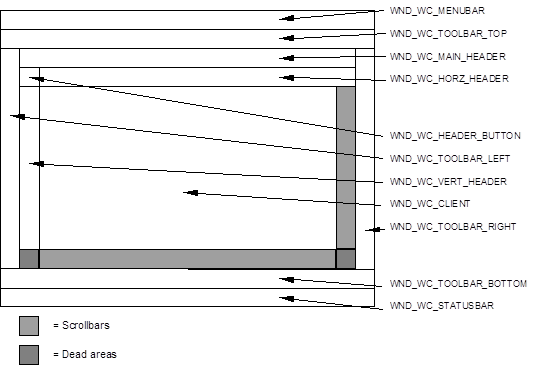
Any window can contain one of each component type. Any component in turn can contain a further full set of components. There is no specific limit to the number of nested windows or component windows. The following diagram shows all component types in their correct position.
In this diagram only the client component is displayed with scrollbars, but any other component could have scrollbars, if appropriate.
Note: The names of the components bear no relationship to objects generally described by these names; a component’s name gives you an idea of its position in the window. For example, Menubar tells you that the component is at the top of the window where you would expect to find a menu bar.
The following is a listing of all the components and their special function.
| Name | Special function | Sizeability |
|---|---|---|
| WND_WC_FRAME | This is the default component ID of a window. A frame window has no special functionality. | all |
| WND_WC_MENUBAR | Width is dependent on parent’s width | height |
| WND_WC_TOOLBAR_TOP | Width is dependent on parent’s width | height |
| WND_WC_TOOLBAR_LEFT | Height is dependent on parent’s height minus the height of MENUBAR, TOOLBAR_TOP, TOOLBAR_BOTTOM and STATUSBAR components | width |
| WND_WC_TOOLBAR_RIGHT | Height is dependent on parent’s height minus the height of the MENUBAR, TOOLBAR_TOP, TOOLBAR_BOTTOM and STATUSBAR components | width |
| WND_WC_TOOLBAR_BOTTOM | Width is dependent on parent’s width | height |
| WND_WC_STATUSBAR | Width is dependent on parent’s width | height |
| WND_WC_MAIN_HEADER | Width is dependent on parent’s width minus the width of the left and right toolbar components | height |
| WND_WC_HORZ_HEADER | Width is dependent on parent’s width minus the width of the left toolbar, right toolbar, and vertical header components. This component’s horizontal scroll range and position is linked to that of the client component’s horizontal scroll range and position. When the client component is scrolled horizontally, this component receives a duplicate of all scroll messages. | height |
| WND_WC_VERT_HEADER | Height is dependent on parent’s height minus the height of the MENUBAR, TOOLBAR_TOP, MAIN_HEADER, HORZ_HEADER, TOOLBAR_BOTTOM and STATUSBAR components. This component’s vertical scroll range and position is linked to that of the client component’s vertical scroll range and position. When the client component is scrolled vertically, this component receives a duplicate of all scroll messages. |
width |
| WND_WC_HEADER_BUTTON | Height and width are dependent on the horizontal and vertical headers’ height and width. | none |
| WND_WC_CLIENT | Height and width are dependent on the remainder of the parent’s client area after subtracting all other components. | none |
These flags are used with the function WNDgetWindow:
GW_CHILD
Identifies the window's first child window.
GW_HWNDFIRST
Returns the first sibling window for a child window.
GW_HWNDLAST
Returns the last sibling window for a child window.
GW_HWNDNEXT
Returns the sibling window that follows the given window in the window manager's list.
GW_HWNDPREV
Returns the previous sibling window in the window manager's list.
These flags are used with the functions WNDgetWindowLong and WNDsetWindowLong:
GWL_STYLE
Returns the window’s basic window style.
GWL_EXSTYLE
Returns the window’s extended window styles. (Omnis additional window styles)
GWL_EXCOMPONENTID
Returns the window’s component id (one of the WND_WC_xxx styles). This flag cannot be used with WNDsetWindowLong.
GWL_BKTHEME
Stores the window theme background. See WNDdrawThemeBackground for full details. Setting this value will invalidate the HWND area.
GWL_BKTHEME_NOINVAL
Same as GWL_BKTHEME, but does not invalidate the HWND area when setting this value.
GWL_INFLATE_ALL (Mac OSX only)
Allows you to set an area around the HWNDs visual area for drawing by this HWND. In other words during painting to this HWND, you may paint outside the HWNDS bounding area. This is useful if you need to paint drop shadows around your control. To specify the inflate values you can set-up a qrect and use the function WNDmakeLong to convert the qrect to a long value.
Example:
// inflate the paint area on the left and right by 2 pixels, and 4

// pixels to the bottom

qrect inflateRect( -2, 0, 2, 4 );

WNDsetWindowLong(theHwnd, GWL_INFLATE_ALL, WNDmakeLong(&inflateRect));The HDC is a graphical device context and is fully documented in the GDI Reference chapter.
These defines are used by some mouse related message, for example, WM_SETCURSOR, to specify the part of a window, the mouse is currently over.
HTNOWHERE
The mouse is not over the window.
HTCLIENT
The mouse is over the client area.
HTHSCROLL
The mouse is over the horizontal scroll bar.
HTVSCROLL
The mouse is over the vertical scroll bar.
HTGROWBOX
The mouse is over the grow box (WIN95 and MacOS only).
HTBORDER
The mouse is over the border of the window.
A handle or reference to a child window.
You can use the following defines instead of a valid HWND with some of the functions in the API:
HWND_DESKTOP
Refers to the desktop window. HWND_DESKTOP can be used with various functions including WNDstartDraw and WNDendDraw, if unclipped drawing to anywhere on the screen is required. Under MacOS it is the sum of all connected monitors.
HWND_MAINWINDOW
Under Windows it refers to the Omnis Program window. Under MacOS it is the main monitor (the one with the menu bar).
HWND_TOP
Can be used with WNDsetWindowPos to move the window to the top of the z-order (Top of its sibling chain).
HWND_BOTTOM
Can be used with WNDsetWindowPos to move the window to the bottom of the z-order (Bottom of its sibling chain).
LPARAM is a typedef and is of type unsigned long. The lParam and uParam parameters of the WndProc function are of this type.
These flags are used with the function WNDshowWindow:
SW_HIDE
Hides the window.
SW_SHOW
Shows the window.
These flags are used with the functions WNDsetWindowPos and WNDsetWindowPosEx:
SWP_NOSIZE
If specified no sizing of the window takes place.
SWP_NOMOVE
If specified no moving of the window takes place.
SWP_NOZORDER
If specified the position in the z-order of the window is not altered.
SWP_NOREDRAW
If specified no invalidating takes place. Any changes to the visibility, z-order or position and size is not reflected on screen.
SWP_SHOWWINDOW
If specified the window is made visible.
SWP_HIDEWINDOW
If specified the window is hidden.
The UINT is defined as an unsigned integer. The message parameter of the WndProc function is of this type.
WM_EXUSER is the base define for all user defined messages for the external components. External components which use the HWND module can create their own message by defining a WM_your_constant as WM_EXUSER + n, where n can be in the range HEX 0 to HEX 1FFF.
Example:
#define WM_MY_MESSAGE1 WM_EXUSER+1
#define WM_MY_MESSAGE2 WM_EXUSER+2These flags are used with the functions WNDsetCapture and WNDreleaseCapture to specify the capture for mouse or key events:
WND_CAPTURE_KEY
Captures all keyboard events. It is not necessary for external components to capture the key events. Omnis sets the key capture for a window when it receives the input focus.
WND_CAPTURE_MOUSE
Captures all mouse events.
These are the flags for the various border styles of a window. They are used to set the mBorderStyle member of the WNDborderStruct. WNDborderStruct is used with the functions WNDcreateWindow, WNDgetBorderSpec, WNDsetBorderSpec, WNDinsetBorderRect, WNDinflateBorderRect, WNDaddWindowComponent and WNDpaintBorder.
WND_BORD_NONE
No border.
WND_BORD_PLAIN
Draws a plain border using the qpen specified by the mLineStyle member of the WNDborderStruct. For a complete description of a qpen refer to the GDI documentation.
WND_BORD_INSET
Draws a 3D inset border. Standard 3D system colors are used to draw the effect.
WND_BORD_EMBOSSED
Draws a 3D embossed border. Standard 3D system colors are used to draw the effect.
WND_BORD_BEVEL
Combination of the embossed and inset border styles, with the inset frame being drawn inside the embossed frame and a flat area in between. The mSize1, mSize2 and mSize3 members of the WNDborderStruct specify the sizes of the three bevel parts (embossed, flat and inset). Standard 3D system colors are used to draw the effect.
WND_BORD_INSETBEVEL
Same as WND_BORD_BEVEL, except that the three bevel parts are reversed, making the bevel appear inset.
WND_BORD_CHISEL
Draws a two pixel wide chiseled border. Standard 3D system colors are used to draw the effect.
WND_BORD_EMBOSSEDCHISEL
Same as WND_BORD_CHISEL, except that it appears embossed.
WND_BORD_SHADOW
Gives client area the appearance of having a shadow. The two members mSize1 and mSize2 are used to specify the horizontal and vertical shadow size (offset) and the mColor specifies the shadows color. mLineStyle is used to give the client area an additional simple frame. A shadow border has two areas called dead area. These are areas that are not covered by the border effect itself, but nevertheless need to be erased. The HWND module queries the erase colors by sending a WM_GETERASEINFO message to the WndProc function.
WND_BORD_SINGLE_INSET
Draws a 3D single pixel width inset border. Standard 3D system colors are used to draw the effect.
WND_BORD_SINGLE_EMBOSSED
Draws a 3D single pixel width embossed border. Standard 3D system colors are used to draw the effect.
WND_BORD_3DFACE
Same as WND_BORD_INSET, but uses 3DFACE color and no black.
WND_BORD_3DHILITE
Same as WND_BORD_INSET, but uses 3DHILITE color and no black.
WND_BORD_CTRL_EDIT (v3.1)
Draws the correct border for a edit control. Platform dependent.
WND_BORD_CTRL_LIST (v3.1)
Draws the correct border for a list control. Platform dependent.
WND_BORD_CTRL_LISTCELL (v3.1)
Draws the correct border for a list cell control. Platform dependent.
WND_BORD_CTRL_TABPANE (v3.1)
Draws the correct border for a tab pane control. Platform dependent. Generates a WM_GETSHADOWRECT message to allow caller to manipulate the border rect prior to drawing.
WND_BORD_CTRL_SHADOW (v3.1)
Draws a system shadow border. Platform dependent.
WND_BORD_CTRL_SHADOW_EX (v3.1)
Same as WND_BORD_CTRL_SHADOW, but generates a WM_GETSHADOWRECT message to allow caller to manipulate the border rect prior to drawing.
WND_BORD_CUSTOM
When specified, custom borders can be drawn in the windows non-client area (frame). The messages WM_BORDCALCRECT and WM_BORDPAINT are send to the WndProc function when the non-client area needs to be calculated or the border needs painting.
These flags are used with the WNDsetWindowCursor and WNDgetWindowCursor functions to specify the cursor type associated with a window, and the functions WNDsetCursor and WNDgetCursor, to instantly change the cursor on screen.
WND_CURS_DEFAULT
Cursor does not change when moving over the window. Control over the cursor is passed to the parent window.
WND_CURS_ARROW
Standard cursor.
WND_CURS_IBEAM
Standard edit text cursor.
WND_CURS_WATCH
Standard time/watch cursor.
WND_CURS_LOCK
Record locked cursor.
WND_CURS_MOVE
Cursor for moving objects.
WND_CURS_SIZE_VERT
Cursor for sizing object vertically only. (Center top/bottom size knobs)
WND_CURS_SIZE_HORZ
Cursor for sizing objects horizontally only. (Center left/right size knobs)
WND_CURS_SIZE_LTRB
Cursor for sizing objects diagonally left.top to right.bottom. (Left.Top and Right.Bottom size knobs)
WND_CURS_SIZE_LBRT
Cursor for sizing objects diagonally left.bottom to right.top. (Left.Bottom and Right.Top size knobs)
WND_CURS_INSERT
Cursor for inserting rows between rows etc.
WND_CURS_COPY_SINGLE
Cursor for copying a single object or data item.
WND_CURS_COPY_MULTI
Cursor for copying multiple objects or data items.
WND_CURS_DRAG_OBJECT
Cursor for dragging objects.
WND_CURS_DRAG_DATA
Cursor for dragging data.
WND_CURS_SPLITTER_VERT
Cursor for moving vertical splitter bars.
WND_CURS_SPLITTER_HORZ
Cursor for moving horizontal splitter bars.
WND_CURS_NOGO
Nogo cursor used for letting user know that you cannot put something here. (Drag or copy)
WND_CURS_HELP
Help cursor, when used to click on an objects, should bring up context sensitive help.
WND_CURS_EXAMINE
Examine cursor used for expanding data etc.
WND_CURS_TRASH
Trash cursor.
WND_CURS_ARROW_WATCH
Cursor displaying an arrow and watch.
WND_CURS_CROSS
Area selection tool.
WND_CURS_DROPPER
Color suction tool.
WND_CURS_BUCKET
Area fill tool.
WND_CURS_PENCIL
Drawing tool.
Used with WNDredrawWindow to redraw/invalidate or update the non-client and/or client area of a window:
WND_RW_NCPAINT
Redraws all of the non-client area.
WND_RW_PAINT
Redraws the specified area within the client area of the window.
WND_RW_ERASE
If specified, erase background messages are generated.
WND_RW_ALLCHILDREN
If specified, all children are included in the redraw operation.
WND_RW_INVALIDATE
If specified, the specified area is invalidated only, and repainted during the normal update process.
WND_RW_UPDATE
If specified, any invalid area of the window is immediately updated. The qrgn and qrect parameters are ignored. Only the WND_RW_ALLCHILDREN and WND_RW_ERASE flags can be specified in combination with this flag.
Returns the width in pixels of a standard scrollbar.
These constants are used with the WNDsetTimer and WNDkillTimer functions:
WND_TIMER_NULL
Internal use only.
WND_TIMER_TOOLTIP
Internal use only.
WND_TIMER_FIRST
Base constant for all timer ids which are used by external components.
The border struct contains information for the border style of a window. It is used with the functions WNDcreateWindow, WNDaddWindowComponent, WNDsetBorderSpec, and WNDgetBorderSpec.
struct WNDborderStruct

{

  qshort mBorderStyle;

  qpen mLineStyle;

  qdim mSize1;

  qdim mSize2;

  qdim mSize3;

  qcol mColor;

  WNDborderStruct();

  WNDborderStruct( qshort pBorderStyle );

  WNDborderStruct( qshort pBorderStyle, qpen pLineStyle );

  WNDborderStruct( qshort pBorderStyle, qdim pSize1, qdim pSize2, qdim pSize3 );

  WNDborderStruct( qshort pBorderStyle, qpen pLineStyle, qdim pSize1, qdim pSize2, qcol pColor );

};
mBorderStyle specifies one of the WND_BORD_xxx constants.
mLineStyle is used by WND_BORD_PLAIN border styles.
mSize1 is used by WND_BORD_BEVEL, WND_BORD_INSETBEVEL and WND_BORD_SHADOW.
mSize2 is used by WND_BORD_BEVEL, WND_BORD_INSETBEVEL and WND_BORD_SHADOW.
mSize3 is used by WND_BORD_BEVEL and WND_BORD_INSETBEVEL.
mColor is used by WND_BORD_SHADOW.
typedef qbool (*WNDenumProc)( HWND hwnd, LPARAM lParam );
struct WNDeraseInfoStruct

{

  qcol   mBackColor;

  qcol   mForeColor;

  qcol   mFillPat;

  qulong mBKTheme;

}
mBackColor - specifies the color for all clear pixels in the fill pattern.
mForeColor - specifies the color for all set pixels in the fill pattern.
mFillPat - specifies the fill pattern.
mBKTheme – specifies the background theme (see GWL_BKTHEME)
struct WNDminMaxInfo

{

  qpoint  ptReserved;

  qpoint  ptMaxSize;

  qpoint  ptMaxPosition;

  qpoint  ptMinTrackSize;

  qpoint  ptMaxTrackSize;

};
ptReserved - Reserved for internal use.
ptMaxSize - Currently NOT used for child windows.
ptMaxPosition - Currently NOT used for child windows.
ptMinTrackSize - Specifies the minimum tracking width (point.h) and the minimum tracking height (point.v) of the window.
ptMaxTrackSize - Specifies the maximum tracking width (point.h) and the maximum tracking height (point.v) of the window.
WNDmultiKey is a class used to pass multiple keypress information via event parameters and is used in conjunction with WM_MULTIKEYxxx events. WNDmultiKey is defined in hwnd.he and contains the following public members:
WNDmultiKey() – Default constructor.
WNDmultiKey(qchar *pData, qlong pLen) – Initializes the class using the supplied keys (one per qchar position). The number of keys is specified via pLen.
WNDmultiKey(WNDmultiKey &pMultiKey) – Initializes the class copying data from an existing WNDmultiKey instance.
~WNDmultiKey() – Default destructor.
void set(qchar *pData, qlong pLen) – Assigns the key-combination held in pData to the class. pLen contains the number of keys being pressed.
qlong len() – Returns the number of key presses stored by the class.
qchar *dataPtr() – Returns a pointer to the keys stored by the class.
struct WNDpaintStruct

{

  HDC     hdc;

  qbool  fErase;

  qrect  rcPaint;

  HDC    fRestore;

};
hdc - Identifies the display context to be used for painting.
fErase - Specifies whether the background needs to be redrawn.
rcPaint - Specifies the upper-left and lower-right corners of the rectangle in which the painting is requested.
fRestore - Reserved; internal use.
class WNDprocClass

{

  public:

  virtual qlong WndProc(HWND hWnd, UINT message, WPARAM wParam,LPARAM lParam, LPARAM uParam ) = 0;

};struct WNDwindowPosStruct
{
HWND hwnd;
HWND hwndInsertAfter;
qdim x;
qdim y;
qdim cx;
qdim cy;
qulong flags;
};hwnd - Identifies the window.
hwndInsertAfter - Identifies the window behind which this window is placed.
x - Specifies the position of the left edge of the window.
y - Specifies the position of the right edge of the window.
cx - Specifies the window width.
cy - Specifies the window height.
flags - Specifies window positioning options. This member is one or more of the SWP_xxx flags.
If this extended style is specified for a component other than WND_WC_FRAME and WND_WC_CLIENT, the user can size the window at runtime. When the cursor moves over the correct border edge (which edge can be dragged depends on the component type) the cursor changes to WND_CURS_SPLITTER_VERT or WND_CURS_SPLITTER_HORZ. Sizing a component effects the size of other sibling components.
These are the floating styles for a window. Floating takes place if the parent of a floating window is sized. The window is sized or moved, horizontally or vertically by the same amount the parent has grown or shrunk by. The floating style can only be specified for windows of type WND_WC_FRAME. The following styles are defined:
WND_FLOAT_NONE
No floating.
WND_FLOAT_LEFT
If set, the window grows or shrinks horizontally by floating the left edge of the window.
WND_FLOAT_RIGHT
If set, the window grows or shrinks horizontally by floating the right edge of the window.
WND_FLOAT_LEFT_RIGHT
If set, the window moves horizontally. (WND_FLOAT_LEFT | WND_FLOAT_RIGHT)
WND_FLOAT_TOP
If set, the window grows or shrinks vertically by floating the top edge of the window.
WND_FLOAT_BOTTOM
If set, the window grows or shrinks vertically by floating the bottom edge of the window.
WND_FLOAT_TOP_BOTTOM
If set, the window moves vertically.
WND_FLOAT_MASK
Masking bits for masking out floating styles in the extended style window long.
If specified, WM_KEYDOWNPREVIEW and WM_KEYUPPREVIEW messages are generated and sent to all parents of the window for which the actual key message was intended. The parameters are identical to WM_KEYDOWN and WM_KEYUP. If a parent deals with a key and returns 0, no further messages are sent relating to the key.
If this style is specified, the component windows of the window are not sized when the window’s size changes. The window component type of all child windows is ignored.
If this style is specified, no child windows of the window are floated when the window size changes. All floating styles of all child windows are ignored.
If this style is specified, the window can receive additional non-cross-platform messages, messages which are not normally supported by the hwnd module. Under Windows 95 platform this may be messages like WM_DROPFILES, etc. This style is currently not supported under MacOS.
If this style is specified, all of the client area of the window is invalidated when the width or height of the window changes. By default only the uncovered areas are invalidated.
If this style is specified, the window becomes transparent. Transparent windows do not receive erase background messages and are painted last (after all non-transparent windows have been painted) and in reverse order. They do not clip the visual region of sibling windows which they cover, nor do they clip their parent. If areas within a transparent window are invalidated, all intersecting sibling windows are effected as well as the area within the parent.
Note: Transparent windows are less efficient, and may not always yield the desired results. Omnis uses transparent windows only for background objects in window and report classes.
The WND_WC_xxx styles are used with the functions WNDaddWindowComponent, WNDremoveWindowComponent, WNDgetWindowComponent, and WNDnextWindowComponent. These flags specify the component type of a window.
WND_WC_FRAME
the default type for all windows created by WNDcreateWindow. It is ignored by the component functions.
WND_WC_MENUBAR
the menu bar component. A window of this type is always positioned in the topmost area of the parent window.
WND_WC_TOOLBAR_TOP
the top toolbar component. A window of this type is always positioned in the topmost area of the parent window just below the menu bar component.
WND_WC_TOOLBAR_BOTTOM
the bottom toolbar component. A window of this type is always positioned in the bottom-most area of the parent window just above the status bar component.
WND_WC_TOOLBAR_LEFT
the left toolbar component. A window of this type is always positioned in the leftmost area of the parent window.
WND_WC_TOOLBAR_RIGHT
the right toolbar component. A window of this type is always positioned in the rightmost area of the parent window.
WND_WC_HEADER_BUTTON
can be created in conjunction with the WND_WC_HORZ_HEADER and WND_WC_VERT_HEADER components both of which must exist. Its position and size depends entirely on these two components being positioned in the top-left corner between the two header components.
WND_WC_MAIN_HEADER
the main header component. A window of this type is always positioned in the topmost area of the parent window just below the top toolbar.
WND_WC_HORZ_HEADER
horizontally scrolling header component which works in conjunction with the WND_WC_CLIENT component. It sits just above the client component, and scrolls horizontally in the same direction by the same amount, when the client component is scrolled horizontally.
WND_WC_VERT_HEADER
vertically scrolling header component which works in conjunction with the WND_WC_CLIENT component. It sits just to the left of the client component, and scrolls vertically in the same direction by the same amount, when the client component is scrolled vertically.
WND_WC_CLIENT
the client component. It is positioned to fill in any space not used by any of the other components within the same parent window. If components are used, this is the component which should receive the scrollbars, if scrollbars are required.
WND_WC_STATUSBAR
the status bar component. A window of this type is always positioned in the bottom-most area of the parent window.
WND_WC_MASK
define which can be used to specify all component types.
These are the windows basic styles.
WS_CHILD
Must always be specified.
WS_CLIPSIBLINGS
Clips child windows relative to each other; that is, when a particular child window receives a WM_PAINT message, this style clips all other top-level child windows out of the region of the child window to be updated. (If the WS_CLIPSIBLINGS style is not given and child windows overlap, it is possible, when drawing in the client area of a child window, to draw in the client area of a neighboring child window.)
WS_CLIPCHILDREN
Excludes the area occupied by child windows when drawing within the parent window. Used when creating the parent window.
WS_DISABLED
If specified, the window is disabled and receives no mouse events. All mouse events which would normally be received by this window, are sent to the parent window.
WS_HSCROLL and WS_VSCROLL
Creates a window that has a horizontal or vertical scroll bar.
WS_VISIBLE
Creates a window that is initially visible.
When users interact with a window, or a window’s properties change, appropriate messages are generated. These messages can be received by sub-classing the WNDprocClass and overloading the virtual function WndProc. An instance of that class must be specified when creating a window. More than one window can be associated with the same instance in this way. The correct HWND is sent to the WndProc function along with its message.
Example of a WndProc function:
qlong MyWndProc::WndProc( HWND hWnd, UINT message, WPARAM wParam, lParam, LPARAM uParam )

{

  switch ( message )

  {

    case WM_GETMINMAXINFO:

    {

      // calculate the minimum tracking size

      WNDminMaxInfo* info = (WNDminMaxInfo*)lParam;

      // first get minimum tracking size for child windows from HWND

      WNDgetMinMaxInfo( hWnd, info );

      if ( info->ptMinTrackSize.h < 300 )

      {

        // do not allow size less than 300 pixels horizontally

        info->ptMinTrackSize.h = 300;

      }

      return 0L;

    }

    case WM_WINDOWPOSCHANGED:

    {

      // reset the scroll range

      qdim hRange = 200;

      qdim vRange = 400;

      qrect cRect;

      WNDgetClientRect( hWnd, &cRect );

      WNDsetScrollRange( hWnd, SB_HORZ, 1, hRange, cRect.width(), qtrue );

      WNDsetScrollRange( hWnd, SB_VERT, 1, vRange, cRect.height(), qtrue );

      break;

    }

  }

  return DefWindowProc( hwnd, message, wparam, lparam );

}Note: All message examples are assumed to have the following pieces of code surrounding them:
qlong cMyWndProcClass::WndProc( HWND hWnd, UINT message, WPARAM wParam, LPARAM lParam, LPARAM uParam )

{

  switch ( message )

  {

    case WM_xxx:

    {

      // example

    }

  }

  return DefWindowProc( hwnd, message, wparam, lparam );

}The WM_BORDCALCRECT message is sent when the client area of window needs to be calculated and the border style of the window is WND_BORD_CUSTOM.
Parameters:
inflate - Boolean value of wParam. If qtrue, the supplied rectangle is to be inflated, otherwise it is to be inset.
rect - Value of lParam. Points to the qrect to be inflated or inset.
Returns:
Always return 1.
The amount by which the rectangle is inflated or inset depends on how much space the custom border requires. It directly effects the size of the client area of the window.
Example:
// this example custom border has a single pixel line at the top and bottom

qrect* pRect = (qrect*)lParam;

if ( wParam )

{

  // inflate

  pRect->top++;

  pRect->bottom++;

}

else

{

  // inset

  pRect->top--;

  pRect->bottom--;

}

return 1L;The WM_BORDERCHANGED message is send when WNDsetBorderSpec is called, and after the border has been changed in the HWND.
Parameters:
Returns:
Always return 1L.
See also WM_BORDERCHANGING, WNDsetBorderSpec
The WM_BORDERCHANGING message is send when WNDsetBorderSpec is called, prior to the border being changed.
Parameters:
redraw - Value of wParam. If 1, the caller called WNDsetBorderSpec with the redraw flag set.
borderSpec - Value of lParam. Points to the border spec structure.
Returns:
Return 1 if WNDsetBorderSpec is to go ahead. Return 0 to prevent the border from changing.
Example:
// this example makes a copy of the border spec and prevents WNDsetBorderSpec from changing

// the border in the HWND (the control draws and manages the border it self)

qbool redraw = (qbool)wParam;

WNDborderStruct* borderSpec = (WNDborderStruct*)lParam;

mBorderSpec = *borderSpec;

if ( redraw )

{

  // invalidate our control

}
See also WM_BORDERCHANGED, WNDsetBorderSpec
The WM_BORDERERASEBACKGROUND message is sent when painting a WND_BORD_CTRL_GROUPBOX on Windows XP. The message informs the control that two 3-pixel strips immediately above and below the control should be erased.
dc - Value of wParam. Points to the device in which the border is to be painted.
rect - Value of lParam. Points to the qrect which forms the outside edge of the border rect. The coordinates are local to the device.
Example: (excerpt from WndProc)
//..

case WM_BORDERASEBACKGROUND:

{

  if (isSetup())

    eraseBorderBackground(hWnd, (HDC) wParam, (qrect *) lParam);

  return 1L;

}The WM_BORDPAINT message is sent when the border of a window needs painting and the border style of the window is WND_BORD_CUSTOM.
dc - Value of wParam. Points to the device in which the border is to be painted.
rect - Value of lParam. Points to the qrect which forms the outside edge of the border rect. The coordinates are local to the device.
Returns:
Always return 1.
Example:
// this example custom border has a single pixel line at the top and bottom

HDC dc = (HDC)wParam;

qrect* pRect = (qrect*)lParam;

HPEN oldPen = GDIselectObject( dc, GDIgetStockPen( BLACK_PEN ) );

GDIsetTextColor( GDI_COLOR_QBLACK );

GDImoveTo( dc, pRect->left, pRect->top );

GDIlineTo( dc, pRect->right, pRect->top );

GDImoveTo( dc, pRect->left, pRect->bottom );

GDIlineTo( dc, pRect->right, pRect->bottom );

GDIselectObject( dc, oldPen );

return 1L;This message is sent by WNDabortMouseCapture() before it releases capture of the mouse pointer (WNDreleaseCapture()). Return type is void.
Parameters: None.
Example:
//will be followed immediately by WM_CAPTURECHANGED

case WM_CAPTUREABORT:

{

  tqfFishEyeObject *object = (tqfFishEyeObject*) ECOfindObject(eci, hwnd);

  if (object)

  {

    object->trackingEnabled(qtrue);

    object->mDestroyOnCaptureChange = qtrue;

  }

  break;

}The WM_CHILDPAINT message is sent for every child window when a window requests its children to be painted by calling the WNDredrawChildren function.
hWnd - is the window handle of the child window.
flags - value of lParam. This is WND_RW_NCPAINT or WND_RW_NCPAINT and WND_RW_PAINT. If WND_RW_PAINT is specified, the client area needs painting. If WND_RW_NCPAINT is specified the non-client area needs painting.
Returns:
An external component should return zero if it processes this message. If non-zero is returned, a WM_PAINT message is sent to the child window.
Example:
See WNDredrawChildren.
This message returns qtrue if the object wants gradients to be shown in the pattern palette in the property inspector, i.e. for $backpattern. Return qfalse to disable gradient back patterns.
Parameters: None.
The WM_CREATE message is sent when an external component requests that a window be created by calling the WNDcreateWindow or WNDaddWindowComponent function. The WndProc function for the new window receives this message after the window is created but before the window becomes visible. The message is sent to the window before the WNDcreateWindow or WNDaddWindowComponent function returns.
Parameters:
None.
Returns:
Must always return 0.
The WM_DESTROY message is sent when a window is being destroyed. It is sent to the WndProc function of the window being destroyed after the window is removed from the screen.
This message is sent first to the window being destroyed and then to the child windows as they are destroyed. During the processing of the WM_DESTROY message, you can assume that all child windows still exist.
Parameters:
None.
Returns:
Must always return 0.
WM_DRAGBORDER is sent during border dragging every time the size of the component is changed, after all children and sibling components have been sized.
Parameters:
isVert - value of wParam. If qtrue we are dragging a vertical border.
Returns:
Must always return 0.
WM_DRAGDROP message is sent during drag & drop operations. Care should be taken not to process these messages during design mode. Most of these messages can be ignored and simply passed into WNDdefWindowProc or returned with a status of -1 for WebClient.
Parameters:
lParam - Value of lParam depends on wDragDropCode, refer to the individual messages.
wDragDropCode - Value of wParam. Specifies a drag drop code that indicates the request. This parameter can be one of the following values:
DD_STARTDRAG
Indicates that the drag process is starting. Normally this message is ignored. LParam will contain a pointer to the FLDdragDrop structure.
DD_ENDDRAG
Indicates that the drag process is finishing. Normally this message is ignored. LParam will contain a pointer to the FLDdragDrop structure.
DD_CHILD_STARTDRAG
Indicates that the drag process is starting. Sent to the parent of the dragging window. LParam will contain a pointer to the FLDdragDrop structure.
DD_CHILD_ENDDRAG
Indicates that the drag process is finishing. Sent to the parent of the dragging window. LParam will contain a pointer to the FLDdragDrop structure.
DD_CANDRAG_ON_DOWN
Enquiry on whether dragging can be started by a mouse button down action. Return true or false, or simply ignore the message. LParam will contain a pointer to a qpoint structure which will contain the mouse position. The point is local to the client area of the window which receives these messages.
DD_CANDRAG_ON_MOVE
Enquiry on whether dragging can be started by a mouse move action. Return true or false, or simply ignore the message. LParam will contain a pointer to a qpoint structure which will contain the mouse position. The point is local to the client area of the window which receives these messages.
DD_CANDROP
Sent to the drop control and it can return qtrue if drop action is allowed. LParam will contain a pointer to the FLDdragDrop structure and member mDropPoint may be used to establish drop position.
DD_CANDROP_OVER
Sent to the drop control and it can return qtrue if dropping is allowed. LParam will contain a pointer to the FLDdragDrop structure and member mDropPoint may be used to establish mouse position.
DD_CANDROPPARENT
Sent to the parent of the drop control and it can return qtrue if dropping is allowed. LParam will contain a pointer to the FLDdragDrop structure and member mDropPoint may be used to establish mouse position.
DD_HILITE
Request to the current dropping control to hilite its acceptance to allow dropping. LParam will contain a pointer to the FLDdragDrop structure.
DD_UNHILITE
Request to the current dropping control to unhilite itself. LParam will contain a pointer to the FLDdragDrop structure.
DD_ALWAYS_HILITE
Request to the current dropping control to establish whether highlighting is required. Return qtrue or qfalse. LParam will contain a pointer to the FLDdragDrop structure
DD_SHOWDRAGSHAPE
Message to show the drag shape. Normally this is ignored. LParam will contain a pointer to the FLDdragDrop structure.
DD_HIDEDRAGSHAPE
Message to hide the drag shape. Normally this is ignored. LParam will contain a pointer to the FLDdragDrop structure.
DD_MOVEDRAGSHAPE
Message to move the drag shape. Normally this is ignored. LParam will contain a pointer to the FLDdragDrop structure.
DD_CANSCROLL
Request to the current dropping control to establish whether scroll is required. Return qtrue or qfalse. If qtrue is returned then DD_DRAGDROPSCROLL will be sent. LParam will contain a pointer to the FLDdragDrop structure.
DD_GETSCROLLRECT
Request to the current dropping control for it to adjust the scrolling rectangle, if required. Return qtrue if processed. lParam will contain a pointer to the qrect which can be adjusted.
DD_DRAGDROPSCROLL
Request to the current dropping control for it to scroll, if required. Return qtrue if processed. lParam will contain a pointer to the qpoint which can be used to ensure that the point is inside the control.
DD_SETDRAGVALUE
Request for control to set the drag value and can be used, for example, to set the drag value to a selection of text. LParam will contain a pointer to the FLDdragDrop structure.
DD_GETDRAGCONTAINER
Request for control to set the drag source HWND (FLDdragDrop member mDragSourceHwnd). Normally this is ignored but can be useful for complex controls that allow dragging of multiple HWNDs. LParam will contain a pointer to the FLDdragDrop structure.
DD_BUTTONDOWN
Message that the button is down during drag move. Normally this is ignored but it can be used to change drop tabs on a tabbed pane control, for example. LParam will contain a pointer to the FLDdragDrop structure.
DD_BUTTONUP
Message that the button is up during drag move. Normally this is ignored but it can be used to change drop tabs on a tabbed pane control, for example. LParam will contain a pointer to the FLDdragDrop structure.
Returns:
Depends on the value of wDragDropCode, but most of these messages can be ignored and simply passed into WNDdefWindowProc or returned with a status of -1 for WebClient.
Example:
// #1: this example is taken from the list control

case WM_DRAGDROP:

{

  switch ( wParam )

  {

    case DD_CANDRAG_ON_DOWN: return qfalse;

    case DD_CANDRAG_ON_MOVE: {

      qlong lineNumber = lineNumberFromPoint( (qpoint*)lParam );

      return lineNumber!=0; } // Start drag if the mouse is over a line

    case DD_SETDRAGVALUE: {

      FLDdragDrop* dragDrop = (FLDdragDrop*)lParam;

      EXTfldval dtype( dragDrop->mDragType );

      dtype.setLong( cFLDdragDrop_dragData ); // We are dragging data

      EXTfldval dval( dragDrop->mDragValue );

      dval.setList( mLocalList, qfalse); // Set data to our list

      return qtrue; }

    default: // Not processed

      #ifdef isRCC

        return 0xffffffffL; // Web component

      #endif

      return DefWindowProc(hWnd,pMsg,wParam,lParam);

    }

  }
//#2: this example is taken from the droplist control
qbool tqfDroplist::dragDrop( HWND hWnd, UINT message, WPARAM wParam, LPARAM lParam, qbool pDoEdwc)
{
switch( message ) {
case WM_DRAGDROP:
{
switch ( wParam ) {
case DD_CANDRAG_ON_DOWN:
case DD_CANDRAG_ON_MOVE: {
if ( mIsDropped ) return qfalse;
if ( !isDesign() && !readOnly() && udDragMode()==cFLDdragDrop_dragData ) {
qpoint pt = *((qpoint*)lParam);
qrect r; WNDgetClientRect( wnd(), &r );
r.left = r.right-mButtonWidth;
if ( GDIptInRect( &r, &pt ) ) return qfalse; //don't allow data dragging from the button
}
break;
}
case DD_SETDRAGVALUE:
{
if ( !isDesign() && dDragMode()==cFLDdragDrop_dragData && !!mList) {
FLDdragDrop *dragDrop = (FLDdragDrop *) lParam;
dragDrop->setDragType( cFLDdragDrop_dragData );
fldval* dval = dragDrop->getDragValue( qtrue );
dval->setlist( mList.getlstptr(), qfalse ); //don't make copy of list
return qtrue;
}
break;
}
}
}
}
return tqfld::dragDrop( hWnd, message, wParam, lParam, pDoEdwc );
}See also FLDdragDrop
The WM_ERASEBKGND message is sent when the window background needs to be erased (for example, when a window is sized). It is sent to prepare an invalidated region for painting. From v3.1 onwards you should always call WNDdrawThemeBackground and only erase the area manually if the function returns qfalse. See example below.
Parameters:
Returns:
An external component should return non-zero if it erases the background; otherwise, it should return zero.
Example:
HDC dc = (HDC)wParam;

qrect cRect; WNDgetClientRect( hWnd, &cRect );

if ( !WNDdrawThemeBackground(hWnd,dc,&cRect,WND_BK_DEFAULT) )

{

  GDIsetTextColor( dc, GDI_COLOR_WINDOW );

  GDIfillRect( dc, &cRect, GDIgetStockBrush( BLACK_BRUSH ) );

}

return 1L;This message is generated when the input focus has been changed by Omnis. If a window displays an input caret, this is the time when the caret should be created or destroyed.
Parameters:
Returns:
An external component should return non-zero if it creates or destroys the caret; otherwise, it should return zero.
Example:
// this example creates a text input cursor at character position 7

// of some text the control is displaying

switch ( message )

{

  case WM_FOCUSCHANGED:

  {

    if ( wParam )

    {

      // create the caret, if ovrTypeOn is qtrue, we in over type mode

      // and the caret is displayed as a block, otherwise we are in

      // insert mode, and the caret is displayed as a vertical line.

      GDItextSpecStruct tSpec(fntEdit,styPlain,GDI_COLOR_WINDOWTEXT,jstLeft);

      str255 text( “This is an example for WNDcreateCaret” )

      qdim caretHeight = GDIfontPart( &tSpec.mFnt, tSpec.mSty, eFontHeight );

      qdim caretWidth = ( ovrTypeOn ? GDIcharWidth( text[8], &tSpec ) : 1 );

      qdim caretLeft = GDItextWidth( &text[1], 7, &tSpec );

      qrect cRect;

      qpoint pt;

      WNDgetClientRect( hWnd, &cRect );

      pt.h = cRect.left + caretLeft;

      pt.v = cRect.top + 1;

      WNDcreateCaret( hWnd, caretWidth, caretHeight );

      WNDsetCaretPos( &pt );

      WNDshowCaret();

    }

    else

    {

      // destroy the caret

      WNDdestroyCaret( hWnd );

    }

    return 1L;

  }

}This message is generated during non-client painting of a window, when the non-client area contains dead areas which need to be erased. Dead areas occur when a window has both horizontal and vertical scrollbars, or has a shadow border style. In response to this message the WNDeraseInfoStruct must be filled in. A pointer to this structure is supplied in lParam.
Parameters:
Returns:
Always return 0.
Example:
WNDeraseInfoStruct *eraseInfo = (WNDeraseInfoStruct*)lParam;

eraseInfo->mBackColor = colWhite;

eraseInfo->mForeColor = colBlack;

eraseInfo->mFillPattern = patFill;

return 0L;The WM_GETMINMAXINFO message is sent to a window whenever Omnis needs the maximum or minimum tracking size of the window. The maximum tracking size of a window is the largest window size that can be achieved by using the borders to size the window. The minimum tracking size of a window is the smallest window size that can be achieved by using the borders to size the window. This message is not usually generated by the HWND module (except during border dragging, see WM_DRAGBORDER), but by other parts of Omnis, for example, window design. However, the function WNDgetMinMaxInfo can be used to assist in calculating the minMaxInfo of a component window when this message is received. When components are used this function should always be called. It is recursive in that it generates further WM_GETMINMAXINFO messages for all child windows. After calling this function, any further restrictions can be applied to the minMaxInfo it calculated.
Parameters:
Returns:
Always return 1.
Example:
WNDminMaxInfo* minMaxInfo = (WNDminMaxInfo*)lParam;

WNDgetMinMaxInfo( hWnd, minMaxInfo );

if ( minMaxInfo->ptMinTrackSize < 100 ) minMaxInfo->ptMinTrackSize = 100;

if ( minMaxInfo->ptMaxTrackSize > 400 ) minMaxInfo->ptMinTrackSize = 400;

return 1L;The WM_GETSHADOWRECT message is send when the HWND manager needs to paint a WND_BORD_CTRL_TABPANE or WND_BORD_CTRL_SHADOW_EX border on Mac OSX. This allows the control to manipulate the rect prior to it being drawn. If the border is to be drawn as is, you do not need to respond to this message.
Parameters:
Example:
qrect* theRectPtr = (qrect*)lParam;

theRectPtr->top += 10;

return 1L;The WM_HSCROLL message is sent to a window when the user clicks the window's horizontal scroll bar (WM_VSCROLL if the user clicks the vertical scrollbar).
Parameters:
| SB_ENDSCROLL | End scroll. |
| SB_LEFT or SB_TOP | Scroll to far left or top. |
| SB_LINELEFT or SB_LINEUP | Scroll one line left or up. |
| SB_LINERIGHT or SB_LINEDOWN | Scroll one line right or down. |
| SB_PAGELEFT or SB_PAGEUP | Scroll one page left or up. |
| SB_PAGERIGHT or SB_PAGEDOWN | Scroll one page right or down. |
| SB_RIGHT or SB_BOTTOM | Scroll to far right or bottom. |
| SB_THUMBPOSITION | Scroll to absolute position. The current position is specified by the LOWORD of lParam. |
| SB_THUMBTRACK | Drag scroll box (thumb) to specified position. The current position is specified by the LOWORD of lParam. |
Returns:
An external component should return zero if it processes this message.
The SB_THUMBTRACK scroll bar code is typically used by external components that give some feedback while the scroll box is being dragged.
If an external component scrolls the contents of the window (see WNDscrollWindow), it must also reset the position of the scroll box by using the WNDsetScrollPos function.
Example:
qdim min, max, page, oldPos, newPos;

qshort sbar = ( message == WM_HSCROLL ? SB_HORZ : SB_VERT );

// get current scrollbar settings

WNDgetScrollPos( hWnd, sbar, &oldPos );

WNDgetScrollRange( hWnd, sbar, &min, &max, &page );

// calculate newPos appropriately

switch ( wParam )

{

  // in this example 1 scroll unit equals 8 pixels

  case SB_LINEDOWN: newPos = oldPos + 8; break;

  case SB_LIENUP: newPos = oldPos - 8; break;

  case SB_PAGEDOWN: newPos = oldPos + page; break;

  case SB_PAGEUP: newPos = oldPos - page; break;

  case SB_TOP: newPos = min; break;

  case SB_BOTTOM: newPos = max; break;

  case SB_THUMBPOSITION:

  case SB_THUMBTRACK:

  {

    // handle sign extension correctly

    qshort shortNewPos = LOWORD( lParam );

    newPos = shortNewPos;

    break;

  }

  case SB_ENDSCROLL: return 1L;

  default: newPos = oldPos; break;

}

if ( newPos != oldPos )

{

  qdim hOff = ( sbar == SB_HORZ ? oldPos - newPos : 0 );

  qdim vOff = ( sbar == SB_VERT ? oldPos - newPos : 0 );

  WNDsetScrollPos( hWnd, sbar, newPos, qtrue );

  WNDscrollWindow( hWnd, hOff, vOff );

}This message should return qtrue if the iPhone rounded rectangle border is the same as the UITextField border, qfalse otherwise. This message applies only to iPhone client component development (Studio v5.0).
Parameters:
None.
The WM_KEYDOWN message is sent when a key is pressed and the window has the key capture (See function WNDsetCapture). If a parent window has the WND_KEYPREVIEW style, the WM_KEYDOWNPREVIEW message is sent to that parent prior to the child receiving the WM_KEYDOWN message. WM_KEYUP and WM_KEYUPPREVIEW messages are generated when the key is released.
WM_KEYDOWN
sent to the window who has the key capture.
WM_KEYUP
sent to the window who has the key capture.
WM_KEYDOWNPREVIEW
sent to all parents of the window who has the key capture, and the parents specify WND_KEYPREVIEW in their extended styles.
WM_KEYUPPREVIEW
sent to all parents of the window who has the key capture, and the parents specify WND_KEYPREVIEW in their extended styles.
Parameters:
Returns:
An external component should return zero if it processes this message. Otherwise it must return 1, so Omnis can continue processing the key.
Example:
// in this example we are only interested in movement keys to scroll

// the window vertically on a WM_KEYDOWN message

qkey* key = (qkey*)lParam;

vchar vch = key->getVChar();

if ( vch ) switch ( vch )

{

  case vcUp:    wParam = SB_LINEUP;   break;

  case vcDown:  wParam = SB_LIENDOWN; break;

  case vcPup:   wParam = SB_PAGEUP;   break;

  case vcDown:  wParam = SB_PAGEDOWN; break;

  case vcHome:  wParam = SB_TOP;      break;

  case vcEnd:   wParam = SB_BOTTOM;   break;

  default:   return 1L;

}

else

{

  return 1L;

}

WNDsendMessage( hWnd, WM_VSCROLL, wParam, 0 );

return 0L;The WM_LBUTTONxxx and WM_RBUTTONxxx messages are generated when the user operates the left or right mouse button.
WM_LBUTTONDOWN or WM_RBUTTONDOWN
The WM_LBUTTONDOWN or WM_RBUTTONDOWN message is sent when the user presses the left or right mouse button.
WM_LBUTTONUP or WM_RBUTTONUP
The WM_LBUTTONUP or WM_RBUTTONUP message is sent when the user releases the left or right mouse button.
WM_LBUTTONDBLCLK or WM_RBUTTONDBLCLK
The WM_LBUTTONDBLCLK or WM_RBUTTONDBLCLK message is sent when the user double clicks the left or right mouse button.
Note: Under MacOS right button clicks are generated by holding down the option key while operating the mouse button.
Parameters:
Returns:
An external component should return zero if it processes this message.
Example:
// This is an example for a simple pushbutton dealing with mouse tracking

// when the user clicks on the button.

switch ( message )

{

  case WM_LBUTTONDOWN:

  {

    if ( ! WNDhasCapture( hWnd, WND_CAPTURE_MOUSE ) )

    {

      // set the capture for mouse tracking

      WNDsetCapture( hWnd, WND_CAPTURE_MOUSE );

      // paint the button in the down position

      // remember the position in a member

      mDown = qtrue;

    }

    return 0L;

  }

  case WM_MOUSEMOVE:

  {

    if ( WNDhasCapture( hWnd, WND_CAPTURE_MOUSE ) )

    {

      qpoint pt; WNDmakePoint( lParam, &pt );

      qrect cRect; WNDgetClientRect( hWnd, &cRect );

      if ( mDown != GDIptInRect( &cRect, &pt ) )

      {

        // the user has moved the mouse out of the button,

        // or into the button.

        // paint the button up or down

        mDown = !mDown;

      }

    }

    return 0L;

  }

  case WM_LBUTTONUP:

  {

    if ( WNDhasCapture( hWnd, WND_CAPTURE_MOUSE ) )

    {

      // tracking has finished, release the mouse capture

      WNDreleaseCapture( hWnd, WND_CAPTURE_MOUSE );

      // was the mouse button released inside the client area

      if ( mDown )

      {

        // do something

        // paint the button in the up position

        mDown = qfalse;

      }

    }

  return 0L;

  }

}The WM_MOUSEMOVE message is sent to a window when the mouse cursor moves. If the mouse is not captured, the message goes to the window beneath the cursor. Otherwise, the message goes to the window that has captured the mouse.
Parameters:
Returns:
An external component should return zero if it processes this message.
Example:
See WM_LBUTTONDOWN
The WM_MOUSEWHEEL message is sent to a window when the mouse wheel is rotated.
If the mouse is not captured, the message goes to the window beneath the cursor. Otherwise, the message goes to the window that has captured the mouse.
Parameters:
direction – Value of wParam. The high-order word indicates the distance the wheel is rotated. A positive value indicates that the wheel was rotated forward, away from the user; a negative value indicates that the wheel was rotated backward, toward the user.
Returns:
An external component should return zero if it processes this message.
Notes:
On macOS
1) The direction value will be either 0, 1 or -1. No other values are supported.
2) Controls that have no scroll bars added will need to respond to WM_FLD_NEEDSWM_MOUSEWHEEL to receive a WM_MOUSEWHEEL message ( see example )
Example:
// This is an example handing WM_MOUSEWHEEL

// Processing to be added to WNDPROC..

switch ( message )

{

  // controls with no scroll bars need to return 1L for the WM_FLD_NEEDSWM_MOUSEWHEEL message to receive WM_MOUSEWHEEL

  case WM_FLD_NEEDSWM_MOUSEWHEEL: return 1L;

  //

  case WM_MOUSEWHEEL:

  {

    // Mouse wheel moved

    if ( wParam )

    {

      qbool lineUp = ((qshort)HIWORD(wParam)) >= 0;

    }

    // return 0 to indicate this control has processed this message.

    return 0L;

}Sent to parent window on a WM_MULTIKEYDOWN event if parent has WND_KEYPREVIEW set (currently WM_MULTIKEYDOWN only applies to Mac OSX).
Parameters:
Returns:
An external component should return zero if it processes this message.
The WM_NCACTIVATE message is sent when a window is activated or deactivated. A window becomes active when it becomes the topmost window (ignoring all floating palette windows).
Parameters:
Returns:
Always return zero.
Example:
// in this example the control needs to draw its control items disabled

// when a window is not active.

qbool active = (qbool)wParam;

if ( active )

{

  // paint control enabled

}

else

{

  // paint control disabled

}The WM_NCLBUTTONDOWN message is sent when the left mouse button has been held down over the non-client area of a window.
Parameters:
hittest - Value of wParam. Specifies the hit-test area code. This parameter is one of the Htxxx defines.
point - Value of lParam. Specifies the point as a long (use WNDmakePoint to retrieve the point). The point is local to the desktop.
Returns:
An external component should return zero if it processes this message.
Example:
// this example lets the user drag the window via the top area of the

// border restricting the movements to the client area of the parent window

if ( wParam == HTBORDER )

{

  // test if the mouse is in the top part of the border

  qpoint pt; WNDmakePoint( lParam, &pt );

  qrect cRect; WNDgetClientRect( hWnd, &cRect );

  // map client rect to desktop

  WNDmapWindowRect( hWnd, HWND_DESKTOP, &cRect );

  if ( pt->v <= cRect.top )

  {

    // restrict movement of mouse to parent’s client area

    HWND parentHwnd = WNDgetParent( hWnd );

    WNDgetClientRect( parentHwnd, &cRect );

    WNDmapWindowRect( parentHwnd, HWND_DESKTOP, &cRect );

    WNDclipCursor( &cRect );

    // loop following the mouse movements while the button is held down

    qpoint lastPt = pt;

    qpoint curPt;

    while ( WNDmouseLeftButtonDown() )

    {

      WNDgetCursorPos( &curPt );

      qdim hDiff = curPt.h - lastPt.h;

      qdim vDiff = curPt.v - lastPt.v;

      if ( hDiff || vDiff )

      {

        // move the window

        qrect wRect; WNDgetWindowRect( hWnd, &wRect );

        // WNDmoveWindow expects coordinates for the window local to

        // the parent’s client area

        WNDmapWindowRect( HWND_DESKTOP, parentHwnd, &wRect );

        WNDmoveWindow( hWnd, wRect.left + hDiff, wRect.top + vDiff, wRect.width(), wRect.height(), qtrue );

        // update parent and all children to give immediate feedback

        // to the user

        WNDredrawWindow( parentHwnd, NULL, NULL, WND_RW_UPDATE | WND_RW_ALLCHILDREN | WND_RW_ERASE );

        lastPt = curPt;

      }

    }

    // must clear cursor clipping before returning

    WNDclipCursor( NULL );

    return 0L;

  }

}

return 1L;This message is generated while the computer is idle, that is, no other messages are pending, and the mouse capture is set (see WNDsetCapture).
Parameters:
None.
Returns:
Always return 1.
The WM_PAINT message is sent when a portion of a window needs repainting. To repaint a window the function WNDbeginPaint must be called, followed by a call to WNDendPaint after all painting has been done.
Note: Nested calls to WNDbeginPaint or WNDstartDraw are not supported and result in a runtime error.
Parameters:
None.
Returns:
An external component should return zero if it processes this message.
Example:
WNDpaintStruct paintInfo;

WNDbeginPaint( hWnd, &paintInfo );

// paint the control

WNDendPaint( hWnd, &paintInfo );

return 0L;The WM_PRI_INSTALL message is sent when the print manager opens the page preview or screen report, and an alternative hwnd has been specified in PRIdestParmStruct when calling PRIstartJob or PRIredirectJob. For more information about printing refer to the print manager documentation.
It is possible to write external components which will display screen or preview reports. When a report is about to be displayed in the given HWND, WM_PRI_INSTALL is sent to the HWND. When the report is closed, WM_PRI_REMOVE is sent.
The component will be responsible for killing an active print job when a new job is about to use the HWND. The component must store the pointer to the job which currently occupies the HWND.
Parameters:
job - Value of lParam. Specifies the pointer to the print job, PRIjob.
device - Value of uParam. Specifies the pointer to the output device.
Returns:
An external component should return 1L if it processes this message.
Example:
// if there is an existing job occupying the hwnd, kill the job

if ( mJob ) PRIdefOutputProc( mJob, mOutput, PM_OUT_KILL, 0, 0, 0 );

// remember the new job and device

mJob = (PRIjob)lParam;

mOutput = (void*)uParam;

return 1L;The WM_PRI_REMOVE message is sent when the print manager closes the page preview or screen report, and an alternative hwnd has been specified in PRIdestParmStruct when calling PRIstartJob or PRIredirectJob. See WM_PRI_INSTALL.
The component will be responsible for killing an active print job when a new job is about to use the HWND. The component must store the pointer to the job which currently occupies the HWND.
Parameters:
None.
Returns:
An external component should return 1L if it processes this message.
Example:
// clear the job and device

mJob = 0;

mOutput = 0;

return 1L;See WM_LBUTTONxxx.
This message informs an OSX browser plugin that it needs to repaint. It is issued by WNDabortMouseCapture()
Parameters:
None.
Example:
case WM_OSXREPAINTPLUGIN:

{

  mThis->mNeedPaint = qtrue;

  break;

}
WM_SETCURSOR is generated every time the mouse moves across a window and the mouse capture has not been set. If WM_SETCURSOR is passed on to the DefWindowProc the cursor is set to the arrow cursor if the mouse is over the non-client area of the window. If the function WNDcheckCursor is called in response to this message, the HWND module sets the cursor to the appropriate cursor depending on the cursor associated with the window or the windows parents (see WNDsetWindowCursor).
Parameters:
hwndCursor - Value of wParam. Specifies the HWND that contains the cursor.
hittest - Value of the low-order word of lParam. Specifies the hit-test area code. This parameter can be one of the Htxxx defines.
mouseMsg - Value of the high-order word of lParam. Specifies the number of the mouse message.
If nHittest is set to HTCLIENT, the window procedure should call WNDcheckCursor.
Note: While the mouse capture is on, no WM_SETCURSOR messages are generated.
Example:
// in this example the cursor is set to a drag cursor when the mouse is over

// the top part of the border

qword2 hittest = LOWORD(lParam);

if ( hittest == HTBORDER )

{

  // test if we are in the top part of the windows border

  qpoint pt; WNDgetCursorPos( &pt );

  qrect cRect; WNDgetClientRect( hWnd, &cRect );

  // map client rect to desktop

  WNDmapWindowRect( hWnd, HWND_DESKTOP, &cRect );

  if ( pt.v <= cRect.top )

  {

    WNDsetCursor( WND_CURS_DRAG_OBJECT );

    return 1L;

  }

}

WNDcheckCursor( hWnd, hittest );

return 1L;The WM_SHOWSIZEGRIP message is sent when the HWND module needs to query the window as regards to properties of the grow box within the client area of the window. If a window has both horizontal and vertical scrollbars, the grow box is displayed in the non-client area, and no WM_SHOWSIZEGRIP message is generated.
Parameters:
WND_GRIP_ALLOWED
Is the grow box allowed to be in the client area. Return one of the following:
WND_GRIP_ALLOW_NO No grow box is allowed.
WND_GRIP_ALLOW_YES The grow box is allowed.
WND_GRIP_ALLOW_STOP The grow box is allowed but not visible.
Note: Under MacOS, the return value is ignored. A grow box is always enforced, if the MacOS window has been given the grow box property.
WND_GRIP_GET_RECT
Position the supplied grow box rect. lParam points to a qrect which is already positioned for the bottom right corner of the client area. The window can adjust this rectangle, so the grow box is painted in the correct location within the client area of the window (DO NOT alter the width or height of the rect). WND_GRIP_GET_RECT should return the same value which was returned by WND_GRIP_ALLOWED.
WND_GRIP_CHANGED
The grow box is removed or added to the window.
Returns:
For WND_GRIP_ALLOWED return one of the WND_GRIP_ALLOW_xxx flags.
For WND_GRIP_GET_RECT return the same value which is returned by WND_GRIP_ALLOWED.
For WND_GRIP_CHANGED always return 0.
Example:
// this window has no scrollbars, so it needs to implement the WM_SHOWSIZEGRIP

// messages if it wants to allow a growbox in its client area

switch ( wParam )

{

  case WND_GRIP_ALLOWED:

  {

    return WND_GRIP_ALLOW_YES;

  }

  case WND_GRIP_GET_RECT:

  {

    // rect is already positioned for bottom right corner of the client

    // area, but you want to bring it in an additional 2 pixels to give

    // as room for our special border

    qrect* theRect = (qrect*)lParam;

    GDIoffsetRect( theRect, -2, -2 );

    return WND_GRIP_ALLOW_YES;

  }

  case WND_GRIP_CHANGED:

  {

    // get the growbox rect so we can invalidate it. Note:

    // WNDgetGrowBoxRect generates a WND_GRIP_GET_RECT message.

    qrect theRect; WNDgetGrowBoxRect( hWnd, &theRect );

    WNDinvalidateRect( hWnd, &theRect );

  }

}The WM_SHOWWINDOW message is sent when the function WNDshowWindow is called to show or hide a window.
Parameters:
Returns:
An external component should return zero if it processes this message.
Example:
// this example only allows the window to be shown if the member mVisible is qtrue.

if ( wParam && !mVisible ) return 0L;

return 1L;The WM_TIMER message is sent to the WndProc function of a window after each interval which was specified when the WNDsetTimer function was called to install the timer.
Note: Because WM_TIMER messages are only generated if no other messages are on the message queue, the accuracy of the intervals at which they are generated cannot be guaranteed, that is, while Omnis is busy, no WM_TIMER messages are generated.
Parameters:
Returns:
Always return zero.
Example:
// this example implements a typical about box behavior by destroying the window

// after it has been around for 5 seconds or on a mouse button up. While the mouse

// button is held down, the window stays around.

switch ( message )

{

  case WM_PAINT:

  {

    // leave the window around for 5 seconds after the first paint

    static qbool sTimerSet = qfalse;

    WNDpaintStruct paintInfo;

    WNDbeginPaint( hWnd, &paintInfo );

    // paint the window

    WNDendPaint( hWnd, &paintInfo );

    if ( ! sTimerSet )

    {

      WNDsetTimer( hWnd, 1, 5000 );

      sTimerSet = qtrue;

    }

    return 0L;

  }

  case WM_TIMER:

  {

    // 5 seconds later destroy the window if the mouse button

    // is not held down

    WNDkillTimer( hWnd, 1 );

    if ( !WNDmouseLeftButtonDown() )

    {

      WNDdestroyWindow( hWnd );

    }

    return 0L;

  }

  case WM_LBUTTONDOWN:

  {

    return 0L;

  }

  case WM_LBUTTONUP:

  {

    // always destroy the window on a button up

    WNDdestroyWindow( hWnd );

    return 0L;

  }

}The WM_TOOLTIP message is sent to the xcomp procedure. The xcomp should check if the wparam is a TIP_GETTIP. The xcomp can use the TIPinfo* by casting the lparam:
TIPinfo* tipInfo = (TIPinfo*)lParam;Then use the TIPinfo* structure to assign its str255 mToolTipText member.
You can use ECOsetToolTipText with the TIPinfo* as a parameter and set a fldval as the tooltip, meaning it can be longer than 255 characters.
Parameters:
See WM_HSCROLL.
The WM_WINDOWPOSCHANGED message is sent to a window whose size, position, visibility, or z-order has changed as a result of a call to WNDsetWindowPos or another window-management function.
Parameters:
Returns:
Always return 1.
Example:
// this example resets the scroll ranges if the width or height of the window has been changed

WNDwindowPosStruct* windowPosInfo = (WNDwindowPosStruct*)lParam;

if ( ( windowPosInfo->flags & SWP_NOSIZE ) == 0 )

{

  qdim min, max, page;

  WNDgetScrollRange( windowPosInfo->hwnd, SB_HORZ, &min, &max, &page );

  page = windowPosInfo->cx;

  WNDsetScrollRange( windowPosInfo->hwnd, SB_HORZ, min, max, page );

  WNDgetScrollRange( windowPosInfo->hwnd, SB_VERT, &min, &max, &page );

  page = windowPosInfo->cy;

  WNDsetScrollRange( windowPosInfo->hwnd, SB_HORZ, min, max, page );

}

return 1L;The WM_WINDOWPOSCHANGING message is sent to a window whose size, position, visibility, or z-order is about to be changed as a result of a call to WNDsetWindowPos or another window-management function.
Parameters:
Returns:
An external component should return zero if it processes this message.
During this message, modifying any of the values in the WNDwindowPosStruct structure affects the new size, position, or z-order. An external component can prevent changes to the window by setting or clearing the appropriate bits in the flags member of the WNDwindowPosStruct structure.
Example:
// this example prevents the window being sized outside a specific size range

WNDwindowPosStruct* windowPosInfo = (WNDwindowPosStruct*)lParam;

if ( ( windowPosInfo->flags & SWP_NOSIZE ) == 0 )

{

  if ( windowPosInfo->cx < 100 )

    windowPosInfo->cx = 100;

  else if ( windowPosInfo->cx > 400 )

    windowPosInfo->cx = 400;

  if ( windowPosInfo->cy < 80 )

    windowPosInfo->cy = 80;

  else if ( windowPosInfo->cy > 200 )

    windowPosInfo->cy = 200;

}

return 1L;| qword2 HIWORD( qword4 pVal ) |
Returns the high order word of the given long value.
| qword2 LOWORD( qword4 pVal ) |
Returns the low order word of the given long value.
| void WNDabortMouseCapture() |
Aborts mouse capture as a result of some user action elsewhere in the process, e.g. CMND+N to open a new window in a web browser. Sends WM_CAPTUREABORT to the hwnd with the mouse capture, and then releases the mouse capture.
| HWND WNDaddWindowComponent( HWND pHwnd, qulong pComponent, qulong pStyle, qulong pExStyle, WNDprocClass* pObject, qdim pSize OR qrect pRect, WNDborderSpec* pBorderSpec ) |
Adds a new window component to the specified parent. Adding components may cause the position of other components to be altered, and generates WM_PAINT messages if these components are visible.
pHwnd - identifies the window to which to add the component.
pComponent - specifies one of the following component types:
WND_WC_MENUBAR
WND_WC_TOOLBAR_TOP
WND_WC_TOOLBAR_LEFT
WND_WC_TOOLBAR_BOTTOM
WND_WC_TOOLBAR_RIGHT
WND_WC_HEADER_BUTTON
WND_WC_MAIN_HEADER
WND_WC_HORZ_HEADER
WND_WC_VERT_HEADER
WND_WC_CLIENT
WND_WC_STATUSBAR
pStyle - specifies the styles for the window. Same as for WNDcreateWindow.
pExStyle - specifies the extended styles for the window. Same as for WNDcreateWindow.
pObject - specifies the WNDprocClass instance which is to be associated with the new component.
pSize or pRect - pSize specifies the height or width of the component (if pRect is specified only the height or width of the rectangle is used), depending on whether it is a horizontal or vertical component. If zero is passed, the default size applies. pSize is ignored for WND_WC_CLIENT and WND_WC_HEADER_BUTTON components.
pBorderSpec - specifies the border style of the component.
return - returns the new HWND of the component.
Example:
// in this example a window adds a menu and client component to it self

// when it is first created

qlong cMyWndProcClass::WndProc( HWND hWnd, UINT message, WPARAM wParam, LPARAM lParam, LPARAM uParam )

{

  switch ( message )

  {

    case WM_CREATE:

    {

      qulong style = WS_CHILD | WS_CLIPSIBLINGS | WS_CLIPCHILDREN | WS_VISIBLE;

      WNDborderStruct border( WND_BORD_EMBOSSED );

      mMenuHwnd = WNDaddWindowComponent( hWnd, WND_WC_MENUBAR, style, WND_DRAGBORDER, this, 20, &border );

      style |= WS_HSCROLL | WS_VSCROLL;

      mClientHwnd = WNDaddWindowComponent( hWnd, WND_WC_CLIENT, style, WND_DRAGBORDER, this, 0, &border );

      return 0L;

    }

  }

  return DefWindowProc( hwnd, message, wparam, lparam );

}| WNDprocClass* WNDbeginPaint( HWND pHwnd, WNDpaintStruct* pPaintStruct ) |
Prepares the given window for painting and fills a WNDpaintStruct structure with information about the painting. The WNDbeginPaint function automatically sets the visual region of the device context to exclude any area outside the update region. The update region is set by the WNDinvalidateRect or WNDinvalidateRgn function and by the HWND module after sizing, moving, creating, scrolling, or any other operation that affects the client area. If the update region is marked for erasing, WNDbeginPaint sends a WM_ERASEBKGND message to the window.
If the caret is in the area to be painted, WNDbeginPaint automatically hides the caret to prevent it from being erased.
Warning: This function must only be called in response to a WM_PAINT or WM_CHILDPAINT message, and must always be followed by a call to WNDendPaint before the next call to WNDbeginPaint (must NOT be nested).
pHwnd - identifies the window to be repainted.
pPaintStruct - points to the WNDpaintStruct structure that receives the painting information.
return - returns a pointer to the WNDprocClass instance which is associated with this window. WARNING: the pointer is NULL if the window has no associated instance.
Example:
See WM_PAINT, WM_TIMER, WNDredrawChildren.
See also WNDendPaint, WNDstartDraw, WNDendDraw, WM_PAINT, WM_NCPAINT, WM_ERASEBKGND, WM_CHILDPAINT, WNDpaintStruct, HDC
| qbool WNDbringWindowToTop( HWND pHwnd ) |
Brings the given child window to the top of a stack of overlapping windows. The WNDbringWindowToTop function should be used to uncover any window that is partially or completely obscured by any overlapping windows.
Calling this function is similar to calling the WNDsetWindowPos function to change a window's position in the Z-order.
pHwnd - identifies the window to bring to the top.
return - returns qtrue if successful. Otherwise, it is qfalse.
Example:
// in this example a window brings itself to the top when it is being clicked on

qlong cMyWndProcClass::WndProc( HWND hWnd, UINT message, WPARAM wParam, LPARAM lParam, LPARAM uParam )

{

  switch ( message )

  {

    case WM_LBUTTONDOWN:

    {

      WNDbringWindowToTop( hWnd );

      return 0L;

    }

  }

  return DefWindowProc( hwnd, message, wparam, lparam );

}
See also WNDsetWindowPos
| qbool WNDchangeComponentId( HWND pHwnd, qulong pComponent ) |
Changes the component type of the given window. All the usual restrictions apply, that is, only one of each component type can be present in the same parent window at any one time.
pHwnd - identifies the window who’s component type is to change.
pComponent - specifies the new component type.
return - returns qtrue if successful.
Example:
WNDchangeComponentId( myComponentHwnd, WND_WC_CLIENT );See also WNDaddWindowComponent, WNDremoveWindowComponent
| void WNDcheckCursor( HWND pHwnd, qword2 pHittest ) |
Checks the window to see if the cursor needs changing and changes it if necessary. This function should be called when a WM_SETCURSOR message is received.
pHwnd - identifies the window to check.
pHittest - specifies the hit test area code. If pHittest is set to HTCLIENT and the window’s cursor is anything other than WND_CURS_DEFAULT, the cursor is changed. If pHittest is set to HTCLIENT and the window’s cursor is set to WND_CURS_DEFAULT, the parent’s window cursor is applied. If that parent’s cursor is also WND_CURS_DEFAULT, the parent’s parent is checked, etc. If none of the parents have a cursor set, the cursor is set to WND_CURS_ARROW. If pHittest is anything other than HTCLIENT, the cursor is set to WND_CURS_ARROW.
Example:
See WM_SETCURSOR.
See also WNDsetCursor, WNDgetCursor, WNDsetWindowCursor, WNDgetWindowCursor, WNDclipCursor, WNDgetCursorPos, WNDsetCursorPos, WM_SETCURSOR
| void* WNDchildPaintBegin( void* pChildPaintInfo, HWND pParentHwnd, HDC pParentHdc, HWND pChildHwnd, qrect* pChildRect, qrect* pClipRect ) |
This function allows you to paint child windows inside the parent DC during the parents paint at a location specified by the parent. This is useful for complex lists which use embedded controls to paint the list data (i.e. Omnis Complex Grid). Such a list will need to paint the same child multiply times, once for every visible row of the list.
You call WNDchildPaintBegin repeatedly for each child which requires painting. When the last child has been painted you must call WNDchildPaintEnd. You would repeat this for every row.
The children must be painted starting with the bottom most child, since visual regions of the children are ignored.
You should use GDIoffscreenPaintBegin and GDIoffscreenPaintEnd when painting each row, to avoid unwanted flicker while painting the children.
pChildPaintInfo – the paint info returned by a previous call to WNDchildPaintBegin.
pParentHwnd – identifies the parents HWND.
pParentHdc – identifies the parents DC.
pChildHwnd – identifies the HWND of the child to be painted.
pChildRect – specifies the coordinates at which to paint the child.
pClipRect – identifies the area in the parent which requires painting.
Example:
// start the parent update

WNDpaintStruct ps;

WNDbeginPaint( parentHwnd, &ps );

// prepare painting of rows

// for the benefit of the example we hard code the row height,

// and assume that the top of each child within each row is zero,

// and the left, right and bottom are correct

qlong rowHeight = 50;

qrect clientRect; WNDgetClientRect( parentHwnd, &clientRect );

qlong fstVisRow = 1;

qlong lstVisRow = ( clientRect.height() + rowHeight –1 ) / rowHeight;

qrect rowRect = clientRect; rowRect.bottom = rowHeight – 1;

void* offscreenInfo = 0;

HDC paintDC = ps.hdc;

// paint the rows

for ( qlong row = fstVisRow ; row<=lstVisRow ; row++ )

{

  // prepare the offscreen paint

  qrect paintRect = rowRect;

  qrect updRect = ps.rcPaint;

  void* offscreenInfo2 = GDIoffscreenPaintBegin( offscreenInfo, paintDC, paintRect, updRect );

  // if offscreenInfo2 == NULL this row doesn’t intersect the update rect

  // so we don’t need to paint anything

  if ( offscreenInfo2 )

  {

    offscreenInfo = offscreenInfo2;

    void* childInfo = 0;

    // erase the background prior to painting the children

    WNDdrawThemeBackground( parentHwnd, paintDC, &paintRect, WND_BK_CONTAINER );

    // get the bottom most child window

    HWND childHwnd = WNDgetWindow( parentHwnd, GW_CHILD );

    if ( childHwnd ) childHwnd = WNDgetWindow( parentHwnd, GW_HWNDLAST );

    // next through the children and paint them

    while ( childHwnd )

    {

      // calculate the childs rects

      qrect childUpdRect = updRect;

      qrect childRect; WNDgetWindowRect( childHwnd, &childRect );

      WNDmapWindowRect( HWND_DESKTOP, parentHwnd, &childRect );

      GDIoffsetRect( &childRect, -paintRect.left, paintRect.top-childRect.top );

      // prepare painting of child

      void* childInfo2 = WNDchildPaintBegin( childInfo, parentHwnd, paintDC, childHwnd, &childRect, &childUpdRect );

      // if childInfo2==NULL the child does not intersect the

      // childUpdRect and there is nothing to paint

      if ( childInfo2 )

      {

        childInfo = childInfo2;

        // paint the child

        WNDsendMessage( childHwnd, WM_PAINT, WPARAM(paintDC), 0 );

      }

      // get the next child, making the assumption that we only have

      // one level of children

      childHwnd = WNDgetWindow( childHwnd, GW_HWNDPREV );

    }

    // we have painted all children for this row, so we must finish off

    if (childInfo) WNDchildPaintEnd( childInfo );

  }

  // prepare for next row

  GDIoffsetRect( &rowRect, 0, rowHeight );

}

// we have painted all rows, so finish off offscreen paint

GDIoffscreenPaintEnd( offscreenInfo );

// finish the parent update

WNDendPaint( parentHwnd, &ps );
See also WNDchildPaintEnd, GDIoffscreenPaintBegin, GDIoffscreenPaintEnd
| void WNDchildPaintEnd( void* pChildPaintInfo ) |
This function completes the painting of child windows inside the parents DC. For a full description of WNDchildPaintBegin and WNDchildPaintEnd see WNDchildPaintBegin above.
See also WNDchildPaintBegin
| void WNDclipCursor( qrect* pRect ) |
Clips the screen cursor to the specified rect, that is, the movement of the cursor is restricted to within the bounds of the rectangle.
Example:
See WM_NCLBUTTONDOWN.
See also WNDsetCursor, WNDgetCursor, WNDsetWindowCursor, WNDgetWindowCursor, WNDgetCursorPos, WNDsetCursorPos
| void WNDcreateCaret( HWND pHwnd, qdim pWidth, qdim pHeight ) |
Creates a new shape for the system caret and assigns ownership of the caret to the given window. The WNDcreateCaret function destroys the previous caret automatically, if any, regardless of which child window owns the caret. Once created, the caret is initially hidden. To show the caret, use the WNDshowCaret function. A child window should create a caret only when it has the input focus (see WM_FOCUSCHANGED).
pHwnd - identifies the window that owns the new caret.
pWidth - specifies the width of the caret in pixels.
pHeight - specifies the height of the caret in pixels.
Example:
See WM_FOCUSCHANGED.
See also WNDdestroyCaret, WNDgetCaretPos, WNDsetCaretPos, WNDhideCaret, WNDshowCaret, WM_FOCUSCHANGED
| HWND WNDcreateWindow( HWND pParentHwnd, qulong pStyle, qulong pExStyle, WNDprocClass* pObject, qrect* pRect, WNDborderStruct* pBorderSpec ) |
Creates a window of type WND_WC_FRAME. The new window becomes the top most window in its parent.
pParentHwnd - identifies the parent of the window being created.
pStyle - specifies the styles for the window. The following styles can be passed in the pStyle parameter:
WS_CHILD
WS_CLIPSIBLINGS
WS_CLIPCHILDREN
WS_HSCROLL
WS_VSCROLL
WS_VISIBLE
Note: For Omnis child windows to work correctly, WS_CHILD, WS_CLIPSIBLINGS, and WS_CLIPCHILDREN must always be specified. If WS_VISIBLE is specified, the window is made visible.
pExStyle - specifies special Omnis extended styles for the window. The following styles can be passed in the pExStyle parameter:
WND_FLOAT_xxx
WND_KEYPREVIEW
WND_REDRAWONSIZE
WND_TRANSPARENT
WND_DRAGBORDER
WND_NOFLOATCHILDREN
WND_NOADJUSTCOMPONENTS
WND_OSMESSAGES
pObject - specifies the WNDprocClass instance which is to be associated with the new window.
pRect - specifies the initial window rectangle local to the parent window’s client area.
pBorderSpec - specifies the border information for the window.
return - returns the new HWND, or NULL if the module fails to create the window.
Example:
// this example subclasses the WNDprocClass for receiving messages for its

// windows and creates a window with an inset border, scrollbars and bottom

// and right floating properties so when the parent sizes, the new window

// sizes by the same amount

// the cMyWndProcClass declaration

class cMyWndProcClass : public WNDprocClass

{

  cMyWndProcClass() {} // default constructor

  ~cMyWndProcClass() {} // default destructor

  virtual qlong WndProc( HWND hWnd, UINT message, WPARAM wParam, LPARAM lParam, LPARAM uParam );

};

// first instantiate the WNDprocClass

cMyWndProcClass myWndProc = new cMyWndProcClass();

// prepare for window creation

qrect myWRect( 10, 10, 100, 20 );

WNDborderStruct myBorder( WND_BORD_INSET );

// now create the window invisibly

HWND myHwnd = WNDcreateWindow

          (

            myParentHwnd,

            WS_CHILD | WS_CLIPSIBLINGS | WS_CLIPCHILDREN | WS_HSCROLL | WS_VSCROLL,

            WND_FLOAT_RIGHT | WND_FLOAT_BOTTOM,

            myWndProc,

            &myWRect,

            &myBorder

);

// WM_CREATE will have been sent by now, make the window visible

WNDshowWindow( myHwnd, SW_SHOW );
See also WNDaddWindowComponent, WNDdestroyWindow, WNDgetWindowComponent, WNDnextWindowComponent, WNDremoveWindowComponent, WM_CREATE
| void WNDdelay( qlong pMilliSecs ) |
Delays program execution by the specified number of milliseconds.
Example:
See WNDgetCursor.
| void WNDdestroyCaret( HWND pHwnd ) void WNDdestroyCaret() |
Destroys the system caret. A child window should destroy the caret if it loses the input focus.
Note: External components should always specify the window parameter, to prevent destroying the caret if it is owned by another window.
Example:
See WM_FOCUSCHANGED.
See also WNDcreateCaret, WNDgetCaretPos, WNDsetCaretPos, WNDhideCaret, WNDshowCaret, WM_FOCUSCHANGED
| qbool WNDdestroyWindow( HWND pHwnd ) |
Destroys the given window and all its children. When a window is destroyed, a WM_DESTROY message is sent to the window and all of its child windows. The window procedure can NOT prevent the windows from being destroyed.
pHwnd - identifies the window to be destroyed.
return - returns qtrue if successful. Otherwise, it is qfalse.
Example:
if ( WNDdestroyWindow( myHwnd ) )

{

  // window has been destroyed

}

else

{

  // window has NOT been destroyed

}
See WM_TIMER.
See also WNDaddWindowComponent, WNDcreateWindow, WNDgetWindowComponent, WNDnextWindowComponent, WNDremoveWindowComponent, WM_DESTROY
| void WNDdragAcceptFiles( HWND pHwnd, qbool pAccept ) |
Registers whether a window accepts dropped files.
pHwnd - identifies the window that is registering whether it will accept dropped files.
pAccept – A value that indicates if the window identified by the hWnd parameter accepts dropped files. This value is qtrue to accept dropped files or qfalse to discontinue accepting dropped files.
| qbool WNDdrawThemeBackground( HWND pHwnd, HDC pHdc, qrect* pRect, qulong pBKTheme ) |
Calling this function will erase the rectangle with the specified theme background.
pHwnd - identifies the window to be erased.
pHdc - identifies the device context for drawing.
pRect - specifies the area to be erased.
pBKTheme - specifies the theme for the erase. This can be one of the following:
WND_BK_TEST - This will simply test if the window has a theme background specified (see GWL_BKTHEME). No drawing takes place. If the window has a theme the function returns qtrue.
WND_BK_DEFAULT - The function will use the background theme as set by GWL_BKTHEME for drawing. If the window has no theme, no drawing takes place and the function returns qfalse.
WND_BK_PARENT - Fill the area using the parents theme or erase colors. This will send a WM_GETERASEINFO message to the parent if the parent has no theme. Function returns qtrue.
WND_BK_HILITE - The area is filled with the standard hilite colors. Function returns qtrue.
WND_BK_NONE - No painting takes place, function returns qfalse.
WND_BK_WINDOW - Area is filled with the standard window background theme. Function returns qtrue.
WND_BK_CONTAINER - Area is filled with the standard container background theme. Function returns qtrue.
WND_BK_TABPANE - Area is filled with the standard tab pane background theme. Function returns qtrue.
WND_BK_TABSTRIP - Area is filled with the standard tab strip background theme. Function returns qtrue.
WND_BK_CONTROL - Area is filled with the standard control background theme. Function returns qtrue.
WND_BK_MENUBAR - Area is filled with the standard menu bar background theme. Function returns qtrue.
WND_BK_MENU - Area is filled with the standard menu background theme. Function returns qtrue.
Example:
See WM_ERASEBKGND
See also GWL_BKTHEME, WM_ERASEBKGND, WNDdrawThemeControl
| qbool WNDdrawThemeControl( HWND hWnd, HDC pHdc, qulong pType, qulong pFlags, qrect* pRect) |
Draws the specified control using the systems current theme.
pHwnd - identifies the controls window.
pHdc - identifies the device context for painting.
pType – identifies the control type. Please note that not all control types are supported on all platforms. The function will return false if a control can not be drawn. The control type can be one of the following:
THEME_PUSHBUTTON - Draws a standard system button. The following flags can be used with this control: THEME_CONTROL_DISABLED, THEME_CONTROL_PRESSED, THEME_CONTROL_HOT, THEME_CONTROL_DEFAULT.
THEME_CHECKBOX - Draws a standard system checkbox. The following flags can be used with this control: THEME_CONTROL_DISABLED, THEME_CONTROL_ACTIVE, THEME_CONTROL_PRESSED, THEME_CONTROL_HOT
THEME_RADIOBUTTON - Draws a standard system radio button. The following flags can be used with this control: see THEME_CHECKBOX
THEME_TABPANE - Draws a standard system tab pane control. The following flags can be used with this control: THEME_CONTROL_FRAME, THEME_CONTROL_CLIENT, THEME_CONTROL_HOT, THEME_CONTROL_DISABLED, THEME_CONTROL_ACTIVE, THEME_CONTROL_POS_TOP, THEME_CONTROL_POS_BOTTOM.
THEME_COMBOBOX - Draws a standard system combo box. The following flags can be used with this control: THEME_CONTROL_PRESSED, THEME_CONTROL_HOT.
THEME_SCROLLBAR - Draws a standard scrollbar.
THEME_HEADER - Draws a standard header. The following flags can be used with this control: THEME_CONTROL_PRESSED, THEME_CONTROL_HOT.
THEME_TOOLBAR - Draws a standard toolbar. The following flags can be used with this control: THEME_CONTROL_POS_TOP, THEME_CONTROL_POS_BOTTOM, THEME_CONTROL_POS_LEFT, THEME_CONTROL_POS_RIGHT.
pFlags – additional drawing flags. See control types for flags which can be used. Please note that some flags may only apply to some platforms. The function will return false if a control can not be drawn using the given flags.
pRect – points to the qrect structure specifying the co-ordinates for drawing the control.
returns – qtrue if painting has taken place, otherwise returns qfalse and the control needs to be painted manually.
See also WNDdrawThemeBackground
| void WNDendDraw( HWND pHwnd, HDC pHdc ) |
Marks the end of painting in the given window. This function is required for each call to the WNDstartDraw function, but only after painting is complete.
WNDstartdraw and WNDendDraw can be used to paint a window without having received a WM_PAINT message.
pHwnd - identifies the window that has been repainted.
pHdc - identifies the device context to be released.
Example:
See WNDredrawChildren, WNDgetWindowFromPt, WNDpaintBorder.
See also WNDstartDraw, WNDbeginPaint, HDC (GDI document)
| void WNDendDrawEx( HWND pHwnd, HDC pHdc ) |
Identical to WNDendDraw on non-macOS platforms.
On macOS this marks the end of drawing to the port in the same way as WNDendDraw but does not end a drawing block. This should be paired with a previous call to WNDstartDrawEx but this does not have to be in the same scope as that call. This allows drawing blocks to be defined separately. All drawing instructions defined in blocks between this call and the preceding WNDstartDrawEx call will be invoked.
pHwnd - identifies the window that has been repainted.
pHdc - identifies the device context to be released.
Drawing Blocks
On macOS these define drawing instructions in the same scope between a pair of WNDstartDrawEx and WNDendDrawEx calls.
The start of a drawing block is defined using BLOCKSTART and the end of a drawing block using BLOCKEND(HDC), where HDC is the device context returned from the previous WNDstartDrawEx call. These calls are NOPs on non-macOS platforms.
These calls must be defined in the same scope or the compiler will report an error. There can be multiple drawing block pairs after a WNDstartDrawEx call. These are then terminated and the drawing blocks invoked with a call to WNDendDrawEx.
Example: (excerpt amended from Zoom control)
void tqfZoomIn::drawDesktopSelectRect( qpoint* pPoint )
omnis { HDC desktop = WNDstartDrawEx( HWND_DESKTOP ); BLOCKVAR qrect zoom = getZoomRect( pPoint ); // Mark this as a BLOCKVAR as it is passed by reference in the following drawing block. BLOCKSTART GDIdrawFocusRect( desktop,&zoom ); BLOCKEND(desktop) WNDendDrawEx( HWND_DESKTOP, desktop ); mLastMousePos = *pPoint; }
Note that code defining a drawing block can also be used by painting code used with a DC created by WNDbeginPaint and not by WNDstartDrawEx. In this case BLOCKEND will just run the drawing block instructions immediately. The same thing will happen with bitmap/offscreen based DC’s.
Example:
See WNDredrawChildren, WNDgetWindowFromPt, WNDpaintBorder.
See also WNDendDraw, WNDstartDraw, WNDstartDrawEx, WNDbeginPaint, HDC (GDI document)
| void WNDendPaint( HWND pHwnd, WNDpaintStruct* pPaintStruct ) |
Marks the end of painting in the given window. This function is required for each call to the WNDbeginPaint function, but only after painting is complete.
Warning: WNDbeginPaint and WNDendPaint must only be ever used in response to a WM_PAINT message.
pHwnd - identifies the window that has been repainted.
pPaintStruct - points to a WNDpaintStruct structure that contains the painting information retrieved by the WNDbeginPaint function.
Example:
See WM_PAINT, WM_TIMER, WNDredrawChildren.
See also WNDbeginPaint, WNDstartDraw, WNDendDraw, WNDpaintStruct
| qbool WNDenumChildWindows( HWND pParentHwnd, WNDenumProc pEnumProc, LPARAM lParam ) |
Enumerates all child windows of the given window and calls the specified WNDenumProc function with the given lParam for each child.
Warning: Destroying the window which is currently being processed causes the system to crash. Changing the parent of a child window during the enumeration process may cause the child window not to be enumerated.
pParentHwnd - identifies the parent window.
pEnumProc - identifies the user WNDenumProc which is to be called for each enumerated child window. If this function wants the enumeration process to continue, qtrue must be returned, otherwise the enumeration process is halted.
lParam - specifies the lParam value to be passed to pEnumProc.
return - returns qtrue if all windows have been successfully enumerated. Returning qfalse from pEnumProc stops enumeration, and returns qfalse to the calling function. If the given window has no child windows, qtrue is returned.
Example:
// this example sends a key message to all child windows of a window and

// stops the enumeration process once a window has accepted the key

// enumeration methods which are called for every child window

static qbool sSendKeyDown( HWND hWnd, LPARAM lParam )

{

  return (qbool) ( WNDsendMessage( hWnd, WM_KEYDOWN, 0, lParam != 0 );

  // note: returning qfalse stops enumeration

}

static qbool sSendKeyUp( HWND hWnd, LPARAM lParam )

{

  return (qbool) ( WNDsendMessage( hWnd, WM_KEYUP, 0, lParam ) != 0 );

  // note: returning qfalse stops enumeration

}

// the parent window receiving a key message

qlong cMyWndProcClass::WndProc( HWND hWnd, UINT message, WPARAM wParam, lParam, LPARAM uParam )

{

  switch ( message )

  {

    case WM_KEYDOWN:

    case WM_KEYUP:

    {

      qbool result;

      if ( message == WM_KEYDOWN )

        result = WNDenumChildWindows( hWnd, sSendKeyDown, lParam );

      else

        result = WNDenumChildWindows( hWnd, sSendKeyUp, lParam );

      // check if a child accepted the key message

      if ( result )

      {

        // NO child accepted the key

        return 1L;

      }

      else

      {

        // the key was accepted by one of the child windows

        return 0L;

      }

    }

  }

  return DefWindowProc( hwnd, message, wparam, lparam );

}
See also WNDgetWindow
| void WNDfloatChildren( HWND pHwnd, qdim pXOffset, qdim pYOffset ) |
Sizes or moves all floating child windows of the given parent window by the specified amounts. A child window is sized or moved only if it has the appropriate floating styles.
Note: Their should be no need to call this function from outside the HWND module. The HWND module calls this function automatically when a window sizes.
pHwnd - identifies the window whose children are to be floated.
pXOffset - specifies the amount by which the parent window has altered in size horizontally.
pYOffset - specifies the amount by which the parent window has altered in size vertically.
See also WNDsetWindowPos, WNDwindowPosStruct., WND_FLOAT_xxx, WND_NOFLOATCHILDREN, WM_WINDOWPOSCHANGING, WM_WINDOWPOSCHANGED
| void WNDgetBorderSpec( HWND pHwnd, WNDborderSpec* pBorderSpec ) |
Returns the windows border information.
pHwnd - identifies the window.
pBorderSpec - the windows border information is returned in this structure.
Example:
// this example gets the border spec and changes the border color if it has a plain border

WNDborderSpec border;

WNDgetBorderSpec( myHwnd, &border );

if ( border.mBorderStyle == WND_BORD_PLAIN )

{

  border.mLineStyle.setColor( GDI_COLOR_QRED );

  WNDsetBorderSpec( myHwnd, &border, qtrue );

}
See also WNDsetBorderSpec, WNDborderSpec
| HWND WNDgetCapture( qulong pFlags ) |
Returns the window which has the specified capture.
pFlags - specifies the capture for which to return the window. This parameter can be WND_CAPTURE_MOUSE or WND_CAPTURE_KEY. Only one of the two flags must be specified.
return - returns the window that has the specified capture. NULL is returned if no window has the capture.
Example:
HWND keyCapture = WNDgetCapture( WND_CAPTURE_KEY );

HWND mouseCapture = WNDgetCapture( WND_CAPTURE_MOUSE );

qbool haveBothCaptures = qbool( myHwnd == keyCapture && myHwnd == mouseCapture );

// is the same as

qbool haveBothCaptures = qbool( WNDhasCapture( myHwnd, WND_CAPTURE_KEY ) && WNDhasCapture( myHwnd, WND_CAPTURE_MOUSE ) );
See also WNDsetCapture, WNDhasCapture, WNDreleaseCapture, WND_CAPTURE_xxx
| void WNDgetCaretPos( qpoint* pPos ) |
Retrieves the system caret position in client coordinates of the associated window.
Example:
// this example makes sure the caret position is within the client area of the window

qpoint pt; WNDgetCaretPos( &pt );

qrect cRect; WNDgetClientRect( myHwnd, &cRect );

// the assumed width of the caret is 1.

cRect.right -= 1;

// the assumed height of the caret is 8

cRect.bottom -= 8;

if ( !GDIptInRect( &cRect, &pt ) )

{

  if ( pt.h < cRect.left ) pt.h = cRect.left;

  else if ( pt.h > cRect.right ) pt.h = cRect.right;

  if ( pt.v < cRect.top ) pt.v = cRect.top;

  else if ( pt.v > cRect.bottom ) pt.v = cRect.bottom

  WNDsetCaretPos( &pt );

}
See also WNDcreateCaret, WNDdestroyCaret, WNDsetCaretPos, WNDhideCaret, WNDshowCaret, WM_FOCUSCHANGED
| void WNDgetClientRect( HWND pHwnd, qrect* pRect ) |
Retrieves the coordinates of the windows client area.
pHwnd - identifies the window for which to return the client rect.
pRect - points to the qrect structure which is to receive the coordinates local to the client area. Left and top are always zero.
Example:
See WM_NCLBUTTONDOWN, WM_SETCURSOR, WNDgetCaretPos, WNDgetWindowFromPt, WNDpaintBorder, WNDsetCursorPos.
See also WNDgetWindowRect
| qshort WNDgetCursor() |
Returns the id of the currently displayed screen cursor.
Example:
// this example changes the screen cursor for a number of

// seconds and restores it

qshort oldCursor = WNDgetCursor();

WNDsetCursor( WND_CURS_WATCH );

WNDdelay( 5000 ); // wait 5 seconds

WNDsetCursor( oldCursor );
See also WNDsetCursor, WNDgetCursorPos, WNDsetCursorPos, WNDclipCursor, WNDgetWindowCursor, WNDsetWindowCursor
| void WNDgetCursorPos( qpoint* pPoint ) |
Returns the location of the cursors Hotpoint in screen coordinates.
Example:
See WM_NCLBUTTONDOWN.
See also WNDsetCursorPos, WNDclipCursor, , WNDsetCursor, WNDgetWindowCursor, WNDsetWindowCursor
| qulong WNDgetFloat( HWND pHwnd ) |
Returns the floating properties of the given window.
pHwnd - identifies the window for which to return the floating properties.
return - returns the WND_FLOAT_xxx flags of the window.
Example:
// this example retrieves the floating properties of a window and switches off the bottom edge floating.

qulong float = WNDgetFloat( myHwnd );

float &= ~WND_FLOAT_BOTTOM;

WNDsetFloat( myHwnd, float );
See also WNDsetFloat, WNDcreateWindow, WND_FLOAT_xxx
| qbool WNDgetGrowBoxRect( HWND pHwnd, qrect* pRect ) |
Returns the rectangle of the grow box, if the given window owns the grow box, and the grow box is located within the client area of the window. The grow box only appears in the client area of a window if it owns the grow box and the window has no scrollbars. This function is useful if a control wants to take into account the position of a possible grow box within the client area, for example, in the case of a status bar control, the panes sizes are restricted. Calling this function generates a WM_SHOWSIZEGRIP message for the given window.
pHwnd - identifies the window for which to return the coordinates of the grow box.
pRect - points to the qrect which is to receive the grow box’s coordinates.
return - returns qtrue if the given window has a grow box in its client area.
Example:
See WM_SHOWSIZEGRIP
See also WM_SHOWSIZEGRIP
| HWND WNDgetMainHwnd() |
This core callback method returns the value of mHwnd; a handle to the Omnis root window. This method was added for use with worker objects, and specifically for use in subscribing client delegates to a central timer object. The resulting HWND is used when starting/stopping the timer using the WNDsetTimer() & WNDkillTimer() callbacks. It is unlikely to be of use generally (and is not supported on macOS), since any messages your component will normally respond to are supplied with an HWND parameter.
Example:
if(!_timerID) //create timer if it does not exist

{

  #if defined(ismacosx)

    _timerID = WNDsetTimer(NULL, 0, TIMER_MS, _omnisTimer);

  #else

    _timerID = WNDsetTimer(WNDgetMainHwnd(), 0, TIMER_MS, _omnisTimer);

  #endif

}| void WNDgetMinMaxInfo( HWND pHwnd, WNDminMaxInfo* pMinMaxInfo ) |
Calculates the basic minimum tracking sizes of the given window by querying all child windows and adding their minimum tracking sizes depending on the child’s component type. WM_GETMINMAXINFO messages are generated for all child windows, and if these child windows call WNDgetMinMaxInfo, further WM_GETMINMAXINFO messages are generated for their children, and so on. All windows which are known to possibly contain child windows must implement the WM_GETMINMAXINFO message and must call this function prior to applying any additional restrictions to the minimum or maximum tracking sizes.
pHwnd - identifies the window for which to calculate the minimum tracking sizes.
pMinMaxInfo - points to the WNDminMaxInfo struct which is to receive the results.
Example:
See WM_GETMINMAXINFO.
See also WM_GETMINMAXINFO
| qbool WNDgetOS( HWND pHwnd, qlong pSelector, qlong pLngValue ) |
Returns or manipulates platform specific information about a window. What information is returned depends on the selector. All information is written to the given buffer.
pHwnd - identifies the window for which to return the platform specific information.
pSelector - platform specific selector. Different platforms have different selectors.
This can be one of the following:
GOS_WINDOW (Mac OS only)
Retrieves the MacOS window port of the given HWND.
Example:
CGrafPtr macGrafPtr;

WNDgetOS( myHwnd, GOS_WINDOW, (qlong)&macGrafPtr );
GOS_EVENT (Mac OS only)
Retrieves the MacOS event record for the currently executing window message.
Example:
EventRecord ev;

WNDgetOS( NULL, GOS_EVENT, &ev );
GOS_REGION (Mac OS only)
Retrieves the given window’s requested visual region. There are additional modifiers which can be added to the selector. These are:
| WND_CLIENT - returns the visual region of the client area. |
| WND_FRAME - returns the visual region of the non-client and client area. |
| WND_EXCLUDE_CLIENT - can be used together with WND_FRAME to get the visual region of the non-client area only. |
| WND_EXCLUDE_SIBLINGS - if specified, all overlapping sibling windows are subtracted from the visual region. |
| WND_EXCLUDE_CHILDREN - if specified, all child window regions are subtracted from the visual region. |
| WND_LOCAL - if specified, the region is local to the non-client or client area depending on which was requested. If not specified the region is local to the MacOS window’s port. |
| WND_INTERSECT_MAC_VISUAL - if specified, the visual region is intersected with the visual region of the HWND’s MacOS window. |
| WND_EXCLUDE_FOCUS (V3.2) – if specified, the visual region does not include the area covered by the Mac OS focus rectangle. |
Example:
// the region handle must be allocated by the caller

RgnHandle rgn = NewRgn();

// the next line returns the true visual region of the non-client

// and client area as the window can be seen on screen.

// The region is local to the MacOS window’s port.

WNDgetOS( myHwnd, GOS_REGION | WND_FRAME | WND_EXCLUDE_SIBLINGS |

WND_EXCLUDE_CHILDREN | WND_INTERSECT_MAC_VISUAL, (qlong)rgn );

// the next line returns the true visual region of the client

// area as can be seen on screen, but includes all areas occupied

// by the windows children. The region is local to the MacOS

// window’s port.

WNDgetOS(myHwnd, GOS_REGION | WND_CLIENT | WND_EXCLUDE_SIBLINGS |

WND_INTERSECT_MAC_VISUAL, (qlong)rgn );

// do NOT forget to dispose of the region when finished

DisposeRgn( rgn );
GOS_MACOS8 (Mac OS only)
Returns 1 if system is version 8 or above.
GOS_OFFSETHWNDS (Mac OS only)
This will offset the given HWND and its children by the qpoint pointed to by pLngValue. No painting takes place. This is useful for 3rd part plug-ins or applications which use our GDI and HWND dll to implement HWNDs. This selector should be called when the Macintosh window has been scrolled, and the HWND containers need to be repositioned in the port without causing any invalidation.
Example:
qpoint pt(0,20);

WNDgetOS( theTopHwnd, GOS_OFFSETHWNDS, (qlong)&pt );
GOS_CLIPHWNDS (Mac OS only)
This will clip the given HWND and its children to the given rectangle which must be local to the Macintosh port to which the HWND belongs. This is useful for 3rd part plug-ins or applications which use our GDI and HWND dll to implement HWNDs. The selector should be called to prevent HWNDs painting over areas in the Mac port which they are not to paint in.
Example:
qrect r(0,0,400,300);

WNDgetOS( theTopHwnd, GOS_CLIPHWNDS, (qlong)&r );
pLngValue - this should point to the buffer which receives/gives the information. The buffer size and type depends on the selector.
return - returns qfalse if an invalid selector was specified.
| HWND WNDgetParent( HWND pHwnd ) |
Returns the parent window of the given window.
Note: WNDgetParent does NOT return parent windows if their parent window is HWND_MAINWINDOW. These windows are instantiated from Omnis window classes and are private to Omnis, no direct support is given to access these windows (see WNDgetOS). NULL is returned instead.
pHwnd - identifies the window for which to return the parent window.
return - returns the parent window.
Example:
See WM_NCLBUTTONDOWN, WNDupdateWindow.
See also WNDsetParent
| void WNDgetScrollPos( HWND pHwnd, qshort pWhich, qdim* pPos ) |
Retrieves the current scroll position of the given window and scrollbar.
Note: Querying a vertical or horizontal header component returns the appropriate scroll position from the client component.
pHwnd - identifies the window for which to return the scroll position.
pWhich - identifies the scrollbar SB_VERT or SB_HORZ.
pPos - points to the qdim which is to receive the scroll position.
Example:
See WM_HSCROLL.
See also WNDsetScrollPos, WNDsetScrollRange, WNDgetScrollRange
| void WNDgetScrollRange( HWND pHwnd, qshort pWhich, qdim* pMin, qdim* pMax, qdim* pPage ) |
Retrieves the scroll range and page size of the given window and scrollbar.
Note: Querying a vertical or horizontal header component returns the appropriate scroll range and page size from the client component. The maximum range includes the page size as specified by WNDsetScrollRange. In order to find the true range of scroll positions you must subtract pPage from the pMax value.
pHwnd - identifies the window for which to return the scroll range.
pWhich - identifies the scrollbar SB_VERT or SB_HORZ.
pMin - points to the qdim which is to receive the minimum scroll range.
pMax - points to the qdim which is to receive the maximum scroll range (includes page size).
pPage - points to the qdim which is to receive the page size.
Example:
See WM_HSCROLL, WM_WINDOWPOSCHANGED.
See also WNDsetScrollPos, WNDgetScrollPos, WNDsetScrollRange
| qcol WNDgetThemeColor(qulong pType, qulong pFlags, qulong pPropId) |
Returns the color of the specified attribute when using the specified theme and state information. Constants are defined in hwnd.he.
pType – Type constant corresponding to the theme type required.
pFlags – Flags representing state information about the control.
pPropId – Constant representing the type of attribute required.
Example:
qcol textColor = textSpec().mTextColor;

if (WND_BORD_CTRL_GROUPBOX == border.mBorderStyle && gmain.isXP() && GDI_COLOR_WINDOWTEXT == textColor && !gmain.isVista() )

{

  textColor = WNDgetThemeColor(THEME_GROUPBOX, THEME_CONTROL_NORMAL, THEME_COLOR_TEXTCOLOR);

  if (GDI_COLOR_QDEFAULT == textColor)

    textColor = GDI_COLOR_ACTIVECAPTION;

}| qulong WNDgetThemeState(HWND hWnd) |
Returns flags describing state information about the window’s theme. State flags are defined in hwnd.he.
| qbool WNDgetThemeControlSize(HWND hWnd,HDC pHdc,qulong pType,qulong pFlags,qpoint* pSize) |
Returns the size coordinates of the specified themed control. Types and flags are defined in hwnd.he
hWnd – identifies the window on which the control resides. If NULL is passed, the main HWND is assumed.
pHdc - identifies the drawing device.
pType – Type constant corresponding to the theme type required.
pFlags – Flags representing state information about the control.
pSize - (output). A qpoint structure containing the size coordinates.
Example:
qpoint size;

if (WNDgetThemeControlSize(0, pHdc, THEME_STATUS, THEME_CONTROL_DEFAULT, &size))

{ //..}| void WNDgetUpdateRgn( HWND pHwnd, qrgn* pRgn ) |
Returns the update region of the given window. This function should only be called during WM_PAINT and WM_CHILDPAINT messages prior to calling WNDbeginPaint (calling WNDbeginPaint clears the update region of the window). Calling it at any other time may not return the correct region.
pHwnd - identifies the window who’s update region is to be retrieved.
pRgn - points to the qrgn which is to receive the update region.
Example:
See WNDredrawChildren.
See also WNDbeginPaint, WM_PAINT, WM_CHILDPAINT
| HWND WNDgetWindow( HWND pHwnd, UINT pRelationFlag ) |
Retrieves the related window of the given window.
pHwnd - identifies the window for which to return the related window.
pRelationFlag - identifies the relation. One of the following flags can be specified:
GW_CHILD - returns the top most child window
GW_HWNDFIRST - returns the top most sibling window
GW_HWNDLAST - returns the bottom most sibling window
GW_HWNDNEXT - returns the sibling window just below the given window
GW_HWNDPREV - returns the sibling window just above the given window
Example:
// this example steps through all immediate children of the window.

HWND curChild = WNDgetWindow( myHwnd, GW_CHILD );

while ( curChild )

{

  curChild = WNDgetWindow( curChild, GW_HWNDNEXT );

}
See also WNDenumChildWindows, WNDgetWindowComponent, WNDnextWindowComponent, GW_xxx
| HWND WNDgetWindowComponent( HWND pHwnd, qulong pComponent ) |
Returns the specified component of the given window.
pHwnd - identifies the window for which to return the component.
pComponent - identifies the component to be returned. One of the WND_WC_xxx flags must be specified here.
return - the HWND of the component.
Example:
// this example retrieves the client component of a window

HWND clientComp = WNDgetWindowComponent( myHwnd, WND_WC_CLIENT );
See also WNDgetWindow
| qshort WNDgetWindowCursor( HWND pHwnd ) |
Returns the cursor id which is associated with the given window.
pHwnd - identifies the window for which to return the cursor id.
return - the cursor id.
Example:
// this example changes the window’s cursor if the current cursor

// is not set, that is, is equal to WND_CURS_DEFAULT.

if ( WNDgetWindowCursor( myHwnd ) == WND_CURS_DEFAULT )

{

  WNDsetWindowCursor( myHwnd, WND_CURS_NOGO );

}
See also WNDsetWindowCursor, WNDcheckCursor, WM_SETCURSOR
| qbool WNDgetWindowFromPt( HWND* pHwnd, qword2* pHitTest, qpoint* pPoint ) |
Takes a global point local to HWND_DESKTOP and locates the window that is underneath the point.
pHwnd - points to the HWND variable which is to contain the window which was found underneath the point.
pHitTest - points to the variable which is to contain the window part which is underneath the point. The value is one of the HTxxx values.
pPoint - points to the qpoint.
return - returns qtrue if a window was found. Otherwise qfalse is returned.
Example:
// this example displays info about the hwnd the mouse is over if the user

// clicks in the client area of this window and than drags around the screen

// while holding down the mouse button

static HWND lastHwndUnder = NULL;

qlong cMyWndProcClass::WndProc( HWND hWnd, UINT message, WPARAM wParam, LPARAM lParam, LPARAM uParam )

{

  switch ( message )

  {

    case WM_LBUTTONDOWN:

    {

      WNDsetCapture( hWnd, WND_CAPTURE_MOUSE );

      return 0L;

    }

    case WM_MOUSEMOVE:

    {

      if ( WNDhasCapture( hWnd, WND_CAPTURE_MOUSE ) )

      {

        qpoint pt; WNDmakePoint( lParam, &pt );

        HWND hwndUnder = NULL;

        qword2 hittest;

        str255 txt;

        WNDmapWindowPoint( hWnd, HWND_DESKTOP, pt );

        if ( WNDgetWindowFromPt( &hwndUnder, &hittest, pt ) )

        {

          qrect wRect; WNDgetWindowRect( hwndUnder, &wRect );

          str15 num;

          txt = str255(“Left=$ ; Top=$ ; Right=$ ; Bottom=$”);

          stri( wRect.left, num ); txt.insertStr( num );

          stri( wRect.top, num ); txt.insertStr( num );

          stri( wRect.right, num ); txt.insertStr( num );

          stri( wRect.bottom, num ); txt.insertStr( num );

        }

        if ( hwndUnder != sLastHwndUnder )

        {

          sLastHwndUnder = hwndUnder;

          HDC dc = WNDstartDraw( hWnd );

          qrect cRect; WNDgetClientRect( hWnd, &cRect );

          GDIsetTextColor( dc, GDI_COLOR_WINDOW );

          GDIfillRect( dc, &cRect, GDIgetStockBrush( BLACK_BRUSH ) );

          GDIsetTextColor( dc, GDI_COLOR_WINDOWTEXT );

          GDIdrawText( dc, 0, 0, &txt[1], txt[0], jstLeft );

          WNDendDraw( hWnd, dc );

        }

      }

      return 0L;

    }

    case WM_LBUTTONUP:

    {

      if ( WNDhasCapture( hWnd, WND_CAPTURE_MOUSE ) )

      {

        WNDreleaseCapture( WND_CAPTURE_MOUSE );

      }

      return 0L;

    }

  }

  return DefWindowProc( hwnd, message, wparam, lparam );

}| qulong WNDgetWindowLong( HWND pHwnd, qlong pOffset ) |
Retrieves style and type information about a window.
pHwnd - identifies the window for which to return the information.
pOffset - identifies the information to be returned. One of the following flags can be specified:
return - the requested information.
Example:
// this example switches of the scrollbars of the window

qulong style = WNDgetWindowLong( myHwnd, GWL_STYLE );

style &= ~(WS_HSCROLL | WS_VSCROLL);

WNDsetWindowLong( myHwnd, GWL_STYLE, style );
See also WNDsetWindowLong, WNDcreateWindow, WS_xxx ( styles ), WND_xxx ( extended styles ), WND_WC_xxx ( component ids )
| WNDprocClass* WNDgetProcInst( HWND pHwnd ) |
Returns a pointer to the WNDprocClass instance which is associated with the given window.
pHwnd - identifies the window for which to return the associated WNDprocClass instance.
return - returns a pointer to the WNDprocClass instance. WARNING: returns NULL if the window has no associated WNDprocClass instance.
Example:
// this example creates a number of child windows which have their own

// WNDprocClass instance. On a delete key message the parent window

// destroys all child windows.

class cChildWndProcClass: public WNDprocClass

{

  cChildWndProcClass() {}

  ~ cChildWndProcClass() {}

  virtual qlong WndProc( HWND hWnd, UINT message, WPARAM wParam, LPARAM lParam, LPARAM uParam );

}


qlong cParentWndProcClass::WndProc( HWND hWnd, UINT message, WPARAM wParam, LPARAM lParam, LPARAM uParam )

{

  switch ( message )

  {

    case WM_CREATE:

    {

      // ** create the child windows **

      // first instantiate the WNDprocClass

      cChildWndProcClass* childWndProc = new cChildWndProcClass();

      // prepare for first child creation

      qrect childWRect( 10, 10, 100, 20 );

      WNDborderStruct childBorder( WND_BORD_INSET );

      // now create the first child window (we do not need to

      // remember the HWND)

      WNDcreateWindow

       (

          hWnd,

          WS_CHILD | WS_CLIPSIBLINGS | WS_CLIPCHILDREN,

          0,

          childWndProc,

          &childWRect,

          &childBorder

        );

        // prepare for second child creation

        childWRect.top += 40;

        // now create the second child window

        WNDcreateWindow

        (

          hWnd,

          WS_CHILD | WS_CLIPSIBLINGS | WS_CLIPCHILDREN,

          0,

          childWndProc,

          &childWRect,

          &childBorder

        );

        return 0L;

      }

      case WM_KEY:

      {

        qkey* key = (qkey*)lParam;

        vchar vch = key->getVChar();

        if ( vch == vcBack || vch == vcClear )

        {

          // ** delete the child windows **

          HWND curChild = WNDgetWindow( hWnd, GW_CHILD );

          while ( curChild )

          {

            // first get the WNDprocClass of the child

            // first get the WNDprocClass of the child

            cChildWndProcClass* childWndProc = (cChildWndProcClass*) WNDgetProcInst( curChild );

            // first get the WNDprocClass of the child

            // delete the childWndProc, but set the WNDprocClass in

            // the window to NULL first

            WNDsetProcInst( curChild, NULL );

            delete childWndProc;

            // destroy the window

            WNDdestroyWindow( curChild );

            // get the next child, always start at the top again

            curChild = WNDgetWindow( hWnd, GW_CHILD );

          }

          return 0L;

        }

        return 1L;

      }

    }

  }

  return ( DefWindowProc( hWnd, message, wParam, lParam ) );

}
See also WNDprocClass, WNDsetProcInst, WNDcreateWindow, WNDaddWindowComponent
| void WNDgetWindowRect( HWND pHwnd, qrect* pRect ) |
Retrieves the global coordinates (local to HWND_DESKTOP) of the window.
pHwnd - identifies the window for which to return the rect.
pRect - points to the qrect structure which is to receive the coordinates.
Example:
See WNDredrawChildren.
See also WNDgetClientRect
| qbool WNDhasCapture( HWND pHwnd, qulong pFlags ) |
Returns qtrue if the given window has the specified capture.
pHwnd - identifies the window to test for the specified capture.
pFlags - specifies the capture for which to test the given window. This parameter can be WND_CAPTURE_MOUSE or WND_CAPTURE_KEY. Only one of the two flags must be specified.
return - returns qtrue if the given window has the specified capture.
Example:
See WM_LBUTTONxxx, WNDgetCapture, WNDgetWindowFromPt.
See also WNDgetCapture, WNDsetCapture, WNDreleaseCapture, WND_CAPTURE_xxx
| void WNDhideCaret() |
Hides the system caret if it is currently visible, and increments the caret’s hidden count. If this function is called more than once before calling WNDshowCaret, it takes the same number of calls to WNDshowCaret, to make the caret visible again.
Example:
WNDhideCaret();See also WNDcreateCaret, WNDdestroyCaret, WNDgetCaretPos, WNDsetCaretPos, WNDshowCaret, WM_FOCUSCHANGED
| void WNDinflateBorderRect( HWND pHwnd, qrect* pRect, WNDborderStruct* pBorderSpec ) |
This function is the reverse of WNDinsetBorderRect. Inflates the supplied rectangle by the left, top, right, and bottom by the amount which is required for the specified border information ( the amount which the border requires to paint ). For example, if the border was of type WND_BORD_INSET the rectangle would be inflated by two pixels on all sides.
For custom borders (WND_BORD_CUSTOM) the HWND module sends a WM_BORDCALCRECT message to the WndProc function of the given window.
pHwnd - identifies the window to be called for custom borders.
pRect - points to the qrect to be inflated.
pBorderSpec - points to the border information.
Example:
See WNDpaintBorder.
See also WNDborderStruct, WNDdrawBorder, WNDinsetBorderRect
| void WNDinsetBorderRect( HWND pHwnd, qrect* pRect, WNDborderStruct* pBorderSpec ) |
Reverse of WNDinflateBorderRect.
Insets the supplied rectangle by the left, top, right, and bottom by the amount which is required for the specified border information ( the amount which the border requires to paint ). For example, if the border was of type WND_BORD_INSET the rectangle would be inset by two pixels on all sides.
For custom borders (WND_BORD_CUSTOM) the HWND module sends a WM_BORDCALCRECT message to the WndProc function of the given window.
pHwnd - identifies the window to be called for custom borders.
pRect - points to the qrect to be inset.
pBorderSpec - points to the border information.
Example
See WNDpaintBorder.
See also WNDborderStruct, WNDdrawBorder, WNDinflateBorderRect
| void WNDinvalidateFrame( HWND pHwnd ) |
Adds the non-client area of the given window to the windows update region. WM_NCPAINT messages are generated as a result of this call.
Example:
WNDinvalidateFrame( myHwnd );See also WNDinvalidateRect, WNDinvalidateRgn
| void WNDinvalidateRect( HWND pHwnd, qrect *pRect ) |
Adds the given rectangular area within the client area of the given window to the windows update region. WM_PAINT messages are generated as a result of this call.
pHwnd - identifies the window to be invalidated.
pRect - points to the qrect to be invalidated inside the client area. If this parameter is NULL, the whole client area is invalidated.
Example:
See WM_SHOWSIZEGRIP.
See also WNDinvalidateRgn, WNDinvalidateFrame
| void WNDinvalidateRgn( HWND pHwnd, qrgn *pRgn ) |
Adds the given region within the client area of the given window to the windows update region. WM_PAINT messages are generated as a result of this call.
pHwnd - identifies the window to be invalidated.
pRgn - points to the qrgn to be invalidated inside the client area. If this parameter is NULL, the whole client area is invalidated.
Example:
// this example invalidates to rectangular areas in the client area of the

// window in one call to WNDinvalidateRgn

qrgn rgn1, rgn2;

GDIsetRectRgn( &rgn1, 10, 10, 50, 20 );

GDIsetRectRgn( &rgn2, 10, 50, 80, 60 );

GDIrgnOr( &rgn1, &rgn1, &rgn2 );

WNDinvalidateRgn( myHwnd, &rgn1 );
See also WNDinvalidateRect, WNDinvalidateFrame
| qbool WNDisBorderExternal( HWND pHwnd, qshort pBorderStyle ) |
This function checks if the given border style will be drawn outside the HWNDs frame. This is only true for some borders on Mac OSX.
pHwnd - identifies the window.
pBorderStyle - identifies the border style to test
returns - true if the border will be drawn outside the windows frame.
| qbool WNDisPaintInProgress() |
Returns qtrue if a paint is currently in progress, qfalse otherwise.
Example:
if (mHWnd)

{

  setPicturesScrollRange();

  if (!WNDisPaintInProgress())

  {

    WNDinvalidateRect(mHWnd,NULL);

    WNDupdateWindow(mHWnd);

  }

}| qulong WNDisVistaTheme() |
Returns THEME_STATE_xxx flags describing the Windows Vista theme being used by the operating system. This depends whether the component is running under Vista and whether Vista is running in Classic mode or not. Currently, if Windows Vista is using themes, WNDisVistaTheme() returns the THEME_STATE_ACTIVE and THEME_STATE_HOTACTIVE flags. Otherwise, THEME_STATE_NOTACTIVE is returned.
Example:
mIsVista = (qbool) (WNDisVistaTheme() != 0);| qbool WNDisWindowVisible( HWND pHwnd ) |
Returns the current visibility state of the given window. It only returns qtrue if the window is visible on screen (the WS_VISIBLE flag is set for it self and all of the windows parents) although it may be hidden by overlapping sibling windows. If it is required to test the WS_VISIBLE style of a window, use the WNDgetWindowLong function.
pHwnd - identifies the window to be tested.
return - returns qtrue if the window is visible.
Example:
// in this example, the window redraws itself if it is truly visible, that is, all of its

// parents are also visible.

if ( WNDisWindowVisible( myHwnd ) )

{

  WNDredrawWindow( myHwnd, NULL, NULL, WND_RW_NCPAINT | WND_RW_PAINT | WND_RW_ERASE );

}
See also WS_VISIBLE, WNDgetWindowLong
| qbool WNDkillTimer( HWND pHwnd, qushort pTimerId ) |
Removes the timer of the specified id from the given window.
pHwnd - identifies the window who owns the timer.
pTimerId - specifies the id of the timer to be removed.
return - returns qtrue if the timer was removed successfully. If a timer of the given id could not be found, qfalse is returned.
Example:
See WM_TIMER.
See also WNDsetTimer, WM_TIMER
| qlong WNDmakeLong( qpoint* pPoint ) |
Converts a qpoint and returns it as a long value. This function should be used when it is required to send a point in the lParam parameter of a message.
pPoint - points to the qpoint to be converted.
return - returns the long value of the point.
Example:
// this example sends a left mousedown and mouseup to a window

qpoint pt(10,10);

WNDsendMessage( myHwnd, WM_LBUTTONDOWN, 0, WNDmakeLong( &pt ) );

WNDsendMessage( myHwnd, WM_LBUTTONUP, 0, WNDmakeLong( &pt ) );
See also WNDmakePoint
| qlong WNDmakeLong( qrect* pRect ) |
Converts a qrect and returns it as a long value. This function is used when setting the GWL_INFLATE_ALL and GWL_INFLATE_FRAME values of a HWND.
pRect - points to the qrect to be converted.
return - returns the long value of the rect.
See also WNDmakeRect, GWL_INFLATE_ALL, GWL_INFLATE_FRAME
| FARPROC WNDmakeEnumWindowsProc(WNDenumProc pEnumProc, HINSTANCE pInstance) |
Returns a FARPROC which then can be passed to WNDenumChildWindows.
pEnumProc - The enumerate procedure.
pInstance - Instance of the component.
| void WNDmakePoint( qlong pLongValue, qpoint* pPoint ) |
Takes a long value and converts it into a point which is returned in the pPoint parameter.
pLongValue - specifies the long value to be converted to a point.
pPoint - points to the qpoint structure which is to store the converted long value.
Example:
See WM_LBUTTONxxx, WM_NCLBUTTONDOWN, WNDgetWindowFromPt.
See also WNDmakeLong
| void WNDmakeRect( qlong pLongValue, qrect* pRect ) |
Takes a long value and converts it into a rect which is returned in the pRect parameter. This function is used when getting the GWL_INFLATE_ALL and GWL_INFLATE_FRAME values of a HWND.
pLongValue - specifies the long value to be converted to a rect.
pRect - points to the qrect structure which is to store the converted long value.
See also WNDmakeLong, GWL_INFLATE_ALL, GWL_INFLATE_FRAME
| void WNDmapWindowPoint( HWND pHwndFrom, HWND pHwndTo, qpoint* pPoint ) |
Converts or maps a point from a coordinate space relative to one window, to a coordinate space relative to another window.
pHwndFrom - identifies the window from which the point is converted. If this parameter is HWND_DESKTOP, the point is assumed to be in screen coordinates (under MacOS: local to the combined union of all monitors). If it is HWND_MAINWINDOW the point is assumed to be in coordinates local to the Omnis program window (under MacOS: in screen coordinates local to the main monitor).
pHwndTo - identifies the window to which the point is converted. If this parameter is HWND_DESKTOP, the point is converted to screen coordinates (under MacOS: local to the combined union of all monitors). If it is HWND_MAINWINDOW the point is converted to the Omnis program window (under MacOS: to screen coordinates local to the main monitor).
pPoint - points to the qpoint to be converted.
Example:
See WNDgetWindowFromPt.
See also WNDmapWindowRect
| void WNDmapWindowRect( HWND pHwndFrom, HWND pHwndTo, qrect* pRect ) |
The same as WNDmapWindowPoint except that it converts a qrect.
Example:
See WM_NCLBUTTONDOWN, WM_SETCURSOR, WNDredrawChildren, WNDsetCursorPos, WNDsetParent.
See also WNDmapWindowPoint
| qbool WNDmouseLeftButtonDown() |
Returns qtrue if the logical (not physical) left mouse button is held down at the time of the call to this function.
Example:
See WM_NCLBUTTONDOWN, WM_TIMER.
See also WNDmouseTrackLeftButton, WNDmouseRightButtonDown
| qbool WNDmouseRightButtonDown() |
Returns qtrue if the logical (not physical) right mouse button is held down at the time of the call to this function.
Example:
// this example holds program execution while the right mouse button is held down

while ( WNDmouseRightButtonDown() ) ;
See also WNDmouseLeftButtonDown
| qbool WNDmouseTrackLeftButton() |
This function should be used to fix tight loop mouse tracking. The traditional way of sitting in a while loop while the left mouse button is down has adverse effects on some platforms like Mac OSX.
The while loop should now call WNDmouseTrackLeftButton which will free processor time while the mouse is not doing anything of interest. The function only returns to the caller, when the mouse has moved, or the button states have changed.
Example:
while ( WNDmouseTrackLeftButton() )

{

  // the button is still down and the mouse has moved

  // do your stuff

}
See also WNDmouseLeftButtonDown
| qbool WNDmoveWindow( HWND pHwnd, qdim pLeft, qdim pTop, qdim pWidth, qdim pHeight, qbool pRepaint ) |
Changes the position and size of the given window (the window’s rectangle) inside its parent window. The given coordinates must be local to the parent’s client area. WM_WINDOWPOSCHANGING and WM_WINDOWPOSCHANGED messages are sent as a result of this call.
pHwnd - identifies the window to be moved.
pLeft - the new position of the left side of the window.
pTop - the new position of the top side of the window.
pWidth - the new width of the window.
pHeight - the new height of the window.
pRepaint - if this parameter is qtrue, all appropriate areas of the window, the parent window, and overlapped sibling windows, are invalidated. If it is qfalse, no painting occurs as a result of this call.
return - returns qtrue if successful.
Example:
See WM_NCLBUTTONDOWN, WNDsetParent, WNDupdateWindow.
See also WNDgetWindowRect, WNDsetWindowPos
| HWND WNDnextWindowComponent( HWND pHwnd, HWND pComponentHwnd, qulong pComponent ) |
Returns the next component of the specified component(s) type. It is possible to next on more than one component type by specifying more than one component type in the pComponent flag.
pHwnd - identifies the parent window for which to return the component(s).
pComponentHwnd - identifies the current component. If it is NULL, the first component of the specified component type(s) is returned, otherwise the next matching component is returned.
pComponent - one or more of the WND_WC_xxx flags must be specified here. Any component types which are not specified are ignored.
return - the HWND of the found component. If no more components can be found, NULL is returned.
Example:
// this example steps through all components of a window with the exception of the

// client component

HWND curComp = NULL;

qulong ids = WND_WC_MASK - WND_WC_CLIENT;

while ( curComp = WNDnextWindowComponent( myHwnd, curComp, ids ) )

{

  // do something

}
See also WNDaddWindowComponent, WNDnextWindowComponent, WNDremoveWindowComponent, WNDgetWindow, WND_WC_xxx
| void WNDpaintBorder( HWND pHwnd, HDC pHdc, qrect* pRect, WNDborderStruct* pBorderSpec ) |
Draws the given border style inside the given rectangle.
pHwnd - identifies the HWND which receives any WM_GETERASEINFO or WM_BORDPAINT (custom borders) messages.
pHdc - identifies the drawing device.
pRect - points to the qrect in which the border is painted.
pBorderSpec - points to the border style structure.
Example:
// this example paints a border inside the client area of a

// window and fills the remaining area

WNDborderStruct border( WND_BORD_BEVEL, 2, 4, 2 );

qrect cRect; WNDgetClientRect( myHwnd, &cRect );

HDC dc = WNDstartDraw( myHwnd );

WNDpaintBorder( NULL, dc, &cRect, &border );

WNDinsetBorderRect( NULL, &cRect, &border );

GDIsetTextColor( dc, GDI_COLOR_3DFACE );

GDIfillRect( dc, &cRect, GDIgetStockBrush( BLACK_BRUSH ) );

WNDendDraw( myHwnd, dc );
See also WNDborderStruct, WNDinflateBorderRect, WNDinsetBorderRect, WNDgetBorderSpec, WNDsetBorderSpec
| qlong WNDpostMessage( HWND pHwnd, UINT message, WPARAM wParam, LPARAM lParam) |
Posts the given message and parameters to the WndProc function associated with the given window. The message is placed in the systems event queue, and not executed immediately.
pHwnd - identifies the window to send the message to.
message - specifies the message to be sent (WM_xxx).
wParam - specifies the wParam parameter to be sent to the windows procedure.
lParam - specifies the lParam parameter to be sent to the windows procedure.
See also WNDsendMessage
| void WNDredrawChildren( HWND pHwnd, qrgn* pRgn ) |
Adds the intersection of the given region and each child’s visual region to the child’s update region. It generates a WM_CHILDPAINT message for the given parent window for each child which requires updating. All child windows are included, no matter how deep the child windows are nested.
The WNDredrawChildren function is specifically designed to allow complex controls, to manage the painting of their child controls. A complex control may want to display the same control in more than one location, displaying different data. The complex control can achieve this by always keeping the child windows invisible, and upon receiving a paint message for itself, the update region can be retrieved to paint the children.
pHwnd - identifies the window who’s children are to be redrawn.
pRgn - identifies the region in the parent for which intersecting children are to be redrawn.
Example:
// in this example a window controls the painting of its child windows:

static HWND sUpdHwnd;

static qrgn sUpdRgn;

qlong cMyWndProcClass::WndProc( HWND hWnd, UINT message, WPARAM wParam, LPARAM lParam, LPARAM uParam )

{

  switch ( message )

  {

  case WM_PAINT:

  {

    WNDpaintStruct paintStruct;

    // retrieve the update region.

    // Note: region is local to hWnd

    WNDgetUpdateRgn( hWnd, &sUpdRgn );

    // clear the update region of this window

    WNDbeginPaint( hWnd, &paintStruct );

    WNDendPaint( hWnd, &paintStruct );

    // now paint the children. Set sUpdHwnd which is used

    // during WM_CHILDPAINT.

    sUpdHwnd = hWnd;

    WNDredrawChildren( hWnd, &sUpdRgn );

    // now fill in the remaining region with the background

    // and return

    HDC dc = WNDstartDraw( hWnd );

    GDIsetTextColor( dc, GDI_COLOR_3DFACE );

    GDIfillRgn( dc, &sUpdRgn, GDIgetStockBrush( BLACK_BRUSH ) );

    WNDendDraw( hWnd, dc );

    return 0L;

  }

  case WM_CHILDPAINT:

  {

    if ( lParam & WND_RW_PAINT )

    {

      // if lParam contains WND_RW_PAINT the child’s client area needs painting

      // Note: hWnd parameter now points to child window.

      // do any work required before painting the child, that is,

      // prepare the child’s data

      // make the child visible but do NOT course any further

      // redraws by specifying SWP_NOREDRAW. The same call can be

      // used to also move the child to a different location.

      WNDsetWindowPos( hWnd, NULL, 0, 0, 0, 0,

SWP_SHOWWINOW|SWP_NOREDRAW|SWP_NOSIZE|SWP_NOMOVE|SWP_NOZORDER );

      // now paint the child

      WNDsendMessage( hWnd , WM_PAINT, 0, 0 );

      // hide the child again

      WNDsetWindowPos( hWnd, NULL, 0, 0, 0, 0, SWP_HIDEWINOW|SWP_NOREDRAW|SWP_NOSIZE|SWP_NOMOVE|SWP_NOZORDER );

      // subtract the child’s rect from the static update region so

      // you can fill in the remaining area with the background of

      // the complex control when WNDredrawChildren returns.

      qrect wRect; qrgn wRgn;

      WNDgetWindowRect( hWnd, &wRect );

      WNDmapWindowRect( HWND_DESKTOP, sUpdHwnd, &wRect );

      GDIsetRectRgn( &wRgn, &wRect );

      GDIrgnDiff( &sUpdRgn, &sUpdRgn, &wRgn );

      // return zero so the window manager takes no further action

      return 0L;

    }

    else

    {

      // only the non-client area needs painting

      // return 1 to tell window manager to go ahead and paint the child normally

      return 1L;

    }

  }

}

return ( DefWindowProc( hWnd, message, wParam, lParam ) );
See also WM_PAINT
| void WNDredrawWindow( HWND pHwnd, qrect* pRect, qrgn* pRgn, qulong pFlags) |
Redraws, invalidates or updates the given window.
pHwnd - identifies the window for the redraw action.
pRect - points to the rectangle to be redrawn or invalidated in the client area of the window. This parameter is only used if WND_RW_PAINT or WND_RW_INVALIDATE is specified, and is ignored if WND_RW_UPDATE is specified. If this parameter is NULL and pRgn is NULL, the entire client area is included in the redraw action if WND_RW_PAINT or WND_RW_INVALIDATE is specified.
pRgn - points to the region to be redrawn or invalidated in the client area of the window. This parameter is only used if WND_RW_PAINT or WND_RW_INVALIDATE is specified, and is ignored if WND_RW_UPDATE is specified. If this parameter is NULL and pRect is NULL, the entire client area is included in the redraw action if WND_RW_PAINT or WND_RW_INVALIDATE is specified.
pFlags - One or more redraw flags. This parameter can be a combination of flags:
WND_RW_NCPAINT -if specified the non-client area is included in the redraw action.
WND_RW_PAINT -if specified client area is included in the redraw action.
WND_RW_ERASE -if specified WM_ERASEBKGND messages are generated as part of the redraw action.
WND_RW_INVALIDATE -if specified, the window is not redrawn immediately, but the specified areas are invalidated instead.
WND_RW_UPDATE -if specified the window is updated. All above flags are ignored.
WND_RW_ALLCHILDREN -if specified with any of the above flags, all children of the window are included in the redraw action.
Example:
See WM_NCLBUTTONDOWN, WNDisWindowVisible, WNDsetParent.
See also WNDupdateWindow, WNDinvalidateRect, WNDinvalidateRgn, WNDinvalidateFrame, WNDredrawWindowCO
| void WNDredrawWindowCO( HWND pHwnd, qrect* pRect, qrgn* pRgn, qulong pFlags, qulong pComponents) |
Calls WNDredrawWindow for all specified components of the given window.
pHwnd - identifies the parent window of the components to be redrawn.
pRect - see WNDredrawWindow.
pRgn - see WNDredrawWindow.
pFlags - see WNDredrawWindow.
pComponents - one ore more of the WND_WC_xxx flags must be specified here.
Example:
// this example redraws all components of a window with the exception of the

// client component

qulong ids = WND_WC_MASK - WND_WC_CLIENT;

qulong flags = WND_RW_NCPAINT | WND_RW_PAINT | WND_RW_ERASE;

WNDredrawWindowCO( myHwnd, NULL, NULL, flags, ids );
See also WNDredrawWindow, WND_WC_xxx (component ids)
| void WNDreleaseCapture( qulong pFlags ) |
Releases the specified capture which was set previously by WNDsetCapture.
Example:
See WNDgetWindowFromPt, WM_LBUTTONxxx.
See also WNDgetCapture, WNDhasCapture, WNDsetCapture
| void WNDremoveWindowComponents( HWND pHwnd, qulong pComponent ) |
Removes the specified component(s) from the given window. Removing components may cause the position of other components to be altered, and generates WM_PAINT messages if these components are visible. The removed component windows are destroyed before the function returns.
pHwnd - identifies the parent window from which to remove the components.
pComponent - one ore more of the WND_WC_xxx flags must be specified here.
Example:
// this example removes (destroys) all components of a window with the exception

// of the client component

WNDremoveWindowComponents( myHwnd, WND_WC_MASK - WND_WC_CLIENT );
See also WNDaddWindowComponent, WNDnextWindowComponent, WNDcreateWindow, WNDdestroyWindow, WND_WC_xxx (component ids)
| void WNDscrollWindow( HWND pHwnd, qdim pXOffset, qdim pYOffset ) |
Scrolls the contents of a windows client area. The positions of any child windows are offset by the amount specified by the pXOffset and pYOffset parameters (NO WM_WINDOWPOSCHANGED messages are generated). The HWND module preserves as much of the client area as it can, and only invalidates the uncovered area in the window. WM_PAINT messages are eventually sent to the window and all child windows which intersect the scrolled in area.
pHwnd - identifies the window to be scrolled.
pXOffset - specifies the amount, in device units, of horizontal scrolling. This parameter must be a negative value to scroll to the left.
pYOffset - specifies the amount, in device units, of vertical scrolling. This parameter must be a negative value to scroll up.
Example:
See WM_HSCROLL.
See also WM_HSCROLL, WM_VSCROLL
| qlong WNDsendMessage( HWND pHwnd, UINT message, WPARAM wParam, LPARAM lParam) |
Sends the given message and parameters to the WndProc function associated with the given window.
pHwnd - identifies the window to send the message to.
message - specifies the message to be sent (WM_xxx).
wParam - specifies the wParam parameter to be sent to the windows procedure.
lParam - specifies the lParam parameter to be sent to the windows procedure.
Example:
See WM_KEYxxx, WNDenumChildWindows, WNDredrawChildren, WNDmakeLong.
See also WNDpostMessage
| void WNDsetBorderSpec( HWND pHwnd, WNDborderSpec* pBorderSpec, qbool pRedraw ) |
Changes the border style of the given window. If as a result of this call the client area of the window changes size, all floating children are floated, and all components are sized accordingly. Changes to the border will result in the following messages being send; WM_BORDERCHANGING, WM_WINDOWPOSCHANGING, WM_WINDOWPOSCHANGED and WM_BORDERCHANGED.
pHwnd - identifies the window which is to receive the new border style.
pBorderSpec - The new border information.
pRedraw - if qfalse, the window is not updated and must be redrawn manually.
Example:
See WNDgetBorderSpec.
See also WNDgetBorderSpec, WM_BORDERCHANGING, WM_WINDOWPOSCHANGING, WM_WINDOWPOSCHANGED, WM_BORDERCHANGED
| WNDcanSetCursorProc WNDsetCanSetCursorProc(WNDcanSetCursorProc pNewProc) |
Assigns the address of a procedure to be called when the window receives a WM_SETCURSOR message. WNDcanSetCursorProc is defined as:
typedef qbool (*WNDcanSetCursorProc)();The supplied proc pointer is stored and the existing proc pointer is returned by this call.
See also WNDsetCurosr()
| void WNDsetCapture( HWND pHwnd, qulong pFlags ) |
Sets the mouse or key capture to the given window. With the mouse or key capture set, all mouse and key input is directed to that window, regardless of whether the cursor is over that window or the window has the focus. Only one window can have the mouse capture or key capture at any one time.
pHwnd - identifies the window that is to receive all mouse or key messages.
pFlags - specifies which capture to set. The values WND_CAPTURE_MOUSE and WND_CAPTURE_KEY can be used with this parameter. Both captures can be specified in the same call. It is not necessary for external components to capture the key events. Omnis sets the key capture for a window when it receives the input focus.
Example:
See WNDgetWindowFromPt, WM_LBUTTONxxx.
See also WNDgetCapture, WNDhasCapture, WNDreleaseCapture, WND_CAPTURE_xxx
| void WNDsetCaretPos( qpoint* pPos ) |
Moves the system caret to a new position inside the window associated with the caret.
Example:
See WM_FOCUSCHANGED, WNDgetCaretPos.
See also WNDcreateCaret, WNDdestroyCaret, WNDgetCaretPos, WNDhideCaret, WNDshowCaret, WM_FOCUSCHANGED
| qshort WNDsetCursor( qshort pCursor ) |
Changes the current mouse cursor. This function should only be used to set a cursor during a mouse capture. During some operations it may be required to permanently set the cursor to a watch cursor. To prevent windows changing the cursor when it moves over them, the mouse capture can be set to HWND_MAINWINDOW or any other valid window. This prevents any WM_SETCURSOR messages being generated.
pCursor - Identifies the new screen cursor. Can be any of the WND_CURS_xxx values.
return - returns the previous cursor id.
Example:
See WNDgetCursor.
See also WNDgetCursor, WNDgetCursorPos, WNDsetCursorPos, WNDclipCursor, WNDgetWindowCursor, WNDsetWindowCursor
| void WNDsetCursorPos( qpoint* pPoint ) |
Sets the location of the cursors Hotpoint on screen.
Example:
// this example moves the screen cursor to the top left corner of a windows client area.

qrect cRect;

WNDgetClientRect( myHwnd, &cRect );

WNDmapWindowRect( myHwnd, HWND_DESKTOP, &cRect );

qpoint pt( cRect.left, cRect.top );

WNDsetCursorPos( &pt );
See also WNDgetCursorPos, WNDclipCursor, WNDgetCursor, WNDsetCursor, WNDgetWindowCursor, WNDsetWindowCursor
| void WNDsetFloat( HWND pHwnd, qulong pFloat ) |
Sets the floating property of the given window.
pHwnd - identifies the window who’s floating properties are to be changed.
pFloat - specifies the new floating properties. This value can be one or a combination of the WND_FLOAT_xxx flags.
Example:
See WNDgetFloat.
See also WNDgetFloat, WNDcreateWindow, WND_FLOAT_xxx
| HWND WNDsetParent( HWND pHwnd, HWND pNewParent ) |
Changes the parent window of the given child window. Changing the parent changes the window’s position in the Z-order.
pHwnd - identifies the window who’s parent is to be changed.
pNewParent - identifies the new parent window.
return - returns the previous parent if the function was successful.
Example:
// this example moves the child windows of one window to another,

// maintaining the coordinates local to the parents.

// first disable all redraws for the two parents, we want to redraw

// everything at the end in one go.

WNDsetRedraw( oldParent, qfalse );

WNDsetRedraw( newParent, qfalse );

HWND curChild = WNDgetWindow( oldParent, GW_CHILD );

while ( curChild )

{

  // remember the child’s window rect and make it local to its old parent

  qrect wRect;

  WNDgetWindowRect( curChild, &wRect );

  WNDmapWindowRect( HWND_DESKTOP, oldParent, &wRect );

  // disable redraws for the child while we change the parent and position

  WNDsetRedraw( curChild, qfalse );

  WNDsetParent( curChild, newParent );

  WNDmoveWindow( curChild, wRect.left, wRect.top,

wRect.width(), wRect.height(), qfalse );

  WNDsetRedraw( curChild, qtrue );

  // now get the next child. Always start from top again

  curChild = WNDgetWindow( oldParent, GW_CHILD );

}

// now redraw everything

WNDsetRedraw( oldParent, qtrue );

WNDsetRedraw( newParent, qtrue );

WNDredrawWindow( oldParent, NULL, NULL, WND_RW_PAINT | WND_RW_ERASE );

WNDredrawWindow( newParent, NULL, NULL, WND_RW_PAINT | WND_RW_ERASE | WND_RW_ALLCHILDREN );
See also WNDgetWindow, WNDsetWindowPos
| void WNDsetProcInst( HWND pHwnd, WNDprocClass* pWndProc ) |
Changes the WNDprocClass instance which is associated with the given window. The new instance receives all messages for the window from then on.
pHwnd - identifies the window for which to change the WNDprocClass instance.
pWndProc - points to the new WNDprocClass instance.
Example:
See WNDgetProcInst.
See also WNDprocClass, WNDgetProcInst, WNDcreateWindow, WNDaddWindowComponent
| void WNDsetRedraw( HWND pHwnd, qbool pRedraw ) |
Enables or disables the painting of the given window. If painting is disabled, any changes made to a window by any of the window management functions do not generate any WM_PAINT messages. In order for changes made to a window while the redraw flag is qfalse to be redrawn, call WNDinvalidateRect, WNDinvalidateRgn or WNDredrawWindow after enabling the redraw for the window.
pHwnd - identifies the window for which to set the redraw flag.
pRedraw - specifies the value for the redraw flag. If qtrue redraws for the window are enabled, otherwise they are disabled.
Example:
See WNDsetParent.
See also WNDinvalidateRect, WNDinvalidateRgn, WNDredrawWindow
| void WNDsetScrollPos( HWND pHwnd, qshort pWhich, qdim pPos, qbool pRedraw ) |
Sets the position of the scrollbar thumb.
pHwnd - identifies the window whose scrollbar is to be set.
pWhich - specifies which scrollbar is to be set. This parameter can be one of the following:
SB_HORZ - horizontal scrollbar
SB_VERT - vertical scrollbar
pPos - specifies the new scroll position.
pRedraw - if qtrue the scrollbar is redrawn to show the new position.
Example:
See WM_HSCROLL.
See also WNDgetScrollPos, WNDsetScrollRange, WNDgetScrollRange
| void WNDsetScrollRange( HWND pHwnd, qshort pWhich, qdim pMin, qdim pMax, qdim pPage, qbool pRedraw ) |
Sets the minimum and maximum scroll range and the page size of the windows scroll bar. The page size should be included in the scroll range. Example: A list box contains 50 lines of data. The list box client area can display 10 complete lines. The minimum range should be specified as 1, the maximum range as 50, and the page size should be specified as 10. The HWND module restricts the maximum scroll range automatically to 40.
pHwnd - identifies the window whose scroll range is to be set.
pWhich - specifies which scrollbar is to be set. This parameter can be one of the following:
pMin - specifies the minimum scroll range.
pMax - specifies the maximum scroll range.
pPage - specifies the page size (this should be the number of visible scroll units).
pRedraw - if qtrue the scrollbar is redrawn to reflect the new range.
Example:
See WM_WINDOWPOSCHANGED.
See also WNDsetScrollPos, WNDgetScrollPos, WNDgetScrollRange
| qbool WNDsetTimer( HWND pHwnd, qushort pTimerId, qushort pMillisecondDuration ) |
Installs a system timer with a duration of the specified number of milliseconds. Every time the specified duration expires, a WM_TIMER message is sent to the WndProc instance of the given window.
Note: Because WM_TIMER messages are only generated if no other messages are on the message queue, the accuracy of the intervals at which they are generated cannot be guaranteed, that is, while Omnis is busy, no WM_TIMER messages are generated.
Warning: On WIN16 timers are a scarce resource, and once they are used up, no more timers can be installed.
pHwnd - identifies the window which owns the timer and receives the WM_TIMER messages.
pTimerId - these must be unique for timers associated with the same window if an existing timer for the window is to remain. If a new timer has the same id as an existing one, the old timer duration is replaced. The timer id given must be WND_TIMER_FIRST + n, where n is a value in the range 0 to 32000.
pMillisecondDuration - specifies the duration in milliseconds.
return - returns qtrue if the timer was installed successfully.
Example:
See WM_TIMER.
See also WNDkillTimer, WM_TIMER
| void WNDsetTimerAttributesOSX(HWND pHwnd, UINT pTimerId, qulong pAttributes) |
MacOSX only. Sets additional attributes associated with a timer. Currently accepts the value: HWND_TIMER_RUNS_WHEN_EVENTS_ARE_BLOCKED defined in hwnd.he.
pHwnd – identifies the window containing the control.
pTimerId – a constant/number which uniquely identifies the timer.
pAttributes – the attribute flags to be assigned.
Example: (excerpt from Fisheye component)
if (mTrackingHwnd && !mTimerRunning)

{

  for (qlong eye = 1; eye <= mEyeCount; ++eye)

  {

    if (!GDIequalRect(&mEye[eye - 1].mCurrentRect, mTracking ? &mEye[eye - 1].mTrackingRect : &mEye[eye - 1].mBaseRect))

    {

      mTimerRunning = qtrue;

      WNDsetTimer(mHWnd, FISHEYE_TIMER_ID, FISH_TIMER_INTERVAL);

      WNDsetTimerAttributesOSX(mHWnd, FISHEYE_TIMER_ID, HWND_TIMER_RUNS_WHEN_EVENTS_ARE_BLOCKED);

      break;

    }

  }

  updateWindows(eci, qtrue, mTracking && !mTimerRunning);

}| void WNDsetWindowCursor( HWND pHwnd, qshort pCursor ) |
Associates a cursor with the given window. When the mouse moves over the visible client area of that window and the function WNDcheckCursor is called in response to a WM_SETCURSOR message, the cursor is changed to the specified cursor. The default window cursor for all windows is WND_CURS_DEFAULT which sets the screen cursor to WND_CURS_ARROW, if none of the parent windows have a different window cursor.
pHwnd - identifies the window whose cursor is to be set.
pCursor - specifies the cursor id. This parameter can be one of the WND_CURS_xxx defines.
Example:
See WNDgetWindowCursor.
See also WNDgetWindowCursor, WNDcheckCursor, WM_SETCURSOR
| qulong WNDsetWindowLong( HWND pHwnd, qlong pOffset, qulong pValue ) |
Sets style information for a window. If the style change causes the window to change physical appearance, the window is invalidated appropriately.
pHwnd - identifies the window for which to set the style information.
return - returns the previous styles.
Example:
See WNDgetWindowLong.
See also WNDgetWindowLong, WNDcreateWindow, WS_xxx ( styles ), WND_xxx ( extended styles )
| qbool WNDsetWindowPos( HWND pHwnd, HWND pHwndInsertAfter, qdim pLeft, qdim pTop, qdim pWidth, qdim pHeight, qulong pFlags) |
Changes the size, position, and Z-order of a window.
pHwnd - the window to be positioned.
pHwndInsertAfter - the window to precede the positioned window in the Z-order. This parameter must be a valid window or one of the following values:
HWND_BOTTOM - The bottom of the Z-order. The system places the window at the bottom of all other sibling windows.
HWND_TOP - The top of the Z-order.
pLeft - the new position of the left side of the window.
pTop - the new position of the top of the window.
pWidth - the new width of the window.
pHeight - the new height of the window.
pFlags - the window sizing and positioning options. This parameter can be a combination of the following values:
SWP_HIDEWINDOW - Hides the window.
SWP_NOMOVE - Retains the current position (ignores the pLeft and pTop parameters).
SWP_NOSIZE - Retains the current size (ignores the pWidth and pHeight parameters).
SWP_NOREDRAW - Does not redraw changes. If this flag is set, no repainting of any kind occurs. This applies to the client area, the non-client area (including the title and scroll bars), and any part of the parent window uncovered as a result of the moved window. When this flag is set, the application must explicitly invalidate or redraw any parts of the window and parent window that must be redrawn.
SWP_NOZORDER - Retains the current ordering (ignores the pHwndInsertAfter parameter).
SWP_SHOWWINDOW - Displays the window.
return - returns qtrue if successful. Otherwise, it is qfalse.
All coordinates for child windows are client coordinates (relative to the upper-left corner of the parent window’s client area).
Example:
See WNDredrawChildren.
See also WNDsetWindowPosEx, WNDbringWindowToTop, WNDshowWindow, WNDmoveWindow, WNDgetWindowRect, WM_WINDOWPOSCHANGING, WM_WINDOWPOSCHANGED
| qbool WNDsetWindowPosEx( WNDwindowPosStruct* pWPos ) |
Same as WNDsetWindowPos, but takes a WNDwindowPosStruct for its parameter which contains all the positioning information.
See also WNDsetWindowPos
| void WNDshowCaret() |
Shows the caret if Omnis is the current task, and a window owns the caret.
Example:
See WM_FOCUSCHANGED.
See also WNDcreateCaret, WNDdestroyCaret, WNDgetCaretPos, WNDsetCaretPos, WNDhideCaret, WM_FOCUSCHANGED
| qbool WNDshowWindow( HWND pHwnd, qulong pCmdShow ) |
Sets the specified window’s visibility state.
pHwnd - identifies the window to be shown or hidden.
pCmdShow - specifies how the window is to be shown. This parameter can be one of the following values:
SW_HIDE - Hides the window and passes activation to another window.
SW_SHOW - Activates a window and displays it in its current size and position.
return - returns qtrue if the window was previously visible. It is qfalse if the window was previously hidden.
Example:
See WNDcreateWindow.
See also WNDsetWindowPos
| HDC WndStartDraw( HWND pHwnd ) |
Opens and prepares a drawing port for the given window’s client area. This function can be used when drawing is required outside the normal WM_PAINT message.
Note: WNDstartDraw must always be followed by a WNDendDraw, they are not allowed to be nested.
pHwnd - identifies the window which is to be painted.
return - returns the device context in which drawing takes place.
Example:
See WNDredrawChildren, WNDgetWindowFromPt, WNDpaintBorder.
See also WNDendDraw, WNDbeginPaint, WNDendPaint, WM_PAINT, WM_CHILDPAINT
On macOS, this takes an additional optional parameter.
| HDC WNDstartDraw( HWND pHwnd, qrect pClipRect ) |
Note (macOS): With the macOS 10.14 SDK, it is no longer possible to invoke drawing commands directly to an HWND outside of the normal WM_PAINT message using WNDstartDraw/WNDendDraw.
These commands are now used to tell macOS to redraw the HWND (a Cocoa NSView) as soon as possible and provide a block of drawing instructions to apply to the HDC. This will invoke a normal WM_PAINT on the HWND before the additional drawing instructions are applied. This ensures the HWND draws its normal contents (e.g. background) before the additional drawing instructions are applied to it.
On macOS, the WNDstartDraw and WNDendDraw functions define an Objective-C block object (similar to closures or lambdas in other programming languages). Therefore, this requires that the functions are invoked in the same scope or the compiler will report an error. Variables outside the scope of the block are by default read-only. This means that if the contents of the block attempt to alter the value, the compiler will report an error. To be able to change the value of a variable, it must be marked as a block variable by prefixing with the BLOCKVAR definition (a NOP on non-macOS platforms).
Example: (excerpt from Zoom control)
void tqfZoomIn::drawDesktopSelectRect( qpoint* pPoint )

{

  BLOCKVAR qrect zoom = getZoomRect( pPoint ); // Mark this as a BLOCKVAR as it is passed by reference in the following drawing block.

  HDC desktop = WNDstartDraw( HWND_DESKTOP );

  GDIdrawFocusRect( desktop,&zoom );

  WNDendDraw( HWND_DESKTOP, desktop );

  mLastMousePos = *pPoint;

}| HDC WndStartDrawEx( HWND pHwnd, qrect pClipRect ) |
Identical to WNDstartDraw on non-macOS platforms.
On macOS this sets up the drawing port in the same way as WNDstartDraw but does not start a drawing block. This allows drawing blocks to be defined in a separate scope.
See also WNDstartDraw, WNDendDraw, WNDbeginPaint, WNDendPaint, WM_PAINT, WM_CHILDPAINT
| void WNDupdateLayeredWindow(HWND pHwnd, qrect &pWindowRect, HBITMAP pBitmap) |
Updates the specified part of a layered window with the supplied bitmap.
pHwnd - identifies the window which is to be updated.
pWindowRect – identifies the bounds of the area to be updated.
pBitmap – the bitmap for the area to be updated.
Example: (excerpt from Fisheye control)
void tqfFishEyeObject::createLayeredWindow(EXTCompInfo *eci, HWND &pHwnd, qrect &pRect)

{

  WNDborderStruct border(WND_BORD_NONE);

  qrect bounds(pRect);

  pHwnd = WNDcreateWindow(hwnd(), 0, WND_LAYERED, WNDgetProcInst(hwnd()), &bounds, &border);

  if (pHwnd)

  {

    WNDshowWindow(pHwnd, SW_SHOW);

    ECOinsertObject(eci, pHwnd, (void *) this);

  }

}

//..

if (mTextBitmap)

{

  qrect tr; getTextRect(tr);

  if (!mTextHwnd) createLayeredWindow(eci, mTextHwnd, tr);

  WNDupdateLayeredWindow(mTextHwnd, tr, mTextBitmap);

}| void WNDupdateWindow( HWND pHwnd ) |
Updates the given window by sending a WM_PAINT message to the window if the update region for the window is not empty. If the update region is empty, no message is sent.
Example:
// this example moves a window and immediately causes the invalid areas

// to be updated by calling update window for itself and its parent window.

WNDmoveWindow( myHwnd, 40, 40, 100, 20, qtrue );

WNDupdateWindow( myHwnd );

WNDupdateWindow( WNDgetParent( myHwnd ) );
See also WNDupdateWindowCO, WNDredrawWindow, WNDredrawWindowCO, WM_PAINT
| void WNDupdateWindowCO( HWND pHwnd, qulong pComponents ) |
Updates the specified components of the given window by calling WNDupdateWindow for each matching component it finds.
pHwnd - identifies the window who’s component(s) are to be updated.
pComponents - specifies the type(s) of the components to be updated. It can be one or a combination of the WND_WC_xxx component type flags.
Example:
// this example updates all components of a window

WNDupdateWindowCO( myHwnd, WND_WC_MASK );
See also WNDupdateWindow, WNDredrawWindow, WNDredrawWindowCO, WM_PAINT
| HWND WNDwindowFromDC( HDC pHdc ) |
This function returns the HWND associated with the given HDC.
See also WNDbeginPaint, WNDstartDraw